
Introduction
Thank you for choosing the FLEXISPOT ErgoX-PRO Ergonomic Office Chair. This manual provides essential information for the proper assembly, operation, maintenance, and troubleshooting of your new chair. Please read these instructions carefully before use and retain them for future reference.
Important Safety Information
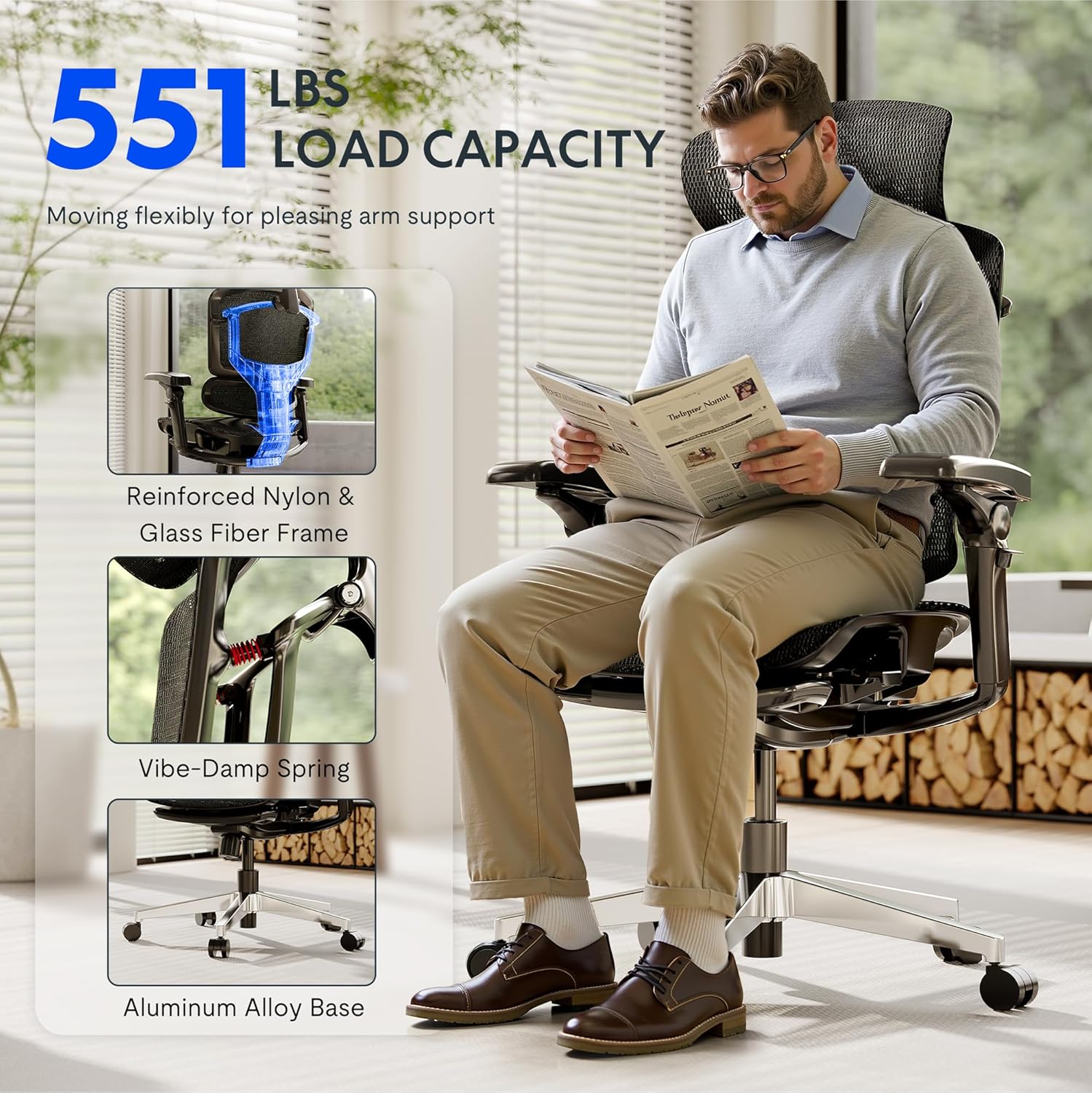
- Do not exceed the maximum weight capacity of 551 pounds.
- Ensure proper assembly following the provided instructions. Incorrect assembly can lead to instability and injury.
- Use adjustable features carefully to avoid misuse and ensure stability during use.
- Keep hands and fingers clear of moving parts during adjustment.
- Do not stand on the chair.
- Only use the chair on a stable, level surface.
Setup and Assembly
The FLEXISPOT ErgoX-PRO chair requires assembly. Please follow the steps below and refer to the assembly video for visual guidance. All necessary tools are included.
Assembly Steps:
- Unpack Components: Carefully remove all parts from the packaging and lay them out. Verify all components are present against the parts list in the included user manual.
- Attach Casters to Base: Insert the five casters into the holes at the end of each leg of the aluminum alloy base. Press firmly until they click into place.
- Insert Gas Lift: Place the gas lift cylinder into the center hole of the assembled chair base.
- Attach Mechanism to Seat: Secure the control mechanism to the underside of the seat cushion using the provided screws. Ensure the front of the mechanism aligns with the front of the seat.
- Attach Armrests: Fasten the 7D linkage armrests to the sides of the seat mechanism using the designated screws.
- Connect Backrest: Attach the backrest to the seat mechanism using the provided screws.
- Install Headrest: Secure the 4D adjustable headrest to the top of the backrest.
- Assemble Footrest (if applicable): Attach the footrest assembly to the designated points on the chair frame.
- Connect Seat to Gas Lift: Carefully place the assembled seat and backrest onto the gas lift cylinder, ensuring it is centered and stable.
Assembly Video:
Video: How to install FlexiSpot Ergox-Pro? This video demonstrates the step-by-step assembly process for the ErgoX-PRO chair, from unboxing to final setup.
Operating Instructions
The FLEXISPOT ErgoX-PRO chair offers multiple adjustment options to customize your seating experience for optimal comfort and support.
Chair Adjustments:
- Seat Height Adjustment: Locate the lever on the right side beneath the seat. Pull the lever up to raise the seat; release to lock. To lower, pull the lever up while seated.
- Seat Depth Adjustment: Use the lever on the left side beneath the seat to slide the seat forward or backward by 2.8 inches (7cm), accommodating different thigh lengths.
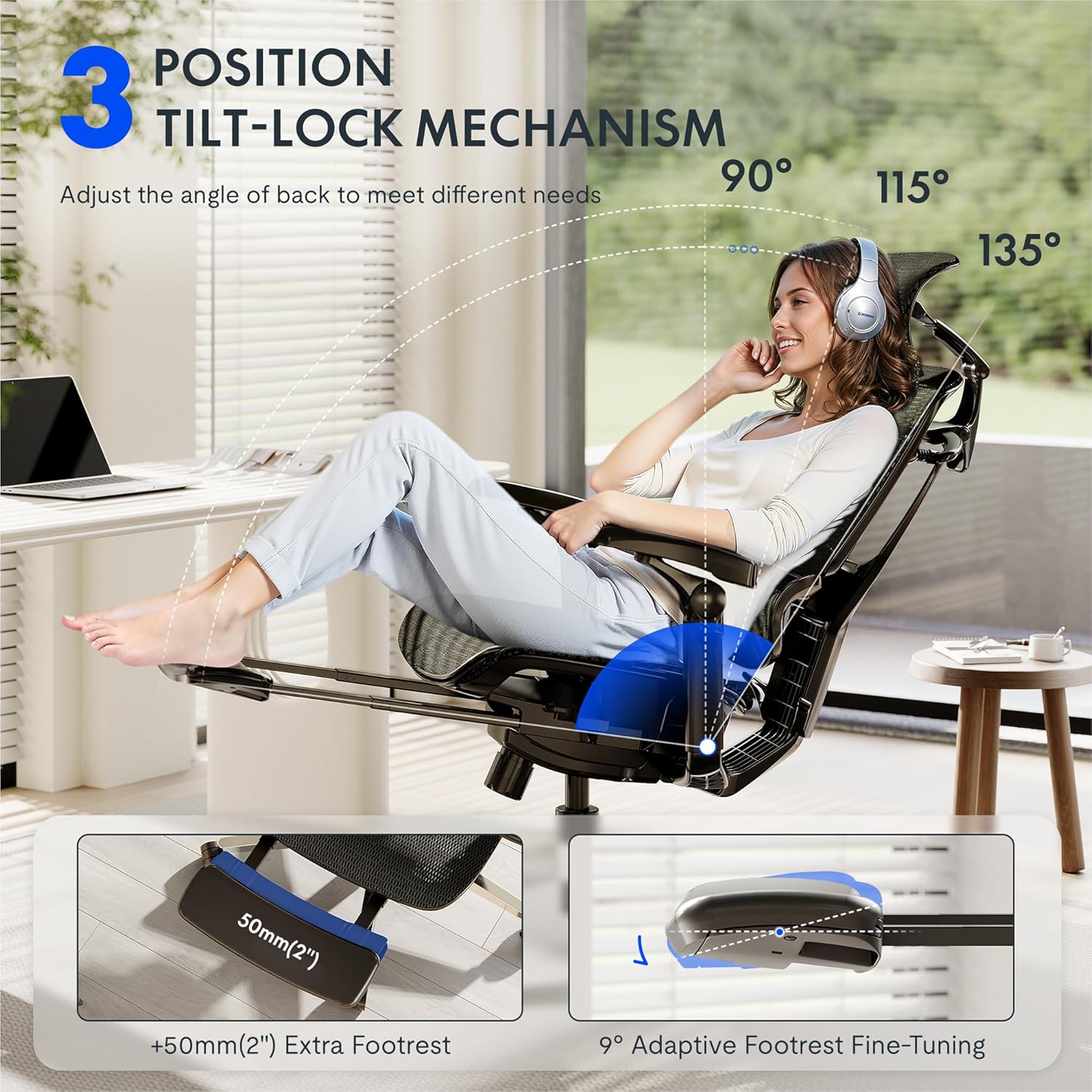
- Backrest Recline and Tilt Lock: The chair features a 3-position tilt base (90°/115°/135°). Use the recline lever to adjust the angle and lock it into your desired position. The 12-level fine-tuned backrest with spring cushioning ensures natural movement.
- 5D Dynamic Lumbar Support: The lumbar support is designed to adapt to your posture. It can be adjusted for height and depth to provide targeted support to your lower back.
- 4D Adjustable Headrest: The headrest can be adjusted for height, angle (45°, 160°, 120° rotation), and front/back position (1.8 inches) to support your head and neck. It can also function as a back cushion.
- 7D Linkage Armrests: These full-motion armrests move with your body. Adjust them for height (3 inches up/down), rotation (40°), left/right movement (360°), and front/back (2.4 inches) to provide continuous support for various activities.
- Footrest (if applicable): Extend the footrest from beneath the seat for additional relaxation. It offers 9° adaptive fine-tuning.
Adjustment Demonstration Video:
Video: Set Up & Adjust the ErgoX Pro Chair for Maximum Comfort. This video illustrates how to effectively use the various adjustment features of your ErgoX-PRO chair.
Key Features Visuals:



Maintenance
To ensure the longevity and optimal performance of your FLEXISPOT ErgoX-PRO chair, regular maintenance is recommended.
- Cleaning: For general cleaning, use a soft, damp cloth. For the mesh components, dry clean only. Avoid harsh chemicals or abrasive cleaners.
- Inspection: Periodically check all screws and bolts to ensure they are tight. Re-tighten if necessary.
- Caster Care: Keep the casters free of hair and debris to ensure smooth movement.
Troubleshooting
If you encounter any issues with your chair, please refer to the following common solutions:
- Chair Does Not Adjust Height: Ensure the gas lift lever is fully engaged or disengaged as required. Check if the gas lift cylinder is properly seated in the base and mechanism.
- Backrest Tilt Not Working: Verify that the tilt lock mechanism is disengaged. Some users report needing to apply more force or adjust the tension knob (if present) to achieve desired tilt.
- Armrests Move Too Easily: The 7D armrests are designed for dynamic movement. If they feel excessively loose, ensure all assembly screws are securely tightened.
- Squeaking Noises: Check all connection points and tighten any loose screws. Applying a small amount of silicone lubricant to moving parts (e.g., gas lift, tilt mechanism) can help.
- Chair Feels Unstable: Re-check all assembly steps to ensure all components are correctly installed and tightened. Ensure the chair is on a flat, even surface.
If these steps do not resolve the issue, please contact FLEXISPOT customer support for further assistance.
Specifications
| Brand | FLEXISPOT |
| Model Name | Ergonomic Task Chair (ErgoX PRO-Mesh+FT) |
| Color | Obsidian Black |
| Product Dimensions | 28.3"D x 28.3"W x 55.9"H |
| Maximum Weight Recommendation | 551 Pounds |
| Back Style | 12-L High-back, Mesh |
| Special Features | Adjustable Headrest, Adjustable Height, Ergonomic, Adjustable Armrest, Dynamic Lumbar Support, Tilt, Back Support, Adjustable Recliner |
| Material | AeroWeave 5.0 Mesh |
| Included Components | Armrest, Headrest, Wheels, Backrest, Seat, User manual, Assembly tools |
| UPC | 840521507332 |
Dimensional Overview:

Warranty and Support
For warranty information, product support, or to purchase replacement parts, please refer to the official FLEXISPOT website or contact their customer service directly. Contact details are typically provided in the packaging or on the brand's official support pages.
Online Support: Visit the FLEXISPOT Store on Amazon for additional resources and contact options.