
Introduction
This manual provides detailed instructions for the safe and effective use of your Digitek DSL 555 RGB Portable LED Stick Light Wand. Please read this manual thoroughly before operating the device and retain it for future reference.
What's in the Box
Verify that all components are present upon unpacking:
- Stick Light
- Barn Door
- Type C Charging Cable
- Carry Bag
Product Overview
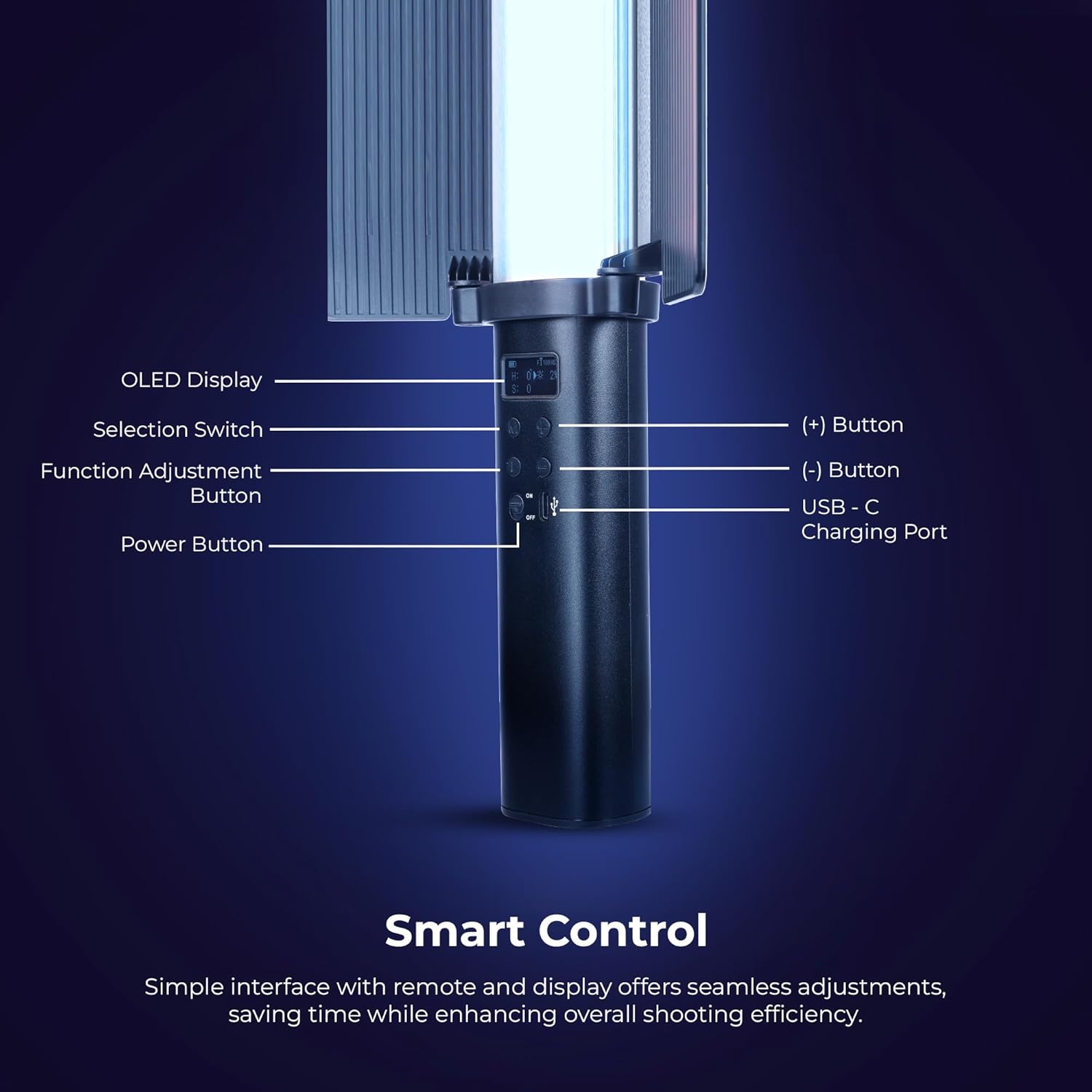
Image: Detailed view of the Digitek DSL 555 RGB control panel with OLED display and buttons.
The Digitek DSL 555 RGB is a versatile LED stick light designed for photography and videography. It features a robust 38W output, dual color temperature (2500K-9900K), full RGB color control, and 24 special effects. The device includes an OLED display for easy adjustments and supports app control for enhanced functionality.
- OLED Display: Shows current settings.
- Selection Switch: Navigates menu options.
- Function Adjustment Button: Confirms selections and changes modes.
- (+) Button: Increases values or navigates up.
- (-) Button: Decreases values or navigates down.
- USB-C Charging Port: For power input and charging.
- Power Button: Turns the device on or off.
Setup
Charging the Device

Image: Digitek DSL 555 RGB with USB-C Charging Port and Battery Details.
Connect the provided Type-C charging cable to the USB-C port on the light wand and plug the other end into a compatible USB power adapter (not included). The OLED display will indicate charging status. A full charge provides approximately 1.5 hours of operation.
Attaching the Barn Door

Image: Digitek DSL 555 RGB with Removable Barn Door and HSI Color Adjustment.
Align the barn door accessory with the light panel and slide it into place until it securely clips onto the light wand. The barn door helps to shape and control the light output.
Mounting
The DSL 555 RGB features a 1/4-inch universal mounting thread at its base. This allows for attachment to tripods, light stands, or other compatible rigs for stable positioning during use.
Operating Instructions
Power On/Off
Press and hold the Power Button located on the handle to turn the light wand on or off.
Basic Adjustments (Button Control)
- Use the Selection Switch to cycle through different modes (CCT, HSI, FX).
- Press the Function Adjustment Button to select a parameter within a mode (e.g., color temperature, brightness, hue).
- Use the (+) and (-) Buttons to adjust the selected parameter's value.
Color Temperature (CCT Mode)
In CCT mode, adjust the color temperature from 2500K (warm light) to 9900K (cool light) using the (+) and (-) buttons. This mode also allows for RGB adjustments.
Brightness Adjustment
The light intensity can be adjusted from 1% to 100% in any mode. Use the (+) and (-) buttons to set the desired brightness level.
HSI Color Mode
The HSI mode offers full creative control over colors:
- Hue (H): Adjust from 0-360 degrees to select any color in the spectrum.
- Saturation (S): Adjust from 0-100% to control the purity of the color.
- Intensity (I): Adjust from 0-100% to control the brightness of the color.
Special Effects (FX Modes)

Image: Digitek DSL 555 RGB showcasing various special effects modes.
The DSL 555 RGB includes 24 pre-programmed special effects such as Strobe, Police, Flame, Firework, and more. Navigate to FX mode using the Selection Switch and choose your desired effect.
Dual-Sided Brilliance

Image: Digitek DSL 555 RGB demonstrating Dynamic RGB and Natural Bi-Color sides.
The light wand features two distinct sides: one for dynamic RGB lighting and the other for natural bi-color (2500K-9900K) output, offering versatile lighting options.
App Control
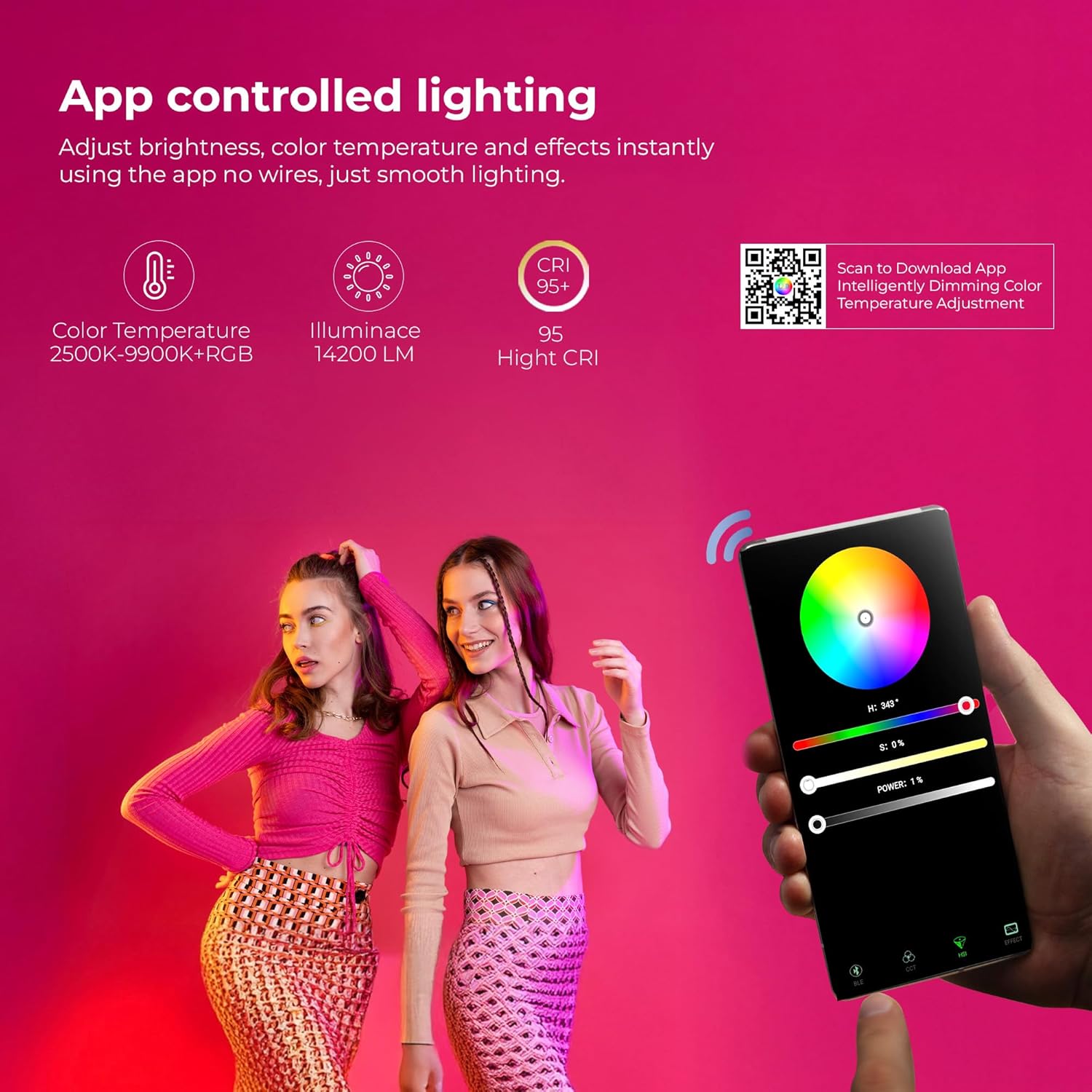
Image: Digitek DSL 555 RGB App Control Interface and QR Code for Download.
For advanced control, download the official app. Scan the QR code provided on the product packaging or visit www.ledlyd.com to download the application. The app allows for remote adjustment of brightness, color temperature, and effects.
Maintenance
Cleaning
Wipe the light wand with a soft, dry cloth. Do not use abrasive cleaners or solvents, as these may damage the surface or internal components.
Storage
When not in use, store the light wand in its carry bag in a cool, dry place away from direct sunlight and extreme temperatures.
Battery Care
To prolong battery life, avoid fully discharging the battery frequently. Charge the device regularly, even if not in use for extended periods.
Troubleshooting
- Light not turning on: Ensure the device is charged. Connect to a power source using the Type-C cable.
- App connectivity issues: Ensure Bluetooth is enabled on your mobile device. Restart both the light wand and the app. Refer to the app's help section for specific pairing instructions.
- Inconsistent light output: Check for any physical damage. Ensure the battery is adequately charged.
If problems persist, contact customer support for assistance.
Specifications

Image: Key Features of Digitek DSL 555 RGB LED Stick Light Wand.
| Power Output | 38W |
| Luminance | Up to 14200LM |
| Color Temperature | 2500K – 9900K + RGB |
| CRI (Color Rendering Index) | RA>95 |
| Brightness Adjustment | 1% – 100% |
| Battery Life | Approx. 1.5 Hours |
| Charging Port | USB Type-C |
| Mounting Option | 1/4” Universal Mount |
| Product Dimensions | 3 x 5 x 59 cm (approx.) |
| Item Weight | 2 kg |
| Country of Origin | China |
Warranty and Support
For warranty information and technical support, please contact the manufacturer:
Manufacturer: IMS Mercantiles Limited
Address: 704, 7th floor, Ring Road Mall, Sec-3, Rohini, Delhi 110085
Customer Helpline (Toll Free): 1800-123-544-444
Email: support@digitek.net.in
Please retain your purchase receipt as proof of purchase for warranty claims.