
1. Introduction
Thank you for choosing the CLEANmaxx 2-in-1 Cordless Handheld Vacuum with Blower Function, Model 16535. This versatile device is designed for quick and effective cleaning of various surfaces, offering both powerful suction and a convenient blower function. Its compact, lightweight design and cordless operation provide maximum flexibility for use in your home, car, or workshop. Please read this manual carefully before first use to ensure proper operation and maintenance.
2. Safety Instructions
To ensure safe operation and prevent damage, please observe the following safety guidelines:
- Keep the device away from water and moisture. Do not operate with wet hands.
- Do not vacuum liquids, glowing ashes, sharp objects, or flammable/explosive substances.
- Ensure the HEPA filter is correctly installed before use.
- Do not block the air inlets or outlets during operation.
- This appliance is not intended for use by persons (including children) with reduced physical, sensory or mental capabilities, or lack of experience and knowledge, unless they have been given supervision or instruction concerning use of the appliance by a person responsible for their safety.
- Only use the provided USB-C charging cable and a suitable power adapter (not included) for charging.
- Do not attempt to open or repair the device yourself. Contact qualified service personnel for repairs.
- Store the device in a dry place, out of reach of children.
3. Package Contents
Carefully unpack your CLEANmaxx 2-in-1 Cordless Handheld Vacuum and check that all items are present and undamaged:
- 1x Motor Unit with integrated battery
- 1x Dirt Bin
- 1x HEPA Filter
- 1x Cushion Nozzle
- 1x Crevice Tool
- 1x Small Blower Nozzle
- 1x Large Blower Nozzle
- 1x Flat Brush Attachment (for crevice tool)
- 1x Round Brush Attachment (for blower nozzle)
- 1x Vacuum Nozzle (for vacuum storage bags)
- 1x USB-C Charging Cable

Image 3.1: All components included with the CLEANmaxx 2-in-1 Cordless Handheld Vacuum.
4. Product Overview
Familiarize yourself with the main parts of your CLEANmaxx handheld vacuum:

Image 4.1: Main unit and various attachments.
- Main Unit: Contains the motor, battery, and control button.
- Dust Bin: Transparent container for collected dirt.
- HEPA Filter: Located inside the dust bin, filters fine particles.
- Suction Port: Front opening for vacuuming.
- Blower Port: Rear opening for the blower function.
- Power Button: To turn the device on/off.
- USB-C Charging Port: For connecting the charging cable.
5. Setup
5.1. Initial Charging
Before first use, fully charge the device. Connect the USB-C charging cable to the charging port on the main unit and plug the other end into a suitable USB power source (e.g., computer, USB wall adapter). The charging indicator light will show the charging status.

Image 5.1: Charging the CLEANmaxx handheld vacuum via USB-C.
5.2. Attaching Accessories
Select the appropriate nozzle or brush for your cleaning task. Attach it firmly to either the suction port (for vacuuming) or the blower port (for blowing) until it clicks into place.
6. Operating Instructions
6.1. Vacuuming Function
Press the power button to turn on the vacuum. Direct the suction port with the chosen attachment towards the area to be cleaned. The powerful 4 kPa suction will collect dirt into the dust bin. The device offers up to 20 minutes of runtime on a full charge.

Image 6.1: Using the vacuum function with a floor brush attachment.

Image 6.2: Vacuuming crumbs with a brush attachment.
6.2. Blower Function
To use the blower function, attach the desired blower nozzle to the rear port. Press the power button to activate. This function is ideal for dislodging dust from keyboards, tight crevices, or for inflating small items (with appropriate adapter, not included).
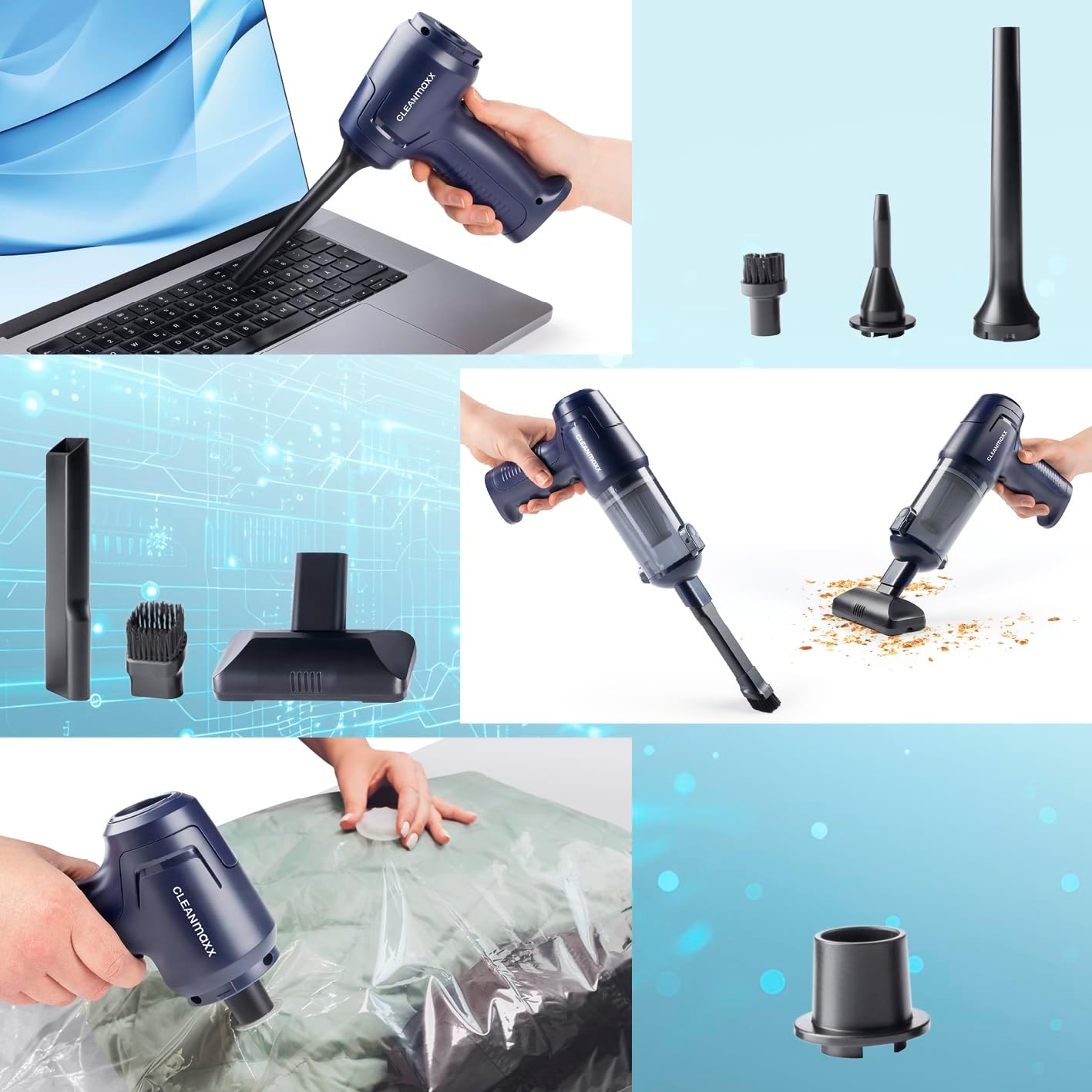
Image 6.3: Using the blower function to clean a laptop keyboard.
6.3. Vacuum Storage Bag Function
Attach the dedicated vacuum nozzle to the suction port. This nozzle can be used with compatible vacuum storage bags (not included) to remove air and compress items.

Image 6.4: Using the vacuum nozzle to compress a storage bag.
7. Maintenance
Regular maintenance ensures optimal performance and extends the lifespan of your device.
7.1. Emptying the Dust Bin
When the dust bin is full or suction power decreases, it's time to empty it. The Easy-Release function allows for quick and hygienic emptying:
- Ensure the device is turned off.
- Press the Easy-Release button to detach the dust bin from the main unit.
- Carefully empty the contents into a waste bin.

Image 7.1: Emptying the dust bin using the Easy-Release mechanism.
7.2. Cleaning the HEPA Filter
The HEPA filter should be cleaned regularly to maintain suction efficiency and air quality. It is washable:
- Remove the HEPA filter from the dust bin.
- Rinse the filter under running water until clean. Do not use detergents.
- Allow the filter to air dry completely before reinserting it into the dust bin. Ensure it is completely dry to prevent mold growth and damage to the device.
Image 7.2: Washing the HEPA filter under running water.
7.3. Cleaning the Exterior
Wipe the exterior of the device with a soft, damp cloth. Do not use abrasive cleaners or solvents.
8. Troubleshooting
If you encounter issues with your CLEANmaxx handheld vacuum, refer to the following table:
| Problem | Possible Cause | Solution |
|---|---|---|
| Device does not turn on | Battery is discharged | Charge the device fully. |
| Low suction power | Dust bin is full | Empty the dust bin. |
| Low suction power | HEPA filter is clogged | Clean or replace the HEPA filter. |
| Low suction power | Nozzle or suction port is blocked | Remove any obstructions from the nozzle or suction port. |
| Blower function is weak | Blower port or nozzle is blocked | Remove any obstructions from the blower port or nozzle. |
| Device stops during operation | Battery is discharged | Recharge the device. |
If the problem persists after attempting these solutions, please contact customer support.
9. Specifications
- Model Number: 16535
- Brand: CLEANmaxx
- Dimensions (Product): 18.5L x 23.5W x 5.5H cm
- Weight (Item): 640 g
- Material: ABS, Polypropylene (PP)
- Power Source: Battery Powered
- Battery: 1800 mAh Li-ion
- Suction Power: Up to 4 kPa
- Runtime: Up to 20 minutes
- Dust Bin Capacity: Approx. 100 ml
- Filter Type: Washable HEPA Filter
- Charging: USB-C
- Color: Dark Blue
10. Warranty and Support
For warranty information, please refer to the terms and conditions provided by your retailer at the time of purchase. Information regarding spare parts availability is currently unavailable. For technical support or further assistance, please contact the retailer or manufacturer directly.


