
1. Introduction
The InAndOn M6 is a versatile all-in-one karaoke system designed for home entertainment, parties, and events. It integrates a karaoke player, speakers, mixer, amplifier, and an HD touchscreen into a single unit, offering a streamlined and user-friendly experience. This manual provides essential information for setting up, operating, maintaining, and troubleshooting your InAndOn M6 Karaoke Machine.

Figure 1.1: InAndOn M6 All-in-One Karaoke Machine with included wireless microphones.
2. Product Features
- 5-in-1 Integrated System: Combines karaoke system, speakers, mixer, amplifier, and HD touchscreen.
- Extensive Music Library: Access to over 650,000 songs with lifetime monthly updates (first year free) and direct YouTube karaoke streaming.
- Powerful Audio Output: 800W Peak Power immersive surround sound with a multi-driver speaker system (2" tweeter, 2" surround driver, 3" midrange, 6.5" subwoofer).
- 12.2" Foldable HD Touchscreen: Full-angle HD display with smooth touch control and 90° foldable design for flexible viewing and space-saving.
- Smart Controls: Connect your smartphone for easy song search, addition, and switching.
- Professional UHF Microphones: Two rechargeable wireless UHF microphones with studio-grade pickup and strong anti-interference stability.
- Multiple Connectivity: HDMI for TV projection, Bluetooth 5.0, USB, and app control.

Figure 2.1: Overview of the InAndOn M6's integrated features.

Figure 2.2: Detailed view of the 360° HD stereo surround sound speaker configuration.
3. Setup Guide
- Unpacking: Carefully remove all components from the packaging. Verify that all items listed in the packing list are present.
- Placement: Place the karaoke machine on a stable, flat surface. Ensure adequate ventilation around the unit.
- Power Connection: Connect the power adapter to the DC IN port on the back of the machine, then plug it into a standard electrical outlet (110V-220V).
- Initial Power On: Press the power button to turn on the machine. The touchscreen will illuminate.
- Network Connection: Navigate to the settings menu on the touchscreen to connect to your Wi-Fi network (supports 2.4G & 5G). A stable internet connection is required for accessing online music libraries and YouTube.
- Microphone Preparation: Ensure the two UHF wireless microphones are charged. They can be charged via USB. The microphones are pre-paired with the system.
- External Display (Optional): To project the screen onto a larger display, connect an HDMI cable from the machine's HDMI OUT port to your television or monitor's HDMI IN port.

Figure 3.1: Rear panel connections for the InAndOn M6.
4. Operating Instructions
4.1 Touchscreen Navigation
The 12.2" HD touchscreen provides intuitive control over the system. Tap icons to navigate menus, select songs, and adjust settings. The screen can be folded up to 90 degrees for optimal viewing angles.
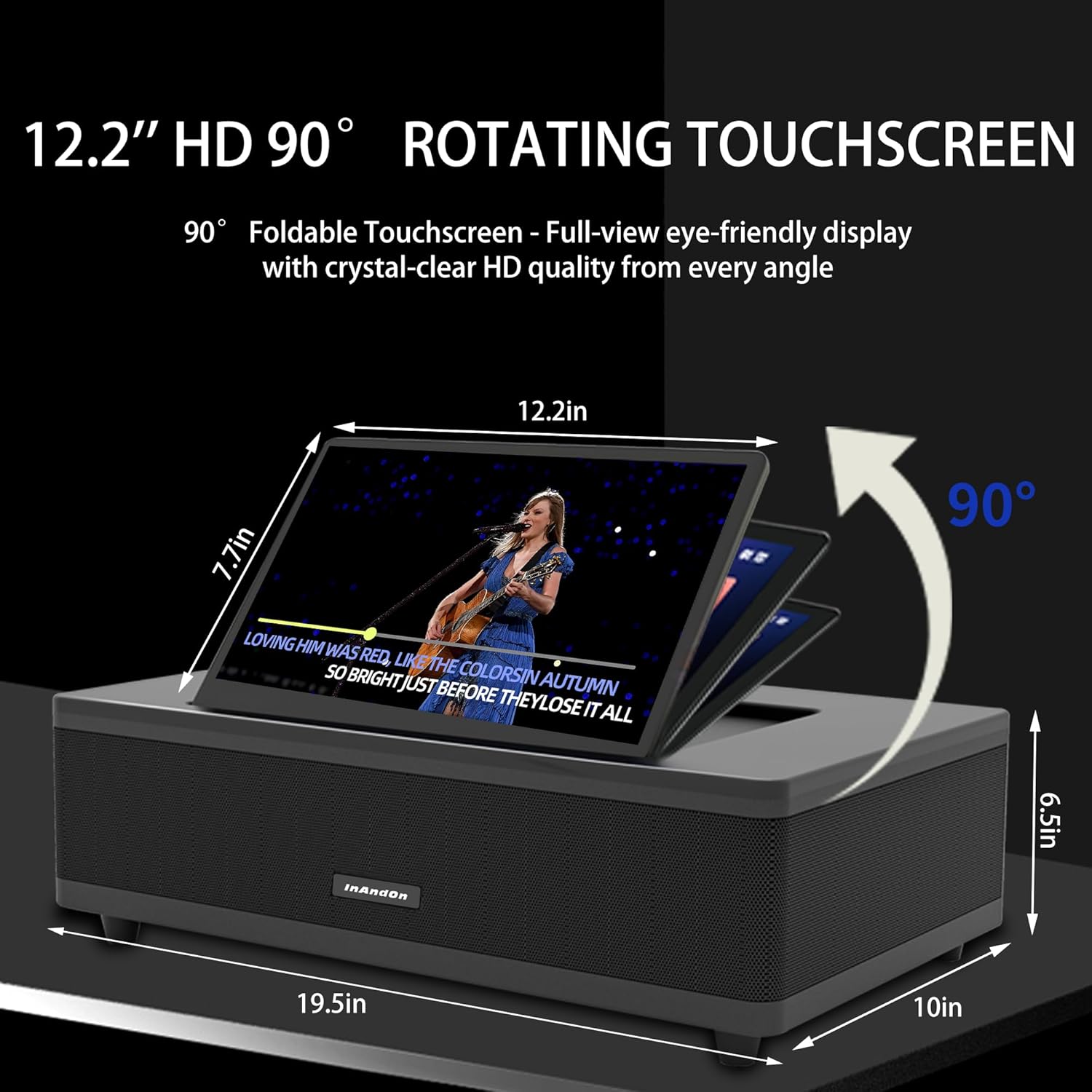
Figure 4.1: The 12.2-inch HD touchscreen can be adjusted for viewing comfort.
4.2 Music Selection
- Cloud Server: Access the extensive library of over 650,000 songs. New songs are updated monthly.
- YouTube Integration: Directly stream karaoke videos from YouTube. Use the search function to find specific songs.
- Mobile App Control: Download the InAndOn mobile application to control song selection, queue management, and volume from your smartphone or tablet. Scan the QR code displayed on the screen to connect.
Video 4.1: Demonstration of the InAndOn M6's features, including the folding touchscreen, YouTube integration, and mobile song selection. This video showcases the user interface and key functionalities of the karaoke machine.

Figure 4.2: Control the InAndOn M6 using your smartphone, tablet, or the dedicated app.
4.3 Vocal and Accompaniment Modes
Easily switch between original vocal and accompaniment modes directly from the touchscreen interface. This allows you to sing along with the artist or perform solo with instrumental tracks.
4.4 Using Wireless Microphones
The two included UHF wireless microphones are designed for clear vocal transmission. Ensure they are charged before use. Adjust microphone volume and effects (e.g., echo) through the system's audio settings on the touchscreen.

Figure 4.3: The professional UHF microphones provide clear vocals and can last up to 9 hours on a full charge.
4.5 Screen Projection
Connect the InAndOn M6 to an external display (TV, projector) via HDMI for a larger viewing experience. Alternatively, use the mobile app to cast content to compatible devices.

Figure 4.4: Project the karaoke screen onto a larger display for an enhanced experience.
5. Maintenance
- Cleaning: Use a soft, dry cloth to clean the exterior of the machine and the touchscreen. Avoid abrasive cleaners or solvents.
- Software Updates: Periodically check for software updates through the system settings to ensure optimal performance and access to new features.
- Storage: When not in use for extended periods, store the machine in a cool, dry place.
- Microphone Care: Keep microphones dry and charge them regularly to maintain battery health.
6. Troubleshooting
- No Power:
- Ensure the power adapter is securely connected to both the machine and a working electrical outlet.
- Check if the power switch is in the 'ON' position. - No Sound:
- Verify that the master volume on the machine is not muted or set too low.
- If connected to an external display, check the volume settings on both the machine and the external display.
- Ensure all audio cables (if any) are properly connected. - Microphone Issues:
- Confirm microphones are charged and turned on.
- Check microphone volume settings on the machine.
- Ensure microphones are within range of the machine. - Network Connection Problems:
- Verify your Wi-Fi router is functioning correctly.
- Re-enter the Wi-Fi password in the system settings.
- Move the machine closer to the Wi-Fi router if signal strength is weak. - Screen Display Issues:
- If the touchscreen is unresponsive, try restarting the machine.
- If using an external display, check the HDMI cable connection and ensure the correct input source is selected on your TV.
7. Specifications
| Feature | Specification |
|---|---|
| Model Number | M6 |
| Product Dimensions | 22.36 x 14.49 x 10.55 inches |
| Display | 12.2" HD Foldable Touchscreen |
| Peak Power Output | 800W |
| Speaker Configuration | 2" Tweeters, 2" Surround Drivers, 3" Midrange, 6.5" Subwoofer |
| Microphones | 2 x UHF Wireless Microphones |
| Connectivity | Wi-Fi (2.4G & 5G), Bluetooth 5.0, HDMI, USB |
| Compatible Devices | Smartphone, Television |
| Power Source | Plug In Electric |
| Included Components | Karaoke Machine, 2 Microphones |
8. Warranty and Support
For warranty information and technical support, please refer to the documentation provided with your purchase or contact InAndOn customer service directly. Keep your proof of purchase for warranty claims.


