
Introduction
This manual provides detailed instructions for the NBD 64MP 5K Digital Camera, Model K100C. Please read this manual thoroughly before using the camera to ensure proper operation and to maximize its features. Keep this manual for future reference.

Image: The NBD 64MP 5K Digital Camera, showcasing its compact design and included accessories.
Setup
1. Battery Installation and Charging
- Locate the battery compartment on the bottom of the camera.
- Open the compartment cover.
- Insert the provided Lithium-Ion Polymer battery, ensuring the correct orientation as indicated inside the compartment.
- Close the battery compartment cover securely.
- Connect the camera to a power source using the supplied USB cable and charger to fully charge the battery before first use. The charging indicator light will show the charging status.
The camera comes with two rechargeable batteries for extended use.
2. Micro SD Card Installation
The camera supports Micro SD cards up to 64GB. A 64GB Micro SD card is included with your purchase.
- Locate the Micro SD card slot, typically on the side or bottom of the camera.
- Insert the Micro SD card with the metal contacts facing the front of the camera until it clicks into place.
- To remove, gently push the card until it springs out.

Image: Included accessories such as the 64GB SD card, batteries, and charger.
3. Powering On/Off
- To power on, press and hold the power button until the screen illuminates.
- To power off, press and hold the power button again until the screen turns off.
Operating Instructions
1. Basic Photography and Video Recording
The camera features a 64MP sensor for high-resolution photos and supports 5K video recording.
- Mode Selection: Use the intuitive dial to switch between photo, video, and other modes.
- Autofocus: Half-press the shutter button to activate autofocus. A green indicator will confirm focus lock.
- Shutter Button: Fully press the shutter button to capture a photo or start/stop video recording.
- 18x Digital Zoom: Use the zoom controls (usually marked 'W' for Wide and 'T' for Telephoto) to adjust the 18x digital zoom.

Image: The camera's autofocus system in action, showing green focus indicators on subjects.

Image: Visual representation of the camera's 18x digital zoom, showing a distant object magnified.
2. 180° Flip Screen
The 3-inch touchscreen can rotate 180° for easy self-portraits or vlogging.
- Gently pull the screen outwards and rotate it to your desired angle.
- The screen will automatically adjust its orientation.
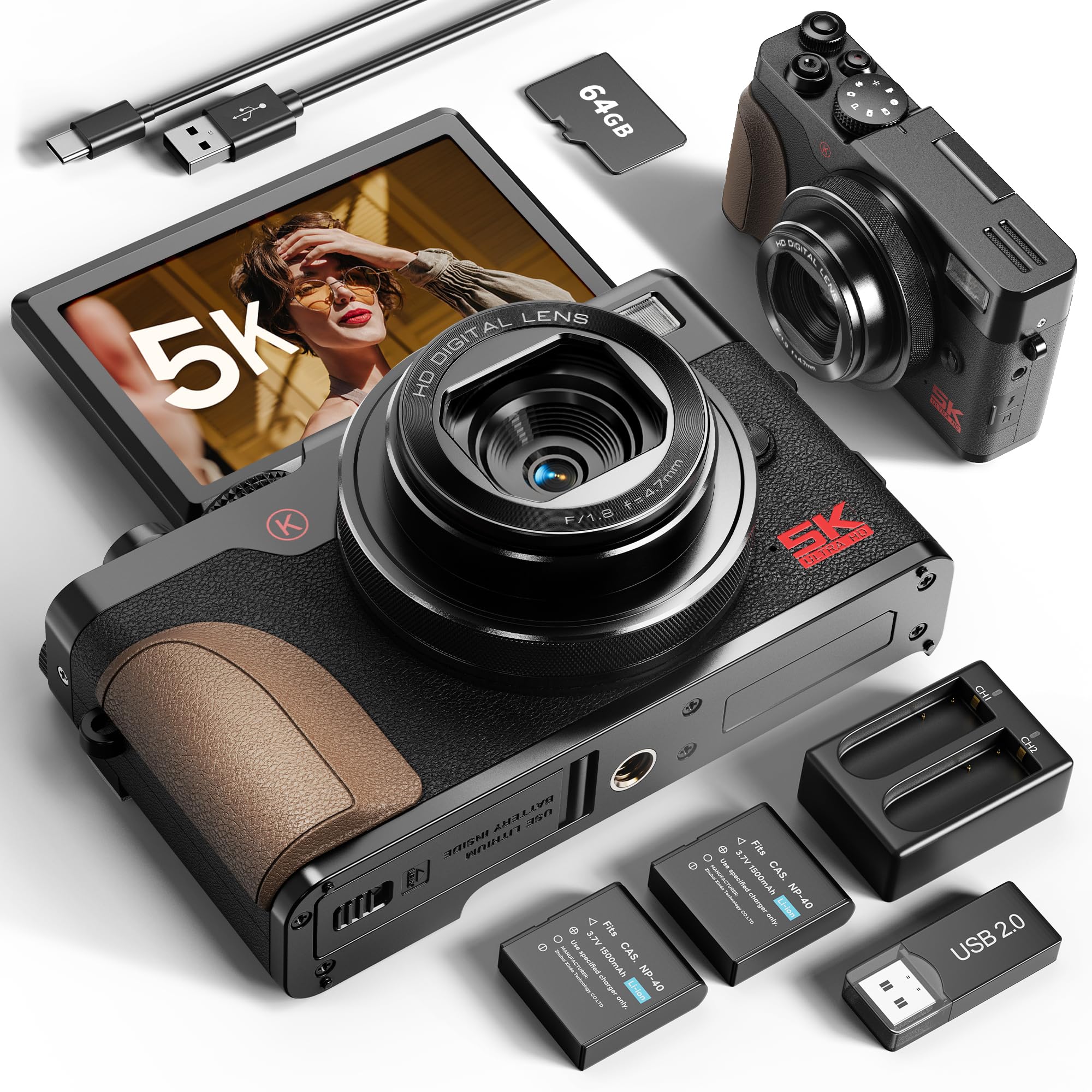
Image: The camera's 180-degree flip screen in use, ideal for vlogging and selfies.
3. Multi-functional Modes
The camera offers various modes for creative photography and videography:
- Continuous Shooting: Capture a rapid sequence of photos.
- Slow-Motion: Record videos at a higher frame rate for slow-motion playback.
- Time-Lapse: Capture images at set intervals to create a time-lapse video.
- Built-in Fill Light: Activate the fill light for improved clarity in low-light conditions.

Image: The camera's mode dial and examples of various shooting modes including video, time-lapse, and continuous shooting.
4. Webcam Mode
Use your camera as a webcam for live streaming or video calls.
- Connect the camera to your computer using the USB cable.
- Select "PC Camera Mode" or "Webcam Mode" on the camera's screen if prompted.
- Your computer should recognize the camera as a webcam. Select it in your video conferencing software.

Image: The camera set up as a webcam, connected to a laptop for video interaction.
Maintenance
1. Cleaning the Camera
- Lens: Use a soft, lint-free cloth specifically designed for camera lenses. Gently wipe in a circular motion. Avoid using harsh chemicals.
- Screen: Use a microfiber cloth to clean the touchscreen. For stubborn smudges, a small amount of screen cleaner can be applied to the cloth (not directly to the screen).
- Body: Wipe the camera body with a soft, dry cloth.
2. Battery Care
- Store batteries in a cool, dry place when not in use.
- Avoid fully discharging batteries frequently to prolong their lifespan.
- If storing for an extended period, charge batteries to about 50% capacity.
3. Storage
- Store the camera in a protective bag or case to prevent scratches and dust accumulation.
- Avoid exposing the camera to extreme temperatures, humidity, or direct sunlight for prolonged periods.
Troubleshooting
| Problem | Possible Cause | Solution |
|---|---|---|
| Camera does not power on. | Battery is depleted or incorrectly inserted. | Ensure battery is fully charged and correctly inserted. Try using the second battery. |
| Cannot take photos/videos. | SD card is full, locked, or not inserted. | Check SD card capacity, ensure it's unlocked, and properly inserted. Format the card if necessary (this will erase all data). |
| Images are blurry. | Autofocus failed, camera shake, or dirty lens. | Ensure autofocus locks (green indicator). Hold the camera steady or use a tripod. Clean the lens. |
| Video quality is poor. | Low light conditions, incorrect settings, or excessive movement. | Use the built-in fill light in low light. Check video resolution settings. Minimize camera movement. |
| Camera not recognized by computer in webcam mode. | Incorrect USB mode selected or driver issue. | Ensure "PC Camera Mode" is selected on the camera. Try a different USB port or cable. Restart computer. |
Specifications
| Feature | Detail |
|---|---|
| Brand | NBDDIGITAL |
| Model Name | K100C |
| Maximum Resolution | 64 MP |
| Video Capture Resolution | 5K (4320p) |
| Digital Zoom | 18x |
| Display Type | 3-inch LCD, 180° Flip Screen |
| Autofocus | Yes |
| Image Stabilization | Digital |
| Memory Storage | Micro SD (up to 64GB, 64GB card included) |
| Battery Type | Lithium-Ion Polymer (2 included) |
| Connectivity | USB |
| Item Weight | 265 g |
| Special Features | Compact, Built-in Fill Light, Webcam Mode, Time-Lapse, Slow Motion |
Warranty and Support
Warranty Information
For specific warranty details, please refer to the warranty card included with your product or contact your retailer. Warranty terms typically cover manufacturing defects for a specified period from the date of purchase.
Customer Support
If you encounter any issues not covered in the troubleshooting section or require further assistance, please contact NBDDIGITAL customer support. Refer to the product packaging or the official NBDDIGITAL website for contact information.