
Timex T5H591
Timex Ironman Classic 30 38mm Watch User Manual
Model: T5H591
1. Product Overview
The Timex Ironman Classic 30 is a digital sport watch designed for durability and functionality. It features a 100-hour chronograph, 30-lap memory, 24-hour countdown timer, multiple alarms, dual time zones, and the INDIGLO night-light.

Front view of the Timex Ironman Classic 30 38mm Watch, displaying the digital time and various function buttons.

Side profile of the Timex Ironman Classic 30 watch, illustrating its design and strap.
2. Setup
2.1 Initial Time and Date Setting
To set the time and date on your Timex Ironman Classic 30 watch:
- Press the MODE button repeatedly until you reach the Time Set mode. The seconds display will begin to flash.
- Press the START/SPLIT button to advance the flashing digit.
- Press the STOP/RESET button to move to the next digit (minutes, hours, 12/24-hour format, month, day, year).
- Repeat steps 2 and 3 until all desired settings are adjusted.
- Press the MODE button to exit Time Set mode and return to the normal time display.
2.2 Dual Time Zone Setup
Your watch supports two time zones. To set the second time zone (T2):
- From the normal time display, press and hold the SET/RECALL button.
- Press the MODE button to cycle through settings until T2 time is displayed.
- Use the START/SPLIT and STOP/RESET buttons to adjust the T2 time, similar to setting the main time.
- Press SET/RECALL to save and exit.
This video provides a brief overview of the Timex Ironman Classic 30 watch, showcasing its design and key features, which can assist with initial setup understanding.
3. Operating Instructions
3.1 Navigating Modes
Press the MODE button to cycle through the watch's functions: Time, Chronograph, Timer, and Alarm.
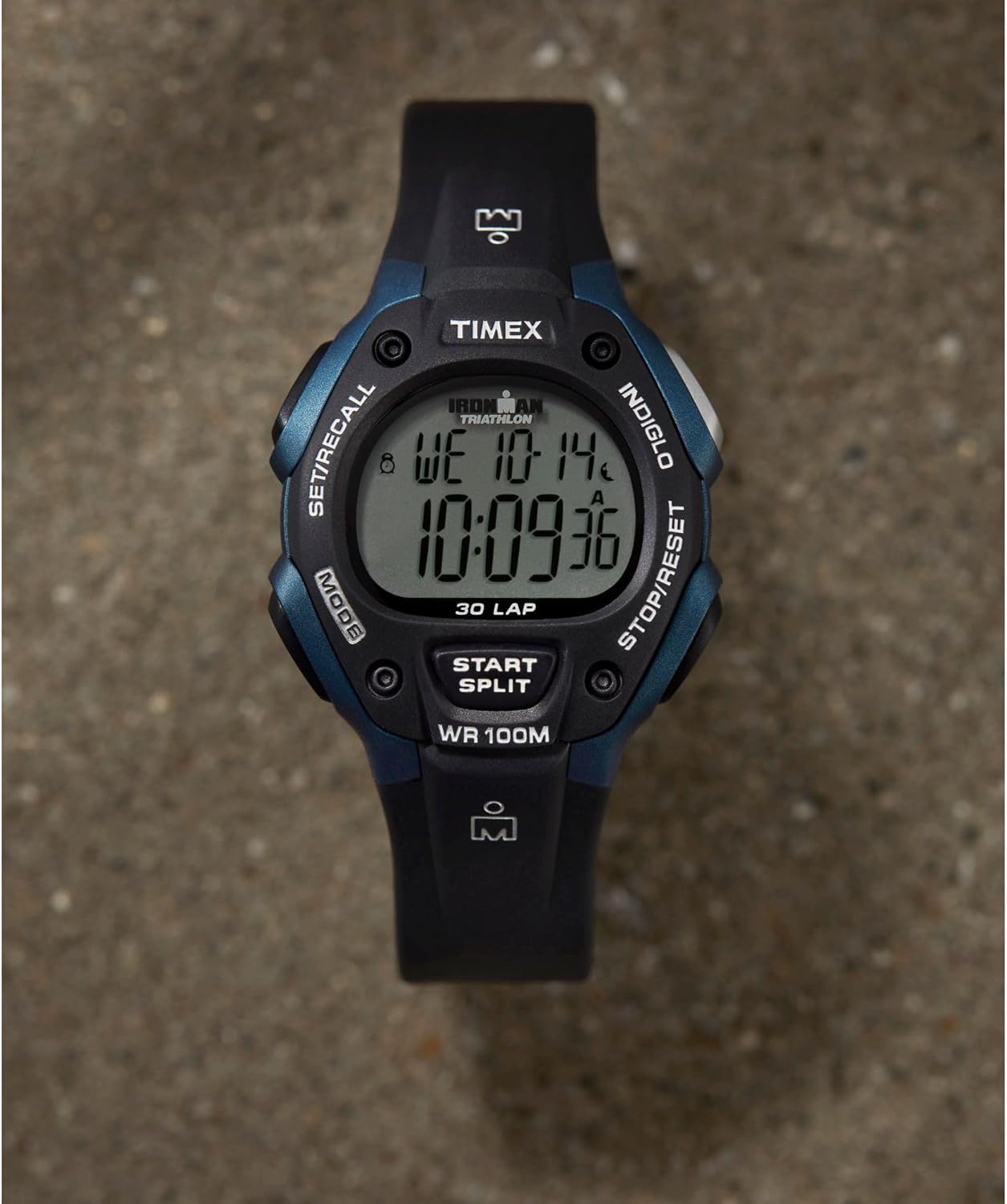
Close-up view of the watch face, showing the labels for the MODE, SET/RECALL, INDIGLO, STOP/RESET, and START/SPLIT buttons.
3.2 Chronograph (Stopwatch)
The chronograph measures elapsed time up to 100 hours with 30-lap memory.
- Press MODE until "CHRONO" appears.
- Press START/SPLIT to begin timing.
- Press START/SPLIT again to record a lap/split time. The display will hold the split time for a few seconds before returning to running time.
- Press STOP/RESET to pause the chronograph.
- Press STOP/RESET again to reset the chronograph to zero.
- To recall lap times, press SET/RECALL while the chronograph is stopped.
3.3 Countdown Timer
The 24-hour countdown timer can be set for various durations.
- Press MODE until "TIMER" appears.
- Press and hold SET/RECALL to enter timer set mode.
- Use START/SPLIT and STOP/RESET to set the desired countdown time.
- Press SET/RECALL to save the setting.
- Press START/SPLIT to start the countdown.
- Press STOP/RESET to pause or resume the timer.
3.4 Alarms
The watch features three customizable alarms (daily, weekday, or weekend).
- Press MODE until "ALARM" appears.
- Press SET/RECALL to select an alarm (AL1, AL2, AL3).
- Press and hold SET/RECALL to enter alarm set mode.
- Use START/SPLIT and STOP/RESET to set the alarm time and frequency (daily, weekday, weekend).
- Press SET/RECALL to save the alarm.
- Press START/SPLIT to toggle the alarm on/off.
3.5 INDIGLO Night-Light
Press the INDIGLO button (top right) to illuminate the watch face for easy viewing in low light conditions.
A video demonstrating the Timex Ironman Classic 30 watch, showcasing its features and display.
This short video highlights the core functions of the Timex Ironman Classic watch, including its chronograph, alarm, timer, and INDIGLO backlight.
4. Maintenance
4.1 Water Resistance
This watch is water-resistant to 100 meters (330 feet). It is suitable for showering, swimming, and snorkeling. Do not press any buttons while the watch is wet or submerged to prevent water entry.
4.2 Battery Replacement
The watch uses one Lithium Metal battery (included). When the display dims or functions become erratic, it may be time to replace the battery. Battery replacement should ideally be performed by a qualified watch technician to ensure proper sealing and maintain water resistance.
4.3 General Care
- Clean your watch regularly with a soft, damp cloth.
- Avoid exposing the watch to extreme temperatures or direct sunlight for prolonged periods.
- Keep the watch away from strong magnetic fields.
5. Troubleshooting
- Display is blank or dim: The battery may be low. Replace the battery.
- Buttons are unresponsive: Ensure the watch is not in a locked mode (if applicable, refer to specific model features). If issues persist, a battery reset may be needed by removing and reinserting the battery.
- Time is incorrect: Re-set the time and date following the instructions in Section 2.1.
- Water inside the watch: Immediately take the watch to a qualified service center. Do not attempt to open it yourself.
6. Specifications
| Model Number | T5H591 |
| Case Diameter | 38 mm |
| Case Material | Resin |
| Band Material | Resin |
| Water Resistance Depth | 100 meters (330 feet) |
| Display Type | Digital |
| Movement Type | Quartz |
| Battery Type | Lithium Metal (included) |
| Special Features | Chronograph, Countdown Timer, Alarms, INDIGLO Night-Light, 30-Lap Memory, Dual Time Zones |
7. Warranty Information
This Timex watch is covered by a manufacturer's warranty. Please refer to the official Timex website or the warranty card included with your purchase for specific terms and conditions regarding coverage and duration.
8. Support
For additional support, frequently asked questions, or to view the full user manual in PDF format, please visit the official Timex website or contact Timex customer service.
You can also find more information and products at the Timex Store on Amazon.
This video provides a sizing guide to help determine the best fit for your Timex watch.
Related documentsT5H591


Ask a question about this manual
Ask about setup, troubleshooting, compatibility, parts, safety, or missing instructions. Manuals+ will review the question and use this page’s manual context to help answer it.