
HOSTACK B0FQP6KLSQ
HOSTACK Queen LED Bed Frame Instruction Manual
Model: B0FQP6KLSQ
1. Product Overview
This manual provides detailed instructions for the assembly, operation, and maintenance of your HOSTACK Queen LED Bed Frame. This bed frame features a storage headboard, integrated charging station, LED lighting, and two under-bed storage drawers.
Key Features:
- Large Storage Capacity: Open headboard and two under-bed drawers for organization.
- Built-in Charging Station & LED Light: Convenient charging for electronic devices and customizable LED lighting.
- Sturdy & Noise-free: Durable wood slats and metal frame provide stability and support.
For optimal performance and longevity, please read this manual thoroughly before assembly and use.

Figure 1.1: The HOSTACK Queen LED Bed Frame, showcasing its modern design, storage headboard, and under-bed drawers.
2. Safety Information
WARNING: Failure to follow these safety instructions could result in injury or damage to the product.
- Do not exceed a maximum weight limit of 900 lbs on the bed frame.
- Exercise caution during assembly and use to avoid injury from sharp edges on the metal frame and wood slats.
- Ensure all screws and fasteners are securely tightened before use and periodically check for tightness.
- Keep small parts away from children during assembly to prevent choking hazards.
- Do not allow children to play on or under the bed frame without supervision.
- Use only the provided power adapter for the charging station and LED lights.
- Do not attempt to modify the bed frame or its components.
3. Setup and Assembly
The HOSTACK Queen LED Bed Frame is designed for straightforward assembly. All necessary parts and a detailed instruction guide are included in one package. Estimated assembly time is approximately 40 minutes, though individual assembly times may vary.
3.1 Unpacking and Part Identification
Carefully unpack all components and lay them out on a clean, soft surface to prevent scratches. Verify that all parts listed in the included instruction guide are present before beginning assembly.

Figure 3.1: Exploded view of the bed frame showing all components and key dimensions. This includes the headboard with integrated storage and charging, the bed frame structure, and the two under-bed drawers.
3.2 Assembly Steps
Follow the step-by-step instructions provided in the separate assembly manual included in your package. General steps include:
- Assemble the headboard structure, including the storage compartments and LED light panel.
- Attach the side rails and footboard to the headboard.
- Install the metal bed slats into the frame. Ensure the noise-free muter bar is correctly positioned.
- Assemble the two under-bed drawers.
- Position the drawers under the bed frame.

Figure 3.2: Illustration of key assembly features, including easy installation points, the noise-free muter bar, and strong supporting force of the metal frame.
Tip: Having a second person assist with assembly can make the process quicker and easier, especially when handling larger components.
4. Operating Instructions
4.1 LED Lighting System
Your bed frame is equipped with an integrated LED lighting system in the headboard. This system can be controlled via a remote control or a dedicated mobile application.
- Power On/Off: Use the power button on the remote or app to turn the lights on or off.
- Color Selection: Choose from over 60,000 colors using the color wheel on the app or preset buttons on the remote.
- Brightness Adjustment: Adjust the light intensity to your preference.
- Modes: Explore various modes such as Timing Mode, Music Mode, and Mic Mode for dynamic lighting effects.

Figure 4.1: The LED lighting system can be controlled using the included remote control or a smartphone application, offering extensive customization options for color and mode.
Video 4.1: Demonstration of the LED Bed Frame with Charging Station features, including the lighting effects and charging capabilities. (Duration: 0:43)
4.2 Charging Station
The headboard includes a built-in charging station with USB-A and USB-C ports. Connect your electronic devices to charge them conveniently overnight or during use.
- The charging station features 2 USB-A ports (5V/2A) and 1 USB-C Port (5V/2A).
- Ensure the bed frame is connected to a power outlet using the provided 6.6ft power cord.

Figure 4.2: Detail of the headboard's charging station, featuring USB-A and USB-C ports, alongside the illuminated LED light strip.
4.3 Storage Drawers
Two spacious drawers are located under the bed frame, providing additional storage. These drawers are designed to be flexible in placement.
- Dimensions: Each drawer measures 29.5"L x 20.5"W x 5.1"H.
- Placement: Drawers can be placed on either side of the bed (one on each side), or both on the left, or both on the right, depending on your room layout.
- Fastening: The drawers feature a buckle mechanism for fastening them to the bed frame, preventing them from rolling out unintentionally.
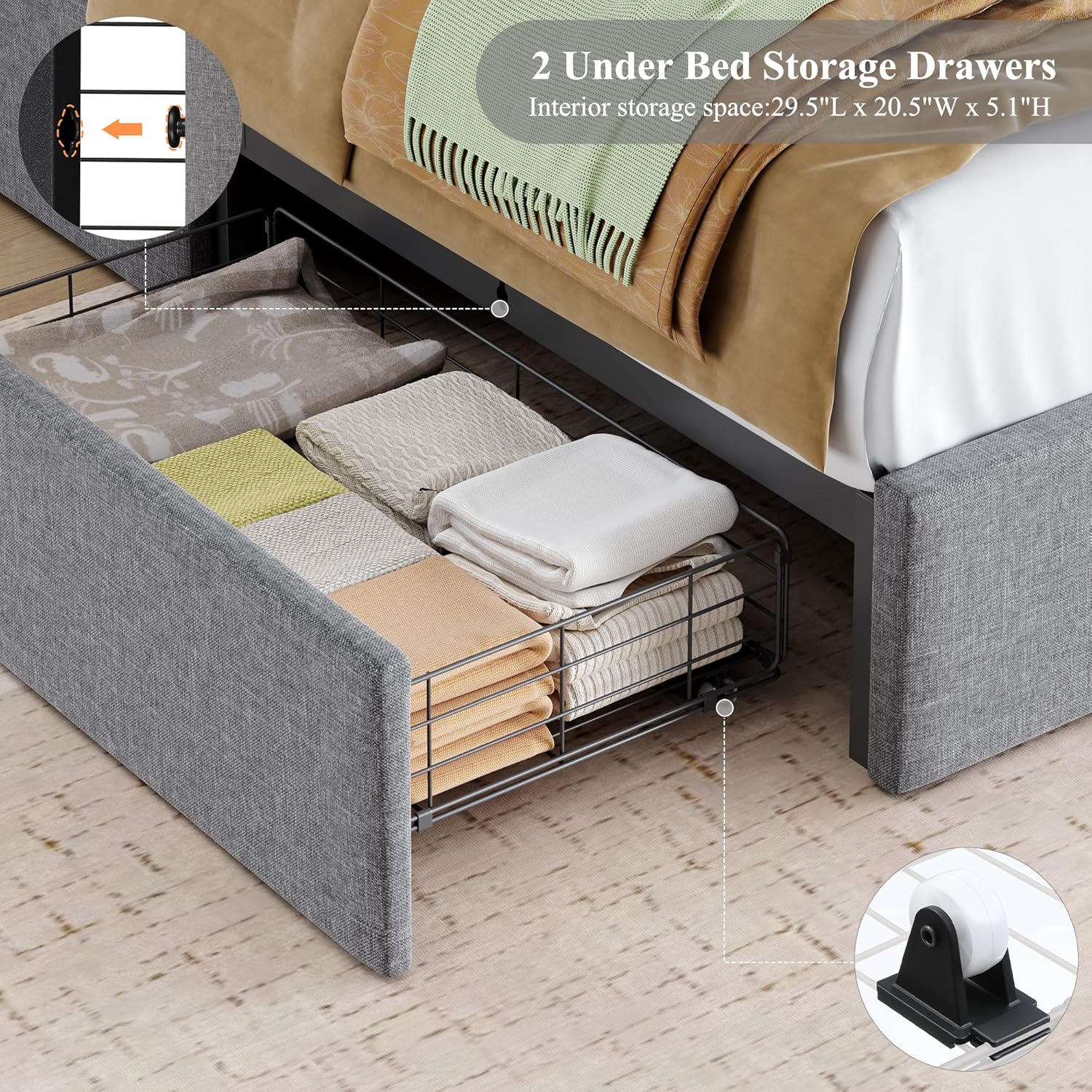
Figure 4.3: An open under-bed drawer filled with folded items, highlighting its storage capacity and the easy-gliding wheels for smooth operation.

Figure 4.4: Visual guide demonstrating the three flexible configurations for the under-bed storage drawers to suit different room layouts.
5. Maintenance
Regular maintenance will help preserve the appearance and functionality of your bed frame.
- Cleaning the Velvet Upholstery:
- Gently vacuum the velvet fabric regularly using an upholstery attachment to remove dust and debris.
- For spills, blot immediately with a clean, dry cloth. Do not rub.
- For stubborn stains, use a mild fabric cleaner specifically designed for velvet, testing on an inconspicuous area first.
- Cleaning Wood and Metal Components:
- Wipe wood and metal surfaces with a soft, damp cloth.
- Avoid using harsh chemicals or abrasive cleaners, as these can damage the finish.
- Dry thoroughly after cleaning.
- Hardware Check: Periodically check all screws, bolts, and connections to ensure they remain tight. Retighten as necessary to maintain stability and prevent noise.
- LED Lights: The LED lights are designed for long life and typically do not require maintenance. If issues arise, refer to the troubleshooting section.
6. Troubleshooting
| Problem | Possible Cause | Solution |
|---|---|---|
| Bed frame is wobbly or noisy. | Loose connections or uneven assembly. | Ensure all bolts and screws are securely tightened. Verify that the bed frame is on a level surface. Check that all slats are properly seated. |
| LED lights are not working. | Power connection issue, remote battery dead, or LED strip malfunction. | Check if the bed frame is plugged into a working power outlet. Ensure the power cord for the LED system is securely connected. Replace remote control batteries. If the issue persists, contact customer support. |
| Charging station is not providing power. | Bed frame not plugged in, power surge protector tripped, or faulty device cable. | Verify the bed frame is plugged into a live power outlet. Try a different USB cable for your device. Test with a different device. |
| Drawers do not slide smoothly or are misaligned. | Obstruction, damaged wheels, or improper assembly. | Check for any items obstructing the drawer's path. Inspect drawer wheels for damage. Ensure drawers were assembled correctly according to the manual. |
7. Product Specifications
| Feature | Detail |
|---|---|
| Model | B0FQP6KLSQ |
| Brand | HOSTACK |
| Size | Queen |
| Material | High-grade Velvet, Wood, Metal |
| Product Dimensions (L x W x H) | 88.9" x 62.2" x 44.5" |
| Color | Grey |
| Maximum Weight Recommendation | 900 Pounds |
| Number of Drawers | 2 |
| Drawer Dimensions (L x W x H) | 29.5" x 20.5" x 5.1" |
| Charging Station | 2 USB-A Ports (5V/2A), 1 USB-C Port (5V/2A) |
| LED Lights | RGB, App & Remote Control, Over 60,000 Colors |
| Required Assembly | Yes |
8. Warranty Information
Specific warranty details for the HOSTACK Queen LED Bed Frame are typically provided with your purchase documentation or available on the manufacturer's official website. Please retain your proof of purchase for warranty claims.
For detailed warranty terms and conditions, please refer to the information included in your product packaging or visit the HOSTACK Store on Amazon.
9. Customer Support
If you encounter any issues, have questions about assembly, operation, or require assistance with your HOSTACK Queen LED Bed Frame, please contact HOSTACK customer service.
Contact Information:
- Refer to the contact details provided in your product packaging.
- Visit the official HOSTACK website for support resources.
- For Amazon purchases, you can contact the seller directly through your Amazon order history.
Ask a question about this manual
Ask about setup, troubleshooting, compatibility, parts, safety, or missing instructions. Manuals+ will review the question and use this page’s manual context to help answer it.