
eLinkSmart YL-L300-A
eLinkSmart 2085 Ultra-Slim Smart Lock User Manual
Model: YL-L300-A
Brand: eLinkSmart
1. Introduction
This manual provides comprehensive instructions for the installation, operation, and maintenance of your eLinkSmart 2085 Ultra-Slim Smart Lock. Please read this manual thoroughly before installation and use to ensure proper function and safety.
2. Safety Information
- Do not attempt to disassemble or repair the lock yourself. Contact customer support for assistance.
- Use only the specified AAA batteries. Do not mix old and new batteries or different types of batteries.
- Keep keys and RFID cards in a secure location away from the lock.
- Ensure all screws are tightened securely during installation to prevent loosening.
- Regularly check the lock for any signs of damage or malfunction.
3. Package Contents
Verify that all items listed below are included in your package:
- eLinkSmart 2085 Smart Lock (Front and Rear Panels)
- 2085 Mortise Lock Body with Hook
- Installation Screw Accessories (5 sets for 22-110mm door thickness)
- Mechanical Keys (x2)
- RFID Cards (x2)
- Mounting Plates and Spindles

Figure 3.1: All components included in the eLinkSmart 2085 Smart Lock package, showing the front and rear lock panels, mortise lock body, keys, RFID cards, and various installation screws and accessories.
4. Product Overview
The eLinkSmart 2085 is an ultra-slim smart lock designed for sliding glass and patio doors. It offers multiple unlocking methods and smart home integration via the Tuya app.
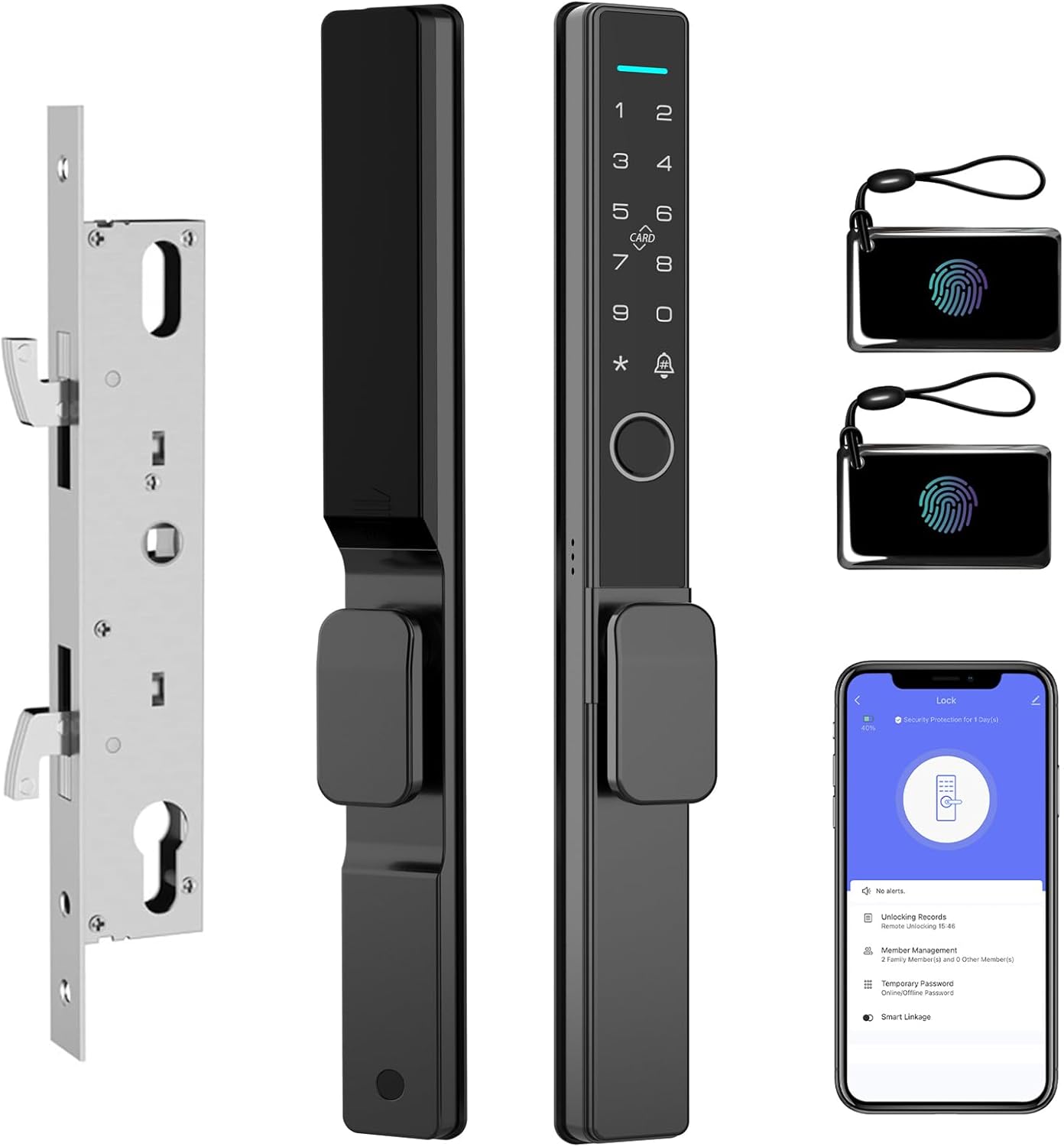
Figure 4.1: Overview of the eLinkSmart 2085 Smart Lock, displaying the sleek front panel with keypad and fingerprint sensor, the rear panel, the mortise lock body, and included RFID cards and app interface.
5. Installation Requirements
Before installation, ensure your door meets the following specifications:
- Door Thickness: 22mm to 110mm (0.87 inches to 4.33 inches). The package includes 5 sets of accessories to accommodate various thicknesses.
- Door Frame Width: Minimum 35mm (1.38 inches). The lock body has a width of 32mm (1.26 inches).
- Door Type: Suitable for sliding glass doors and patio doors.
- Handing: The handle is reversible, making it suitable for both left and right-opening doors.

Figure 5.1: Detailed dimensions for the eLinkSmart 2085 Smart Lock and its mortise, illustrating the required door frame width and lock body measurements for proper installation.
6. Installation Guide
Follow these steps carefully for proper installation. No drilling is typically required for standard installations.
- Prepare the Door: Ensure the existing mortise cutout in your door matches the dimensions of the 2085 mortise lock body. If replacing an old lock, remove it completely.
- Install Mortise Lock Body: Insert the 2085 mortise lock body into the door edge. Secure it with the provided screws. Ensure the hook latch operates smoothly.
- Determine Door Handing: If necessary, reverse the handle on the lock panels to match your door's opening direction (left or right).
- Install Front Panel: Route the cable from the front panel through the door and align the spindle with the mortise. Secure the front panel to the door.
- Install Rear Panel: Connect the cable from the front panel to the rear panel. Align the rear panel with the mortise and secure it to the door using the appropriate screws for your door thickness.
- Test Operation: After installation, manually test the lock and unlock mechanism to ensure smooth operation before setting up electronic functions.

Figure 6.1: Visual examples demonstrating correct and incorrect installation scenarios for the eLinkSmart 2085 Smart Lock, highlighting door frame compatibility and proper alignment.
7. Setup and Configuration
7.1 Battery Installation
The lock requires 4 x AAA batteries. Install them into the battery compartment on the rear panel. Ensure correct polarity.

Figure 7.1: The battery compartment of the eLinkSmart 2085 Smart Lock, showing the placement for 4 AAA batteries and indicating features like long battery life and low battery alarm.
7.2 Tuya App Integration
The eLinkSmart 2085 Smart Lock integrates with the Tuya App for advanced control and management. Remote unlocking requires a Bluetooth gateway (sold separately).
- Download the "Tuya Smart" or "Smart Life" app from your device's app store.
- Register or log in to your account.
- Add Device: Follow the in-app instructions to add your smart lock. This typically involves putting the lock into pairing mode (refer to the lock's specific prompts) and connecting via Bluetooth.
- Configure Settings: Once connected, you can manage users, add fingerprints, set passcodes, and view unlocking records through the app.

Figure 7.2: A user interacting with the Tuya app on a smartphone, demonstrating the interface for controlling the eLinkSmart 2085 Smart Lock, including unlocking records and temporary password management.
7.3 Adding Users (Fingerprint, Passcode, RFID Card)
All user management is primarily done through the Tuya App. Refer to the app's help section for detailed, up-to-date instructions.
- Fingerprint: In the app, navigate to "Member Management" or "Fingerprint Management" and follow the prompts to register new fingerprints. You will typically need to place your finger on the sensor multiple times.
- Passcode: Create permanent, one-time, or temporary passcodes through the app. Temporary passcodes can be set with specific date/time access.
- RFID Card: In the app, select "Card Management" and follow instructions to pair your RFID cards with the lock.
8. Operating Instructions
The eLinkSmart 2085 Smart Lock offers multiple ways to unlock your door:

Figure 8.1: Visual representation of the multiple unlocking methods available for the eLinkSmart 2085 Smart Lock, including fingerprint, passcode, app control, key, RFID card, and Bluetooth (BLE).
- Fingerprint: Place your registered finger on the fingerprint sensor. The lock will unlock if the fingerprint is recognized.
- Passcode: Enter your registered passcode on the keypad, then press the '#' key (or equivalent confirmation key).
- RFID Card: Present your registered RFID card to the card reader area on the lock.
- Tuya App: Open the Tuya app, select your lock, and tap the unlock button. (Requires Bluetooth gateway for remote unlocking).
- Mechanical Key: In case of emergency or battery depletion, insert the mechanical key into the keyhole and turn to unlock.
8.1 Locking the Door
The lock will automatically engage the hook latch when the door is closed. You can also manually lock it from the inside or via the Tuya app.
9. Maintenance
- Battery Replacement: When the low battery alarm sounds, replace all 4 AAA batteries promptly. Do not wait for complete battery depletion.
- Cleaning: Wipe the lock's surface with a soft, dry cloth. Avoid using abrasive cleaners or solvents that could damage the finish or electronic components.
- Sensor Care: Keep the fingerprint sensor clean and dry for optimal performance.
10. Troubleshooting
| Problem | Possible Cause | Solution |
|---|---|---|
| Lock does not respond. | Dead batteries. | Replace batteries. Use mechanical key if necessary. |
| Fingerprint not recognized. | Finger is wet/dirty, sensor is dirty, or fingerprint not properly registered. | Clean finger and sensor. Re-register fingerprint in the app if issues persist. |
| Passcode not working. | Incorrect passcode entered, or passcode expired (for temporary codes). | Verify passcode. Check passcode validity in the Tuya app. |
| Lock mechanism is stiff. | Misalignment during installation or debris in the mortise. | Check installation alignment. Clean the mortise area. |
| Cannot connect to Tuya App. | Bluetooth is off, lock not in pairing mode, or gateway issue (for remote access). | Ensure Bluetooth is on. Follow app instructions to put lock in pairing mode. Verify gateway connection if applicable. |
11. Specifications
| Model Name | YL-L300-A |
| Brand | eLinkSmart |
| Lock Type | Biometric, Mortise Lock with Hook |
| Material | Zinc |
| Color | Black |
| Dimensions (L x W x H) | 1.37 x 2.16 x 12.6 inches (34.8 x 54.9 x 320 mm) |
| Item Weight | 4.6 Pounds (2.09 kg) |
| Door Thickness Compatibility | 22mm - 110mm |
| Control Method | App (Tuya), Fingerprint, Passcode, RFID Card, Mechanical Key |
| Power Source | 4 x AAA Batteries (not included) |
| Special Features | Ultra-Slim Design, Waterproof, Reversible Handle, Double Hook Mortise |
12. Warranty and Support
eLinkSmart provides the following after-sales guarantee:
- Refund Policy: 30 days refund from the date of purchase.
- Exchange Policy: Free exchange within 180 days of purchase.
For any product problems or technical assistance, please contact eLinkSmart customer support directly. Provide your model number (YL-L300-A) and purchase details for faster service.
Related documentsYL-L300-A


Ask a question about this manual
Ask about setup, troubleshooting, compatibility, parts, safety, or missing instructions. Manuals+ will review the question and use this page’s manual context to help answer it.