
Introduction
Thank you for choosing the Baseus 120W 6-in-1 USB-C PD Fast Charging Desktop Charger. This manual provides essential information for the safe and efficient operation of your device. Please read it thoroughly before use and retain it for future reference.
Key Features
- 120W Total Fast Charging: Delivers up to 65W single-port output, capable of charging a MacBook Air M4 to 50% in 30 minutes or fully in 110 minutes. Supports PD3.0 and dual-port fast charging for laptops, tablets, and smartphones.
- 6-in-1 Charging Station: Equipped with 4 USB-C ports and 2 USB-A ports, allowing simultaneous charging of up to 6 devices. Designed for a clean and organized desktop setup.
- Compact & Portable Design: Measures approximately 77 × 84 mm, with a lightweight design for easy transport between various locations or during travel.
- Safe & Reliable GaN Technology: Incorporates AI temperature monitoring (45,000 times per hour), 90% energy conversion, and an 8800mm² heat dissipation area. Features 6 built-in protections for enhanced safety.
- Ultra Wide Compatibility: Supports PD3.0, QC3.0, PPS, and other charging protocols, ensuring compatibility with a broad range of USB devices including MacBooks, iPads, iPhones, Samsung Galaxy, Google Pixel, Nintendo Switch, Steam Deck, GoPro, and drones.


Package Contents
Verify that all items are present upon unboxing:
- Baseus 120W 6-in-1 Desktop Charging Station (Model E0120T)
- 5ft Extension Power Cord
- User Manual / Quick Start Guide

Setup Instructions
- Connect Power Cord: Insert the 5ft extension power cord into the designated power input port on the back of the charging station.
- Plug into Outlet: Connect the other end of the power cord to a standard wall outlet (100-240V). The power indicator light on the charging station will illuminate, confirming it is powered on.
- Position the Station: Place the charging station on a stable, flat surface. The anti-slip pads on the bottom will help keep it secure.

Operating Instructions
The Baseus 120W charging station features 4 USB-C ports and 2 USB-A ports, allowing for versatile charging of multiple devices simultaneously.
Charging Devices
- Connect Your Devices: Use appropriate charging cables to connect your devices to the available USB-C or USB-A ports on the charging station.
- Automatic Power Distribution: The charging station intelligently detects connected devices and allocates power efficiently. For optimal fast charging, utilize the designated high-wattage USB-C ports for power-hungry devices like laptops.
- Simultaneous Charging: You can charge up to 6 devices concurrently. The total output is 120W, with individual ports providing varying maximum outputs depending on the connected devices and other active ports.

Power Output Details
The charging station dynamically adjusts power output based on the number and type of connected devices. Here's a general overview of port capabilities:
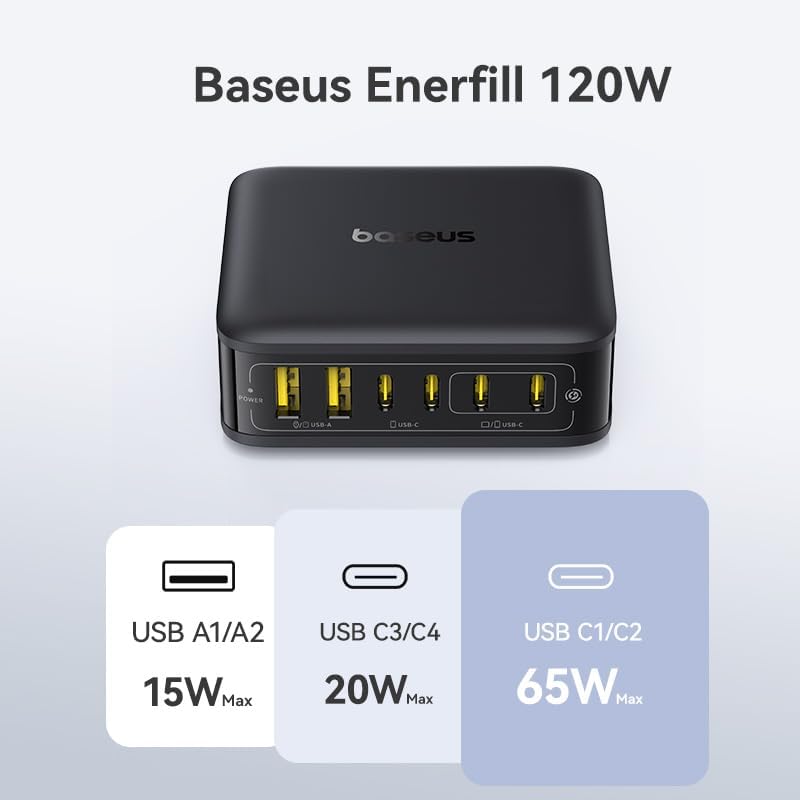
- USB-C1/C2: Up to 65W Max (for single device charging, ideal for laptops).
- USB-C3/C4: Up to 20W Max.
- USB-A1/A2: Up to 15W Max.
- Total Output: 120W Max across all 6 ports.

Official Product Video: Enerfill 120W Charging Station
Specifications
| Feature | Detail |
|---|---|
| Model Number | E0120T |
| Total Wattage | 120W |
| Total USB Ports | 6 (4 USB-C, 2 USB-A) |
| USB-C Output (Single Port) | Up to 65W (USB-C1/C2), Up to 20W (USB-C3/C4) |
| USB-A Output (Single Port) | Up to 15W (USB-A1/A2) |
| Input Voltage | 100-240V |
| Dimensions | 5.39 x 3.43 x 2.64 inches |
| Item Weight | 14.4 ounces |
| Special Feature | Fast Charging, GaN Technology, AI Temperature Monitoring |
| Compatibility | MacBook, iPad, iPhone, Samsung Galaxy, Google Pixel, Switch, Steam Deck, GoPro, drones, and other USB devices. |
Safety Information
The Baseus 120W charging station is designed with multiple safety features to protect your devices and ensure reliable operation:
- Over Current Protection: Prevents damage from excessive current flow.
- Over Voltage Protection: Safeguards against voltage surges.
- Short Circuit Protection: Automatically cuts power in case of a short circuit.
- Under Voltage Protection: Protects devices from insufficient voltage.
- Over Temperature Protection: AI temperature monitoring (45,000 times per hour) prevents overheating.
- GaN Technology: Ensures high energy conversion efficiency (90%) and effective heat dissipation (8800mm²).
Always use the charging station in a well-ventilated area and avoid covering it during operation. Do not expose the device to liquids or extreme temperatures.


Troubleshooting
Device Not Charging
- Check Power Connection: Ensure the charging station is securely plugged into a working wall outlet and the power cord is firmly connected to the station. The power indicator light should be on.
- Verify Cable: Try a different charging cable to rule out a faulty cable.
- Check Device Compatibility: Ensure your device is compatible with USB-C or USB-A charging standards.
- Port Functionality: Try connecting the device to a different port on the charging station.
Slow Charging
- Cable Quality: Use high-quality, certified charging cables that support fast charging protocols.
- Port Selection: For devices requiring higher wattage (e.g., laptops), ensure they are connected to the 65W USB-C ports (USB-C1/C2).
- Number of Devices: Charging many devices simultaneously may distribute the total 120W, potentially reducing individual port speeds. Disconnect less critical devices to prioritize others.
- Device Battery Level: Charging speed can decrease as a device's battery approaches full capacity.
Overheating
- Ventilation: Ensure the charging station is placed in a well-ventilated area and not covered by other objects.
- Environmental Temperature: Avoid using the charger in excessively hot environments.
- If the device consistently overheats, discontinue use and contact customer support.
Maintenance
- Cleaning: Disconnect the charging station from the power outlet before cleaning. Use a soft, dry cloth to wipe the surface. Do not use liquid cleaners or aerosols.
- Storage: When not in use, store the charging station in a cool, dry place away from direct sunlight and moisture.
- Cable Care: Avoid bending or crimping the power cord excessively to prevent damage.
Warranty and Support
For warranty information, technical support, or service inquiries, please refer to the official Baseus website or contact their customer service directly. Keep your purchase receipt for warranty validation.
Manufacturer: Shenzhen Baseus Technology Co., Ltd.


