
1. Introduction
This manual provides detailed instructions for the safe and effective operation of your ZLLJMETER ZL16B Smart Digital Pen Type Multimeter. Please read this manual thoroughly before use and retain it for future reference.
The ZL16B is a compact, portable digital multimeter designed for measuring AC/DC voltage, resistance, capacitance, frequency, diode, continuity, non-contact voltage (NCV), live line detection, and phase sequence. It features a 6000-count display, smart and manual modes, and a built-in rechargeable battery.
2. Safety Information
WARNING: To avoid electric shock or personal injury, read and understand all safety information before using this product.
- Always ensure the multimeter is in good working condition before use.
- Do not apply voltage exceeding the maximum rated voltage marked on the multimeter.
- Exercise extreme caution when working with voltages above 30V AC RMS, 42V peak, or 60V DC. These voltages pose a shock hazard.
- Do not use the multimeter if it appears damaged or if the test leads are damaged.
- Ensure the test leads are properly connected to the correct input terminals for the desired measurement.
- Do not operate the multimeter in explosive gas, vapor, or dusty environments.
- Always disconnect power to the circuit and discharge all high-voltage capacitors before measuring resistance, continuity, or capacitance.
- Adhere to local and national safety codes.
3. Product Overview
The ZLLJMETER ZL16B is a pen-type digital multimeter with a clear display and intuitive controls.
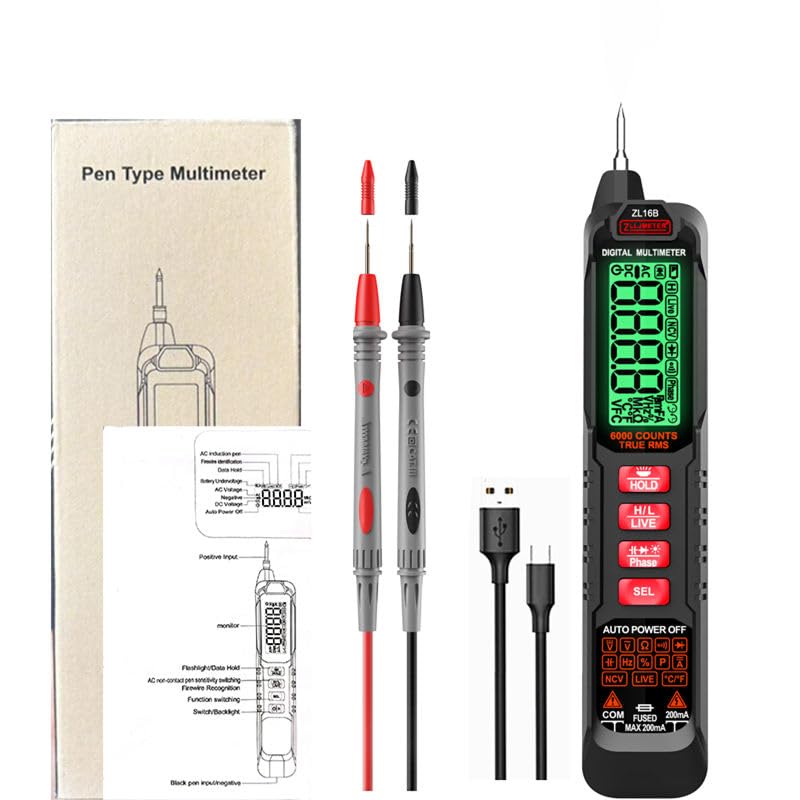
Figure 3.1: ZLLJMETER ZL16B Multimeter and included accessories (test leads, USB cable, user manual).
3.1 Key Features
- 6000 Counts Digital Display
- Smart and Manual Measurement Modes
- AC/DC Voltage Measurement
- Resistance and Capacitance Measurement
- Frequency Measurement
- Diode and Continuity Test
- Non-Contact Voltage (NCV) Detection
- Live Line Detection
- Phase Sequence Recognition
- Data Hold Function
- Automatic Shutdown
- Flashlight Illumination
- USB Rechargeable Lithium Battery
4. Setup
4.1 Charging the Battery
The ZL16B multimeter is equipped with a built-in 500mAh lithium battery, rechargeable via a Type-C USB cable.
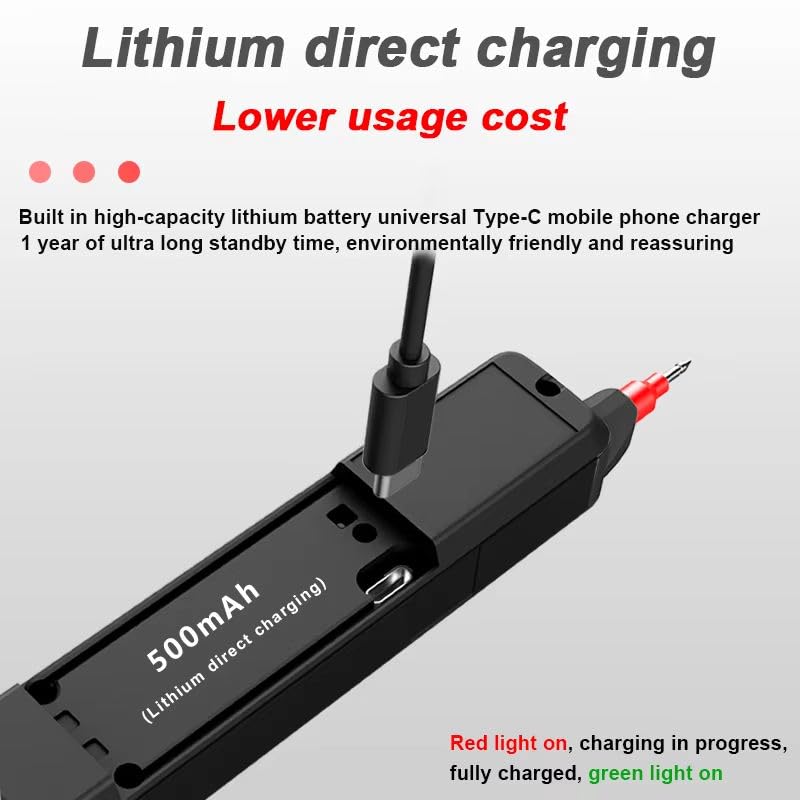
Figure 4.1: Charging the ZL16B Multimeter via USB-C port.
- Locate the Type-C USB charging port on the side of the multimeter.
- Connect the provided USB cable to the multimeter and to a standard USB power adapter (not included) or a computer USB port.
- During charging, a red indicator light will be illuminated.
- Once fully charged, the indicator light will turn green.
Note: A full charge provides extended standby time.
4.2 Initial Power-On
Press and hold the power button (usually marked with a power symbol) to turn on the multimeter. The display will illuminate.
5. Operating Instructions
5.1 Measurement Modes
The ZL16B offers both Smart Mode and Manual Mode for measurements.
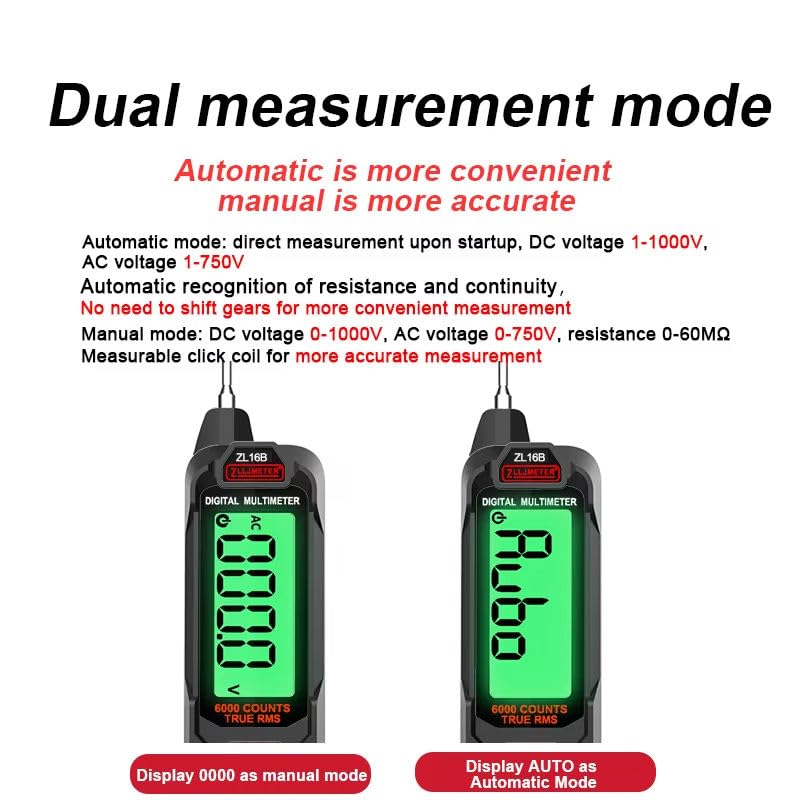
Figure 5.1: Display comparison between Manual Mode (showing '0000') and Automatic Mode (showing 'Auto').
- Automatic Mode (Smart Mode): Upon startup, the multimeter automatically detects the measurement type (DC voltage 1-1000V, AC voltage 1-750V, resistance, continuity) and displays the result. No manual range selection is required. This mode is generally more convenient.
- Manual Mode: For specific measurements or when more precise control is needed, you can switch to manual mode. In manual mode, you select the desired function and range. This mode supports DC voltage 0-1000V, AC voltage 0-750V, and resistance 0-60MΩ.
Use the 'SEL' button to cycle through different functions within a mode or to switch between Smart and Manual modes if applicable.
5.2 Specific Measurement Functions

Figure 5.2: Examples of functional testing: AC Voltage, DC Voltage, Continuity (On/Off), and Current measurement.

Figure 5.3: Further examples of functional testing: AC Current, Diode, Capacitance, Resistance, Phase Sequence, and Zero Line (Live Line) judgment.
- AC/DC Voltage Measurement:
Connect the test leads to the circuit in parallel. The multimeter will automatically detect AC or DC voltage in Smart Mode. For manual mode, select the appropriate ACV or DCV function.
Range: AC Voltage 6V/60V/600V; DC Voltage 6V/60V/600V.
- Resistance Measurement (Ω):
Ensure the circuit is de-energized and all capacitors are discharged. Connect the test leads across the component. The multimeter will display the resistance value.
Range: 600Ω/6KΩ/60KΩ/600KΩ/6MΩ/60MΩ.
- Capacitance Measurement (F):
Ensure the capacitor is fully discharged before connecting the test leads. Connect the leads across the capacitor terminals. The multimeter will display the capacitance value.
Range: 60nF/600nF/6uF/60uF/600uF/6mF.
- Frequency Measurement (Hz):
Connect the test leads to the circuit where frequency needs to be measured. The multimeter will display the frequency.
Range: 9.99Hz - 9.999MHz.
- Diode Test:
Ensure the circuit is de-energized. Connect the red lead to the anode and the black lead to the cathode of the diode. The display will show the forward voltage drop. Reverse the leads to check for open circuit (OL).
- Continuity Test:
Ensure the circuit is de-energized. Connect the test leads across the component or wire. A continuous beep indicates continuity (low resistance).
- AC/DC Current Measurement (A):
WARNING: To measure current, the multimeter must be connected in series with the circuit. Incorrect connection can damage the multimeter or the circuit. Ensure the circuit is de-energized before connecting. The ZL16B supports current measurement up to 200mA.
Range: 1mA-200mA.
- Non-Contact Voltage (NCV) Detection:
Press the NCV button. Place the tip of the multimeter near a live conductor. The multimeter will indicate the presence of AC voltage without physical contact, often with an audible beep and visual indicator. It features high/low sensitivity automatic adjustment.

Figure 5.4: NCV test indicating electrified, breakpoint, and non-electrified conditions.
- Live Line Detection:
Use the 'LIVE' function to identify live wires. Insert the probe into the socket or touch the conductor. The multimeter will indicate if the line is live.
- Phase Sequence Recognition:
Switch to the 'Phase' function. Touch the sensing pen firmly against the first phase line. The LCD will display 'PA' and flash. Wait for a beep. Repeat for 'PB' and 'PC' for subsequent phases. The final display will indicate positive or reverse phase sequence.
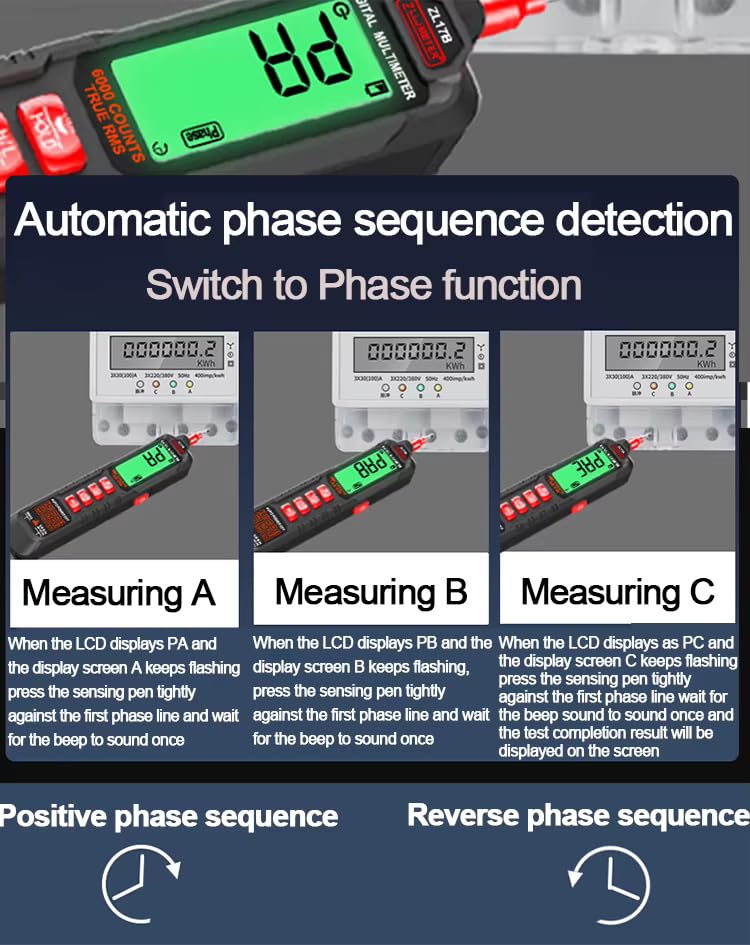
Figure 5.5: Automatic phase sequence detection process.
5.3 Additional Functions
- Data Hold: Press the 'HOLD' button to freeze the current reading on the display. Press again to release.
- Flashlight: The multimeter includes a built-in flashlight for illuminating dark work areas. Activate it via a dedicated button or by holding a specific function button (refer to device markings).
- Automatic Shutdown: To conserve battery life, the multimeter will automatically power off after a period of inactivity.
6. Maintenance
6.1 Cleaning
Wipe the case with a damp cloth and mild detergent. Do not use abrasives or solvents. Ensure the multimeter is powered off and disconnected from any circuits before cleaning.
6.2 Storage
When not in use for extended periods, store the multimeter in a dry, cool place, away from direct sunlight and extreme temperatures. Ensure the battery is partially charged before storage to prolong its lifespan.
7. Troubleshooting
- No Display/Power On:
Check if the battery is charged. Connect the multimeter to a USB charger and observe the charging indicator light.
- Inaccurate Readings:
Ensure test leads are properly connected and not damaged. Verify the correct measurement function and range are selected (if in manual mode). Check for external interference.
- "OL" or "OVER" on Display:
This indicates an overload or out-of-range condition. The measured value exceeds the selected range. Switch to a higher range or ensure the circuit is within the multimeter's specifications.
- No Continuity Beep:
Ensure the circuit is de-energized. Check the test leads for damage. The resistance might be too high for continuity detection.
8. Specifications
The following table outlines the technical specifications of the ZLLJMETER ZL16B Multimeter.
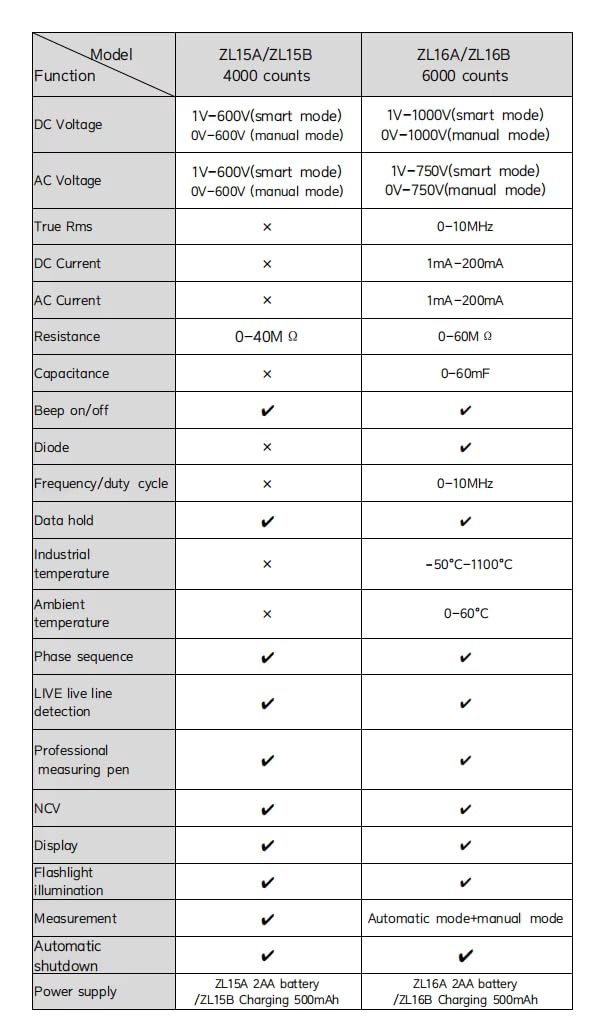
Figure 8.1: Model comparison table, showing ZL16B specifications.
| Parameter | Specification (ZL16B) |
|---|---|
| Display | 6000 Counts |
| AC Voltage | 6V/60V (±1.0%+3), 600V (±1.2%+3) |
| DC Voltage | 6V/60V (±0.8%+2), 600V (±1.0%+2) |
| Resistance | 600Ω/6KΩ/60KΩ/600KΩ/6MΩ (±1.2%+3), 60MΩ (±2.0%+5) |
| Capacitance | 60nF/600nF/6uF/60uF/600uF/6mF (±4.0%+5) |
| Frequency | 9.99Hz - 9.999MHz (±2.0%+5) |
| AC Current | 1mA - 200mA |
| DC Current | 1mA - 200mA |
| Power Source | Rechargeable Lithium Battery (500mAh) |
| Automatic Shutdown | Yes |
| NCV | Yes |
| Live Line Detection | Yes |
| Phase Sequence | Yes |
| Dimensions (L x W x H) | 15 x 5 x 2.5 cm |
| Item Weight | 180 g |
| Safety Standard | IEC 61010-1 |
| Model Number | ZL6B (also referred to as ZL16B) |
9. Warranty and Support
For warranty information and technical support, please refer to the contact details provided by your retailer or the manufacturer's official website. Keep your purchase receipt as proof of purchase.
Included components: 1 Multimeter, 1 User Manual, 1 Test Lead, 1 USB Cable.