
Introduction
Welcome to the user manual for your VINGLI Fireplace TV Stand. This manual provides essential information for the safe assembly, operation, and maintenance of your new entertainment center. Please read all instructions carefully before use and retain this manual for future reference.
Important Safety Information
Please observe the following safety precautions to prevent injury or damage to the product.
- Do not exceed the maximum weight capacity of 420 lbs (190 kg) for the TV stand.
- Ensure all components are securely fastened during assembly.
- Keep flammable materials away from the fireplace insert.
- The fireplace features overheating protection and is CSA certified.
- Unplug the fireplace insert before cleaning or maintenance.
- This product is designed for indoor use only.
Package Contents
Your VINGLI Fireplace TV Stand is typically delivered in multiple packages. Please verify all parts are present before beginning assembly.
- TV Stand components (wood panels, hardware, sliding barn door mechanisms)
- 23-inch Electric Fireplace Insert
- Remote Control for Fireplace
- Assembly Instructions
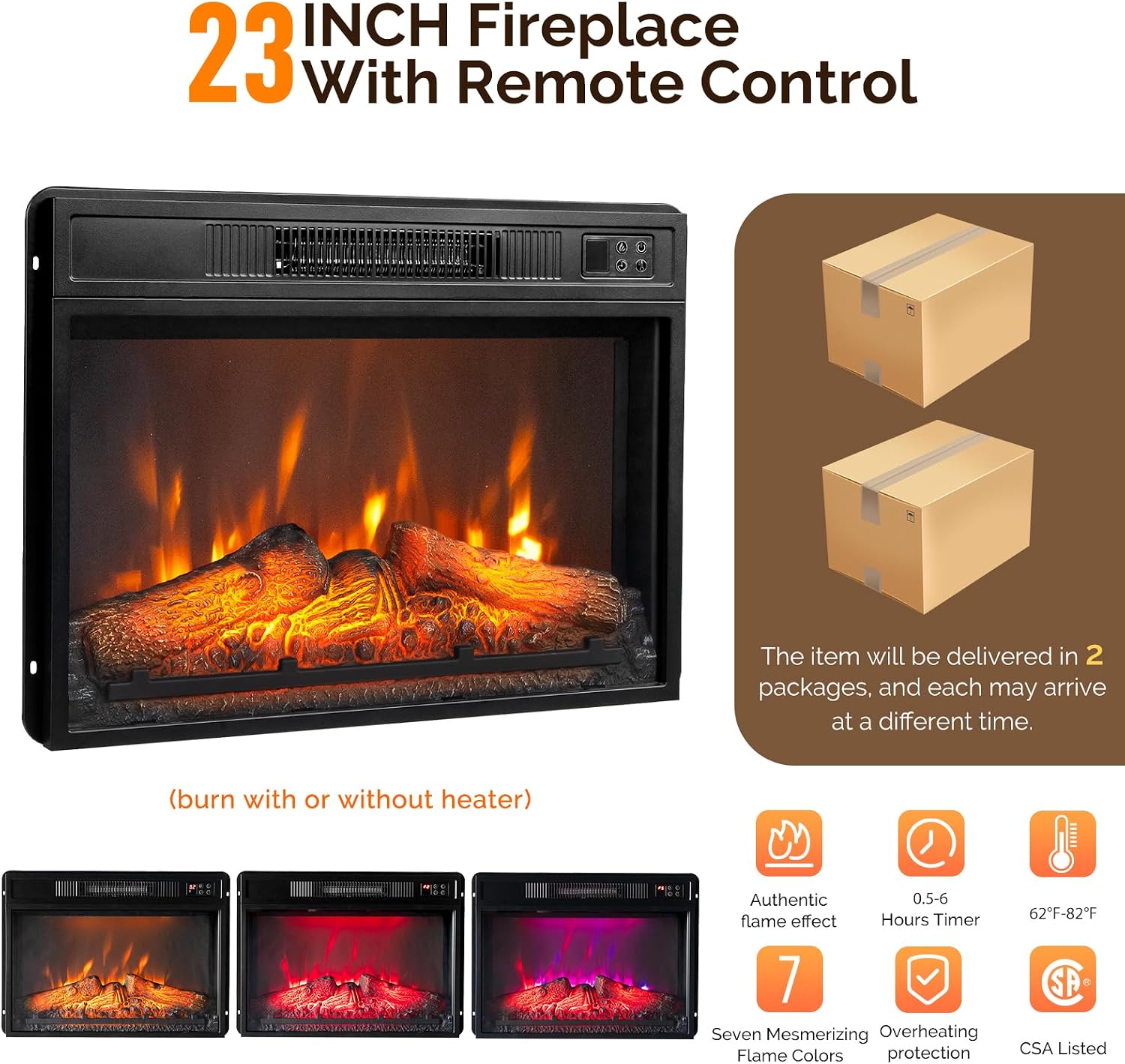
Figure 1: The 23-inch electric fireplace insert, remote control, and an illustration indicating delivery in two packages.
Setup and Assembly
Assembly is required for this product. It is recommended to have two people for assembly. Please follow the detailed instructions provided in the separate assembly manual included with your product.
- Unpack all components and verify against the parts list.
- Assemble the main frame of the TV stand according to the diagrams.
- Install the adjustable shelves and sliding barn door rails.
- Insert the 23-inch electric fireplace into the designated opening.
- Secure all connections and ensure stability.

Figure 2: Key features for assembly and functionality, including the sliding rail, adjustable shelves, and cable management.
Operating the Electric Fireplace
The electric fireplace insert provides both aesthetic flame effects and heating functionality. Use the included remote control or the control panel on the unit.
- Power On/Off: Press the power button to turn the fireplace on or off.
- Flame Effect: The flame effect can be operated independently of the heater. Choose from seven mesmerizing flame colors to suit your preference.
- Temperature Control: Adjust the temperature from 62°F to 82°F (17°C to 28°C) using the temperature control buttons.
- Timer Function: Set the operational timer for 0.5 to 6 hours, allowing the fireplace to automatically shut off after the selected duration.
- Safety Features: The unit includes built-in overheating protection, which will automatically shut off the heater if it reaches an unsafe temperature. It is also CSA certified for safety standards.
Care and Maintenance
Proper care and maintenance will ensure the longevity and appearance of your TV stand.
- Cleaning Surfaces: Wipe all surfaces with a soft, slightly damp cloth. Avoid using harsh chemicals, abrasive cleaners, or polishes that may damage the finish.
- Dusting: Regularly dust the unit to prevent buildup, especially around the fireplace vents to ensure proper airflow.
- Fireplace Insert: Ensure the fireplace insert is unplugged and completely cool before cleaning. Refer to the fireplace insert's specific manual for detailed cleaning instructions.
- Hardware: Periodically check and tighten all screws and fasteners to maintain the structural integrity and stability of the TV stand.
Troubleshooting
Refer to the table below for common issues and their solutions.
| Problem | Possible Cause | Solution |
|---|---|---|
| Fireplace not turning on. | Not plugged in; power switch off; circuit breaker tripped. | Ensure power cord is securely plugged into a working outlet. Check the main power switch on the unit. Reset the household circuit breaker if necessary. |
| No heat, but flames are visible. | Heater function is off; temperature setting too low. | Activate the heater function using the remote or unit controls. Increase the temperature setting to a desired level. |
| Sliding doors are stiff or stuck. | Rails are dirty; hardware loose; obstruction. | Clean the sliding rails with a soft cloth. Check and tighten all hardware for the door mechanism. Remove any obstructions from the track. |
| Unit feels unstable. | Loose assembly hardware; uneven floor surface. | Re-check and tighten all screws and fasteners according to the assembly instructions. Ensure the unit is placed on a level surface. |
Product Specifications
- Brand: VINGLI
- Model Number: FireplaceTVStand
- Material: Engineered Wood
- Color: Rustic Brown
- Overall Dimensions (L x W x H): 151 cm x 40 cm x 75.4 cm (59.45"W x 15.75"D x 33.85"H)
- Item Weight: 34.6 kg (76.28 lbs)
- Maximum Weight Capacity: 420 lbs (190 kg)
- Fireplace Insert Size: 23 inches
- Fireplace Temperature Range: 62°F to 82°F (17°C to 28°C)
- Fireplace Timer: 0.5 - 6 hours
- Certifications: CSA (for fireplace insert)
- TV Size Compatibility: Up to 70 inches

Figure 3: Product dimensions and TV size compatibility.
Warranty Information
Specific warranty details are typically provided with your purchase documentation. Please refer to the warranty card or contact VINGLI customer support for information regarding warranty coverage and terms. Retain your proof of purchase for any warranty claims.
Customer Support
For any questions, missing parts, or assistance with assembly or operation, please contact VINGLI customer support.
Contact Information: Refer to your purchase receipt or the VINGLI official website for the most current customer service contact details.
Online Resources: Visit the VINGLI website for FAQs, additional product information, and assembly guides.