
FURITEK UNITYDRIVE Combo (FUR-2695)
FURITEK UNITYDRIVE Combo for Axial SCX24: MINI KMD Unity ESC/Motor & Mini Stellar Transmission User Manual
Model: UNITYDRIVE Combo (FUR-2695) | Brand: FURITEK
Introduction
This manual provides detailed instructions for the installation, operation, and maintenance of the FURITEK UNITYDRIVE Combo. This system integrates the MINI KMD Unity 2-in-1 ESC/Motor with the Mini Stellar Transmission, designed as a plug-and-play drivetrain solution for Axial SCX24 micro crawlers. It aims to enhance performance through smooth power delivery and compact integration.
Safety Information
The FURITEK UNITYDRIVE Combo is an advanced electronic component for remote control vehicles. It is not intended for use by children without adult supervision. Always ensure proper handling of LiPo batteries, as incorrect use can lead to fire or injury. Disconnect the battery when not in use and during maintenance. Avoid contact with water unless the product is specifically rated as waterproof. Always operate RC vehicles in a safe environment, away from people, pets, and obstacles.
What's in the Box
- MINI KMD Unity 2-in-1 ESC/Motor
- Mini Stellar Transmission
- Necessary mounting hardware and connectors

Image: The complete FURITEK UNITYDRIVE Combo, featuring the MINI KMD Unity 2-in-1 ESC/Motor connected to the Mini Stellar Transmission.
Setup and Installation
The UNITYDRIVE Combo is designed for a drop-in installation on the Axial SCX24 platform, requiring no soldering or extensive modifications. Follow these steps for proper setup:
1. Components Overview
The combo consists of the integrated ESC/Motor unit and the CNC Mini Stellar Transmission. Familiarize yourself with these components before installation.
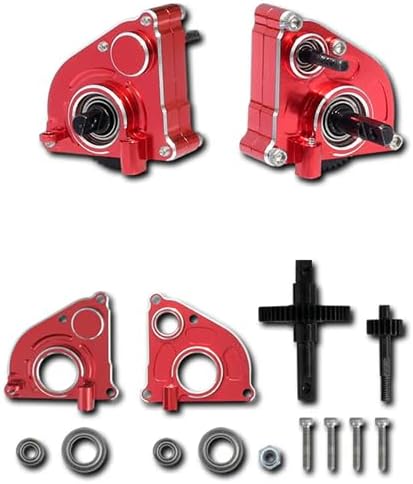
Image: Individual components of the CNC Mini Stellar Transmission, highlighting its precision-machined aluminum parts and gears.
2. Prepare Your SCX24 Chassis
- Carefully remove the existing motor, ESC, and transmission from your Axial SCX24.
- Ensure the chassis is clean and free from debris.
3. Install the UNITYDRIVE Combo
Position the integrated MINI KMD Unity ESC/Motor and Mini Stellar Transmission unit into the designated mounting location on your SCX24 chassis. Secure it using the provided hardware. The design ensures a clean and minimalist setup, optimizing airflow and reducing clutter.
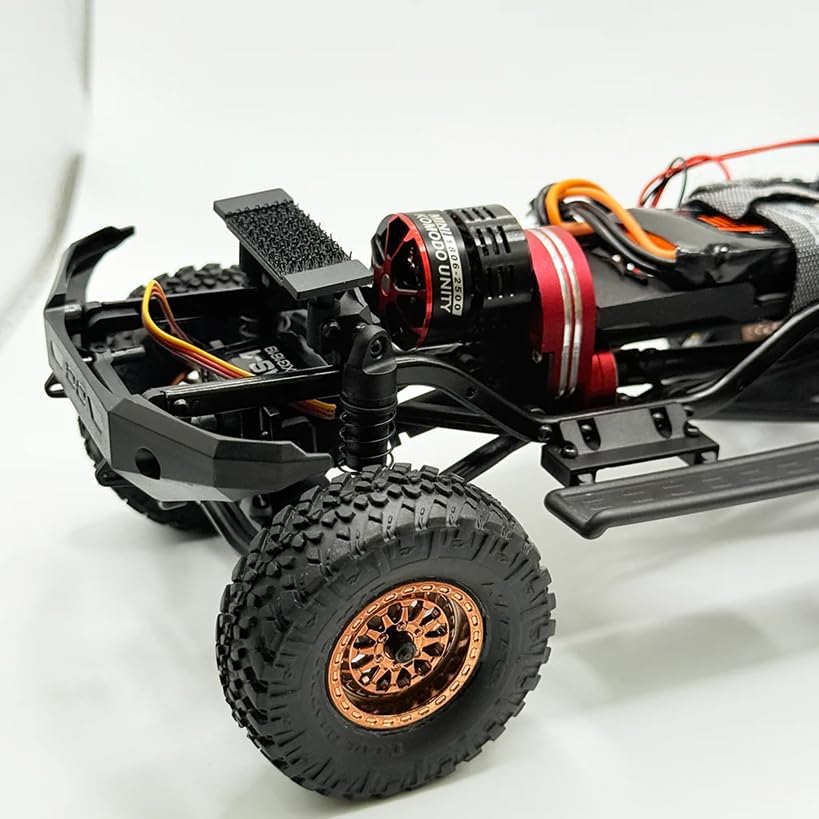
Image: The UNITYDRIVE Combo neatly installed within an Axial SCX24 chassis, demonstrating its compact integration and clean wiring.
4. Wiring Connections
Connect the UNITYDRIVE Combo to your receiver and battery. The system features minimal wiring for a clean layout. Ensure all connections are secure and correctly oriented.
- Receiver Connection: Plug the signal wire from the ESC/Motor unit into the appropriate channel on your RC receiver (typically channel 2 for throttle).
- Battery Connection: Connect your 2S or 3S LiPo battery to the power input of the ESC/Motor. Ensure polarity is correct.
- BEC Output: The built-in BEC provides 5.5V or 7.4V output for your servo. If your servo requires a specific voltage, ensure the BEC is configured accordingly via the Furicar app.

Image: A small connector and twisted wire, typically used for receiver connection or BEC output, included with the UNITYDRIVE Combo.
Operating Instructions
Once installed, the UNITYDRIVE Combo is ready for operation. Its advanced features ensure a superior crawling experience.
Powering On/Off
- To Power On: Connect the battery to the ESC/Motor unit. The system will initialize.
- To Power Off: Disconnect the battery from the ESC/Motor unit.
Field-Oriented Control (FOC) Technology
The integrated ESC utilizes FOC technology, providing ultra-smooth and precise throttle response, especially at low speeds. This results in enhanced crawlability and efficient power delivery, contributing to cooler operation and extended component life.
Furicar Mobile App Control
For advanced tuning and customization, download the Furicar mobile app (available for iOS and Android). The app allows you to:
- Fine-tune throttle curves for precise control.
- Adjust braking parameters.
- Configure startup settings.
- Select BEC output voltage (5.5V / 7.4V).
- Perform firmware updates.
Refer to the Furicar app's in-app guide for detailed instructions on using its features.
Maintenance
Regular maintenance ensures the longevity and optimal performance of your UNITYDRIVE Combo.
- Cleaning: Periodically clean the motor and transmission from dirt, dust, and debris using a soft brush or compressed air. Avoid using liquids directly on electronic components.
- Inspections: Regularly check all wiring connections for looseness or damage. Inspect the transmission gears for wear.
- Firmware Updates: Utilize the Furicar app to check for and apply the latest firmware updates. These updates often include performance enhancements and bug fixes.
- Storage: When not in use, store the RC vehicle and its components in a dry, cool place, away from direct sunlight and extreme temperatures. Disconnect the battery during storage.
Troubleshooting
If you encounter issues with your UNITYDRIVE Combo, refer to the following common troubleshooting steps:
- No Power:
- Check battery connection and ensure the battery is charged.
- Verify all wiring connections are secure.
- Motor Not Responding / Erratic Behavior:
- Ensure the receiver is properly bound to your transmitter.
- Check the signal wire connection from the ESC/Motor to the receiver.
- Recalibrate your ESC if necessary (refer to Furicar app or online resources).
- Inspect for any physical obstructions preventing motor or transmission movement.
- Overheating:
- Ensure adequate airflow around the motor and ESC.
- Check for excessive load on the drivetrain (e.g., binding gears, tight bearings).
- Consider adjusting motor timing or gearing via the Furicar app if consistently overheating under normal load.
For further assistance, consult the Furicar app or contact FURITEK customer support.
Specifications
| Component | Specification |
|---|---|
| Motor Type | Outrunner Brushless (MINI KMD Unity) |
| KV Rating | 2500KV |
| Max Power Output | 160W |
| ESC Type | Integrated FOC (Field-Oriented Control) |
| Continuous Current | 30A |
| Burst Current | 50A |
| Battery Support | 2S-3S LiPo |
| Built-in BEC | 5A with selectable 5.5V / 7.4V output |
| Programming | Furicar mobile app (iOS & Android) |
| Transmission | CNC Mini Stellar Transmission |
| Dimensions (Motor/ESC) | Ø23 × 21.3 mm (approximate) |
| Weight (Motor/ESC) | 25.1g (approximate) |
Warranty and Support
FURITEK provides ongoing support for the UNITYDRIVE Combo, including lifetime firmware updates accessible via the Furicar mobile app. For specific warranty details, technical assistance, or customer service inquiries, please refer to the official FURITEK website or contact their authorized distributors. Keep your purchase receipt as proof of purchase.
Ask a question about this manual
Ask about setup, troubleshooting, compatibility, parts, safety, or missing instructions. Manuals+ will review the question and use this page’s manual context to help answer it.