
1. Introduction
The Trevi RDA 70 BR is a compact and versatile portable radio designed to provide a comprehensive listening experience. It combines traditional radio functionality with modern digital features, making it suitable for listening to music or news anywhere. This manual provides instructions for the proper setup, operation, and maintenance of your device.
2. Safety Information
- Read all instructions carefully before using the device.
- Do not expose the radio to rain, moisture, or extreme temperatures.
- Avoid placing the device near heat sources or in direct sunlight.
- Do not disassemble or attempt to repair the unit yourself. Refer all servicing to qualified personnel.
- Keep the device away from strong magnetic fields.
- Use only the specified charging cable (USB Type-C) for recharging the battery.
3. Package Contents
Ensure all items are present in the package:
- Trevi RDA 70 BR Portable Radio
- USB Type-C Charging Cable
- User Manual (this document)
4. Product Overview
Familiarize yourself with the various parts and controls of your Trevi RDA 70 BR radio.

Figure 1: Angled front view of the Trevi RDA 70 BR Portable Radio, showing the speaker grille, display, and main controls.
Front Panel Controls
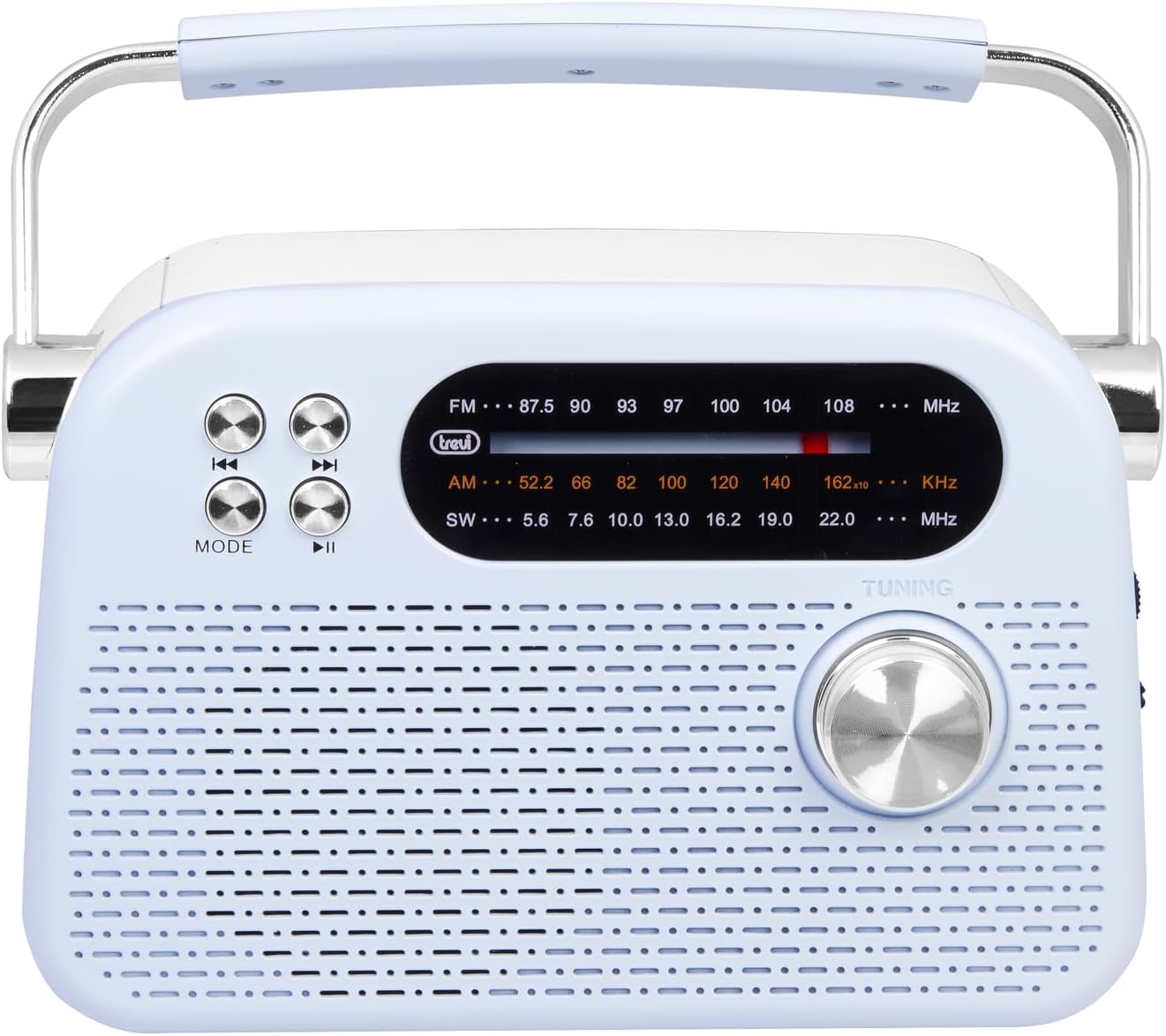
Figure 2: Detailed front view highlighting the display, mode button, playback controls, and tuning knob.
- Display: Shows frequency, mode, and other information.
- MODE Button: Switches between radio bands (FM/AM/SW) and media playback modes (USB/Micro SD/Wireless).
- Playback Controls (◀◀ / ▶▶ / ▶▶): Used for skipping tracks in media mode or fine-tuning in radio mode.
- Tuning Knob: For manual station tuning.
Side Panel Controls and Ports

Figure 3: Side view showing the power switch, volume control, USB port, Micro SD slot, and USB Type-C charging port.
- OFF/ON/Volume Knob: Turns the radio on/off and adjusts the volume level.
- DC 5V IN (USB Type-C): Charging port for the internal battery.
- USB Port: For connecting USB flash drives for MP3 playback.
- Micro SD Slot (TF): For inserting Micro SD cards for MP3 playback.
- Band Selector Switch: Selects between FM, AM, and SW radio bands, and MEDIA mode for USB/Micro SD/Wireless.
Rear Panel

Figure 4: Rear view showing the telescopic antenna and battery compartment.
- Telescopic Antenna: Extend for improved radio reception, especially for FM and SW bands.
- Battery Compartment: Houses the rechargeable lithium battery.
5. Setup
5.1 Charging the Battery
- Locate the USB Type-C charging port on the side of the radio.
- Connect the provided USB Type-C cable to the radio's charging port.
- Connect the other end of the USB cable to a standard USB power adapter (not included) or a computer's USB port.
- The charging indicator light will illuminate (if present) to show charging status.
- Once fully charged, disconnect the cable. A full charge ensures maximum portability and uninterrupted use.
5.2 Antenna Adjustment
For optimal radio reception, extend the telescopic antenna fully. Adjust its direction and angle to achieve the clearest signal, especially for FM and Shortwave (SW) broadcasts.
6. Operating Instructions
6.1 Power On/Off and Volume Control
- To turn the radio ON, rotate the OFF/ON/Volume knob clockwise.
- Continue rotating the knob clockwise to increase the volume.
- Rotate the knob counter-clockwise to decrease the volume.
- To turn the radio OFF, rotate the knob counter-clockwise until it clicks into the OFF position.
6.2 Mode Selection
Use the Band Selector Switch on the side panel to choose your desired mode:
- FM: For Frequency Modulation radio stations.
- AM: For Amplitude Modulation radio stations.
- SW: For Shortwave radio stations.
- MEDIA: For playing audio from USB, Micro SD, or Wireless (Bluetooth) sources.
6.3 Radio Tuning
- Select the desired radio band (FM, AM, or SW) using the Band Selector Switch.
- Extend the telescopic antenna for better reception.
- Slowly rotate the Tuning Knob on the front panel to scan for stations.
- The frequency will be displayed on the screen. Stop tuning when you find a clear station.
6.4 USB/Micro SD Playback (MP3)
- Insert a USB flash drive or a Micro SD card (with MP3 files) into the corresponding port/slot on the side panel.
- Switch the Band Selector Switch to MEDIA mode. The radio should automatically detect and begin playing MP3 files.
- Use the Playback Controls (◀◀ / ▶▶) to skip to the previous or next track.
- Use the Play/Pause (▶▶) button to pause or resume playback.
6.5 Wireless (Bluetooth) Connection
The radio supports wireless audio streaming from compatible devices.
- Switch the Band Selector Switch to MEDIA mode. The radio will enter Bluetooth pairing mode (indicated by an audible prompt or flashing indicator).
- On your smartphone, tablet, or other Bluetooth-enabled device, enable Bluetooth and search for available devices.
- Select "Trevi RDA 70 BR" (or similar name) from the list of devices to pair.
- Once paired, you can stream audio from your device to the radio.
- Use the playback controls on your connected device or the radio's playback controls to manage audio.
7. Maintenance
- Cleaning: Use a soft, dry cloth to clean the exterior of the radio. Do not use abrasive cleaners or solvents.
- Storage: When not in use for extended periods, store the radio in a cool, dry place, away from direct sunlight and extreme temperatures.
- Battery Care: To prolong battery life, avoid fully discharging the battery frequently. Recharge it regularly, even if not in constant use.
8. Troubleshooting
| Problem | Possible Cause | Solution |
|---|---|---|
| No power | Battery is discharged; Power knob is OFF. | Charge the battery; Rotate the power knob to ON. |
| Poor radio reception | Antenna not extended; Weak signal; Interference. | Extend and adjust the telescopic antenna; Move the radio to a different location; Tune carefully. |
| USB/Micro SD not playing | Incorrect mode; Unsupported file format; Corrupted files. | Ensure Band Selector Switch is on MEDIA; Check if files are MP3 format; Try a different USB/Micro SD card. |
| Cannot connect via Wireless (Bluetooth) | Radio not in pairing mode; Bluetooth off on device; Device already connected to another unit. | Ensure radio is in MEDIA mode; Enable Bluetooth on your device; Disconnect from other devices and try again. |
9. Specifications
| Feature | Detail |
|---|---|
| Brand | Trevi |
| Model | RDA 70 BR |
| Dimensions (L x W x H) | 18.5 x 7 x 12.5 cm |
| Weight | 600 grams |
| Power Source | Rechargeable Lithium Battery |
| Charging Port | USB Type-C (DC 5V) |
| Supported Radio Bands | FM, AM, SW |
| Media Playback | USB, Micro SD (MP3 format) |
| Wireless Connectivity | Yes (Bluetooth compatible) |
| Special Features | Portable, Rechargeable |
10. Warranty and Support
For warranty information and customer support, please refer to the documentation provided at the time of purchase or visit the official Trevi website. Standard return policies apply for products purchased through retailers. For specific details regarding returns or defective products, consult your purchase platform's help pages.


