
EWEADN V102
EWEADN V102 Wired Gaming Keyboard User Manual
Model: V102
1. Introduction
Thank you for choosing the EWEADN V102 Wired Gaming Keyboard. This manual provides essential information for setting up, operating, and maintaining your new keyboard. Please read it thoroughly to ensure optimal performance and longevity of your device.

Figure 1: EWEADN V102 Wired Gaming Keyboard
2. Package Contents
Ensure all items are present in the package:
- EWEADN V102 Wired Gaming Keyboard
- USB Type-C Cable
- User Manual (this document)
3. Setup Instructions
3.1 Connecting the Keyboard
- Locate the USB Type-C port on the keyboard.
- Connect one end of the provided USB Type-C cable to the keyboard.
- Connect the other end of the USB Type-C cable to an available USB port on your computer or compatible device.
- The keyboard is plug-and-play and should be recognized automatically by your operating system.

Figure 2: Wired Type-C Connectivity
4. Operating Instructions
4.1 Multi-Function Control Knob
The smart rotary knob provides quick control over various functions:
- Single Press: Toggles between backlight modes.
- Rotate: Adjusts backlight brightness.
- Hold FN + Rotate Knob: Switches to multimedia mode for volume control (rotate) and mute (press).

Figure 3: Multi-Function Control Knob
Video 1: Demonstration of the EWEADN V102 Keyboard's multi-function knob and lighting effects.
4.2 Display Screen
The integrated display screen shows real-time status indicators without requiring additional software:
- Caps Lock status
- Num Lock status
- Win Lock status
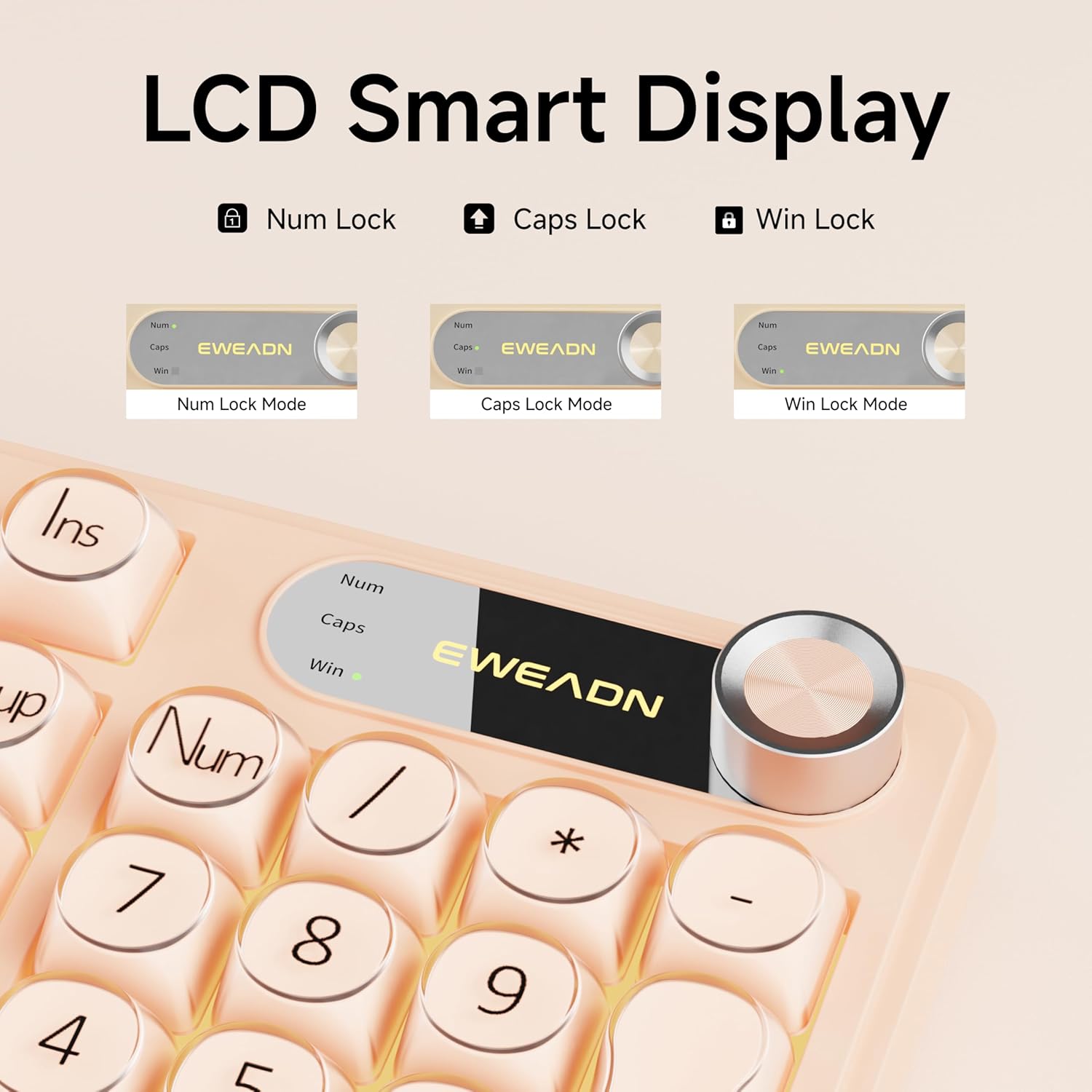
Figure 4: LCD Smart Display
4.3 RGB Backlighting
Customize your typing experience with dynamic RGB lighting:
- FN + INS: Switches between 12 stunning RGB lighting effects.
- FN + PGUP/PGDN: Adjusts backlight brightness (5 levels).
- FN + "_" or "+": Adjusts lighting speed (5 levels).
- FN + Backspace: Toggles backlight on/off.

Figure 5: RGB Backlight Control Functions
Video 2: Demonstration of various RGB lighting effects on the keyboard.
4.4 Dual-System Compatibility
The V102 keyboard is designed for broad compatibility across multiple operating systems and devices:
- Windows
- Mac (FN + S for Mac layout)
- Android
- iOS
- Xbox
- PS4
- PS5

Figure 6: Dual-System Connection for Windows and Mac
4.5 Ergonomic Design
The keyboard features a streamlined layout and adjustable typing angles for enhanced comfort during extended use. It includes a numeric keypad for efficient data entry.

Figure 7: 98-Key Layout and Adjustable Feet
4.6 Silent Operation
The membrane keyboard design is engineered to reduce typing sound, providing a quieter experience suitable for various environments.

Figure 8: Silent Computer Keyboard Design
4.7 Spill-Resistant Design
The keyboard features a spill-resistant design to protect against accidental liquid spills. In case of a spill, promptly disconnect the keyboard and allow it to dry completely before reconnecting.

Figure 9: Spill-Resistant Design
5. Maintenance
To ensure the longevity and optimal performance of your EWEADN V102 keyboard, follow these maintenance guidelines:
- Cleaning: Use a soft, lint-free cloth to wipe the surface of the keyboard. For deeper cleaning, use a can of compressed air to remove dust and debris from between the keys. Avoid using harsh chemicals or abrasive materials.
- Storage: Store the keyboard in a cool, dry place away from direct sunlight and extreme temperatures.
- Handling: Avoid dropping the keyboard or exposing it to excessive force, which can damage internal components.
6. Troubleshooting
If you encounter issues with your keyboard, refer to the following common solutions:
- Keyboard not responding: Ensure the USB Type-C cable is securely connected to both the keyboard and your device. Try connecting to a different USB port or a different device to rule out port or device issues.
- Backlight not working: Check if the backlight is turned off using the FN + Backspace shortcut. Adjust brightness using FN + PGUP/PGDN.
- Keys not registering: Ensure no debris is lodged under the keys. If the issue persists, contact customer support.
- Incorrect layout (Mac users): Press FN + S to switch to the Mac layout.
For further assistance, please refer to the Warranty and Support section.
7. Specifications
| Model | V102 |
| Layout | 98-Key Compact Layout with Number Pad |
| Connectivity | Wired USB Type-C |
| Backlighting | Dynamic RGB (12 effects, 5 brightness levels, 5 speed levels) |
| Special Features | Multi-Function Control Knob, Display Screen, Silent Membrane Keys, Spill-Resistant Design, Adjustable Typing Angles |
| Compatible Devices | Laptop, PC, Gaming Console (Windows, Mac, Android, iOS, Xbox, PS4, PS5) |
| Material | Polybutylene Terephthalate |
| Item Weight | 2.4 pounds |
| Package Dimensions | 17.68 x 7.05 x 1.97 inches |
8. Warranty and Support
Your EWEADN V102 Wired Gaming Keyboard is backed by a standard warranty. For specific warranty details, please refer to the product packaging or contact your retailer.
Customer Support
For technical assistance, troubleshooting, or any product-related inquiries, please contact EWEADN customer support:
- Email Support: eweadnkeyboard@outlook.com
- Online Support: Visit the EWEADN Store on Amazon and click 'Ask a question' to contact the seller.
Related documentsV102


Ask a question about this manual
Ask about setup, troubleshooting, compatibility, parts, safety, or missing instructions. Manuals+ will review the question and use this page’s manual context to help answer it.