
Introduction
The Soundstream BX-LOC1 is a compact and powerful digital bass processor, line driver, and line converter designed to enhance your car audio system. It restores low-end impact to compressed or factory audio, provides a clean signal boost, and facilitates the integration of aftermarket amplifiers with OEM or aftermarket head units. This manual provides comprehensive instructions for installation, operation, and maintenance to ensure optimal performance of your BX-LOC1 unit.
Features
- Digital Bass Reconstruction: Restores low-frequency information lost during compression or in factory audio systems.
- High Voltage Line Driver: Delivers up to 9V adjustable output for maximum performance and distortion-free sound to your amplifier.
- Line Output Converter: Converts speaker-level signals from OEM or aftermarket head units to RCA line-level outputs.
- Universal Compatibility: Works with RCA inputs/outputs, aftermarket amplifiers, and factory head units.
- Noise-Free Performance: Features premium shielding and ground isolation to minimize hiss, hum, and engine noise.
- Advanced Tuning Controls: Includes adjustable Wide and Sweep controls for bass enhancement, output voltage selection, and trigger mode options.
- Clipping Indicator: Onboard LED clipping indicator helps prevent distortion during setup.
- Compact Design: Small footprint allows for flexible installation in various vehicle spaces.
- Remote Bass Control: Includes a dash-mountable remote control for convenient bass level adjustment.
What's in the Box

The Soundstream BX-LOC1 package includes the following items:
- BX-LOC1 Digital Bass Processor Unit
- Remote Bass Control Knob
- Wiring Harnesses for Power/Ground/Remote
- Mounting Hardware
- User Manual (this document)
Setup and Installation
Proper installation is crucial for optimal performance and safety. If you are unsure about any steps, consult a professional car audio installer.
1. Mounting the Unit
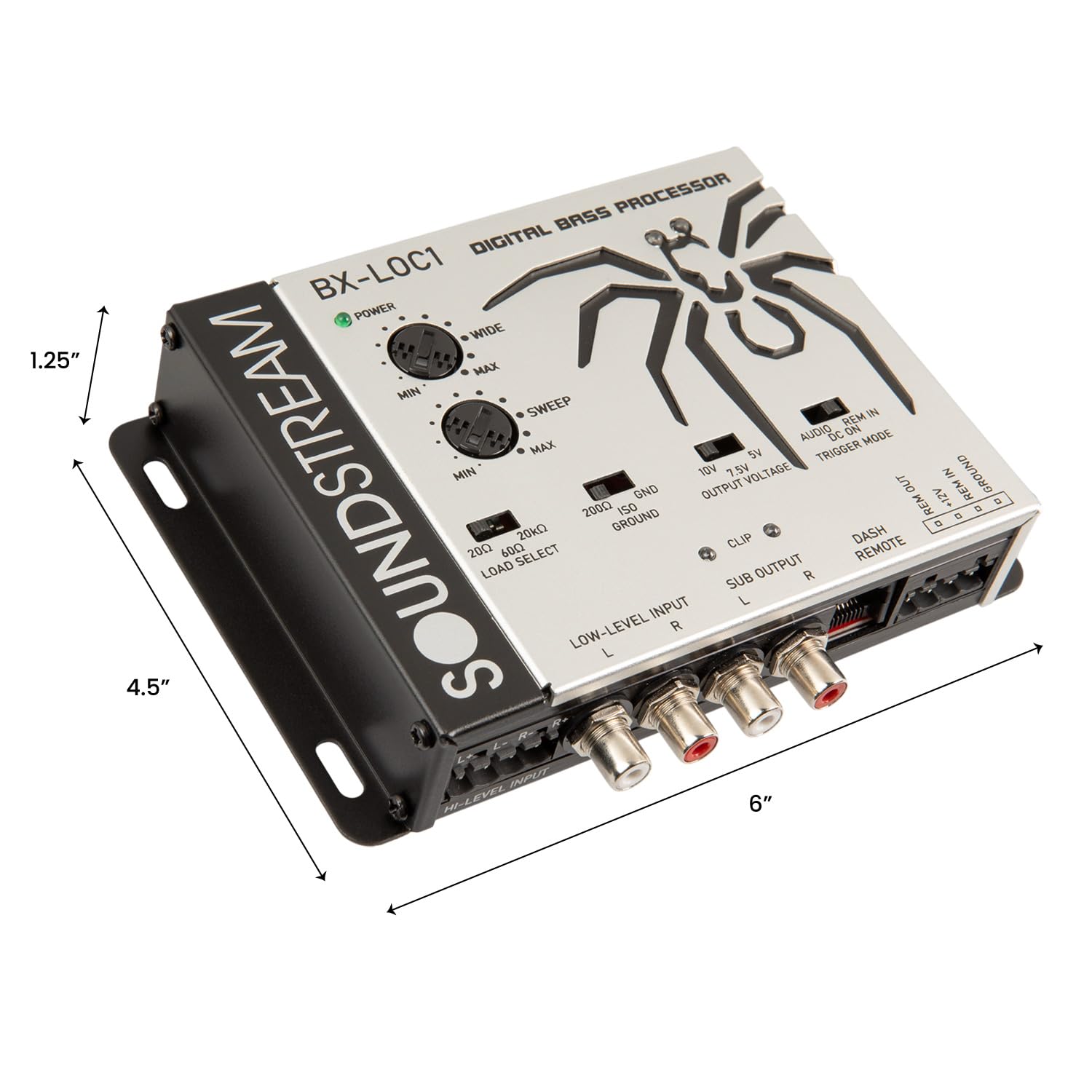
Choose a secure, dry location for mounting the BX-LOC1, away from direct heat or moisture. Ensure adequate ventilation. The unit's dimensions are approximately 4.5 x 6 x 1.25 inches (L x W x H). Use the provided mounting hardware to secure the unit firmly.
2. Wiring Connections

Refer to the diagram above for connection points. Ensure all connections are secure and properly insulated to prevent short circuits.
- Power (+12V): Connect to a constant +12V power source from the vehicle's battery. Use an appropriate gauge wire and an inline fuse (not supplied, typically 1A-3A).
- Ground (GND): Connect to a clean, chassis ground point. Ensure good metal-to-metal contact.
- Remote In (REM IN): Connect to the remote turn-on output of your head unit or another switched +12V source. This turns the BX-LOC1 on and off with your audio system.
- Remote Out (REM OUT): Provides a +12V remote output to turn on your aftermarket amplifier(s).
- High-Level Input (HI-LEVEL INPUT): If using a factory head unit without RCA outputs, connect the speaker wires directly to these inputs. Observe polarity (L+, L-, R+, R-).
- Low-Level Input (LOW-LEVEL INPUT): If your head unit has RCA outputs, connect them here.
- Sub Output (SUB OUTPUT): Connect these RCA outputs to the input of your subwoofer amplifier.
- Dash Remote: Connect the provided remote bass control knob to this port.
3. Initial Switch Settings

Before powering on, set the following switches:
- LOAD SELECT:
- 20kΩ: For most aftermarket head units using RCA inputs.
- 60Ω: For most factory head units using high-level inputs.
- 20Ω: For specific factory head units with low impedance outputs.
- GND GROUND:
- GND: Standard ground connection.
- ISO: Isolates the ground to help eliminate ground loop noise.
- 200Ω: Adds resistance to the ground path, useful for certain noise issues.
Start with GND. If noise occurs, try ISO, then 200Ω.
- OUTPUT VOLTAGE: Select the desired maximum output voltage (5V, 7.5V, or 10V) based on your amplifier's input sensitivity. Start with 5V and adjust as needed.
- TRIGGER MODE:
- REM IN: Unit turns on via the remote wire connection.
- DC ON: Unit turns on when it detects a DC offset on the high-level inputs (for factory head units without remote output).
- AUDIO: Unit turns on when it detects an audio signal on the inputs.
REM IN is recommended if your head unit provides a remote output.
Operating and Adjustments
Once installed, fine-tune the BX-LOC1 for optimal bass performance.

- Power LED: Illuminates green when the unit is powered on.
- Clip LED: Illuminates red when the output signal is clipping (distorting). Adjust input gain or output voltage to prevent clipping.
- WIDE Control (Min/Max): This knob adjusts the Q factor or bandwidth of the bass enhancement.
- Min: Provides a narrower, more focused bass enhancement.
- Max: Provides a broader, more encompassing bass enhancement.
- SWEEP Control (Min/Max): This knob adjusts the center frequency of the bass enhancement.
- Min: Enhances lower bass frequencies.
- Max: Enhances higher bass frequencies.
Adjust WIDE and SWEEP to find the most impactful and natural-sounding bass for your music and vehicle acoustics.
- Dash Remote: The external remote knob allows you to adjust the overall bass output level from the driver's seat.
Maintenance
The Soundstream BX-LOC1 requires minimal maintenance. Follow these guidelines to ensure longevity:
- Keep the unit clean and free from dust and debris. Use a soft, dry cloth for cleaning.
- Periodically check all wiring connections to ensure they are secure and free from corrosion.
- Avoid exposing the unit to extreme temperatures or moisture.
Troubleshooting
If you experience issues with your BX-LOC1, refer to the following common problems and solutions:
| Problem | Possible Cause | Solution |
|---|---|---|
| No Power (Power LED off) |
|
|
| No Audio Output |
|
|
| Distortion (Clip LED on) |
|
|
| Engine Noise/Hiss |
|
|
Specifications
| Feature | Specification |
|---|---|
| Model Number | BX-LOC1 |
| Product Dimensions (L x W x H) | 4.5 x 6 x 1.25 inches |
| Item Weight | 1.95 pounds |
| Material | Metal |
| Maximum Supply Voltage | 9 Volts (Output) |
| Number of Channels | 1 (Subwoofer Output) |
| Mounting Type | Freestanding |
| UPC | 709483072985 |
Warranty and Support
Soundstream products are designed for reliability and performance. For warranty information and technical support, please refer to the official Soundstream website or contact their customer service department. Keep your purchase receipt as proof of purchase for any warranty claims.
Manufacturer: Soundstream
Website: www.soundstream.com (Example link, actual link not provided in JSON)


