
1. Introduction
Thank you for choosing the KSIPZE 100ft Permanent Outdoor Lights. This product is designed to provide versatile and durable outdoor lighting for your home, garden, or event spaces. Featuring smart RGB+IC technology, these lights offer a wide range of colors and dynamic scene modes, controllable via a dedicated app, remote, or integrated button. This manual provides essential information for safe installation, operation, and maintenance of your lighting system.

Figure 1.1: Overview of KSIPZE 100ft Permanent Outdoor Lights, showing the light string, remote control, and app interface.
2. Safety Information
Please read all safety instructions carefully before installation and use. Failure to follow these instructions may result in electric shock, fire, or other hazards.
- Ensure the power supply is disconnected before installation or maintenance.
- This product is rated IP67 waterproof; however, the power adapter and controller should be protected from direct exposure to heavy rain or submersion.
- Do not attempt to repair or modify the product. Contact customer support for assistance.
- Keep out of reach of children.
- Do not stare directly into the LED lights for extended periods, as this may cause eye strain.
- Ensure the installation surface is stable and can support the weight of the lights.
3. Package Contents
Verify that all components are present and in good condition:
- 100ft (2x50ft) Permanent Outdoor LED Light String
- Power Adapter
- Smart Controller
- Remote Control
- Mounting Clips and Screws
- User Manual
4. Product Features
- Permanent Outdoor Design: Durable construction suitable for long-term outdoor installation.
- Waterproof IP67: Lights are protected against dust and immersion in water up to 1 meter for 30 minutes.
- Smart RGB+IC Technology: Individual LED control for vibrant, multi-color effects and dynamic scenes.
- Multiple Control Options: Control via smartphone app, included remote control, or integrated button on the controller.
- Extensive Scene Modes: Over 200 dynamic scene modes for various occasions and moods.
- Music Sync Mode: Lights synchronize with music rhythm via built-in microphone or app.
- Timer Function: Schedule automatic on/off times.
- UV-Resistant Material: Designed to withstand outdoor elements.
5. Setup and Installation
5.1 Physical Installation
- Plan Placement: Determine the desired path for your lights. Ensure the power adapter and controller are placed in a location protected from direct heavy rain or submersion.
- Mounting: Use the provided mounting clips and screws to secure the light string along your chosen path (e.g., eaves, roofline, garden fences). Ensure clips are evenly spaced to prevent sagging.
- Connect Components: Connect the light string to the smart controller, and then connect the controller to the power adapter. Ensure all connections are secure.
- Power On: Plug the power adapter into a suitable outdoor power outlet. The lights should illuminate.
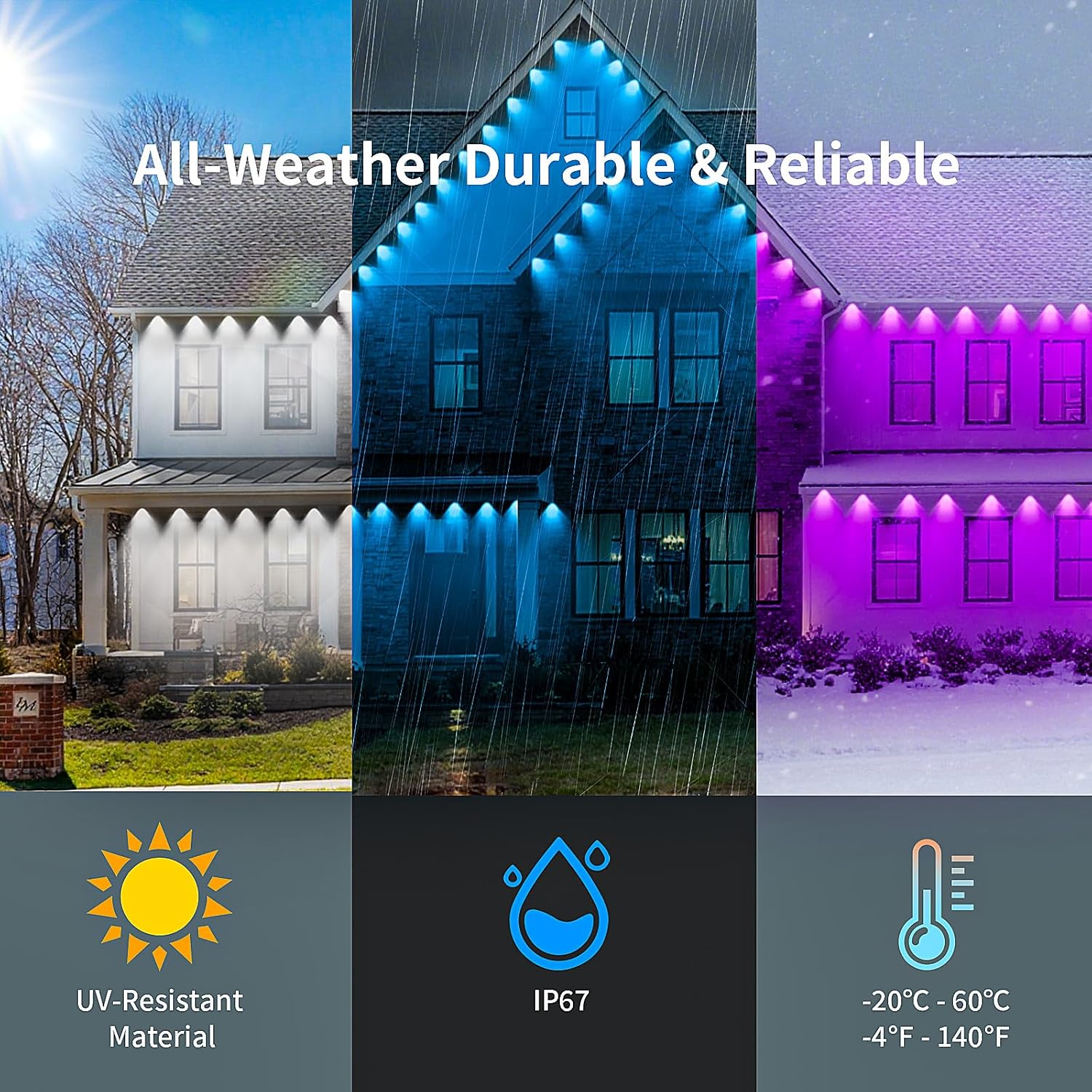
Figure 5.1: Illustration of the lights' all-weather durability, including UV resistance, IP67 waterproof rating, and temperature tolerance.
5.2 App Download and Pairing
- Download App: Scan the QR code on the packaging or search for the "KSIPZE Smart" app (or similar, check packaging for exact name) in your smartphone's app store (App Store for iOS, Google Play Store for Android).
- Register/Login: Open the app and follow the prompts to register a new account or log in if you already have one.
- Add Device:
- Ensure your phone's Bluetooth is enabled.
- Power on the lights. The lights may flash, indicating pairing mode.
- In the app, tap "Add Device" or the "+" icon. The app should automatically detect the lights via Bluetooth.
- Select your device from the list and follow the on-screen instructions to complete the pairing process.
- Once paired, you can control the lights via the app.
6. Operating Instructions

Figure 6.1: The KSIPZE lights offer multiple control options: remote, smart app, and an integrated button on the controller.
6.1 App Control
The smartphone app provides the most comprehensive control over your KSIPZE lights.
- Color Selection: Use the color wheel to choose from millions of colors. Adjust brightness and saturation.
- Scene Modes: Browse and select from over 200 pre-set dynamic scene modes.
- Music Mode: Activate music sync. The app can use your phone's microphone or local music files to synchronize light effects with audio.
- Timer Function: Set schedules for the lights to turn on and off automatically at specific times.
- DIY Mode: Create and save custom lighting effects and color sequences.

Figure 6.2: The app interface displaying options for adjusting colors, music sync, style modes, DIY effects, and timing schedules.

Figure 6.3: The lights syncing to music, demonstrating the music and microphone mode functionality.

Figure 6.4: Example of the timer setting interface within the app, allowing users to schedule on/off times.
6.2 Remote Control
The included remote control offers quick access to basic functions.
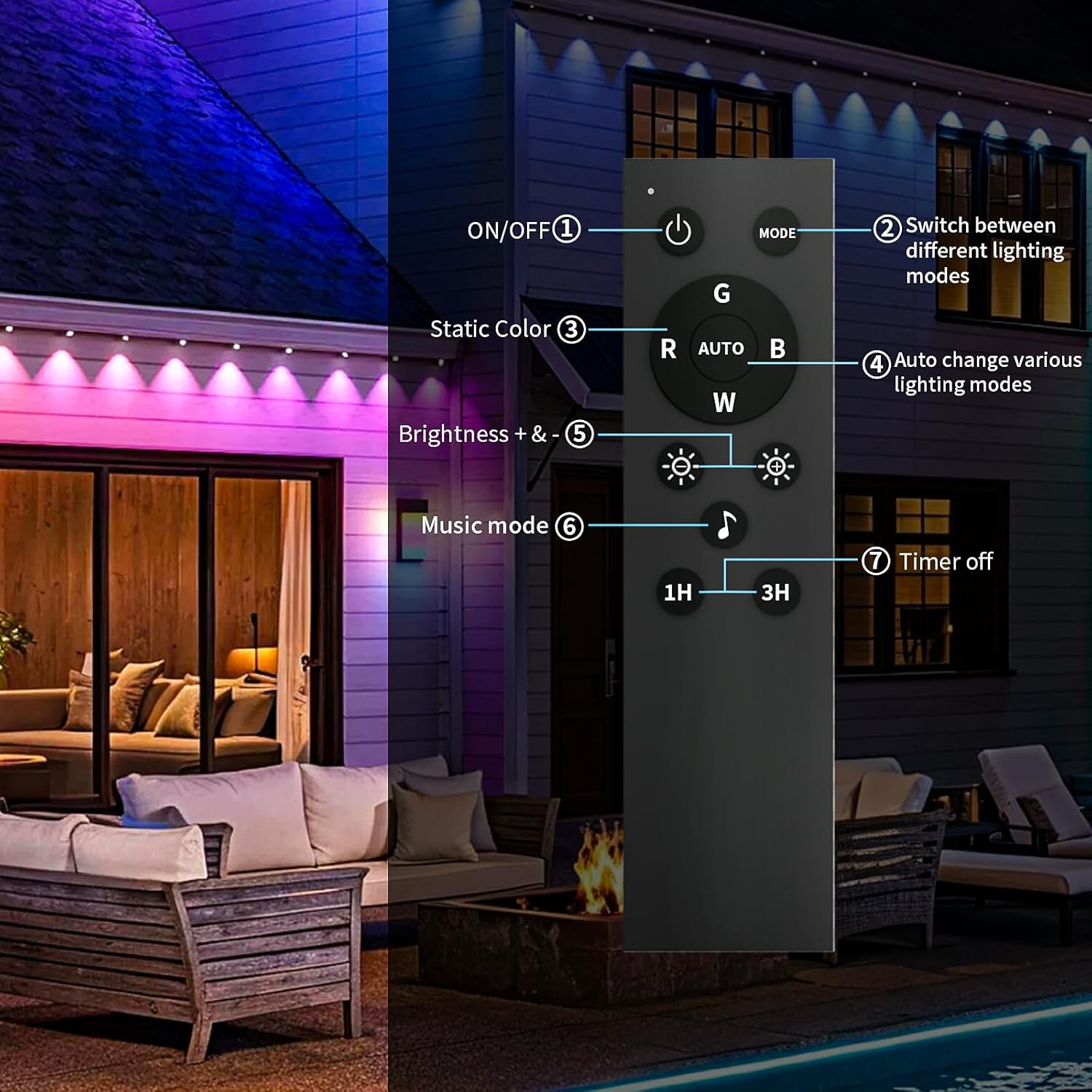
Figure 6.5: Diagram of the remote control with labeled buttons and their functions.
- ON/OFF (1): Power the lights on or off.
- MODE (2): Switch between different lighting modes.
- Static Color (3): Select specific static colors (R, G, B, W).
- AUTO (4): Automatically cycle through various lighting modes.
- Brightness +/- (5): Adjust the brightness level.
- Music Mode (6): Activate music synchronization.
- Timer Off (7): Set a timer for 1 hour or 3 hours for automatic shutdown.
6.3 Controller Button
The button on the smart controller allows for basic control without the app or remote.
- Single Press: Cycles through various pre-set lighting modes.
- Long Press: Typically turns the lights on/off or initiates pairing mode (refer to specific product instructions for exact behavior).
7. Maintenance
- Cleaning: Gently wipe the lights with a soft, damp cloth. Do not use harsh chemicals or abrasive cleaners. Ensure the power is off before cleaning.
- Inspection: Periodically check the light string, connections, and power adapter for any signs of damage or wear.
- Storage: If storing the lights for an extended period, disconnect them from power, clean them, and store them in a cool, dry place away from direct sunlight.
8. Troubleshooting
| Problem | Possible Cause | Solution |
|---|---|---|
| Lights do not turn on. | No power; loose connection; faulty adapter. | Check power outlet. Ensure all connections are secure. Test with another outlet. Contact support if adapter is suspected faulty. |
| App cannot connect to lights. | Bluetooth off; lights not in pairing mode; app issue. | Ensure phone Bluetooth is on. Power cycle the lights to re-enter pairing mode. Restart the app. Re-pair the device in the app. |
| Remote control not working. | Battery depleted; remote out of range; obstruction. | Replace remote battery. Ensure remote is pointed at the controller and within range. Remove any obstructions. |
| Lights are flickering or displaying incorrect colors. | Loose connection; power fluctuation; software glitch. | Check all connections. Power cycle the lights. Update the app to the latest version. |
9. Specifications
- Brand: KSIPZE
- Model Number: ST582430
- Light Length: 100ft (2 x 50ft sections)
- Waterproof Rating: IP67 (lights only)
- Control Methods: App, Remote Control, Controller Button
- Light Type: RGB+IC LED
- Operating Temperature: -20°C to 60°C (-4°F to 140°F)
- Power Source: AC Adapter (Input: 100-240V)
- Connectivity: Bluetooth (for app pairing)
- Item Weight: Approximately 3.98 pounds
- Package Dimensions: 10.59 x 8.7 x 4.72 inches
10. Warranty and Support
KSIPZE products are designed for quality and reliability. For warranty information, technical support, or any questions regarding your product, please refer to the warranty card included in your package or visit the official KSIPZE website. Please have your model number (ST582430) and purchase details ready when contacting support.
Online Support: Visit the KSIPZE Store on Amazon