
1. Introduction
This manual provides detailed instructions for the DEKELIFE CS5 Fitness Tracker Smart Watch. Please read this manual thoroughly before using the device to ensure proper operation and to maximize its features.
2. What's in the Box
- DEKELIFE CS5 Fitness Tracker Smart Watch
- Sporty Silicone Watch Band
- Exquisite Metal Watch Band
- Charging Cable
- User Manual
3. Product Overview
The DEKELIFE CS5 is an ultra-light (14.5g) fitness tracker featuring a 1.47-inch high-definition touchscreen. It comes with two interchangeable watch bands: a sporty silicone band and an elegant metal band, offering versatility for various occasions. The device is designed for comfort and functionality, providing comprehensive health and activity tracking.
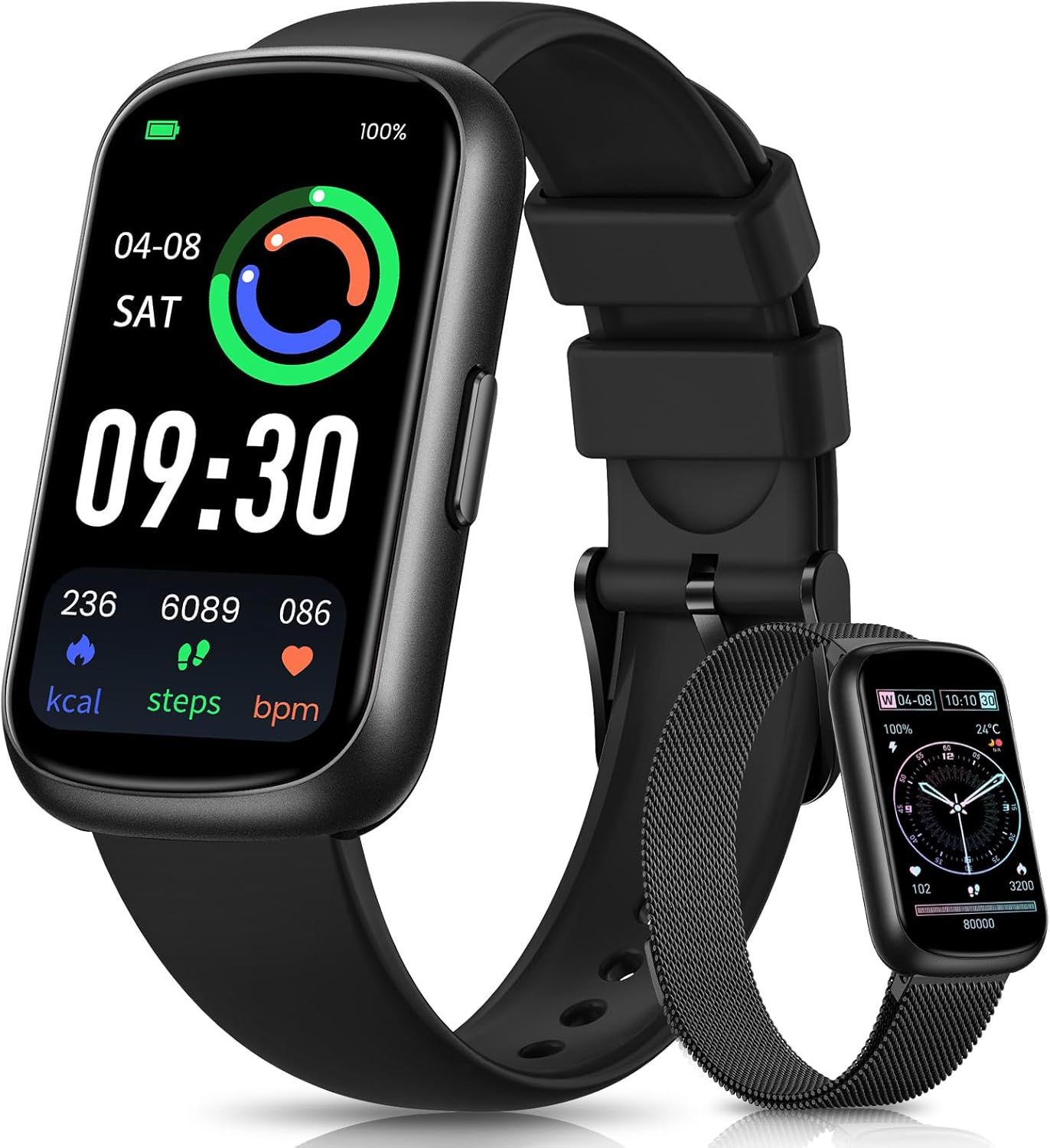
Image 3.1: DEKELIFE CS5 Fitness Tracker Smart Watch with both silicone and metal bands.

Image 3.2: The ultra-light body and the two included strap options: silicone and steel.
4. Setup Guide
4.1 Charging the Device
Before first use, fully charge your DEKELIFE CS5. Connect the charging cable to the magnetic charging points on the back of the watch and to a USB power source. A full charge typically takes approximately 1.5 hours. The battery capacity is 300 mAh, providing up to 7 days of normal use.
4.2 App Download and Pairing
- Download the Companion App: Scan the QR code in the quick start guide or search for the recommended app (e.g., 'GloryFit' as mentioned in reviews) in your smartphone's app store (compatible with Android 4.4+ and iOS 9.0+).
- Enable Bluetooth: Ensure Bluetooth is enabled on your smartphone.
- Pair the Device: Open the app, create an account if necessary, and follow the on-screen instructions to search for and connect to your DEKELIFE CS5. The watch will vibrate to confirm successful pairing.
4.3 Adjusting the Watch Band
The metal band features a highly adjustable magnetic clasp. To adjust, simply slide the clasp along the band to achieve the desired fit, then secure it. The silicone band uses a traditional buckle for adjustment.
5. Operating Instructions
5.1 Basic Navigation
- Touchscreen: The 1.47-inch HD screen is touch-sensitive. Tap to select, swipe left/right or up/down to navigate through menus and features.
- Lift-to-Wake: The screen automatically lights up when you lift your wrist to view the time or notifications. This feature can be enabled/disabled in the app settings.
5.2 Customizing Watch Faces
The DEKELIFE CS5 offers over 165 online watch faces and allows for DIY customization using your favorite photos. Access watch face settings through the companion app to browse and apply new designs.

Image 5.1: Examples of customizable watch faces and device compatibility.
6. Health Monitoring
The DEKELIFE CS5 provides continuous health monitoring features to help you stay informed about your well-being.
6.1 Heart Rate Monitor
The watch continuously monitors your heart rate 24/7. View real-time data on the watch or detailed analysis reports in the companion app.
6.2 Blood Oxygen Detection
Measure your blood oxygen levels directly from your wrist. This data is accessible on the watch and stored in the app for historical tracking.
6.3 Breathing Training
Utilize the guided breathing training mode to help manage stress and improve relaxation.
6.4 Female Health Tracking
For female users, the watch can track and provide reminders for menstrual cycles, offering personalized health insights.

Image 6.1: The DEKELIFE CS5 monitors heart rate, blood oxygen, and supports breathing training and female health functions.
6.5 Sleep Tracker
The watch automatically monitors your sleep patterns from 6 PM to 12 PM the next day. It records the duration of deep sleep, light sleep, and awake times. Detailed analysis and weekly reports are available in the app to help improve sleep quality.

Image 6.2: The sleep tracking feature monitors deep sleep, light sleep, and awake periods.
7. Activity Tracking
The DEKELIFE CS5 is equipped with features to accurately track your physical activities.
7.1 Sport Modes
Choose from over 20 sport modes, including running, cycling, dancing, and yoga. The watch accurately records calorie consumption, distance, and heart rate during your workouts.

Image 7.1: The DEKELIFE CS5 supports 24 sport modes for professional activity tracking.
7.2 Daily Activity Tracking
As a pedometer, the watch automatically records your daily steps, distance walked, and calories burned. This data helps you monitor your progress towards daily fitness goals.
7.3 GPS via Smartphone
For outdoor activities, the watch can utilize your smartphone's GPS to track routes and provide more accurate distance data.
8. Notifications & Connectivity
Stay connected and informed with real-time notifications.
8.1 Call, Text, and App Notifications
When connected to your smartphone via Bluetooth, the DEKELIFE CS5 will display incoming call alerts, text messages, and notifications from various apps directly on your wrist. Note: You cannot answer calls or reply to messages directly from the watch; these functions require your smartphone.

Image 8.1: The watch displays notifications for calls, texts, and various social media applications.
9. Other Features
The DEKELIFE CS5 includes several convenient features to enhance your daily life:
- Weather Display: Get real-time weather updates.
- Music Control: Control music playback on your smartphone.
- Camera Control: Use the watch as a remote shutter for your phone's camera.
- Sedentary Reminder: Receive alerts to encourage movement after periods of inactivity.
- Find Phone: Locate your misplaced smartphone by triggering an alert from the watch.
- Timer & Stopwatch: Built-in tools for timing activities.
10. Water Resistance
The DEKELIFE CS5 has an IP68 water resistance rating, meaning it is protected against immersion in water up to 1.5 meters for up to 30 minutes. It is suitable for daily use, including hand washing, showering, and light swimming. However, it is not recommended for diving or high-pressure water activities.

Image 10.1: The watch features IP68 water resistance for everyday use.
11. Maintenance
- Cleaning: Regularly clean the watch and bands with a soft, dry cloth. For silicone bands, a mild soap and water solution can be used, ensuring it is thoroughly dried afterward.
- Avoid Chemicals: Do not expose the watch to strong chemicals, detergents, or solvents, as these can damage the materials.
- Storage: Store the watch in a cool, dry place when not in use.
12. Troubleshooting
- Device Not Turning On: Ensure the device is fully charged. Connect it to the charger for at least 30 minutes.
- Cannot Pair with App: Make sure Bluetooth is enabled on your phone and the watch is within range. Restart both the watch and your phone, then try pairing again. Check if the app is updated to the latest version.
- Inaccurate Readings: Ensure the watch is worn snugly on your wrist, not too tight or too loose. Clean the sensors on the back of the watch.
- Notifications Not Received: Verify that app notifications are enabled in both your phone's settings and the companion app's settings. Ensure the watch is connected via Bluetooth.
13. Specifications
| Feature | Specification |
|---|---|
| Model Number | CS5 |
| Screen Size | 1.47 Inches |
| Battery Capacity | 300 Milliamp Hours |
| Normal Use Battery Life | Up to 7 Days |
| Charging Time | Approx. 1.5 Hours |
| Connectivity Technology | Bluetooth |
| Operating System Compatibility | Android 4.4+, iOS 9.0+ |
| Water Resistance | IP68 |
| Item Weight | 3.52 ounces (0.1 Kilograms) |
| Special Features | Activity Tracker, Alarm Clock, Lightweight, Multisport Tracker, Touchscreen |
14. Warranty and Support
For warranty information and customer support, please refer to the product packaging or contact DEKELIFE customer service directly. Keep your purchase receipt for warranty claims.

