
Introduction
Thank you for choosing the Poedagar 997 Men's Chronograph Watch. This timepiece combines a classic analog display with a modern digital interface, offering precise quartz movement and multiple functions including a stopwatch and luminous display. This manual provides detailed instructions for the proper setup, operation, and maintenance of your watch to ensure optimal performance and longevity.
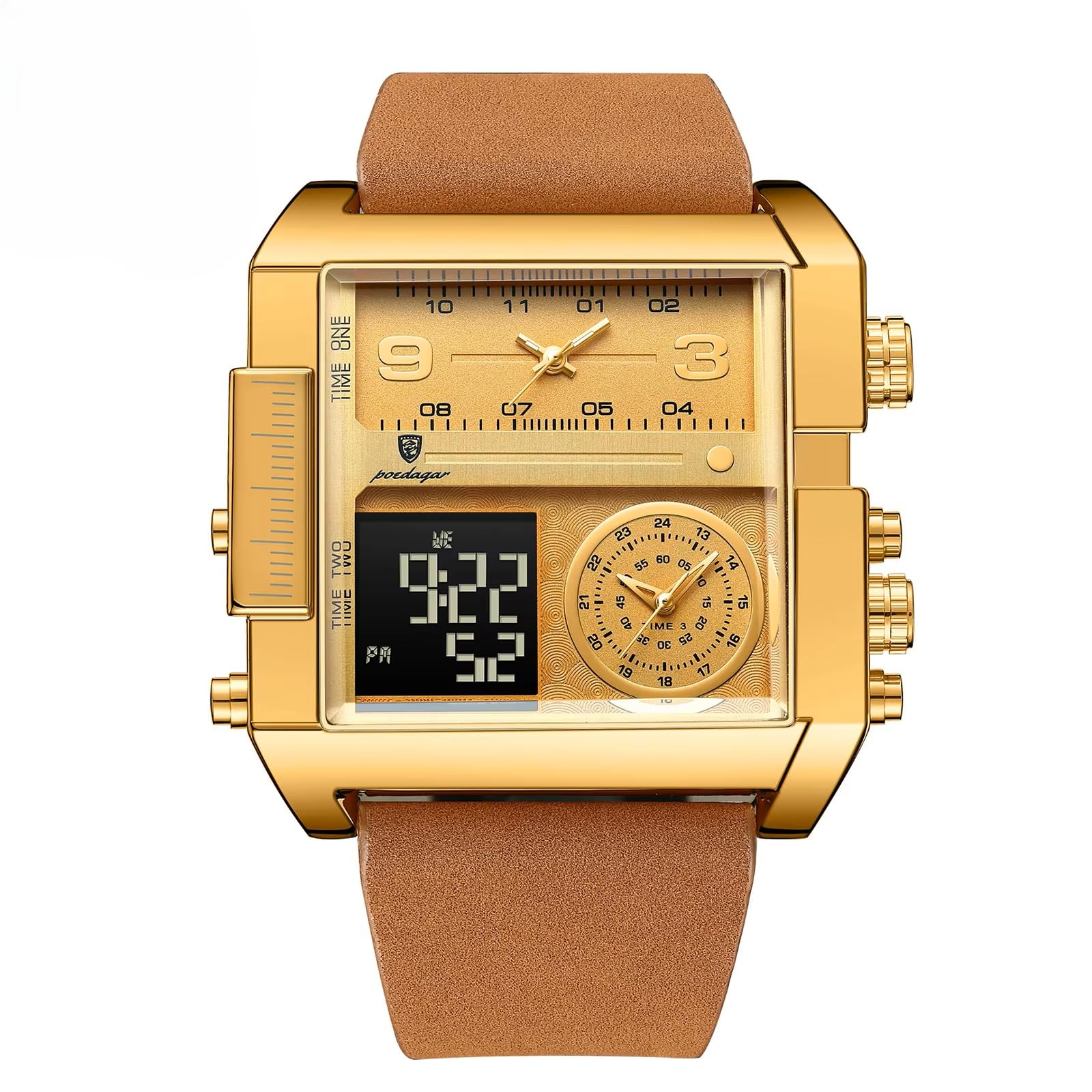
Figure 1: Poedagar 997 Chronograph Watch. This image displays the Poedagar 997 watch with its distinctive square gold-tone case, brown leather strap, and both analog and digital time displays. The watch features multiple crowns and pushers for its various functions.
Setup
1. Wearing the Watch
Adjust the comfortable leather strap to fit securely but not too tightly around your wrist. The buckle clasp ensures a firm hold. Ensure the watch is positioned comfortably above your wrist bone.

Figure 2: Poedagar 997 watch worn on a wrist. This image shows the watch from a side angle while being worn, highlighting its profile, the texture of the leather strap, and the placement of the crowns and pushers on the side of the case.
2. Setting the Time and Date
- Analog Time Setting: Gently pull out the main crown (usually on the right side, middle) to the second click position. Rotate the crown to adjust the hour and minute hands to the correct time. Push the crown back in to its original position to start the watch.
- Digital Time/Date Setting: The digital display typically has dedicated buttons (pushers) for adjustment. Refer to the specific button layout on your watch. Usually, one button is for mode selection (e.g., time, date, alarm, stopwatch), and another for adjusting values. Press the mode button until the desired setting (e.g., hours, minutes, month, day) flashes, then use the adjustment button to change the value. Confirm settings by pressing the mode button again or waiting for the display to stop flashing.
- Date Setting (Analog): If your watch has an analog date display, pull the main crown out to the first click position. Rotate the crown to set the date. Avoid setting the date between 9 PM and 3 AM, as this can interfere with the automatic date change mechanism. Push the crown back in.
Operating the Watch
1. Basic Timekeeping
Your Poedagar 997 watch is equipped with a reliable quartz movement, providing accurate timekeeping with minimal maintenance. The analog hands display the primary time, while the digital display offers additional time zones, date, and other functions.
2. Chronograph (Stopwatch) Function
The chronograph function allows you to measure elapsed time. This watch features sub-dials for seconds, minutes, and possibly hours for the stopwatch function.
- Start: Press the upper pusher button (typically at 2 o'clock position) to start the chronograph. The chronograph second hand will begin to move.
- Stop: Press the upper pusher button again to stop the chronograph. The elapsed time will be indicated by the chronograph hands.
- Reset: After stopping, press the lower pusher button (typically at 4 o'clock position) to reset the chronograph hands to their zero positions.
3. Luminous Display
The watch hands and markers are treated with a luminous material, allowing for easy readability in low-light conditions. Exposure to light charges this material, causing it to glow in the dark.

Figure 3: Luminous display of the Poedagar 997 watch. This image shows the watch in low light, demonstrating the glow-in-the-dark hands and markers on the analog dial, as well as the illuminated digital display, ensuring readability in darkness.
4. Digital Display Backlight
The digital display features an LED backlight for enhanced visibility in complete darkness. Activate the backlight by pressing the designated button (refer to your watch's specific button layout, often a pusher on the side).
Maintenance
1. Water Resistance (3ATM / 3BAR)
Your Poedagar 997 watch is rated for 3ATM (30 meters) water resistance. This means it is protected against splashes, rain, and hand washing. It is not suitable for showering, swimming, diving, or any activities involving prolonged water immersion or high-pressure water exposure.
- Ensure the crown is fully pushed in before any contact with water.
- Do not operate the crown or pushers when the watch is wet or submerged.
- Avoid exposing the watch to extreme temperature changes, which can affect its water resistance seals.

Figure 4: Water resistance demonstration of the Poedagar 997 watch. The image depicts the watch partially submerged in water, illustrating its 3ATM water resistance suitable for splashes and hand washing. Icons for rain, hand wash, and car wash are shown.
2. Cleaning Your Watch
Wipe the watch case and strap regularly with a soft, dry cloth. For light dirt, a slightly damp cloth can be used, followed by immediate drying. Avoid using chemical cleaners, as they can damage the watch's finish or strap material.
3. Battery Replacement
The quartz movement is powered by a battery with a typical life of up to 18 months. When the watch stops or the digital display fades, it indicates that the battery needs replacement. It is recommended to have the battery replaced by a qualified watch technician to ensure proper sealing and maintain water resistance.
4. Strap Care
The leather strap is durable but can be affected by moisture, sweat, and direct sunlight. Avoid prolonged exposure to these elements. If the strap gets wet, dry it thoroughly with a soft cloth. Periodically, you may use a leather conditioner to keep the strap supple and prevent cracking.
Troubleshooting
- Watch Not Running: Check if the crown is fully pushed in. If the watch still does not run, the battery may need replacement.
- Incorrect Time/Date: Follow the 'Setting the Time and Date' instructions in the Setup section. Ensure the crown is fully pushed in after setting.
- Chronograph Not Resetting to Zero: If the chronograph hands do not reset to their zero positions, they may need calibration. Consult a watch technician for adjustment.
- Digital Display Issues: If the digital display is blank or flickering, check the battery. If the issue persists after battery replacement, contact support.
Specifications
| Feature | Detail |
|---|---|
| Brand | Poedagar |
| Model | 997 |
| Movement Type | Quartz (CHENLGONG) |
| Display Type | Analog-Digital |
| Functions | Chronograph, Stopwatch, Day/Date, Auto Date, Luminous, Water Resistant |
| Water Resistance | 3ATM / 3BAR (Splash/Rain/Hand-wash resistant) |
| Case Material | Alloy case, Stainless Steel back |
| Case Shape | Square |
| Dial Window Material | Hardlex Mineral Glass |
| Strap Material | Leather |
| Clasp Type | Buckle |
| Dial Diameter | 51 mm |
| Case Thickness | 15 mm |
| Band Width | 31 mm |
| Band Length | 24 cm |
| Item Weight | 140 g |
| Battery Life | Up to 18 months (typical) |
| Included Components | Watch, Watch wipe, Warranty Card |
Warranty
Your Poedagar 997 watch comes with a manufacturer's warranty. Please refer to the included Warranty Card for specific terms, conditions, and duration of the warranty coverage. Keep your proof of purchase for any warranty claims.
Support
For further assistance, technical support, or service inquiries regarding your Poedagar 997 watch, please refer to the contact information provided on your warranty card or the official Poedagar website. Always provide your model number (997) when seeking support.