1. Introduction
This manual provides detailed instructions for the proper use and maintenance of your Wintact Handheld Anemometer, Model WT816. This device is designed for accurate measurement of air velocity and temperature, making it suitable for various applications including HVAC system checks, outdoor activities like sailing and kite flying, and general environmental monitoring.
The WT816 is a compact, lightweight, and multifunctional tool featuring a high-precision pressure sensor, data hold function, and a backlit LCD screen for clear readings.
2. Key Features
- Fast & Accurate Measurement: Provides precise wind speed readings from 0.3 to 30 m/s with ±5% accuracy.
- Temperature Monitoring: Measures air temperature from 14°F to 113°F (-10°C to 45°C) and displays wind chill.
- Multiple Units: Supports m/s, ft/min, knots, km/h, and mph for wind speed, and Beaufort scale display.
- Portable Design: Ultra-compact and lightweight (0.14lb) for easy carrying in a pocket or backpack.
- Multifunctional Display: Features a bright LCD screen with backlight, showing current, maximum (MAX), and average (AVG) wind speeds.
- Durability: Equipped with an anti-slip, anti-fall rubber jacket for enhanced protection.
- Convenience: Includes a low battery indicator and an auto power-off function.
3. Package Contents
Upon unpacking, please ensure all items listed below are present and in good condition:
- 1x Wintact Anemometer (WT816)
- 1x 3.0V CR2032 battery (pre-installed or included separately)
- 1x User Manual
- 1x Lanyard
4. Setup
4.1. Battery Installation
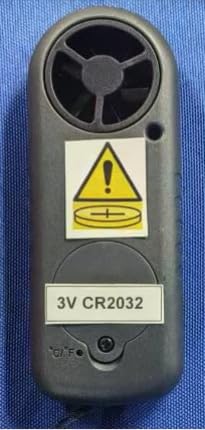
The Wintact WT816 Anemometer uses one 3.0V CR2032 Lithium Metal battery. If the battery is not pre-installed or needs replacement, follow these steps:
- Carefully remove the red rubber protective cover from the device.
- Locate the circular battery compartment on the back of the unit.
- Use a coin or a flat-head tool to twist the battery cover counter-clockwise to open it.
- Insert the CR2032 battery with the positive (+) side facing upwards.
- Replace the battery cover by twisting it clockwise until secure.
- Re-attach the red rubber protective cover.

4.2. Attaching the Lanyard
Thread the included lanyard through the designated loop at the bottom of the anemometer for secure handling and to prevent accidental drops.
5. Operating Instructions
5.1. Power On/Off
- To Turn On: Press the "MODE" button for 2 seconds. The LCD will display air velocity, temperature, and battery icon. The backlight will activate for 12 seconds.
- Auto Power Off: The unit will automatically shut off after 14 minutes of no operation to conserve battery life.
- Manual Power Off: Press the "MODE" and "SET" buttons simultaneously to turn off the unit.
5.2. Backlight Display
Press any button to activate the backlight for 12 seconds, improving visibility in low-light conditions.

5.3. Selecting Wind Speed Units
The anemometer supports five units of air velocity: meters per second (m/s), kilometers per hour (Km/h), feet per minute (ft/min), knots, and miles per hour (mph).
- With the unit turned on, press the "MODE" button for more than 3 seconds until the current unit (e.g., "m/s") starts to blink.
- Press the "SET" button repeatedly to cycle through the available units.
- Once your desired unit is displayed, press the "MODE" button to confirm and save the selection.

5.4. Selecting Measurement Mode (Current, MAX, AVG, Wind Chill)
The WT816 can display current, maximum (MAX), and average (AVG) wind speeds, as well as wind chill.
- After setting the desired air velocity unit (as described in 5.3), press the "SET" button repeatedly.
- Cycle through the modes until "CU" (Current), "MAX" (Maximum), or "AVG" (Average) blinks. The wind chill value will be displayed when the temperature is below 0°C (32°F).
- Press the "MODE" button to confirm your selection. The setting will be stored even after the unit is turned off.

5.5. Selecting Temperature Units (°C/°F)
To switch between Celsius (°C) and Fahrenheit (°F) for temperature display:
- Remove the red rubber protective cover.
- Locate the small push-button switch labeled °C/°F inside the rear cabinet, near the battery compartment.
- Use a small pointed object (like a pen tip) to press this button to toggle between °C and °F.
- Re-attach the rubber protective cover.
6. Maintenance
6.1. Cleaning
Wipe the device with a soft, dry cloth. Do not use abrasive cleaners or solvents. Ensure the impeller area is free from dust and debris for accurate readings.
6.2. Battery Replacement
When the low battery indicator appears on the LCD, replace the CR2032 battery by following the steps outlined in Section 4.1.
6.3. Storage
Store the anemometer in a cool, dry place, away from direct sunlight and extreme temperatures. If storing for extended periods, it is recommended to remove the battery.
7. Troubleshooting
- No Display/Unit Not Turning On: Check if the battery is correctly installed and has sufficient charge. Replace the battery if necessary.
- Inaccurate Readings: Ensure the impeller is clean and unobstructed. Make sure the device is held in a clear airstream, away from your body or other objects that might interfere with airflow.
- Settings Resetting: This may indicate a loose battery connection. Ensure the battery is securely seated in its compartment and the cover is tightly closed.
- Backlight Not Working: Check battery level. If the battery is low, the backlight may not function optimally.
8. Specifications
| Feature | Detail |
|---|---|
| Model Number | WT816 |
| Wind Speed Range | 0.3 - 30 m/s |
| Wind Speed Accuracy | ±5% |
| Temperature Range | 14°F to 113°F (-10°C to 45°C) |
| Temperature Accuracy | ±2°C (±3.6°F) |
| Wind Speed Units | m/s, Km/h, ft/min, Knots, mph |
| Power Supply | 1x 3.0V CR2032 Lithium Metal battery |
| Operating Humidity | Less than 90% RH |
| Operating Temperature | 14°F to 113°F (-10°C to 45°C) |
| Storage Temperature | 40°F to 140°F (4°C to 60°C) |
| Product Dimensions | 4.13 x 1.57 x 0.71 inches |
| Item Weight | 1.66 ounces (47 Grams) |
| Material | Plastic |
9. Warranty and Support
9.1. Warranty Information
The Wintact Handheld Anemometer WT816 comes with a 12-month warranty from the date of purchase, covering manufacturing defects and workmanship. Please retain your proof of purchase for warranty claims.
9.2. Customer Support
For any questions, technical assistance, or warranty inquiries, please contact the Wintact customer service team. They are available 24/7 to provide professional support.
- Manufacturer: Wintact
- Email: wintact01@outlook.com
- Website: http://www.wintact.net


