
Scosche MPQTRDV
Scosche MPQTRDV Qi2 MagSafe Car Mount Charger Instruction Manual
1. Product Overview
The Scosche MPQTRDV is a Qi2-certified MagSafe compatible car mount charger designed to securely hold and fast charge your smartphone in your vehicle. It offers flexible mounting options for both dashboard and air vent installations, ensuring your device remains powered and accessible for navigation, calls, and music.

Image: The Scosche MPQTRDV Qi2 MagSafe Car Mount Charger, showcasing its sleek design and magnetic charging surface.
2. What's Included
Verify that all components are present in the package:
- MagicMount Charge Pro Dash/Vent Magnetic Wireless Charging Phone Mount
- Vent Clip
- 36W USB-C Car Charger
- Cleaning Wipe
- Cable Management Clip

Image: All components included in the Scosche MPQTRDV package, laid out for inspection.
3. Features
- Fast Qi2 Wireless Charging: Delivers up to 25W of Qi2-certified power for compatible iPhone models with MagSafe and Qi2-ready phones with magnetic cases.
- Secure Magnetic Grip: Equipped with powerful Rare-Earth magnets to hold your phone firmly in place, even on bumpy roads.
- Flexible Mounting Options: Includes both a dashboard mount for permanent installation and a vent clip for temporary or interchangeable use.
- Wide Device Compatibility: Compatible with iPhone 17/16/15/14/13/12 series (MagSafe models) and Samsung Galaxy S25 models with magnetic cases.
- Optimal Viewing Angle: A 360° ball-joint allows for easy adjustment to achieve the best viewing angle for navigation and hands-free use.
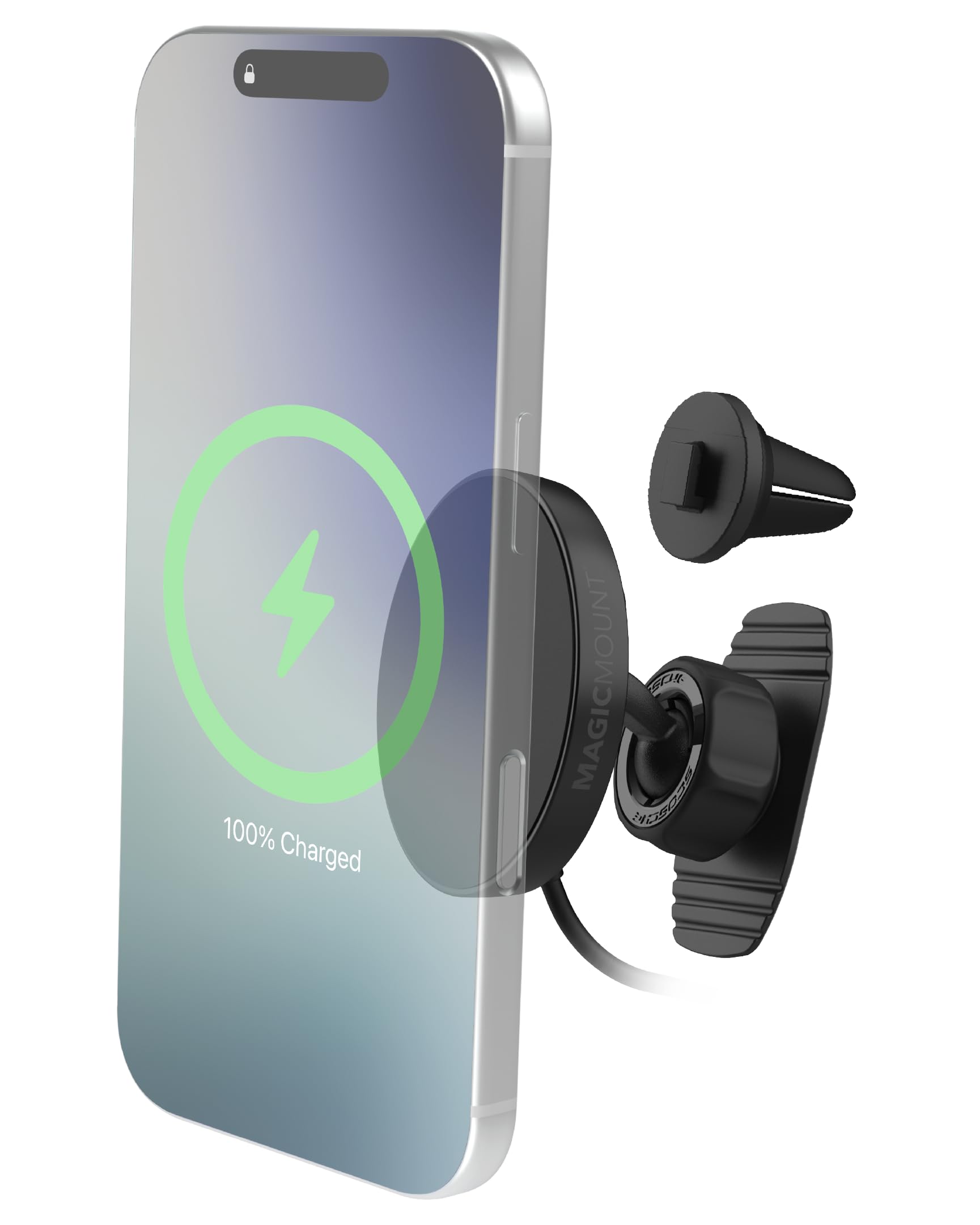
Image: Internal view of the charger highlighting the 25W Qi2 fast wireless charging coils and powerful neodymium magnets for secure attachment.

Image: A smartphone securely mounted on the charger, demonstrating the 360-degree rotation for optimal viewing angles.
4. Setup and Installation
4.1 Dashboard Mount Installation
- Choose a flat, clean surface on your dashboard for permanent installation.
- Clean the chosen area thoroughly with the provided cleaning wipe and allow it to dry completely.
- Peel the protective film from the adhesive on the dashboard mount.
- Press the mount firmly onto the dashboard for at least 30 seconds. Allow the adhesive to cure for 24 hours before attaching your device.
- Attach the magnetic charging head to the ball-joint of the dashboard mount and tighten the collar.
4.2 Vent Mount Installation
- Select a suitable air vent in your vehicle. Ensure the vent louvers are sturdy enough to support the mount and your phone.
- Attach the vent clip to the back of the magnetic charging head.
- Gently push the vent clip onto one of your car's air vent louvers until it is securely fastened.
- Adjust the angle of the mount using the ball-joint for optimal viewing.

Image: The Scosche MPQTRDV charger shown installed on both a car dashboard and an air vent, illustrating the two mounting options.
4.3 Power Connection
- Plug the USB-C end of the charging cable into the magnetic charging head.
- Insert the 36W USB-C car charger into your vehicle's 12V power outlet.
- Use the provided cable management clip to secure the charging cable and maintain an organized setup.
Video: An official Scosche video demonstrating the features and installation of the MagicMount Charge Pro Dash/Vent mount.
5. Operating Instructions
- Ensure the car mount charger is properly installed and connected to power.
- Place your MagSafe-compatible iPhone or Qi2-ready phone with a magnetic case onto the magnetic charging surface. The powerful magnets will automatically align and secure your device.
- Confirm that your phone indicates it is charging wirelessly.
- Adjust the phone's orientation (portrait or landscape) and viewing angle as needed using the 360° ball-joint.

Image: A smartphone actively charging wirelessly while securely attached to the Scosche car mount.
6. Compatibility
The Scosche MPQTRDV is compatible with a wide range of smartphones:
- Apple iPhones: iPhone 17, iPhone Air, iPhone 17 Pro, iPhone 17 Pro Max, iPhone 16, iPhone 16 Plus, iPhone 16 Pro, iPhone 16 Pro Max, iPhone 15, iPhone 15 Plus, iPhone 15 Pro, iPhone 15 Pro Max, iPhone 14, iPhone 14 Plus, iPhone 14 Pro, iPhone 14 Pro Max, iPhone SE 3, iPhone 13, iPhone 13 Pro, iPhone 13 Pro Max, iPhone 13 Mini, iPhone 12, iPhone 12 Pro, iPhone 12 Pro Max.
- Google Pixel: Pixel 10, Pixel 10 Pro, Pixel Pro 10 XL (with a magnetic case).
- Samsung Galaxy: S25 Ultra, S25 Edge, S25+, S25 (with a magnetic case).
For the strongest magnetic connection and fastest charging performance, a slim MagSafe-compatible case is recommended for all devices.

Image: Examples of different smartphone models, including iPhone and Samsung Galaxy, demonstrating compatibility with the magnetic charging mount.
7. Maintenance
To ensure optimal performance and longevity of your Scosche MPQTRDV charger, follow these maintenance guidelines:
- Cleaning: Regularly wipe the charging surface and the mount with a soft, dry cloth to remove dust and debris. Avoid using harsh chemicals or abrasive cleaners.
- Cable Care: Do not bend or crimp the charging cable excessively. Ensure it is routed safely to prevent damage.
- Adhesive Check (Dashboard Mount): Periodically check the dashboard mount's adhesive for secure attachment. If it loosens, re-secure or replace the adhesive as needed.
8. Troubleshooting
If you encounter issues with your Scosche MPQTRDV charger, refer to the following common solutions:
- Phone Not Charging:
- Ensure the car charger is securely plugged into the 12V outlet and the USB-C cable is firmly connected to both the charger and the mount.
- Verify your phone is MagSafe-compatible or using a magnetic case that supports wireless charging.
- Remove any thick or non-magnetic phone cases that might interfere with wireless charging.
- Check for foreign objects between the phone and the charging surface.
- Phone Not Holding Securely:
- Ensure your phone or case has MagSafe or strong magnetic capabilities.
- Clean the magnetic surface of the mount and your phone/case to ensure a clear connection.
- Avoid using overly heavy or bulky phone cases that may exceed the magnetic hold strength.
- Mount is Loose:
- For vent mounts, ensure the clip is fully engaged with the vent louver.
- For dashboard mounts, check the adhesive. If it's no longer secure, consider re-applying with a new adhesive pad (not included).
- Tighten the ball-joint collar if the viewing angle shifts easily.
9. Specifications
| Feature | Detail |
|---|---|
| Brand | Scosche |
| Model Name | MagicMounCharge Pro Dash/Vent |
| Model Number | MPQTRDV |
| Color | Black |
| Wireless Charging Output | Up to 25W (Qi2 Certified) |
| Mounting Type | Vent, Dashboard |
| Compatible Devices | Smartphones (MagSafe iPhones, Qi2-ready Android with magnetic cases) |
| Additional Features | Adjustable, Hands-Free, Rotatable, Tilt Head, Wireless Charging |
| Water Resistance Level | Not Water Resistant |
| Item Weight | 0.21 Kilograms |
| Enclosure Material | Acrylonitrile Butadiene Styrene, Plastic |
| Included Power Adapter | 36W USB-C Car Charger |
| UPC | 033991110090 |
10. Warranty and Support
The Scosche MPQTRDV Qi2 MagSafe Car Mount Charger is backed by a Limited Lifetime Warranty. Scosche also provides Lifetime Tech Support for this product.
For warranty claims, technical assistance, or further inquiries, please refer to the official Scosche website or contact their customer support directly.
Related documentsMPQTRDV


Ask a question about this manual
Ask about setup, troubleshooting, compatibility, parts, safety, or missing instructions. Manuals+ will review the question and use this page’s manual context to help answer it.