
1. Introduction
This manual provides essential information for the safe and efficient operation of your Thomson 43UF4S35 43-inch 4K UHD Smart LED TV with Fire TV. Please read this manual thoroughly before using your television and retain it for future reference. This television combines a stunning 4K UHD display with the intuitive Fire TV operating system, offering integrated Alexa voice control, Apple AirPlay support, and comprehensive connectivity options for a complete entertainment experience.
2. Safety Information
Observe the following safety precautions to prevent fire, electric shock, or injury:
- Do not expose the TV to rain or moisture.
- Ensure proper ventilation; do not block ventilation openings.
- Do not place the TV on an unstable cart, stand, tripod, bracket, or table.
- Protect the power cord from being walked on or pinched.
- Unplug the TV during lightning storms or when unused for long periods.
- Refer all servicing to qualified service personnel.
3. Package Contents
Verify that all items are present in the packaging:
- Thomson 43UF4S35 43-inch 4K UHD Smart LED TV
- Power Adapter
- Power Cable
- Remote Control (with batteries)
- TV Stand (2 pieces)
- User Manual (this document)
4. Physical Overview
4.1. Dimensions

Image: Front view of the Thomson 43UF4S35 TV with key dimensions labeled in centimeters. The TV measures 97 cm in width, 60 cm in total height with the stand, and has a screen height of 56 cm. The TV's depth is 9 cm, and the stand's depth is 27 cm.

Image: Side profile of the Thomson 43UF4S35 TV, illustrating its slim design and the attached stand.
4.2. Rear Panel Connections

Image: Detailed view of the rear connection panel of the Thomson 43UF4S35 TV. Ports are clearly labeled for Audio Out, CI+ slot, Headphone jack, three HDMI 2.1 inputs, LAN (Ethernet) port, Satellite input, Antenna input, and two USB 2.0 ports.
- AUDIO OUT: For connecting external audio systems.
- CI+: Common Interface Plus slot for conditional access modules (CAM) to decrypt pay-TV channels.
- HEADPHONES: 3.5mm jack for connecting headphones.
- 3x HDMI 2.1: High-Definition Multimedia Interface inputs for connecting devices like Blu-ray players, game consoles, or set-top boxes.
- LAN: Ethernet port for wired network connection.
- SATELLITE: Input for satellite dish connection (DVB-S2).
- ANTENNA: Input for terrestrial antenna connection (DVB-T2) or cable TV (DVB-C).
- 2x USB 2.0: Universal Serial Bus ports for connecting USB storage devices for media playback or software updates.
5. Setup
5.1. Stand Assembly
- Carefully place the TV face down on a soft, flat surface to prevent screen damage.
- Attach the two stand pieces to the designated slots on the bottom of the TV using the provided screws. Ensure they are securely fastened.
- Lift the TV upright and place it on a stable, level surface.
5.2. Connecting Power
Connect the power adapter to the TV's power input, then plug the power cable into a wall outlet. The TV will enter standby mode.
5.3. Initial Setup (Fire TV)
- Press the power button on the remote control to turn on the TV.
- Follow the on-screen instructions to select your language, connect to a Wi-Fi network, and sign in to your Amazon account.
- The Fire TV interface will guide you through setting up live TV channels (via the Triple Tuner) and installing your favorite streaming applications.
- Create user profiles for personalized recommendations and settings.
6. Operating the TV
6.1. Remote Control

Image: The Bluetooth remote control for the Thomson 43UF4S35 TV, featuring a central navigation pad, number buttons, and dedicated quick access buttons for popular streaming services like Netflix, Prime Video, Amazon Music, and an Alexa voice control button.
The included Bluetooth remote control allows for easy navigation. It features dedicated buttons for quick access to popular streaming services such as Netflix, Prime Video, and Amazon Music. The central navigation pad is used for menu selection and browsing.
6.2. Fire TV Interface

Image: A visual representation of the Fire TV home screen, displaying a selection of streaming applications and options for multiple user profiles, indicating the personalized nature of the interface.
The Fire TV operating system provides a user-friendly interface for accessing streaming services, live TV, and apps. Navigate using the remote control to browse content, launch applications, and manage settings. User profiles can be created to tailor recommendations and settings for different household members.
6.3. Alexa Voice Control
Press the Alexa button on your remote control and speak your commands. You can ask Alexa to:
- Search for movies or TV shows.
- Launch applications.
- Control smart home devices.
- Check the weather or get information.
6.4. Apple AirPlay
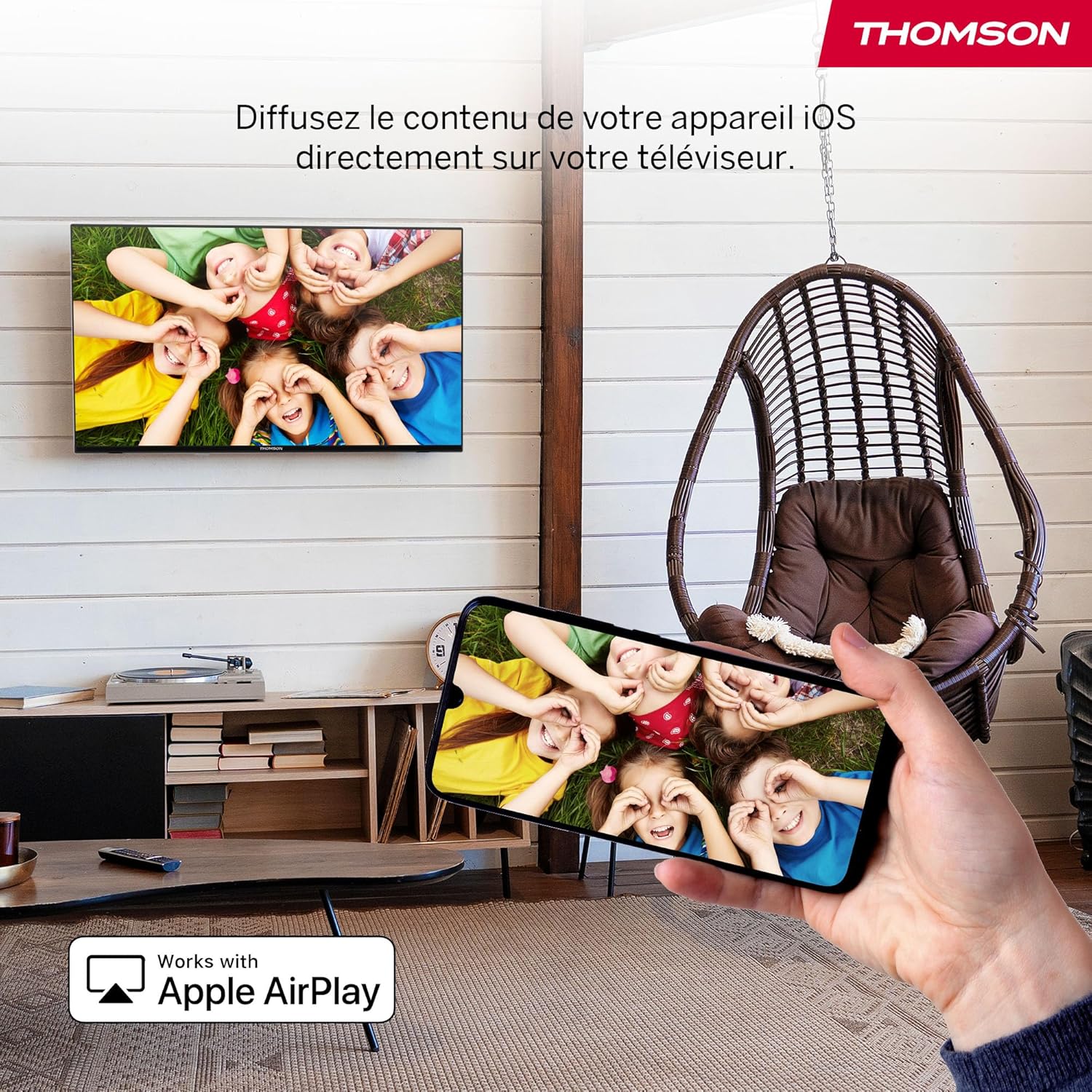
Image: An illustration of Apple AirPlay in use, showing content from an iPhone being wirelessly streamed or mirrored to the Thomson TV, enabling seamless content sharing from iOS devices.
The TV supports Apple AirPlay, allowing you to stream content directly from your iPhone, iPad, or Mac. Ensure your Apple device and the TV are connected to the same Wi-Fi network. Select the AirPlay icon on your Apple device and choose your Thomson TV from the list of available devices.
6.5. Triple Tuner
The integrated Triple Tuner supports DVB-C (cable), DVB-S2 (satellite), and DVB-T2 (terrestrial antenna) signals. Connect your preferred signal source to the corresponding input on the rear panel. During initial setup or via the TV settings, you can scan for available channels.
6.6. Smart Home Dashboard

Image: A view of the Smart Home Dashboard accessible on the Thomson TV, presenting an organized interface for managing and controlling various smart home devices, including cameras and lighting, directly from the television screen.
Access the integrated Smart Home Dashboard to control compatible connected devices in your home. This feature allows you to manage smart lights, cameras, and other smart appliances directly from your TV screen.
7. Picture and Sound
7.1. 4K UHD with Dolby Vision

Image: A side-by-side comparison illustrating the visual difference between Standard Dynamic Range (SDR) and Dolby Vision. The Dolby Vision image on the right displays significantly improved contrast, brighter highlights, and more vibrant colors in a landscape scene.
Experience exceptional clarity with 4K UHD resolution, offering four times the detail of Full HD. Dolby Vision further enhances the visual experience by providing superior brightness, contrast, and color accuracy, bringing scenes to life with stunning realism.
7.2. Dolby Atmos Sound
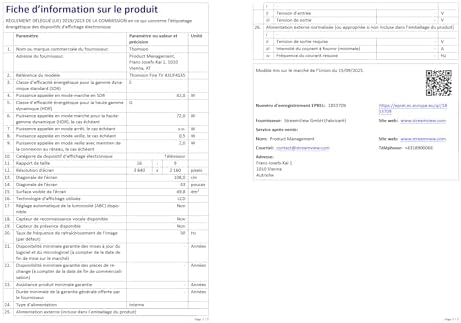
Image: A visual representation of the Dolby Atmos audio experience, showing sound waves expanding from the television screen to envelop viewers, suggesting a multi-dimensional and immersive sound environment.
Dolby Atmos delivers rich, multi-dimensional sound that flows around you, creating an immersive audio experience. For the full effect, connect your TV to a compatible Dolby Atmos sound system.
8. Connectivity
Your Thomson TV offers a variety of connection options:
- HDMI: Connect up to three HDMI devices for high-definition audio and video.
- USB: Use the two USB 2.0 ports to play media from USB drives or for service updates.
- LAN (Ethernet): For a stable wired internet connection.
- Wi-Fi: Connect wirelessly to your home network for streaming and online features.
- Bluetooth: Pair Bluetooth-enabled devices such as headphones or soundbars.
- CI+: Insert a Conditional Access Module for encrypted digital TV services.
9. Maintenance
To ensure the longevity and optimal performance of your TV:
- Cleaning: Gently wipe the screen with a soft, dry, lint-free cloth. For stubborn marks, use a screen-specific cleaner applied to the cloth, not directly to the screen. Clean the TV body with a soft, dry cloth.
- Ventilation: Ensure the ventilation openings on the back of the TV are not blocked.
- Software Updates: The Fire TV system will periodically check for and install software updates automatically when connected to the internet.
10. Troubleshooting
If you encounter issues, refer to the following common solutions:
| Problem | Possible Solution |
|---|---|
| No power | Check if the power cable is securely connected to the TV and the wall outlet. Ensure the outlet is functioning. |
| No picture, but sound is present | Verify the correct input source is selected. Check external device connections. |
| No sound, but picture is present | Check volume levels and mute settings. Ensure external audio devices are correctly connected and powered on. |
| Remote control not working | Replace batteries. Ensure there are no obstructions between the remote and the TV. Re-pair the Bluetooth remote if necessary (refer to Fire TV settings). |
| Cannot connect to Wi-Fi | Ensure your router is on and functioning. Re-enter the Wi-Fi password. Try restarting both the TV and the router. |
| Poor picture quality | Check antenna/cable/satellite connections. Adjust picture settings (brightness, contrast, sharpness). Ensure the content source is high quality. |
11. Specifications
| Feature | Detail |
|---|---|
| Brand | Thomson |
| Model Number | 43UF4S35 |
| Screen Size | 43 Inches (109 cm) |
| Resolution | 4K UHD (3840 x 2160) |
| Display Technology | LCD |
| Refresh Rate | 50 Hz |
| Operating System | Fire TV |
| Special Features | Dolby Vision, Dolby Atmos, Alexa Voice Control, Apple AirPlay, Smart Home Dashboard |
| Connectivity | Wi-Fi, Bluetooth, Ethernet (LAN), 3x HDMI 2.1, 2x USB 2.0, CI+, Audio Out, Headphones, Satellite, Antenna |
| Triple Tuner | DVB-C, DVB-S2, DVB-T2 |
| Color | Black |
| Aspect Ratio | 16:9 |
| Product Dimensions (D x W x H) | 9 cm x 97 cm x 60 cm |
| Included Components | Power Adapter, Power Cable, Remote Control, Stand, User Manual |
| Manufacturer | STREAMVIEW GMBH |
| Country of Origin | Turkey |
12. Warranty and Support
Your Thomson 43UF4S35 TV comes with a 3-year manufacturer's warranty. This warranty covers defects in materials and workmanship under normal use. Please retain your proof of purchase for warranty claims.
For technical support, troubleshooting assistance, or warranty service, please contact your retailer or the manufacturer, STREAMVIEW GMBH. Refer to your purchase documentation for specific contact details.


