
1. Introduction
Thank you for choosing the VINGLI Fluted Makeup Vanity Desk. This manual provides essential information for the safe assembly, operation, and maintenance of your new vanity desk. Please read these instructions carefully before beginning assembly and retain them for future reference.
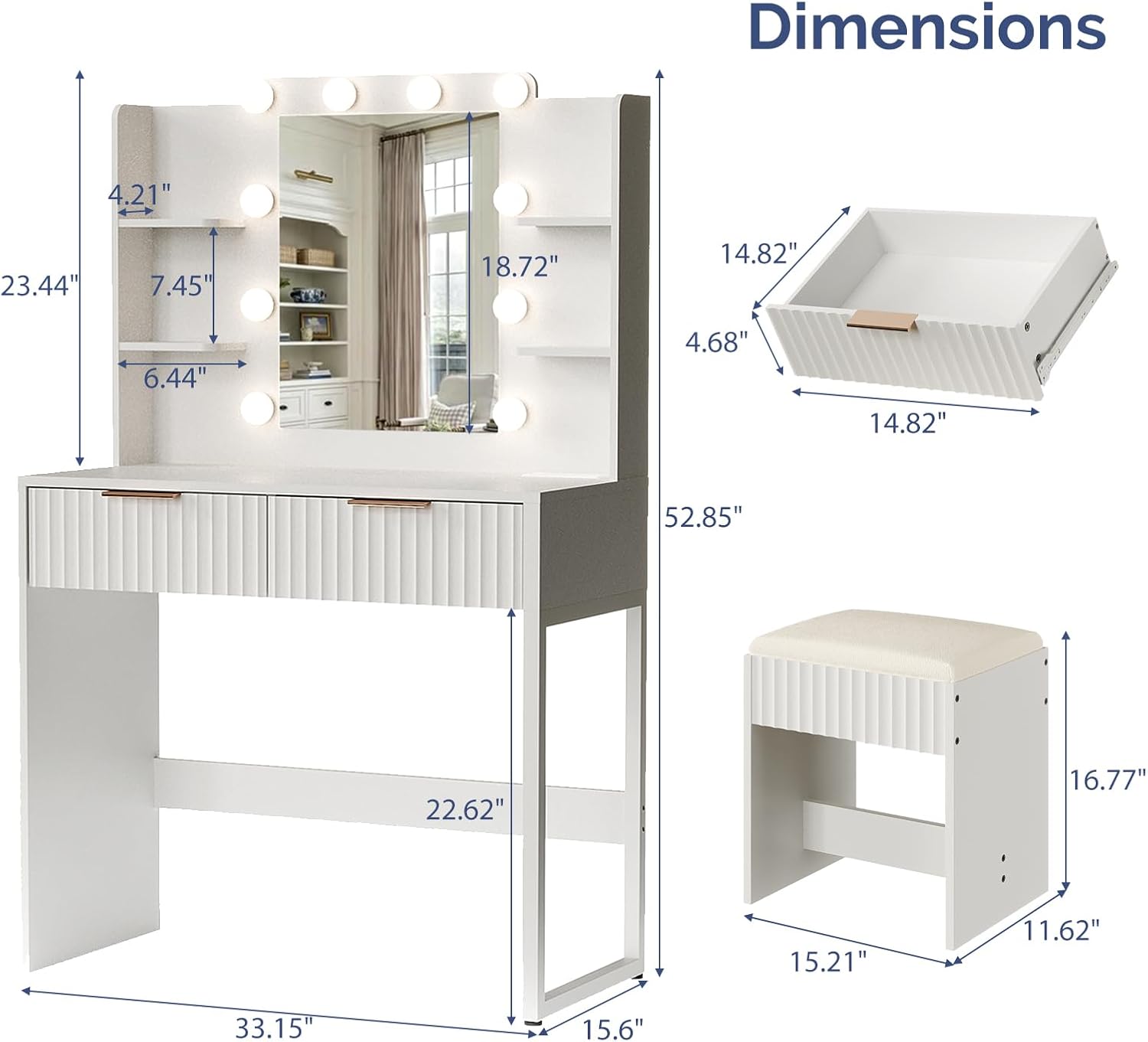
This modern vanity desk features a fluted design, a lighted mirror with Hollywood-style bulbs, a built-in power outlet with USB and Type-C ports, two drawers, and four storage shelves. It is designed to provide a functional and organized space for your daily routine.
2. Safety Information
- Exercise caution around sharp edges during unpacking and assembly.
- Always assemble the product strictly according to the provided instructions to prevent tip-over risks.
- Keep small parts away from children during assembly to prevent choking hazards.
- Ensure all connections for the power outlet and lights are secure before use.
- Do not overload the power outlets.
- Place the vanity on a stable, level surface.
3. Package Contents
Before assembly, verify that all components listed below are present and undamaged. If any parts are missing or damaged, please contact VINGLI customer support.
- Vanity Desk (Fluted Dressing Table)
- Mirror with Hollywood-style Light Bulbs
- Stool/Bench Chair
- Built-in Power Outlet with USB and Type-C Ports
- 2 Drawers
- 4 Storage Shelves
- Assembly Hardware (screws, connectors, etc.)
- Assembly Tools (e.g., Allen wrench, screwdriver)
- Instruction Manual
4. Assembly Instructions
Assembly of the VINGLI Fluted Makeup Vanity Desk requires careful attention to detail. Please follow the step-by-step instructions provided in the separate assembly guide included in your package. All necessary tools are supplied.
General Assembly Tips:
- Clear a spacious area for assembly.
- Lay out all parts and hardware, comparing them against the parts list.
- Do not overtighten screws during initial assembly; tighten fully once the structure is stable.
- Seek assistance for lifting and positioning heavier components, especially the mirror section.
- Ensure the stool is assembled securely. Some users have reported challenges with stool assembly; ensure all connections are firm.
5. Operating Instructions
5.1. Lighted Mirror Operation
The vanity mirror is equipped with Hollywood-style bulbs offering three light modes and adjustable brightness.
- Power On/Off: Locate the touch sensor on the mirror to turn the lights on or off.
- Change Light Mode: Tap the touch sensor to cycle through the three color temperature modes: Cold White, Warm White, and Warm Yellow.
- Adjust Brightness: Press and hold the touch sensor to increase or decrease the brightness level for the selected light mode.

5.2. Built-in Charging Station
The vanity desk includes a built-in power outlet for convenient charging of electronic devices.
- AC Outlets: Two 125V/12A AC outlets are available for standard plugs.
- USB Ports: One 5V/2A PD 20W USB port and one Type-C port are provided for charging compatible devices.
- Power Cord: The unit features a 4.92-foot power cord for connection to a wall outlet.

5.3. Storage Utilization
The vanity desk offers ample storage to keep your items organized.
- Drawers: Utilize the two smooth-gliding drawers for storing cosmetics, accessories, or other personal items.
- Open Shelves: The four open shelves provide space for displaying frequently used items, decorative pieces, or additional storage.

6. Maintenance
6.1. Cleaning
- Wipe surfaces with a soft, damp cloth. Avoid abrasive cleaners or harsh chemicals that may damage the finish.
- For the mirror, use a glass cleaner and a lint-free cloth.
- Ensure the power outlet is unplugged before cleaning the vanity.
6.2. General Care
- Periodically check all screws and connections to ensure they remain tight.
- Avoid placing hot items directly on the vanity surface. Use coasters or protective pads.
- Keep the vanity away from direct sunlight and excessive moisture to prevent material damage.
7. Troubleshooting
| Problem | Possible Cause | Solution |
|---|---|---|
| Lights do not turn on or flicker. | Power cord not fully plugged in; loose bulb connection; faulty touch sensor. | Ensure the power cord is securely plugged into a wall outlet. Check if all bulbs are screwed in tightly. Contact customer support if the issue persists. |
| Charging station not working. | Power cord not plugged in; device not compatible; faulty outlet. | Verify the vanity's main power cord is connected. Ensure your device is compatible with the USB/Type-C ports. Test with another device or use a different outlet. |
| Stool feels unstable after assembly. | Screws not fully tightened; incorrect assembly step. | Review the stool assembly instructions carefully. Ensure all screws are fully tightened. Disassemble and reassemble if necessary, paying close attention to each step. |
| Drawers do not slide smoothly. | Drawer slides misaligned; obstruction in the track. | Check for any obstructions in the drawer tracks. Ensure the drawer slides are correctly installed and aligned. |
8. Specifications
| Feature | Detail |
|---|---|
| Brand | VINGLI |
| Model | Fluted Makeup Vanity Desk |
| Color | White |
| Size | 33in |
| Material | Engineered Wood (Particleboard) |
| Product Dimensions (D x W x H) | 33.5" x 15.7" x 30" (Desk) |
| Number of Drawers | 2 |
| Included Components | Bulbs for mirror, Stool |
| Power Outlet | 2 AC Outlets (125V/12A), 1 USB Port (5V/2A PD 20W), 1 Type-C Port |
| Power Cord Length | 4.92 feet |
| Assembly Required | Yes |
9. Warranty and Support
9.1. Warranty Information
Specific warranty details for the VINGLI Fluted Makeup Vanity Desk are typically provided with your purchase documentation. Please refer to the warranty card or contact the retailer/manufacturer directly for information regarding warranty coverage and terms.
9.2. Customer Support
For any questions, missing parts, or assistance with assembly or operation, please contact VINGLI customer support. Have your product model number and purchase date ready when contacting support.
You can typically find contact information on the VINGLI official website or through the retailer where the product was purchased.