
TOPUTURE TP5
TOPUTURE TP5 Folding Treadmill User Manual
Model: TP5 | Brand: TOPUTURE
Introduction
This manual provides essential instructions for the safe and efficient use of your TOPUTURE TP5 Folding Treadmill. Please read this manual thoroughly before operating the device and retain it for future reference.
Important Safety Instructions
To reduce the risk of serious injury, read all important precautions and instructions in this manual before using the treadmill. The manufacturer assumes no responsibility for personal injury or property damage sustained by or through the use of this product.
- Always ensure the safety key is properly attached to your clothing before starting the treadmill.
- Keep children and pets away from the treadmill during operation.
- Place the treadmill on a level surface with adequate clearance around it.
- Do not operate the treadmill if it has a damaged cord or plug, or if it is not working properly.
- Consult a physician before starting any exercise program.
Setup and Assembly
The TOPUTURE TP5 treadmill comes largely pre-assembled. Follow these steps for quick setup:
- Unpacking: Carefully remove the treadmill from its packaging. Ensure all components are present.
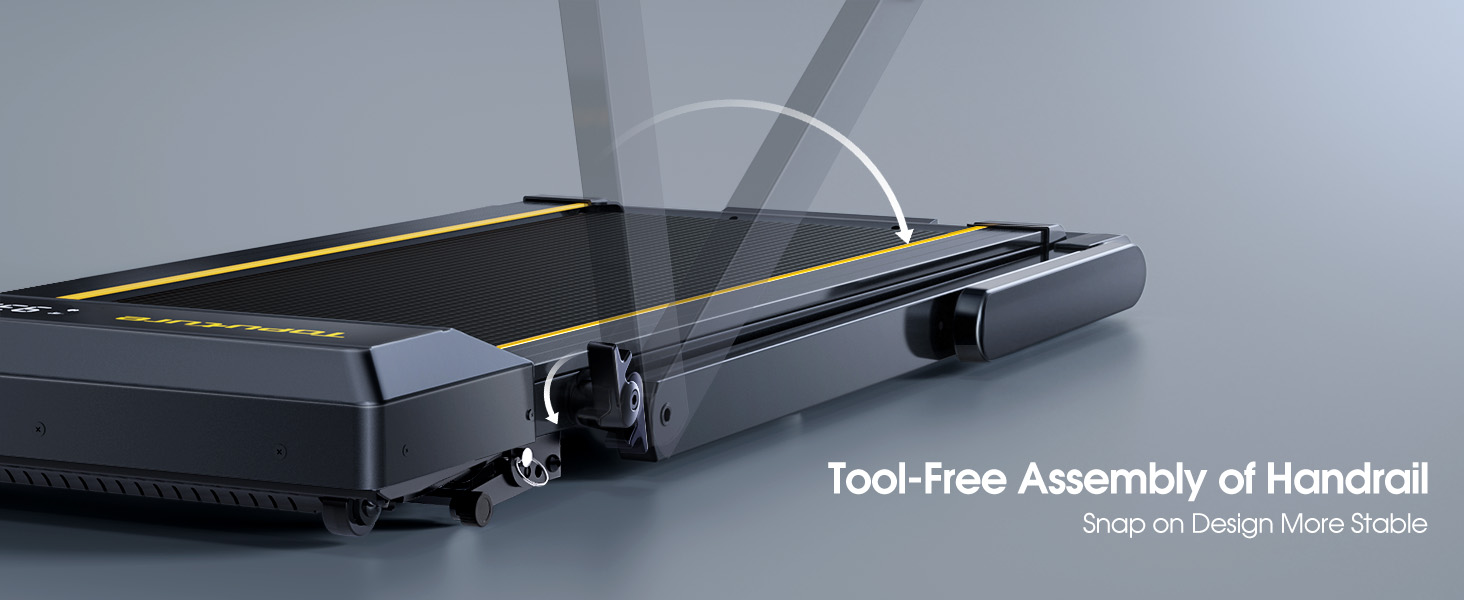
- Unfolding the Handlebar: Gently lift the handlebar into its upright position until it locks securely. The quick-release snaps allow for easy transition between walking pad and running treadmill configurations.
- Connecting Power: Plug the power cord into a grounded electrical outlet.
- Initial Check: Before first use, ensure the running belt is centered and properly tensioned. Refer to the maintenance section for belt adjustment if needed.

Operating Instructions
Control Panel and Display
The treadmill features a multifunctional LED display and touch controls. Information displayed includes time, speed, calories burned, distance, and heart rate.

Starting and Adjusting Speed
- Start/Stop: Press the Start/Pause button on the control panel or remote to begin/end your workout.
- Speed Adjustment: Use the Speed +/- buttons on the control panel or remote to adjust the speed from 0.6 to 10 MPH.
- App Control: Connect your smartphone or tablet via Bluetooth to control the treadmill and access guided workouts.

Incline Function
The treadmill offers three manual incline levels: 1%, 6%, and 12%. Adjust the incline by manually setting the support legs at the rear of the treadmill to the desired position.

Bluetooth Speaker
Connect your device to the treadmill's built-in Bluetooth speaker to enjoy music or audio during your workout.
Heart Rate Monitor
Grip the hand sensors on both sides of the display to monitor your heart rate during exercise.
Maintenance
- Lubrication: Regularly apply treadmill lubricant under the running belt to ensure smooth operation and prolong belt life. Refer to the lubricant instructions for frequency.
- Cleaning: Wipe down the treadmill with a damp cloth after each use to remove sweat and dust.
- Belt Adjustment: If the running belt feels loose or is off-center, use the provided tools to adjust the tension and alignment as per the detailed instructions in the full manual.

Troubleshooting
If you encounter any issues with your treadmill, please refer to the following common solutions:
- Treadmill not starting: Ensure the power cord is securely plugged in and the safety key is correctly placed on the console. Check the power switch on the treadmill.
- Belt slipping: The running belt may need tensioning. Refer to the maintenance section or the full manual for instructions on adjusting belt tension.
- Unusual noises: Check for any loose parts or foreign objects under the belt. Lubricate the running belt if it has not been done recently.
- Display not working: Ensure all connections are secure. If the issue persists, contact customer support.
Specifications
| Feature | Detail |
|---|---|
| Brand | TOPUTURE |
| Model Name | TP5 |
| Color | Black |
| Product Dimensions | 52.3"D x 28.2"W x 5.1"H |
| Item Weight | 78 Pounds |
| Material | Alloy Steel |
| Maximum Speed | 10 Miles per Hour |
| Maximum Incline Percentage | 12% |
| Maximum Horsepower | 2.5 HP |
| Maximum Weight Recommendation | 300 Pounds |
| Display | LED |
| Connectivity Technology | Bluetooth |
| Special Features | Built-In Speaker, Foldable, Heart Rate Monitor, Portable, Shock Absorbent |
| Assembly Required | No (Pre-assembled) |
| Included Components | Power Cord |
Warranty and Support
Your TOPUTURE TP5 Treadmill comes with a one-year warranty. For any assistance, questions, or warranty claims, please contact TOPUTURE customer support.
How to Contact Support:
- Login to your Amazon account.
- Go to "Your Orders".
- Find the order ID for your treadmill.
- Click "Contact Seller".
Please have your model name (TP5) and purchase details ready when contacting support.
Related documentsTP5


Ask a question about this manual
Ask about setup, troubleshooting, compatibility, parts, safety, or missing instructions. Manuals+ will review the question and use this page’s manual context to help answer it.