
1. Introduction
Thank you for choosing the TOPUTURE Foldable Walking Pad with Incline. This versatile fitness equipment is designed for both walking and running, offering a convenient way to stay active at home or in the office. Featuring a 4-in-1 design, adjustable incline, and a compact form factor, this treadmill provides an effective workout solution. Please read this manual carefully before use to ensure safe and optimal operation.
2. Safety Information
WARNING: To reduce the risk of serious injury, read all important precautions and instructions in this manual before using the treadmill.
- Always place the treadmill on a flat, stable surface.
- Keep children and pets away from the treadmill during operation.
- Wear appropriate athletic footwear. Do not use the treadmill barefoot or in socks.
- Ensure the safety key is properly attached to your clothing before starting. In case of emergency, the safety key will stop the treadmill.
- Do not exceed the maximum user weight of 300 lbs (approximately 136 kg).
- Consult a physician before starting any exercise program.
- Unplug the treadmill from the power outlet when not in use or before cleaning/maintenance.
- Do not operate the treadmill if it has a damaged cord or plug, or if it is not working properly.
3. Package Contents
Please check the package for the following items:
- TOPUTURE Foldable Walking Pad with Incline Treadmill
- Power Cord
- Tool Kit
- User Manual (this document)
- Remote Control
4. Product Features
The TOPUTURE Foldable Walking Pad with Incline offers a range of features designed for a comprehensive and convenient workout:
- 4-in-1 Design: Seamlessly switch between Walking, Running, Climbing, and Working modes to suit your fitness needs.
- Adjustable Manual Incline: Features a 0-9% manual incline adjustment to simulate uphill walking/running, enhancing calorie burn.
- Powerful 2.5 HP Motor: Provides smooth and consistent performance for various exercise intensities.
- Compact & Foldable: Designed for easy storage, folding to a compact size of approximately 50x23x4.5 inches. Transport wheels allow for effortless movement.
- LED Display & Remote Control: Monitor your speed, time, distance, and calories burned on the integrated LED display. Control settings conveniently with the included remote.
- App Connectivity: Connect to a dedicated app for additional workout tracking and program options.
- Low Noise Operation: Operates at less than 45dB, making it suitable for home and office environments without causing disturbance.
- Generous Running Area: Provides a comfortable 40 x 16 inch running surface.
- Sturdy Construction: Supports a maximum user weight of 300 lbs.
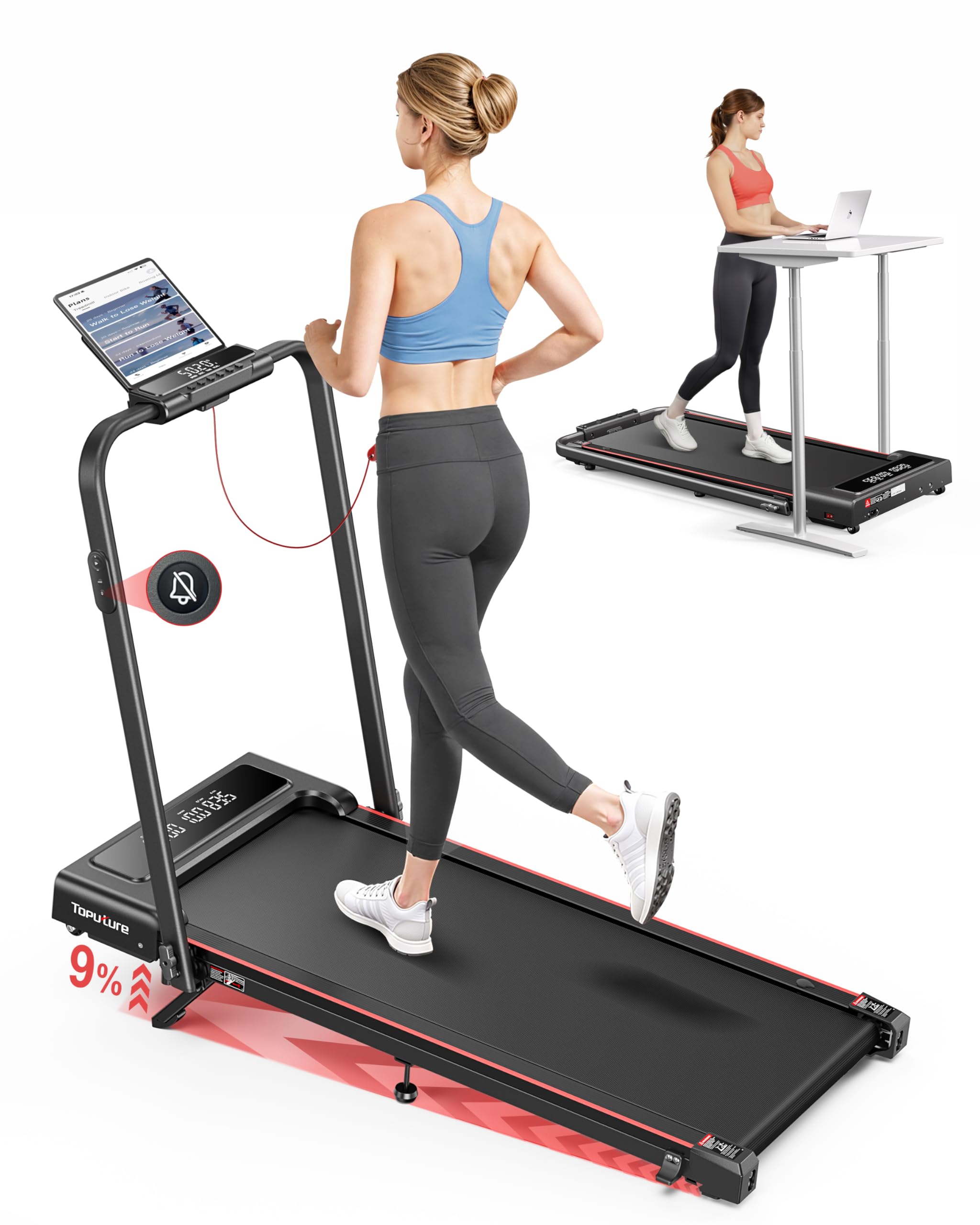
Image: The TOPUTURE walking pad features an adjustable 0-9% incline, designed to boost calorie burning during workouts.

Image: The 4-in-1 design allows for various uses, including walking under a desk or traditional running with the handle.

Image: Visual representation of the four distinct modes: Running, Climbing, Walking, and Working, with their respective speed ranges.
5. Setup Guide
The TOPUTURE Walking Pad is designed for minimal setup. Follow these steps to prepare your treadmill for use:
5.1 Unfolding the Treadmill
- Carefully remove the treadmill from its packaging.
- Place the treadmill on a flat, level surface.
- If the handle is folded, gently lift it until it locks into the upright position. Ensure all locking mechanisms are secure.
5.2 Adjusting the Incline
The treadmill features a manual incline adjustment. To change the incline:
- Unfold the footpad: Locate the adjustable footpads at the rear of the treadmill and unfold them.
- Insert the pin: Use the provided pin to secure the footpad at your desired incline level (0% or 9%).
- Adjust the middle footpad: Ensure the middle support footpad is also adjusted to provide stable support for the chosen incline.

Image: Step-by-step guide on how to manually adjust the treadmill's incline.
5.3 Connecting Power
Plug the power cord into the treadmill's power input port and then into a grounded electrical outlet. Ensure the power switch is in the OFF position before plugging in.
6. Operating Instructions
6.1 Power On/Off
- Turn the main power switch located at the front of the treadmill to the ON position.
- Attach the safety key to the designated area on the console and clip the other end to your clothing. The display will illuminate.
- To turn off, remove the safety key, then switch the main power switch to OFF.
6.2 Using the Remote Control
The remote control allows you to start, stop, and adjust the speed of the treadmill.
- Start/Stop: Press the START/STOP button to begin or end your workout.
- Speed Adjustment: Use the '+' and '-' buttons to increase or decrease the speed.
- Mode Selection: Some remotes may have buttons to switch between preset modes or programs.
6.3 Speed Adjustment and Modes
The treadmill supports various speed ranges depending on the mode:
- Working Mode: 0.6 - 1.5 MPH (ideal for under-desk use).
- Walking Mode: 1.5 - 3 MPH.
- Climbing Mode: 0.6 - 3 MPH (when incline is engaged).
- Running Mode: 3 - 7.6 MPH (with handle in upright position).

Image: The treadmill's low noise feature and remote control make it ideal for under-desk use, allowing for quiet operation.
6.4 Using the App
Download the dedicated TOPUTURE app from your smartphone's app store. Follow the in-app instructions to pair your device with the treadmill via Bluetooth. The app allows you to track progress, set goals (time, calories, distance), and access additional workout programs.
6.5 Safety Key
The safety key is a critical safety feature. Always ensure it is properly placed on the treadmill console and clipped to your clothing. If the safety key is dislodged, the treadmill will immediately stop, preventing potential injury.
7. Maintenance
Regular maintenance ensures the longevity and optimal performance of your treadmill.
7.1 Lubrication
The running belt requires periodic lubrication to reduce friction and wear. Refer to the included tool kit for lubricating oil and instructions. Typically, lubrication is needed every 3-6 months depending on usage.
7.2 Belt Adjustment
If the running belt feels loose, slips, or is off-center, it may need adjustment. Use the provided tool to adjust the belt tension and alignment screws at the rear of the treadmill. Adjust in small increments and test the belt after each adjustment.
7.3 Cleaning
Wipe down the treadmill surfaces with a damp cloth after each use to remove sweat and dust. Do not use abrasive cleaners or solvents. Keep the area around the treadmill clean and free of obstructions.

Image: Instructions for adding lubricating oil and adjusting the running belt for optimal performance.
8. Troubleshooting
If you encounter any issues with your TOPUTURE Walking Pad, refer to the following common problems and solutions:
| Problem | Possible Cause | Solution |
|---|---|---|
| Treadmill does not power on. | Power cord not connected, power switch off, safety key not in place. | Check power cord connection, ensure power switch is ON, place safety key correctly. |
| Running belt slips or stops. | Belt too loose, motor overload, insufficient lubrication. | Adjust belt tension, reduce user weight/speed, lubricate the belt. |
| Unusual noise during operation. | Loose components, belt friction, motor issue. | Check for loose screws, lubricate belt, contact customer support if noise persists. |
| Remote control not responding. | Dead battery, interference, remote not paired. | Replace remote battery, ensure no obstructions, re-pair remote if necessary (refer to app instructions). |
9. Specifications
| Feature | Detail |
|---|---|
| Product Dimensions (Unfolded) | 126 x 62 x 12 cm (approx. 50 x 24.4 x 4.7 inches) |
| Packed Size | 50 x 23 x 4.5 inches |
| Item Weight | 24.95 kg (approx. 55 lbs) |
| Material | Alloy Steel |
| Motor Horsepower | 2.5 HP |
| Maximum Speed | 7.6 Miles per Hour |
| Maximum Incline Percentage | 9% (Manual Adjustment) |
| Running Area | 40 x 16 inches |
| Maximum User Weight | 300 lbs |
| Display Metrics | Calories Burned, Distance, Speed, Time |
| Number of Programs | 12 (via App) |
| Special Features | Compact Design, Foldable, Lightweight, App Control, Remote Control |
| Assembly Required | No (Installation-Free) |

Image: The treadmill is built to support a maximum user weight of 300 lbs.

Image: The treadmill's space-saving design allows it to be easily folded and moved using transport wheels for convenient storage.
10. Warranty and Support
For warranty information, please refer to the documentation included with your product or contact TOPUTURE customer support directly. If you require assistance with setup, operation, maintenance, or troubleshooting that is not covered in this manual, please reach out to our customer service team.
Contact Information: Refer to your product packaging or the official TOPUTURE website for the most current customer support details.


