
Introduction
The Raddy SH-906 is a multi-functional emergency radio designed for reliable communication and power in various situations. It features AM/FM/SW/VHF and NOAA weather band reception, multiple charging options (solar, hand crank, USB), a 10,000mAh power bank, flashlight, reading lamp, SOS alarm, and an integrated compass. This manual provides detailed instructions for its proper use and maintenance.
Safety Instructions
- Do not expose the device to extreme temperatures, direct sunlight, or high humidity.
- Avoid dropping or subjecting the radio to strong impacts.
- Keep the device away from water and liquids. If it gets wet, dry it thoroughly before use.
- Do not attempt to disassemble or modify the radio. This will void the warranty and may cause damage.
- Use only specified charging cables and adapters.
- When using the hand crank, turn it at a steady, moderate pace. Excessive force may damage the mechanism.
- The SOS alarm produces a loud sound. Avoid prolonged exposure to prevent hearing damage.
Package Contents
Verify that all items are present in the package:
- Raddy SH-906 Emergency Radio
- USB Charging Cable
- AUX Audio Cable
- Wrist Strap with Compass
- User Manual (this document)
Product Overview
Familiarize yourself with the various parts and controls of your Raddy SH-906 radio.

Image: Overview of the Raddy SH-906 radio, showing its front panel, flashlight, solar panel, hand crank, and included accessories like the USB cable, AUX cable, and compass wrist strap. Dimensions are also indicated.
- Antenna: Extendable for improved radio reception.
- Solar Panel: For trickle charging the internal battery under direct sunlight.
- Hand Crank: For manual power generation.
- Flashlight: Integrated LED light on one end.
- Reading Lamp: Panel light on the side.
- Display Screen: Shows frequency, battery level, and other indicators.
- Control Buttons: Power, Band, Volume, Tuning, SOS, Menu, Scan, etc.
- USB-C Input Port: For charging the radio.
- USB-A Output Port: For charging external devices (power bank function).
- AUX Jack: For connecting external audio devices.
- Compass: Attached to the wrist strap for navigation.
Setup
Initial Charging
Before first use, fully charge the radio's internal 10,000mAh battery using the USB-C input port. Connect the provided USB cable to the radio's USB-C port and the other end to a standard USB power adapter (not included) or a computer USB port.
The charging indicator on the display will show the charging status. Charging is complete when the indicator shows a full battery.
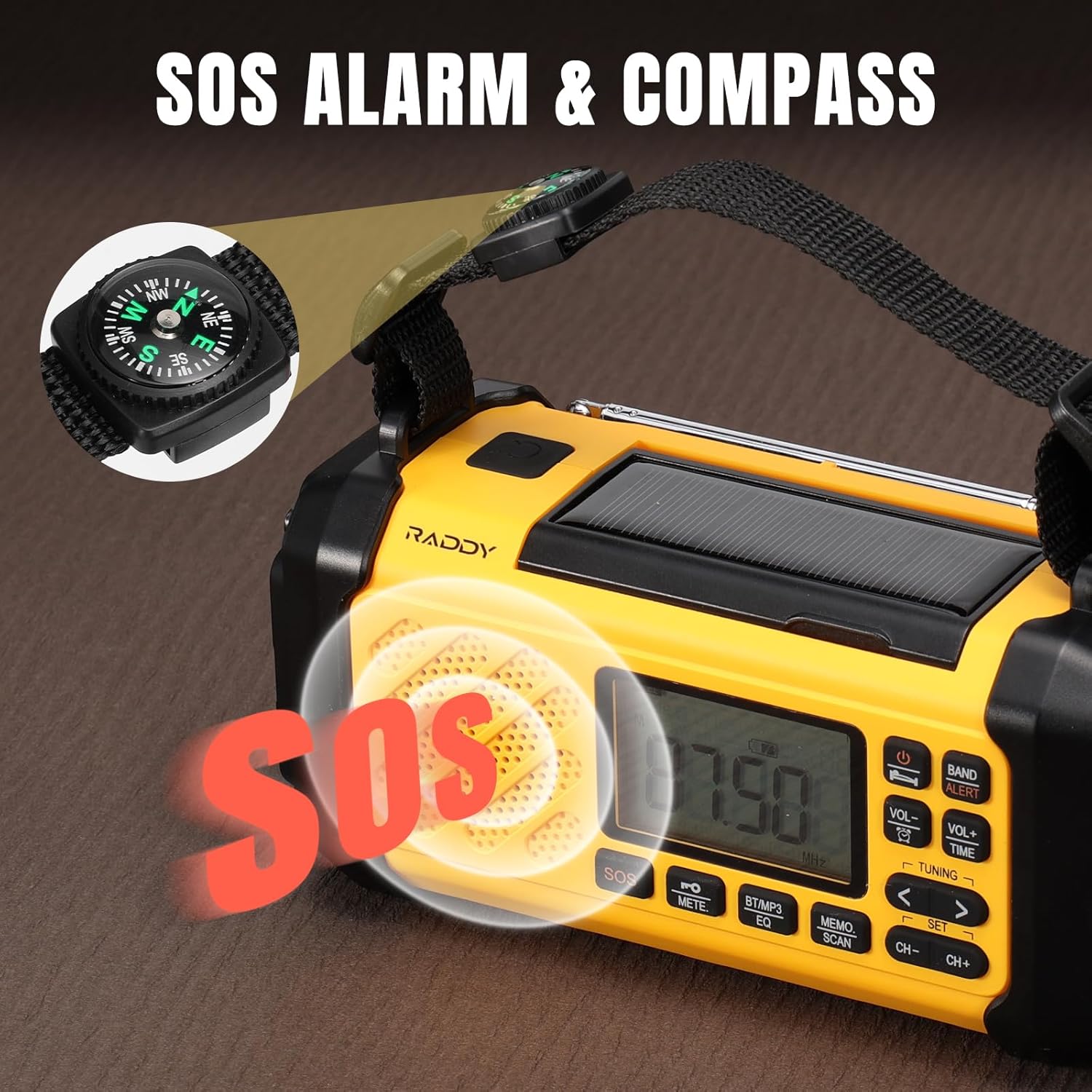
Image: The Raddy SH-906 radio with a USB-C cable connected for charging, illustrating the USB-C input port.
Operating Instructions
Power On/Off
- Press and hold the Power button to turn the radio on or off.
Radio Function (AM/FM/SW/VHF/NOAA)
- Extend the antenna for optimal reception.
- Press the BAND button to cycle through AM, FM, SW, VHF, and NOAA weather bands.
- Use the Tuning buttons (< / >) to manually adjust the frequency.
- Press the SCAN button to automatically search for and save available stations.
- Use the VOL+ / VOL- buttons to adjust the volume.
- For NOAA weather alerts, ensure the radio is set to the NOAA band. The radio will automatically activate and sound an alert when a weather warning is broadcast.

Image: The Raddy SH-906 radio displaying a frequency of 87.50 MHz, indicating active radio reception. Icons for AM/FM/SW/VHF/NOAA radio and Bluetooth connection are shown.
Bluetooth Connectivity
- Press the BT/MP3 button to switch to Bluetooth mode. The display will show "BT".
- On your mobile device, search for Bluetooth devices and select "Raddy SH-906" to pair.
- Once paired, you can play audio from your device through the radio's speaker.
Flashlight and Reading Lamp
- Press the Light button (usually located near the flashlight) to turn the flashlight on/off.
- Press the Lamp button (usually located near the reading lamp) to turn the reading lamp on/off.
SOS Alarm
- Press and hold the SOS button to activate the emergency alarm and flashing light.
- Press the SOS button again to deactivate it.
Image: The Raddy SH-906 radio with a visual representation of the SOS alarm sound emanating from the speaker. A compass attached to the radio's strap is also visible.
Power Bank Function
The Raddy SH-906 can charge external devices using its 10,000mAh internal battery.
- Connect your device's charging cable to the radio's USB-A Output Port.
- The radio will begin charging your device. Monitor your device's charging status.

Image: The Raddy SH-906 radio acting as a power bank, with two smartphones connected and displaying charging indicators. The 10,000mAh capacity is highlighted.
Charging the Radio
The radio offers three methods for recharging its internal battery:
- USB-C Charging: Connect the USB-C cable to the radio's input port and a USB power source. This is the fastest charging method.
- Solar Charging: Place the radio with the solar panel facing direct sunlight. This method provides trickle charging and is best for maintaining battery life or slow recharging in emergencies.
- Hand Crank Charging: Rotate the hand crank clockwise or counter-clockwise at a steady pace (approximately 120-150 RPM). One minute of cranking can provide several minutes of radio operation or a small amount of charge for the power bank function.

Image: A composite image illustrating the three charging methods for the Raddy SH-906: solar panel exposed to light, a USB-C cable connected to the input port, and a hand turning the crank.
Compass Usage
The included compass on the wrist strap can be used for basic navigation. Hold the compass flat and allow the needle to settle. The red end of the needle typically points North.
Maintenance
- Cleaning: Wipe the radio with a soft, damp cloth. Do not use harsh chemicals or abrasive cleaners.
- Storage: Store the radio in a cool, dry place away from direct sunlight and extreme temperatures. For long-term storage, ensure the battery is charged to at least 50% and recharge it every 3-6 months to maintain battery health.
- Battery Care: Avoid fully discharging the battery frequently.
Troubleshooting
| Problem | Possible Cause | Solution |
|---|---|---|
| Radio does not turn on. | Battery is depleted. | Charge the radio using USB-C, solar, or hand crank. |
| Poor radio reception. | Antenna not extended; weak signal; interference. | Fully extend the antenna. Try repositioning the radio. Scan for stations again. |
| Cannot charge external devices. | Radio battery is low; incorrect cable; device not compatible. | Ensure radio battery is sufficiently charged. Use the correct USB cable. Check device compatibility. |
| Hand crank is stiff or not charging. | Mechanism obstruction; incorrect rotation speed. | Ensure no obstructions. Rotate at a steady, moderate pace. Do not force. |
| Bluetooth pairing fails. | Radio not in pairing mode; device too far; interference. | Ensure radio is in Bluetooth mode ("BT" displayed). Keep devices close. Restart both devices. |
Specifications
- Model: SH-906
- Battery Capacity: 10,000mAh
- Radio Bands: AM/FM/SW/VHF, NOAA Weather Band
- Charging Methods: USB-C, Solar Panel, Hand Crank
- Output: USB-A (for charging external devices)
- Connectivity: Bluetooth
- Special Features: Flashlight, Reading Lamp, SOS Alarm, Compass
- Product Dimensions: 3"L x 2"W x 4"H (approx. 7.6cm L x 5.1cm W x 10.2cm H)
- Manufacturer: Raddy
Warranty and Support
Raddy products are designed for reliability and performance. For warranty information, please refer to the warranty card included with your purchase or visit the official Raddy website. If you encounter any issues or require technical assistance, please contact Raddy customer support through their official channels. Please have your model number (SH-906) and purchase details ready when contacting support.


