
1. Introduction
This manual provides detailed instructions for the proper use and maintenance of your BOBLOV KJ26 2K Body Camera. Please read this manual thoroughly before operating the device to ensure optimal performance and longevity.
2. Package Contents
Verify that all items listed below are included in your package:
- KJ26 Body Camera
- 360° Rotatable Long Clip
- 360° Rotatable Short Clip
- Two Rechargeable Batteries (2000mAh each)
- Charging Dock
- USB-C Cable
- User Manual (this document)
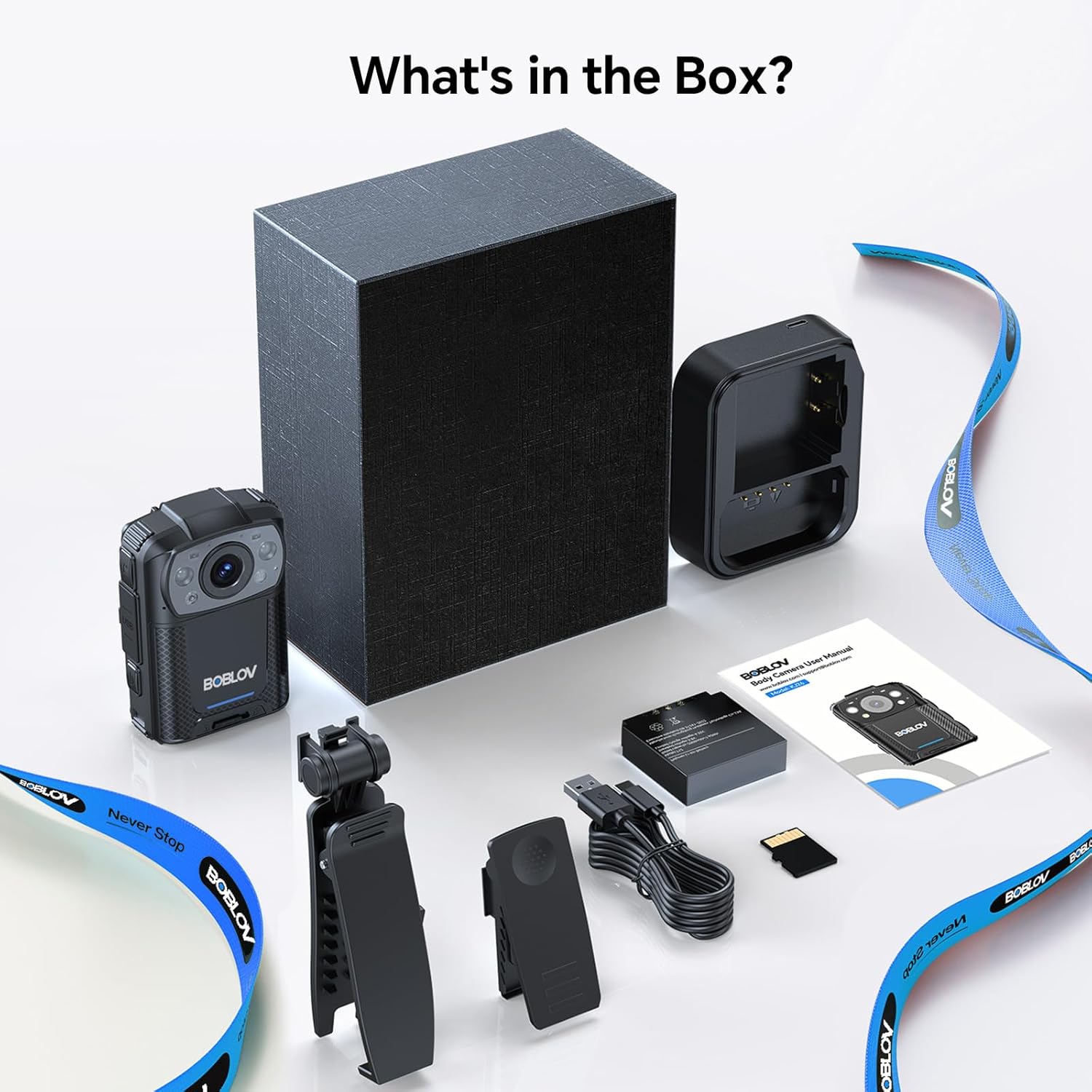
Image: All components included in the BOBLOV KJ26 Body Camera package.

Image: Visual representation of the package contents.
Video: Official unboxing video for the BOBLOV KJ26 body camera, demonstrating the contents of the package and initial setup.
3. Setup
3.1. Battery Installation and Charging
The KJ26 body camera comes with two 2000mAh rechargeable batteries. Ensure batteries are fully charged before first use.
- Insert a battery into the designated battery compartment on the camera.
- Place the camera onto the charging dock.
- Connect the USB-C cable to the charging dock and a power source.
- The charging indicator light will show charging status.
- To swap batteries, remove the current battery and insert a fresh one.

Image: BOBLOV KJ26 body camera highlighting its dual battery system for extended recording.

Image: Swappable batteries for continuous recording.
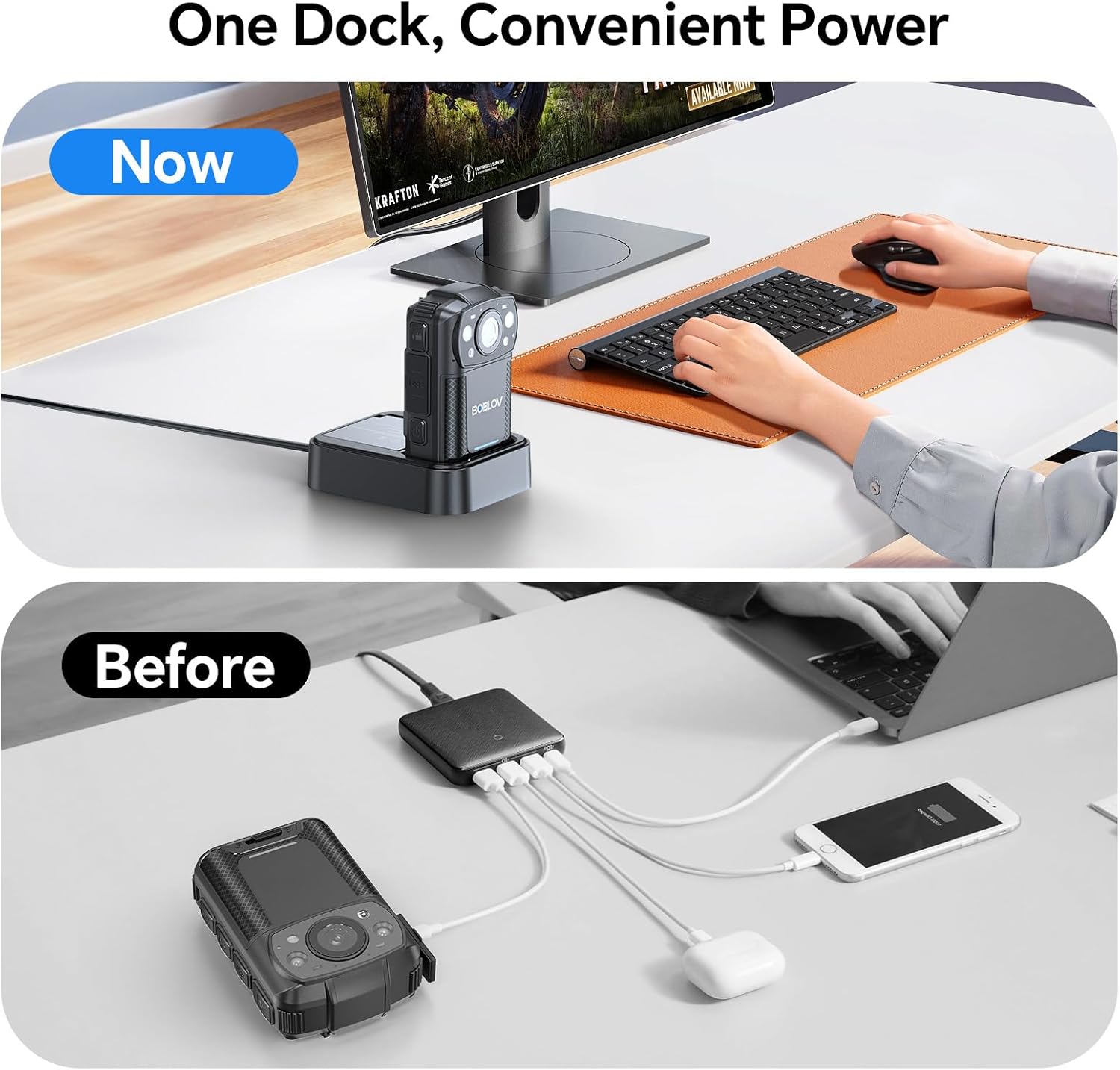
Image: The camera charging in its dedicated dock.
3.2. Memory Card Installation
The camera supports external Micro SD cards for storage expansion. The device comes with a 256GB card installed.
- Locate the Micro SD card slot on the camera.
- Gently insert the Micro SD card until it clicks into place.
- To remove, press the card inward until it springs out.

Image: The camera supports easy memory card swapping for expanded storage.
3.3. Attaching Clips
Two rotatable clips (long and short) are provided for flexible mounting options.
- Select the appropriate clip (long or short) for your intended use.
- Attach the clip to the back of the camera by sliding it into the designated slot until it locks securely.
- The clip can rotate 360° for optimal positioning.

Image: Examples of flexible mounting with different clip lengths.
4. Operating Instructions
4.1. Power On/Off
- To power on: Press and hold the Power button until the screen illuminates.
- To power off: Press and hold the Power button until the device shuts down.
4.2. Video Recording
The camera records video in 2K, 1080P, or 720P resolution with audio, saving files in MOV format.
- To start recording: Press the Record button. A red indicator light or on-screen icon will confirm recording is active.
- To stop recording: Press the Record button again.
- Loop Recording: The camera supports loop recording, overwriting the oldest files when the memory card is full.
- Adjustable Video Length: Video segments can be set to 5, 10 (default), 15, or 20 minutes.

Image: The compact design of the wearable body camera.

Image: Continuous recording with adjustable video segment lengths.
4.3. Photo Capture
The camera can also capture still images.
- To take a photo: Press the Photo button.
4.4. Night Vision
The KJ26 features infrared LEDs for clear recording in low-light conditions.
- Night vision activates automatically in dark environments.

Image: Night vision capability for reliable surveillance in low light.

Image: Capturing details even in low light conditions.
4.5. Special Features
- Motion Detection: The camera can be set to start recording automatically when motion is detected.
- Dash Camera Mode: The device can function as a dash camera, suitable for vehicle use.

Image: The camera mounted in a vehicle, demonstrating dash camera mode.
5. Maintenance
5.1. Cleaning
- Use a soft, dry cloth to clean the camera body.
- For the lens, use a specialized lens cleaning cloth and solution to avoid scratches.
- Do not use harsh chemicals or abrasive materials.
5.2. Battery Care
- Store batteries in a cool, dry place when not in use.
- Avoid fully discharging batteries frequently to prolong their lifespan.
- If storing for extended periods, charge batteries to approximately 50% capacity.
5.3. Storage
- Store the camera in a protective case to prevent damage from impacts or dust.
- Keep the device away from extreme temperatures and direct sunlight.
6. Troubleshooting
| Problem | Possible Cause | Solution |
|---|---|---|
| Camera does not power on. | Battery is depleted or not properly installed. | Ensure battery is charged and correctly inserted. Try swapping with the second battery. |
| Cannot record video. | Memory card is full, corrupted, or not inserted. | Check memory card status. Format the card (this will erase all data). Replace the card if necessary. |
| Poor video quality at night. | Night vision not active or insufficient ambient light. | Ensure night vision is enabled (if manual setting is available) or that there is some minimal light for the IR sensors to function. |
| Camera freezes or becomes unresponsive. | Software glitch or temporary error. | Press and hold the Power button for 10-15 seconds to force a restart. If issue persists, contact support. |
7. Specifications
| Feature | Detail |
|---|---|
| Brand | BOBLOV |
| Model Number | KJ26 |
| Video Capture Resolution | 2K, 1080P, 720P |
| Photo Sensor Technology | CMOS |
| Flash Memory Type | Micro SD |
| Flash Memory Installed Size | 256 GB |
| Video Capture Format | MOV |
| Supported Audio Format | AAC, MP3 |
| Screen Size | 2 inches |
| Connectivity Technology | USB |
| Special Features | Audio Recording, Dash Camera Mode, Loop Recording, Motion Detection, Night Vision |
| Water Resistance Level | Not Water Resistant |
| Battery Average Life | 8 hours (with two batteries) |
| Number of Batteries | 2 (included) |
| Shooting Modes | Video Recording, Photo Capture |
| Image Aspect Ratio | 16:9 |
| Compatible Devices | Laptop, Personal Computer |
8. Warranty Information
The BOBLOV KJ26 Body Camera comes with a 2-year warranty from the date of purchase. This warranty covers manufacturing defects and malfunctions under normal use. Please retain your proof of purchase for warranty claims. For detailed warranty terms and conditions, please refer to the official BOBLOV website or contact customer support.
9. Customer Support
For technical assistance, troubleshooting, or any inquiries regarding your BOBLOV KJ26 Body Camera, please contact BOBLOV customer support:
- Official Website: Visit the BOBLOV Store on Amazon for product information and support resources.
- Email/Phone: Refer to the contact information provided on the official BOBLOV website or in your product packaging.


