
1. Product Overview
This BrickSoul LED lighting kit is designed to enhance your Lego 75304 Darth Vader Helmet model, transforming it into a vibrant display piece. The kit provides illumination to highlight details and create a dynamic visual impact. This package contains only the lighting components; the Lego 75304 model is not included and is shown for illustrative purposes only.
The kit features a wired dimmable design with a convenient one-touch brightness control button integrated into the USB cable, allowing for easy adjustment of light intensity without needing to unplug the unit.
2. What's Included
Please verify that all components listed below are present in your package:
- LED Light Kit components
- Battery Box (AAA batteries not included)
- USB Cable with integrated control button
- Tweezers (for precise placement)
- Installation Guide (digital instructions available via QR code/model query)
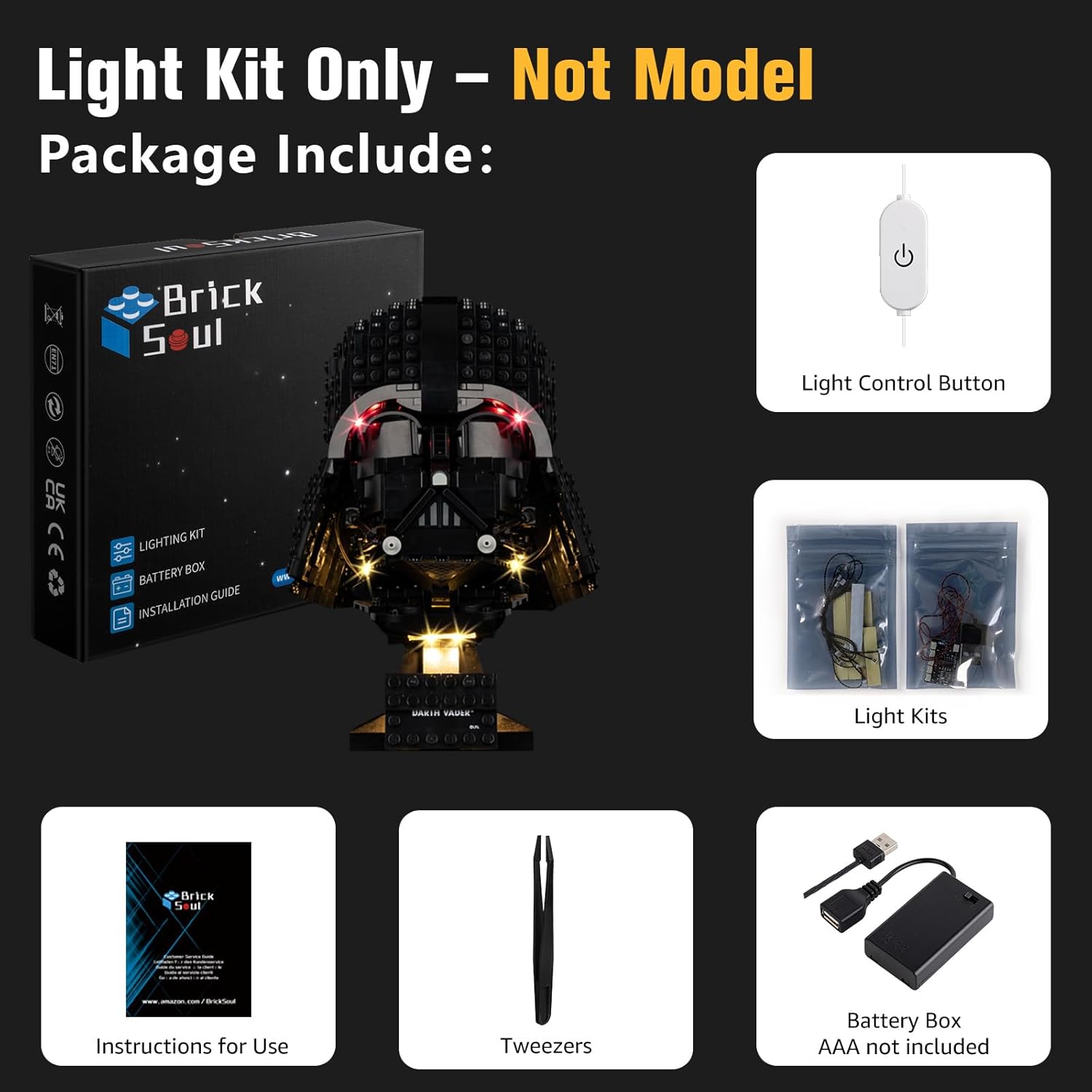
Figure 2.1: Package contents of the BrickSoul LED Light Kit. The image displays the light kit box, a light control button on a USB cable, individual light kits in bags, an instruction manual, tweezers, and a battery box (AAA batteries not included).
3. Setup and Installation
The BrickSoul LED kit is designed for straightforward installation. No specialized skills are required. Follow the detailed digital instructions provided via numbered step-by-step bags and video/PDF guides. These guides will direct you on how to integrate the lighting components into your Lego 75304 model by carefully removing and reattaching specific bricks.
- Preparation: Ensure your Lego 75304 model is fully assembled before beginning the light kit installation.
- Accessing Instructions: Scan the QR code provided in your package or input the product model number (75304-TV) on the BrickSoul website to access the digital installation guides.
- Component Placement: Use the included tweezers for precise handling and placement of small LED components and wires. The design ensures a seamless fit and clean wiring, enhancing the display without clutter.
- Power Connection: Connect the light kit to the battery box (requires 3-5V input, AAA batteries not included) or a USB power source.
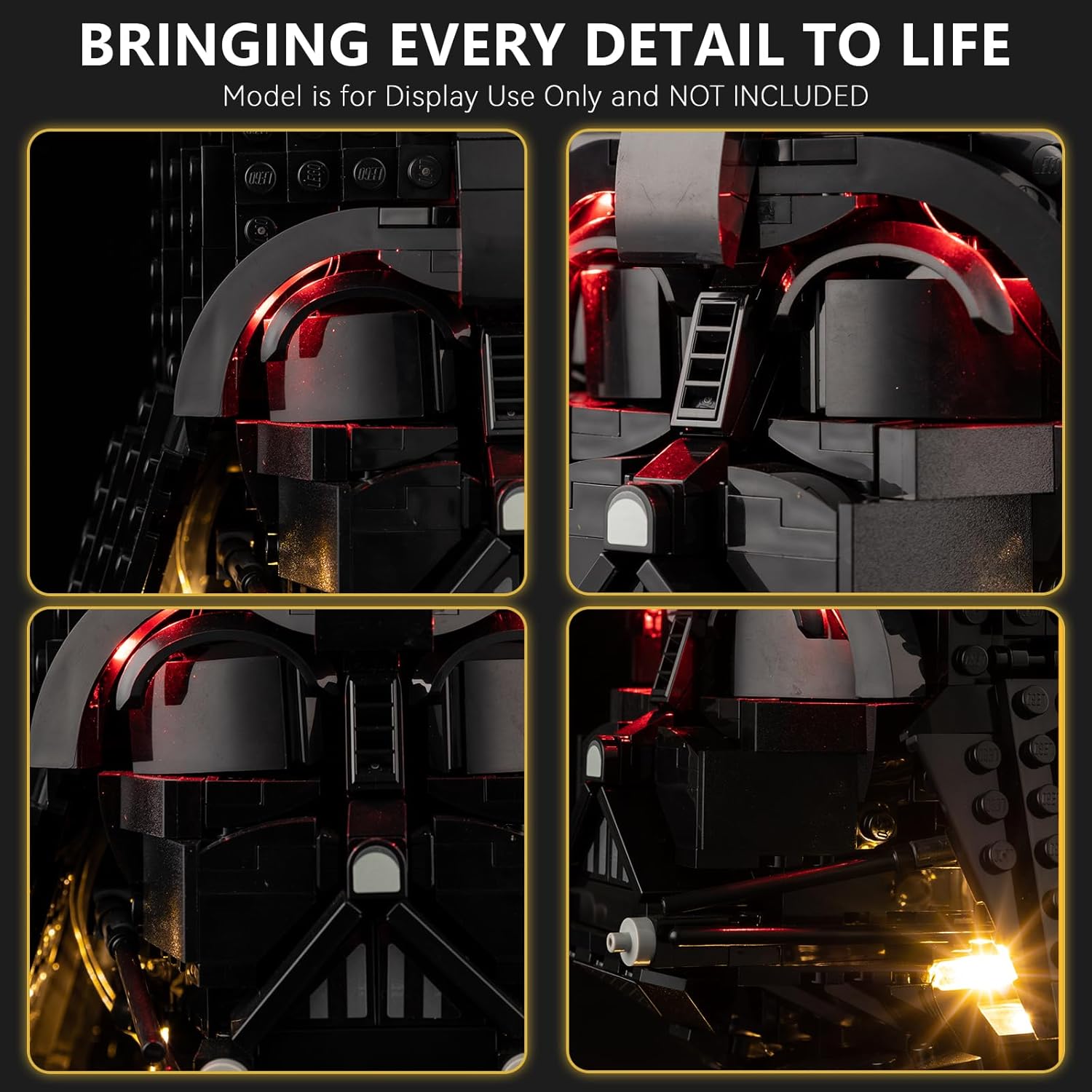
Figure 3.1: Detailed views of the LED lights integrated into the Lego Darth Vader Helmet, highlighting the precise placement and illumination of various sections.

Figure 3.2: The Lego Darth Vader Helmet model illuminated by the BrickSoul LED light kit, displayed in a room at night, demonstrating its visual impact.

Figure 3.3: A visual comparison illustrating the clean wiring and vibrant illumination provided by the BrickSoul light kit.
Video 3.1: An official product video demonstrating the BrickSoul LED Light Kit for Lego 75304, showcasing its features and the illuminated Darth Vader Helmet model.
4. Operation
The BrickSoul LED Light Kit features a user-friendly control system for managing your lighting display.
- Power On/Off: Tap the button on the USB cable to turn the lights on or off.
- Brightness Adjustment: Press and hold the button on the USB cable to adjust the brightness level. Release the button when the desired brightness is achieved. The dimmable feature allows you to customize the intensity of the light.
- Power Source: The kit can be powered via a standard USB port or a battery box (requires AAA batteries, not included). Ensure the power source provides 3-5V.

Figure 4.1: Illustration of the one-touch brightness control feature, demonstrating how to turn lights on/off and adjust intensity using the USB button.
5. Maintenance
To ensure the longevity and optimal performance of your BrickSoul LED Light Kit, follow these maintenance guidelines:
- Cleaning: Gently dust the LED components and wires with a soft, dry cloth. Avoid using liquid cleaners directly on the lights or electrical connections.
- Handling: Handle the wires and LED components with care to prevent bending or breaking. Avoid excessive pulling or tension on the wires.
- Storage: If disassembling or storing the model, carefully remove the light kit components to prevent damage. Store in a dry, cool place.
- Battery Replacement: If using the battery box, replace AAA batteries as needed to maintain consistent light output. Ensure correct polarity when inserting new batteries.
6. Troubleshooting
If you encounter issues with your BrickSoul LED Light Kit, refer to the following common troubleshooting steps:
- Lights Not Turning On:
- Check all wire connections to ensure they are securely plugged in.
- If using the battery box, verify that batteries are correctly inserted and have sufficient charge. Replace if necessary.
- If using USB, ensure the USB power source is active and providing power. Try a different USB port or adapter.
- Lights Are Dim or Flickering:
- Adjust the brightness using the control button on the USB cable.
- Check battery charge if using the battery box. Low batteries can cause dimming or flickering.
- Ensure all connections are firm. Loose connections can lead to inconsistent power delivery.
- Individual Lights Not Working:
- Inspect the specific light and its wiring for any visible damage or disconnections.
- Gently re-seat the connector for the affected light.
If these steps do not resolve the issue, please contact BrickSoul customer support for further assistance.
7. Specifications
| Brand | BrickSoul |
| Model Number | 75304-TV |
| Compatible With | Lego 75304 Darth Vader Helmet Building Set |
| Light Source Type | Light Emitting Diode (LED) |
| Power Source | Battery Powered (AAA batteries not included) or USB |
| Input Voltage | 3-5V |
| Brightness | Up to 900 Lumens |
| Bulb Features | Dimmable |
| Material | ABS Plastic, Copper Wire |
| Item Weight | 4.8 ounces (0.3 Pounds) |
| Product Dimensions | 6.36 x 4.32 x 1.33 inches |
| Recommended Age | 14 years and up |
8. Warranty and Support
BrickSoul offers a worry-free warranty for your LED Light Kit. In the event of accidental damage, such as a bent connector or broken wire, we provide quick and hassle-free replacements to ensure your build remains on track.
Our dedicated support team is available to assist you with any questions or issues you may encounter during installation or operation. Please refer to the contact information provided in your digital instruction guide or on the official BrickSoul website for support.
We are committed to ensuring a smooth and stress-free lighting experience for all our customers.
