
Introduction
This manual provides detailed instructions for the assembly, operation, and maintenance of your COMHOMA Vanity Desk Model B1006. Please read this manual thoroughly before beginning assembly or use to ensure proper function and safety. Keep this manual for future reference.
Safety Information
Please observe the following safety guidelines:
- Assembly may require two people.
- Always unplug the vanity before assembly or disassembly.
- Be cautious of sharp edges and heavy weight during handling.
- Do not operate the vanity with wet hands.
- Keep the vanity away from heat sources and flammable materials.
Package Contents
Before assembly, verify that all components are present and undamaged. The package should include:
- Engineered wood panels for desk, drawers, and shelves
- Gold metal frame components
- LED mirror with integrated lighting
- 4 drawer handles
- Adjustable leg pads
- Assembly hardware (screws, dowels, etc.)
- Assembly tools (e.g., screwdriver)
- Instruction manual
Setup and Assembly
The COMHOMA Vanity Desk is designed for straightforward assembly. It is recommended to follow the provided instructions step-by-step. Lay out all numbered boards before beginning assembly.
Assembly Steps Overview:
- Unpack all components and verify against the parts list.
- Assemble the main desk frame using the metal supports and designated wood panels.
- Construct the drawers by attaching the side panels to the base and securing them. Install the handles.
- Integrate the assembled drawers into the desk structure.
- Attach the LED mirror unit and any additional shelving to the main desk.
- Install the adjustable leg pads at the base of the vanity.
- Connect the power cable for the LED mirror to a suitable power outlet.
Visual Guide: Product Dimensions

Image: Detailed dimensions of the vanity desk components.
Visual Guide: Storage Layout
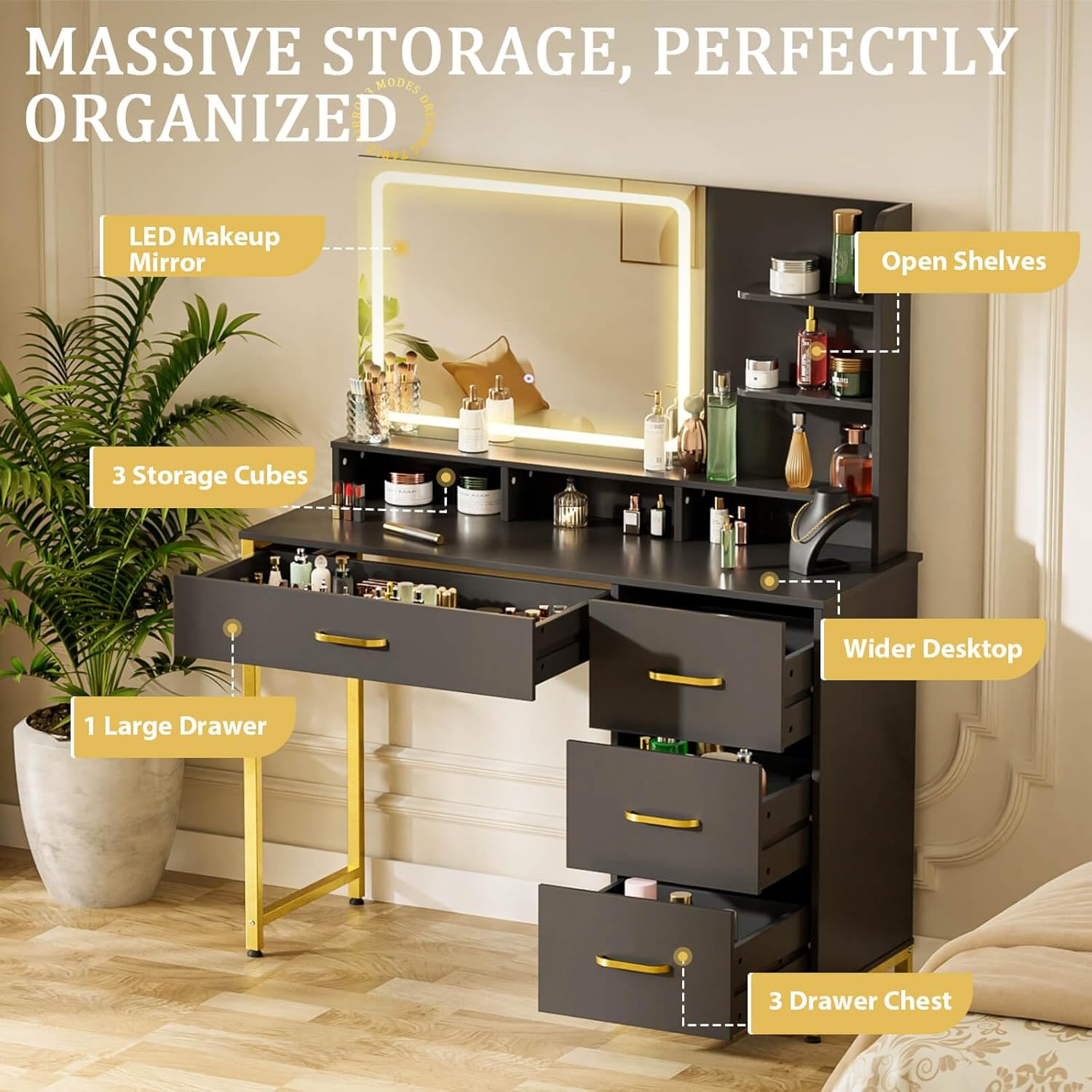
Image: Overview of the vanity's storage compartments, including drawers and open shelves.
Installation Video:
Video: Step-by-step installation instructions for the COMHOMA Vanity Desk.
Operating Instructions
The vanity desk features an integrated LED mirror with adjustable lighting.
LED Mirror Operation:
- Power On/Off: Ensure the vanity is plugged into a power outlet. Locate the touch screen switch on the mirror. Tap once to turn the lights on or off.
- Adjusting Color Modes: The mirror offers three color modes: warm yellow, warm white, and cool white. Short press the touch switch to cycle through these modes.
- Adjusting Brightness: To adjust the brightness, long press the touch switch. The brightness will gradually increase or decrease. Release the switch when the desired brightness level is reached.
Visual Guide: Mirror Lighting Modes

Image: Demonstration of the three color lighting modes and brightness adjustment for the LED mirror.
Maintenance
Proper care will extend the life and appearance of your vanity desk.
- Cleaning: Wipe surfaces with a soft, damp cloth. Avoid abrasive cleaners or harsh chemicals that may damage the finish. For the mirror, use a glass cleaner and a lint-free cloth.
- Dusting: Regularly dust all surfaces with a dry, soft cloth.
- Spills: Clean up spills immediately to prevent staining or damage to the wood.
- Drawer Care: Ensure drawers glide smoothly. Do not overload drawers to prevent damage to the runners.
- Electrical Components: Keep the mirror's electrical components dry. Do not attempt to repair the LED lighting system yourself; contact customer support if issues arise.
Troubleshooting
If you encounter issues with your vanity desk, refer to the following common problems and solutions:
| Problem | Possible Cause | Solution |
|---|---|---|
| LED mirror lights do not turn on. | Not plugged in; power outage; faulty connection. | Check power cord connection. Ensure outlet has power. Verify mirror cable is securely connected. |
| LED mirror lights flicker. | Loose wiring; internal component issue. | Unplug and re-plug the vanity. If flickering persists, contact customer support. Do not attempt internal repairs. |
| Drawers are difficult to open/close. | Overloaded; misaligned during assembly; debris in runners. | Reduce drawer contents. Check assembly for proper alignment. Clean drawer runners. |
| Vanity feels wobbly. | Loose screws; uneven floor; adjustable leg pads not set. | Tighten all assembly screws. Adjust the leg pads to stabilize the desk on uneven surfaces. |
| Parts do not fit during assembly. | Mislabeled parts; incorrect orientation. | Double-check part numbers against the manual. Ensure parts are oriented correctly as shown in diagrams. Refer to the installation video for visual guidance. |
If the problem persists after attempting these solutions, please contact COMHOMA customer support for further assistance.
Specifications
Key specifications for the COMHOMA Vanity Desk Model B1006:
- Model Number: B1006
- Color: Black
- Material: Engineered Wood, Metal
- Product Dimensions (D x W x H): 35.43" x 15.74" x 54.72"
- Item Weight: 49 Pounds
- Number of Drawers: 4
- Mirror Features: Large HD Mirror, 3 Color Modes (Warm Yellow, Warm White, Cool White), Adjustable Brightness, Touch Screen Switch
- Included Components: Gold Metal Frame, LED Mirror
- Assembly Required: Yes
Visual Guide: Key Features

Image: Details on convenient shelves, smooth-glide drawers, and adjustable leg pads.
Visual Guide: Construction Details

Image: Information on the heavy-duty structure, premium metal handles, and sustainable engineered wood.
Warranty and Support
COMHOMA is committed to providing quality products and customer satisfaction. While specific warranty details are not provided in this manual, if you have any concerns or require assistance with your vanity desk, please contact COMHOMA customer support.
For support, please refer to the contact information provided at the point of purchase or on the official COMHOMA website.
