
Introduction
This manual provides essential instructions for the safe and efficient use of your Tesla Mobile Connector. Please read this manual thoroughly before operating the device and retain it for future reference.
Product Overview
The Tesla Mobile Connector is a portable Level 2 electric vehicle charger designed for use with all Tesla models equipped with a NACS (North American Charging Standard) port. It offers flexible charging solutions at home or on the go.

Image: The Tesla Mobile Connector cable, NACS charging handle, and two interchangeable wall adapters (NEMA 5-15 and NEMA 14-50).
What's in the Box
- 1x Tesla Mobile Connector (20-foot cable)
- 1x NEMA 5-15 Adapter (for standard 120V outlets)
- 1x NEMA 14-50 Adapter (for 240V outlets)
- 1x Storage Bag
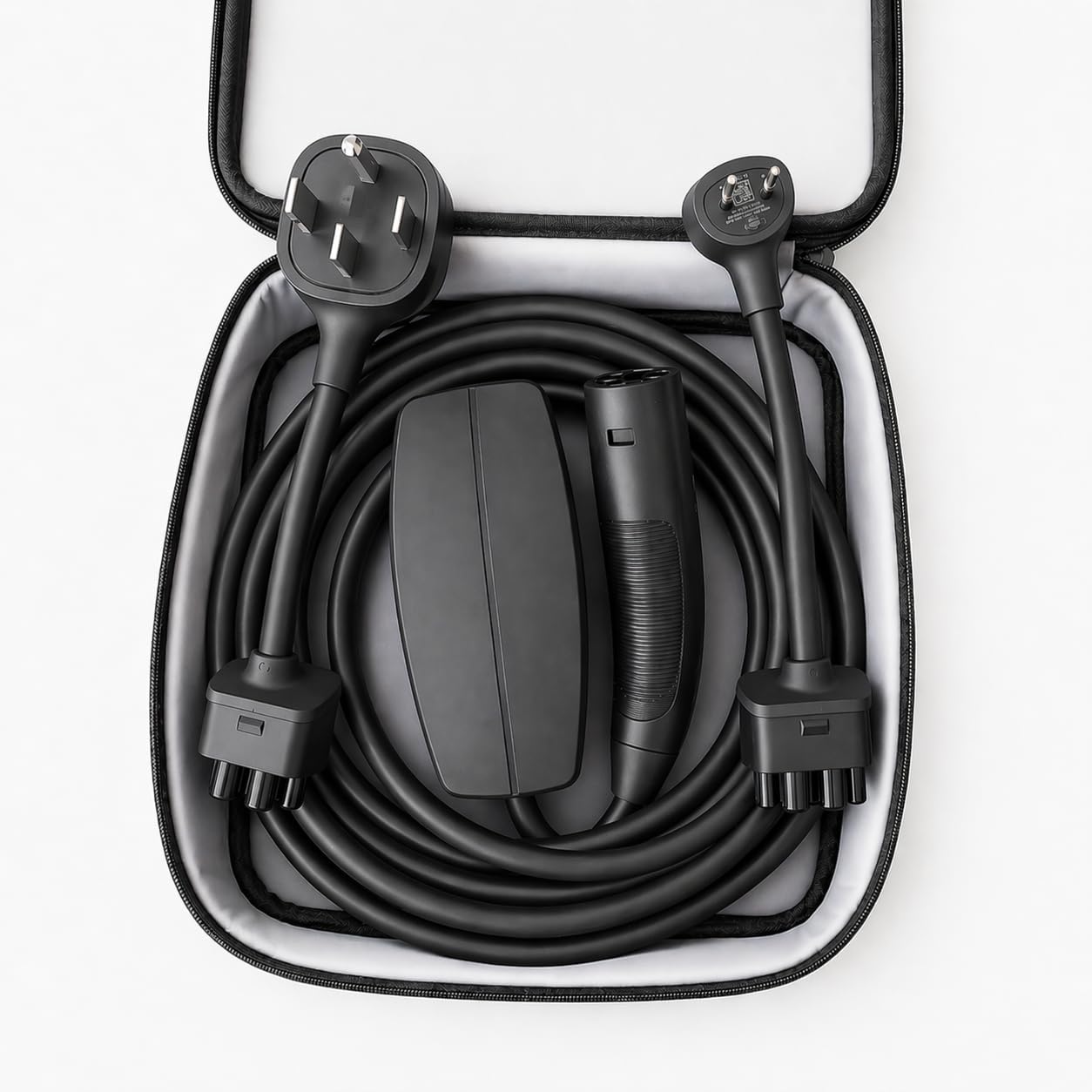
Image: The Tesla Mobile Connector, NEMA 5-15 adapter, and NEMA 14-50 adapter neatly packed inside the provided storage bag.
Safety Information
Always follow these safety guidelines to prevent injury or damage to the product or vehicle:
- Do not use the Mobile Connector if it appears damaged, frayed, or has exposed wiring.
- Ensure the wall outlet is properly grounded and rated for the adapter being used.
- Avoid using extension cords or adapters not supplied by Tesla.
- Keep the Mobile Connector away from water, flammable liquids, and extreme temperatures.
- Do not attempt to open, disassemble, or modify the Mobile Connector.
- Supervise children around the charging equipment.
- Always disconnect the Mobile Connector from the wall outlet before cleaning or maintenance.
Setup
- Select the Correct Adapter: Choose either the NEMA 5-15 adapter for standard 120V household outlets or the NEMA 14-50 adapter for 240V high-power outlets. The NEMA 14-50 adapter provides significantly faster charging.
- Attach the Adapter: Align the chosen adapter with the Mobile Connector's plug end and push firmly until it clicks into place. Ensure a secure connection.
- Plug into Wall Outlet: Insert the adapter into the appropriate wall outlet. The Mobile Connector's indicator light will illuminate, indicating it is ready for use.

Image: A white Tesla Model 3 connected to the Mobile Connector, which is plugged into a standard 120V NEMA 5-15 wall outlet.
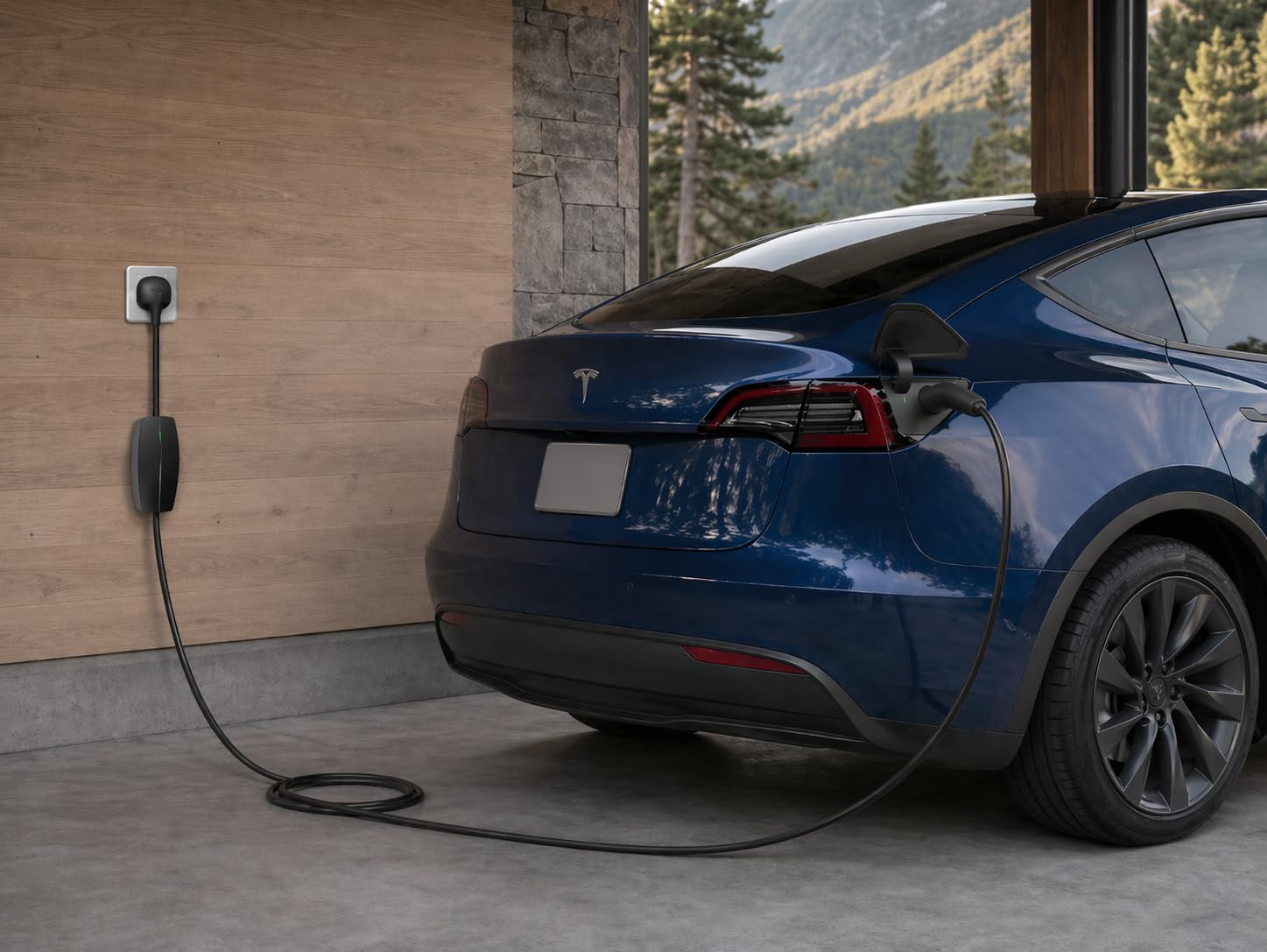
Image: A blue Tesla Model Y connected to the Mobile Connector, which is plugged into a 240V NEMA 14-50 wall outlet.
Operating Instructions
- Connect to Vehicle: Open your Tesla's charge port door. Insert the NACS charging handle firmly into the vehicle's charge port until it clicks.
- Initiate Charging: The vehicle will automatically begin charging. The Mobile Connector's indicator light and your vehicle's charge port light will show charging status. Refer to your Tesla's owner's manual for specific charging indicators.
- Monitor Charging: You can monitor charging progress via your vehicle's touchscreen or the Tesla mobile app.
- Disconnect from Vehicle: When charging is complete, or if you need to stop charging, press the button on the NACS charging handle to release the latch. Pull the handle straight out of the charge port.
- Store the Connector: After disconnecting, coil the cable neatly and store the Mobile Connector and adapters in the provided storage bag to protect them from damage.
Note on Charging Speed: The charging speed (up to 32A) depends on the adapter used and the available power from your wall outlet. The NEMA 14-50 adapter provides significantly faster charging than the NEMA 5-15 adapter.
Maintenance
- Cleaning: Wipe the Mobile Connector and cable with a soft, dry cloth. Do not use abrasive cleaners, solvents, or immerse in water. Ensure the connector is unplugged from the wall before cleaning.
- Cable Care: Avoid kinking, bending, or driving over the cable. Always coil the cable loosely when storing to prevent damage.
- Storage: Store the Mobile Connector in a cool, dry place, preferably in its storage bag, when not in use. Protect it from direct sunlight and extreme temperatures.
Troubleshooting
If you encounter issues with your Mobile Connector, try the following steps:
- No Power/Indicator Light Off:
- Ensure the adapter is fully seated into the Mobile Connector.
- Verify the Mobile Connector is securely plugged into a functional wall outlet.
- Check the circuit breaker for the outlet; reset if tripped.
- Vehicle Not Charging:
- Ensure the NACS charging handle is fully inserted into the vehicle's charge port.
- Check your vehicle's charging settings (e.g., scheduled charging).
- Try disconnecting and reconnecting the Mobile Connector from both the wall and the vehicle.
- Slow Charging:
- Confirm you are using the NEMA 14-50 adapter and a 240V outlet for optimal speed.
- Ensure the outlet is not shared with other high-power appliances.
If the issue persists, contact Tesla Support for further assistance.
Specifications
| Brand | Tesla |
| Model Name | Mobile Connector |
| Model Number | 1991254-00-A |
| Connector Type | NACS |
| Amperage | Up to 32 A |
| Wattage | 7680 watts |
| Output Voltage | 240 volts AC |
| Cable Length | 20 feet |
| Included Components | Mobile Connector, NEMA 5-15 Adapter, NEMA 14-50 Adapter, Storage Bag |
Warranty Information
The Tesla Mobile Connector is covered by a 1 Year Manufacturer Limited Warranty. For detailed terms and conditions, please refer to the official Tesla warranty documentation or contact Tesla Support.
Support
For technical assistance, troubleshooting beyond this manual, or warranty claims, please contact Tesla Support directly. You can find contact information on the official Tesla website:


