
1. Introduction
Thank you for choosing the Vaczon 60" Farmhouse Ceiling Fan with Lights. This manual provides essential information for the safe installation, operation, and maintenance of your new ceiling fan. Please read these instructions thoroughly before beginning installation or use, and retain them for future reference.
This ceiling fan features a durable construction, a reversible DC motor for year-round comfort, 6-speed settings, and convenient control via both a remote and the "FanLamp Pro" mobile application. The dual-finish blades allow for customization to match your interior decor.

Image: Overview of the Vaczon 60" Farmhouse Ceiling Fan highlighting key features such as energy efficiency, quiet operation, and reversible motor.
2. Safety Information
WARNING: To reduce the risk of fire, electric shock, or personal injury, always follow these basic precautions:
- Read all instructions before installing the fan.
- Ensure the installation site is structurally sound and can support the fan's weight.
- All wiring must be in accordance with national and local electrical codes. Consult a qualified electrician if you are unsure.
- Disconnect power at the circuit breaker or fuse box before beginning installation or performing any maintenance.
- Do not operate the fan with damaged wiring or if any parts are missing or damaged.
- Keep hands, clothing, and other objects clear of the fan blades when the fan is in operation.
3. Package Contents
Verify that all components listed below are included in your package. If any parts are missing or damaged, contact Vaczon customer support immediately.
- Ceiling Fan Motor Housing
- 5 Dual-Finish Fan Blades (Matte Black / Maple Wood Grain)
- Light Kit with 2 E12 Lamp Holders (bulbs not included)
- Remote Control
- Receiver for Remote Control/APP
- Downrods (6-inch and 10-inch options)
- Mounting Bracket and Hardware
- Instruction Manual
4. Setup and Installation
This section provides a general overview of the installation process. Refer to the detailed instruction manual included in your package for step-by-step guidance and safety warnings specific to your model.
4.1 Pre-Installation Considerations
- Ceiling Height: Choose the appropriate downrod (6-inch or 10-inch) based on your ceiling height to ensure proper blade clearance.
- Ceiling Type: The fan is suitable for both flat ceilings and sloped ceilings with an angle of up to 15 degrees.
- Electrical Supply: Ensure the electrical box is securely mounted and capable of supporting the fan's weight.
4.2 Installation Steps (Overview)
- Turn off power at the circuit breaker.
- Install the mounting bracket to the ceiling electrical box.
- Assemble the downrod and hang the fan motor assembly.
- Connect the electrical wiring, including the receiver for remote/APP control.
- Attach the fan blades to the motor housing.
- Install the light kit and desired E12 bulbs (not included).
- Secure the canopy and test the fan's operation.

Image: Diagram illustrating the fan's dimensions, available downrod lengths, and suitable ceiling types (flat and sloped up to 15 degrees).
5. Operating Instructions
Your Vaczon ceiling fan offers multiple control options for convenience and comfort.
5.1 Remote Control Operation
The included remote control allows you to manage all fan functions from anywhere in the room. Ensure batteries are correctly inserted.

Image: Detailed view of the remote control with labels for each button's function, including power, light, fan speed, direction, and timer.
- Power ON/OFF: Turns the fan and light on or off.
- Light ON/OFF: Controls the light independently.
- Fan Speed Setting: Adjusts fan speed from 1 (lowest) to 6 (highest).
- Forward/Reverse (F/R): Changes the direction of blade rotation for summer or winter mode.
- Timer Settings (1H, 2H, 4H): Sets the fan to turn off automatically after 1, 2, or 4 hours.
- Sound ON/OFF: Toggles audible feedback from the fan.
- Fan Stopped: Stops the fan blades.
5.2 "FanLamp Pro" APP Control
Download the "FanLamp Pro" application on your smartphone to control the fan. The app offers similar functionalities to the remote control, including fan speed adjustment, light control, and timer settings. The fan also features a memory function that recalls your last settings upon restart.
5.3 Reversible DC Motor (Summer/Winter Modes)
The reversible DC motor allows you to optimize air circulation for different seasons:
- Summer Mode (Downdraft): Blades rotate counter-clockwise, pushing cool air downwards to create a refreshing breeze.
- Winter Mode (Updraft): Blades rotate clockwise, drawing cool air up towards the ceiling and circulating warm air downwards, helping to distribute heat more evenly.
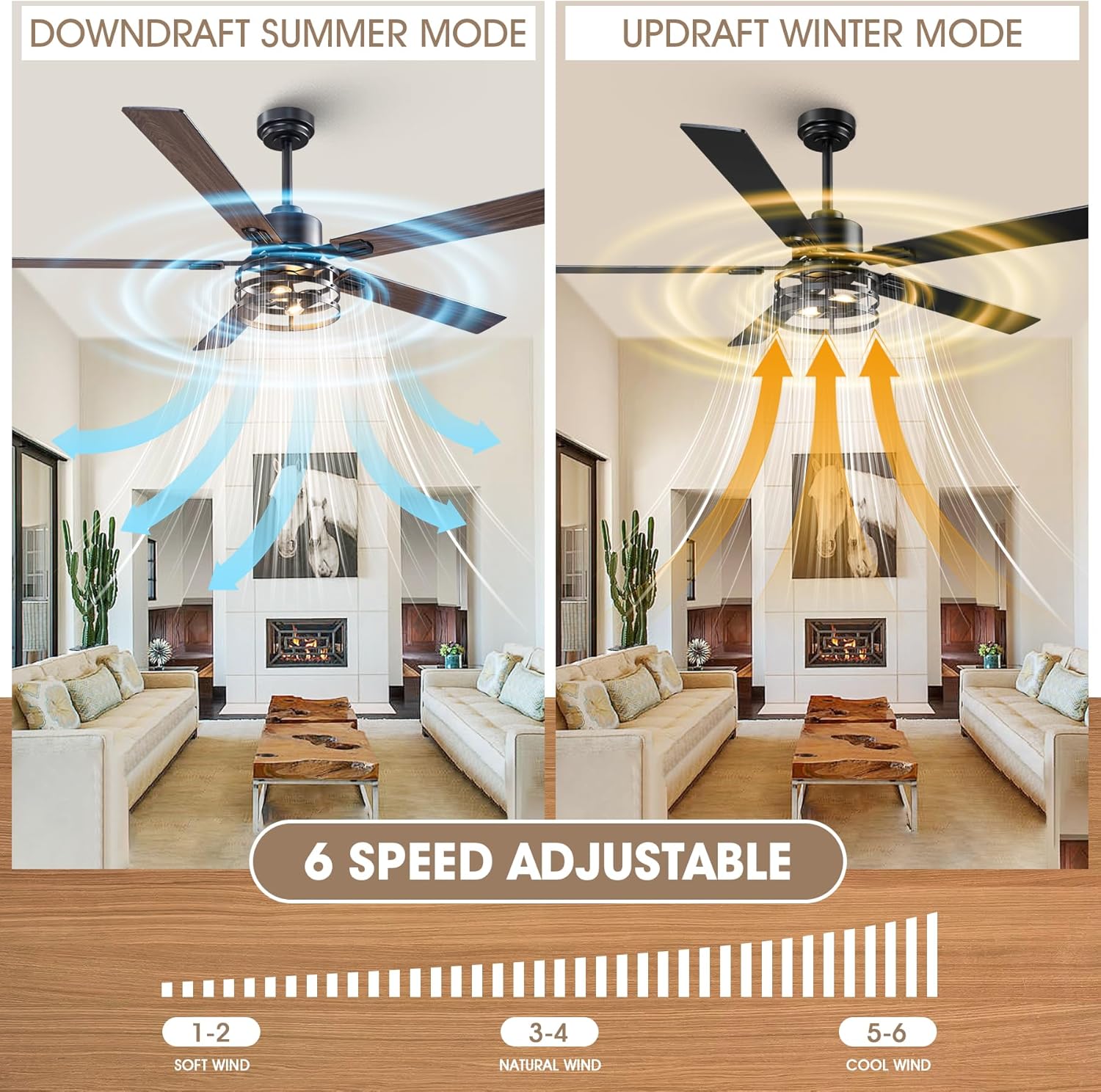
Image: Illustration of the fan's reversible motor function, demonstrating downdraft for summer cooling and updraft for winter heat circulation, along with the 6-speed adjustment scale.
5.4 Dual-Finish Blades
The fan comes with 5 dual-finish blades, featuring matte black on one side and maple wood grain on the other. You can choose the side that best complements your room's aesthetic during installation.

Image: Close-up view of the dual-sided fan blades, showcasing the maple wood and matte black finishes.
6. Maintenance
Regular maintenance ensures optimal performance and extends the lifespan of your ceiling fan.
- Cleaning: Periodically clean the fan blades and motor housing with a soft, damp cloth. Do not use abrasive cleaners or solvents. Ensure the power is off before cleaning.
- Tightening Fasteners: Check all screws and fasteners annually to ensure they are secure. Loose connections can cause noise and wobble.
- Light Bulbs: Replace E12 bulbs as needed. Always turn off power before changing bulbs.
7. Troubleshooting
If you encounter issues with your fan, refer to the following common problems and solutions. For persistent issues, contact customer support.
| Problem | Possible Cause | Solution |
|---|---|---|
| Fan does not start | No power supply; Loose wiring; Remote control battery dead; Receiver not paired. | Check circuit breaker; Verify all wire connections; Replace remote battery; Re-pair remote/receiver (refer to detailed manual). |
| Fan wobbles | Loose blades or mounting hardware; Unbalanced blades. | Ensure all blade screws and mounting screws are tight; Use a blade balancing kit (if included or purchased separately). |
| Light does not work | Bulbs faulty or loose; Wiring issue; Light switch on remote/app off. | Check/replace bulbs; Verify light kit wiring; Ensure light is turned on via remote/app. |
| Remote control not working | Dead battery; Obstruction; Receiver issue. | Replace remote battery; Ensure clear line of sight to fan; Check receiver connections. |
8. Specifications
| Brand | Vaczon |
| Model Number | VCZ099BK |
| Product Dimensions | 60"D x 60"W x 18.9"H |
| Color | Black/Maple |
| Material | Iron, Aluminum, Copper, MDF (Blades: Plastic) |
| Power Source | DC |
| Wattage | 21 watts |
| Number of Blades | 5 |
| Number of Speeds | 6 |
| Air Flow Capacity | 3726 Cubic Feet Per Minute |
| Control Method | Remote, App ("FanLamp Pro") |
| Light Type | LED (E12 lamp holders, bulbs not included) |
| Indoor/Outdoor Usage | Indoor |
9. Warranty and Support
For warranty information and customer support, please refer to the documentation included with your product or visit the official Vaczon website. Typically, warranty details cover manufacturing defects for a specified period from the date of purchase.
If you require assistance with installation, operation, or troubleshooting that is not covered in this manual, please contact Vaczon customer service. Have your model number (VCZ099BK) and purchase date ready when contacting support.
