
1. Introduction
Thank you for choosing the Monster Open Ear AC336 Headphones. These wireless earbuds are designed to provide a comfortable listening experience with open-ear design, advanced Bluetooth 6.0 connectivity, and clear audio for music and calls. This manual provides detailed instructions for setup, operation, and maintenance to ensure optimal performance.

Image 1.1: Monster Open Ear AC336 Headphones and Charging Case.
2. Product Overview
2.1 Key Features
- Open-Ear Design: Provides comfort and situational awareness.
- Bluetooth 6.0: Ensures fast, stable, and efficient wireless connectivity.
- Stereo Sound: Delivers clear audio for an immersive listening experience.
- ENC Clear Call: Environmental Noise Cancellation for clear voice calls.
- Extended Playtime: Up to 21 hours of total playback with the charging case.
- Touch Control: Intuitive controls for music playback and call management.
- IPX6 Waterproof: Resistant to sweat and splashes, suitable for outdoor and sports activities.
- Type-C Charging: Modern and convenient charging interface.
2.2 What's in the Box
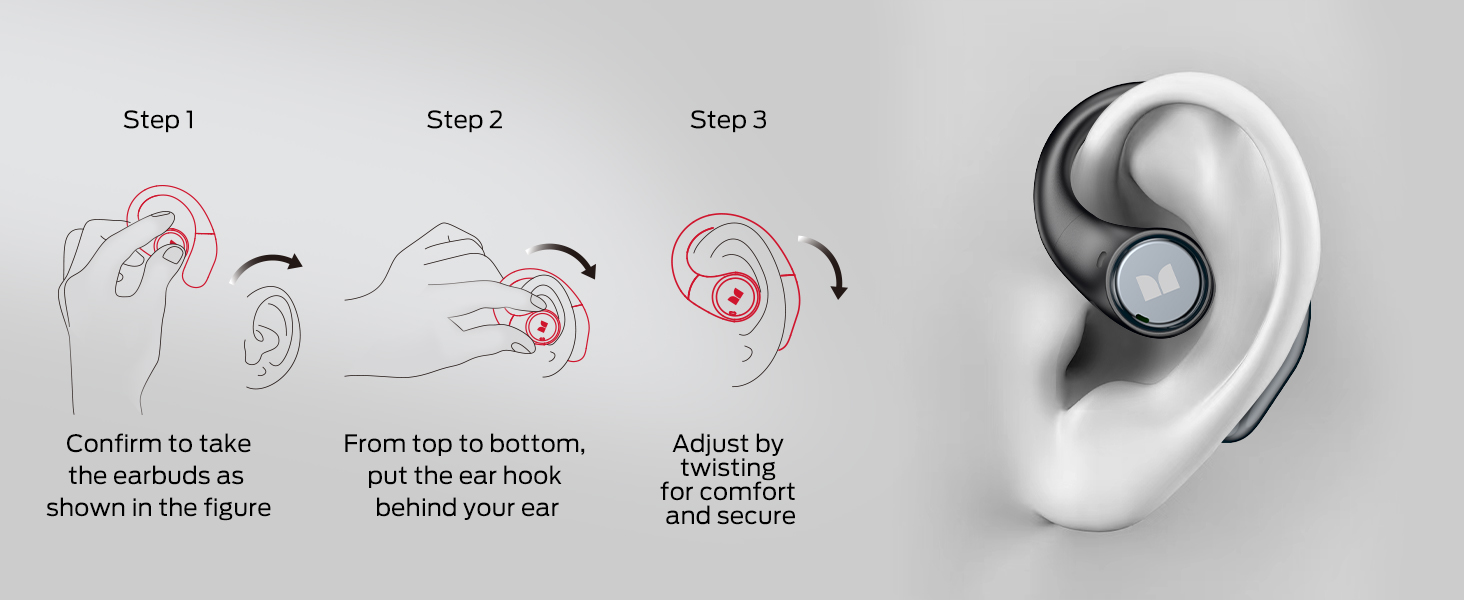
Image 2.1: The product package includes the Monster Open Ear AC336 Headphones, a USB-C charging cable, and a user manual.
- Monster Open Ear AC336 Headphones x 1 pair
- USB-C Cable x 1
- User Manual x 1
3. Setup
3.1 Charging the Earbuds and Case
Before first use, fully charge the earbuds and the charging case. Use the provided USB-C cable to connect the charging case to a power source.

Image 3.1: The charging case being charged via a USB-C cable. A 10-minute charge provides 2 hours of use, with a total of 21 hours of battery life when combined with the fully charged case.
- Place the earbuds into the charging case.
- Connect the USB-C cable to the charging port on the case and to a compatible USB power adapter.
- The indicator light on the charging case will show charging status.
- A full charge provides approximately 7 hours of playback for the earbuds, and the charging case provides an additional 14 hours, totaling 21 hours.
3.2 Pairing with a Bluetooth Device
The earbuds utilize Bluetooth 6.0 for a fast and stable connection.

Image 3.2: Visual representation of the upgraded Bluetooth 6.0 technology, highlighting improved stability, lower latency, reduced power consumption, and longer transmission range compared to Bluetooth 5.0.
- Open the charging case. The earbuds will automatically enter pairing mode.
- On your device (smartphone, tablet, laptop), enable Bluetooth.
- Search for available Bluetooth devices and select "Monster Open Ear AC336" or "Monster E89" from the list.
- Once connected, you will hear an audio prompt, and the indicator lights on the earbuds will change.
For a visual guide on pairing and features, please refer to the official product videos below:
Video 3.1: Official Monster E89 Brand Video. This video provides an overview of the headphones' features, including design, comfort, and connectivity.
Video 3.2: Monster E89 Product Overview. A brief video showcasing the earbuds' design and different color options.
4. Operating Instructions
4.1 Wearing the Earbuds
The Monster Open Ear AC336 headphones feature an ergonomic open-ear design for comfort and stability.

Image 4.1: A person wearing the open-ear headphones, illustrating the comfortable fit. The image also details the flexible memory-rebound material, special angle for comfortable wearing, and adaptable earhook design.
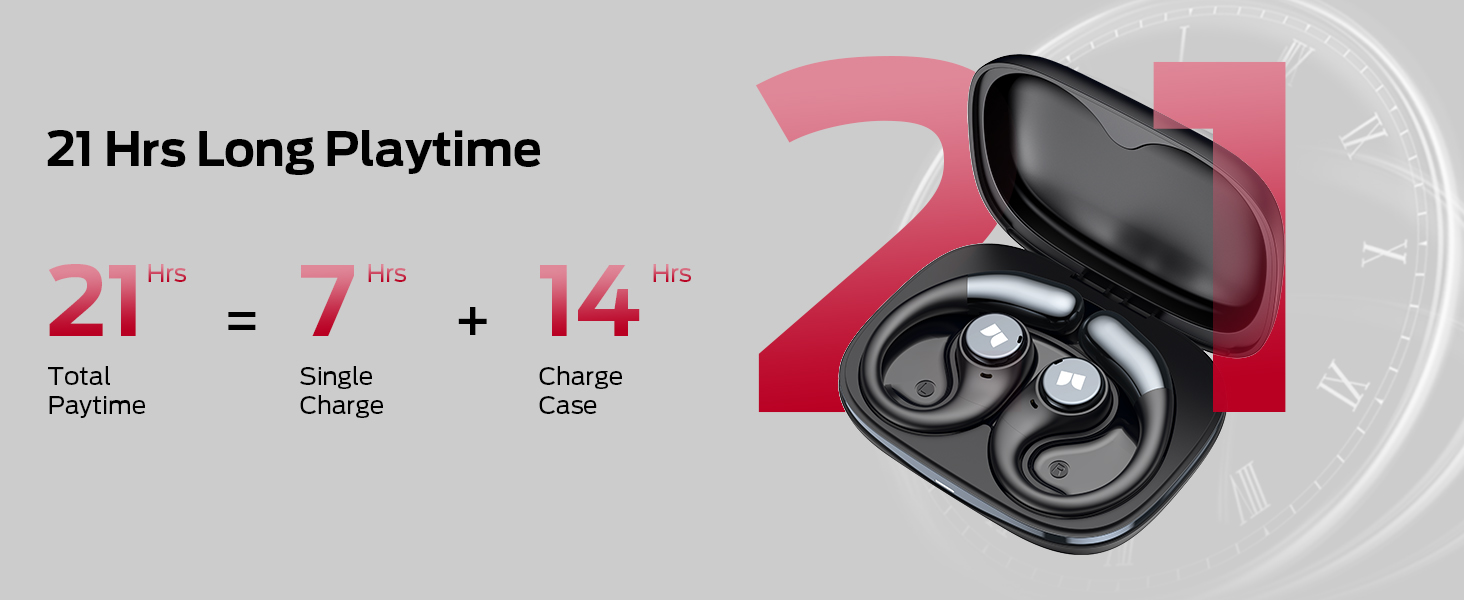
Image 4.2: Step-by-step guide for wearing the earbuds: 1. Confirm earbud orientation. 2. Place the ear hook behind your ear. 3. Adjust by twisting for comfort and security.
4.2 Touch Controls
The earbuds feature intuitive touch controls for managing audio and calls.

Image 4.3: Diagram illustrating the touch control functions for both left (L) and right (R) earbuds.
| Action | Function |
|---|---|
| Click x 2 (R/L) | Answer Call |
| Hold x 2s (R/L) | Reject Call |
| Hold x 2s (R/L) | Activate Voice Assistant |
| Click x 2 (R/L) | Play/Pause Music |
| Click x 3 (L) | Previous Song |
| Click x 3 (R) | Next Song |
| Click x 1 (L) | Volume Down |
| Click x 1 (R) | Volume Up |
4.3 Audio Quality and Call Functionality
The headphones are equipped with 13mm customized dynamic drivers for clear stereo sound and Environmental Noise Cancellation (ENC) for calls.
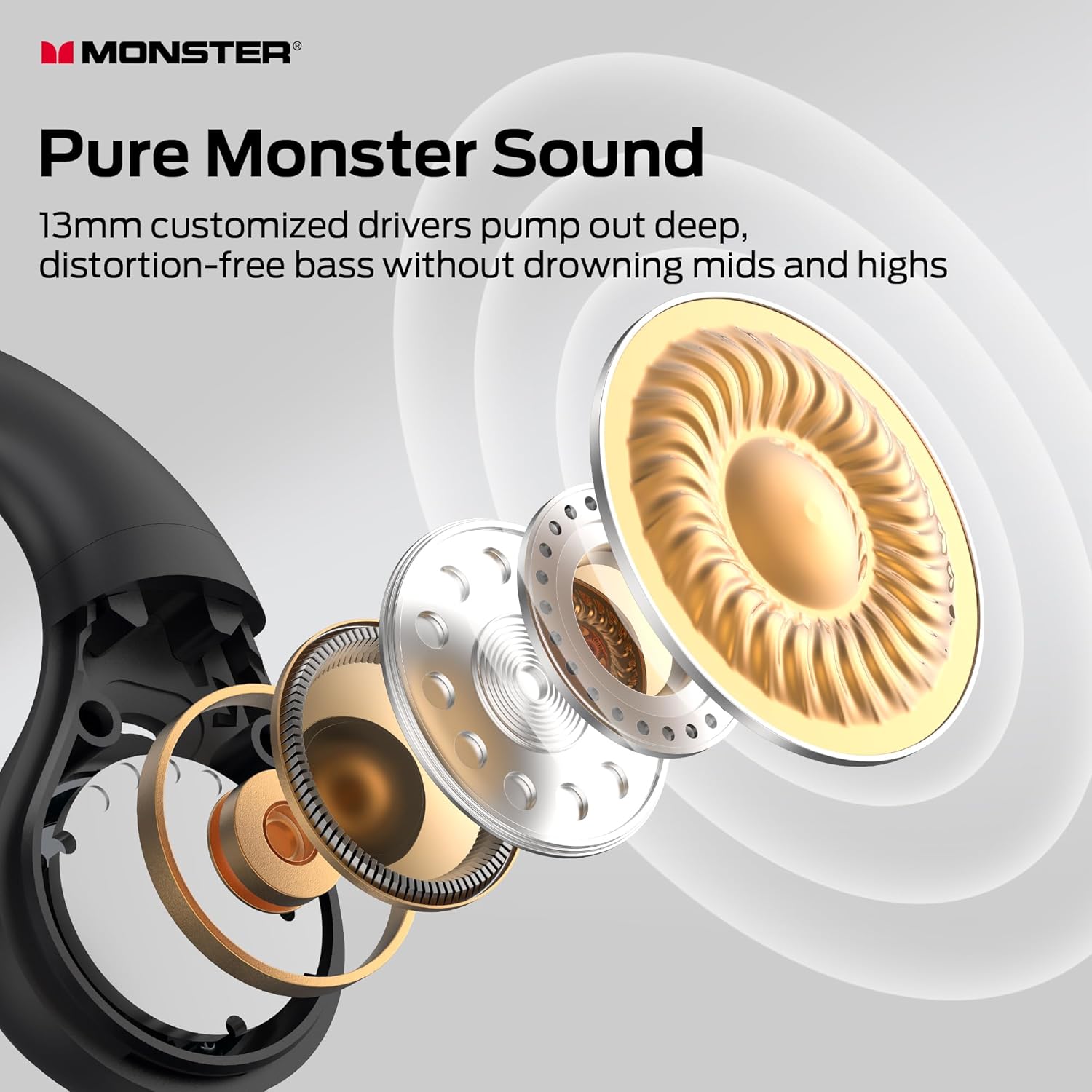
Image 4.4: An exploded view illustrating the 13mm customized drivers designed to deliver clear audio.
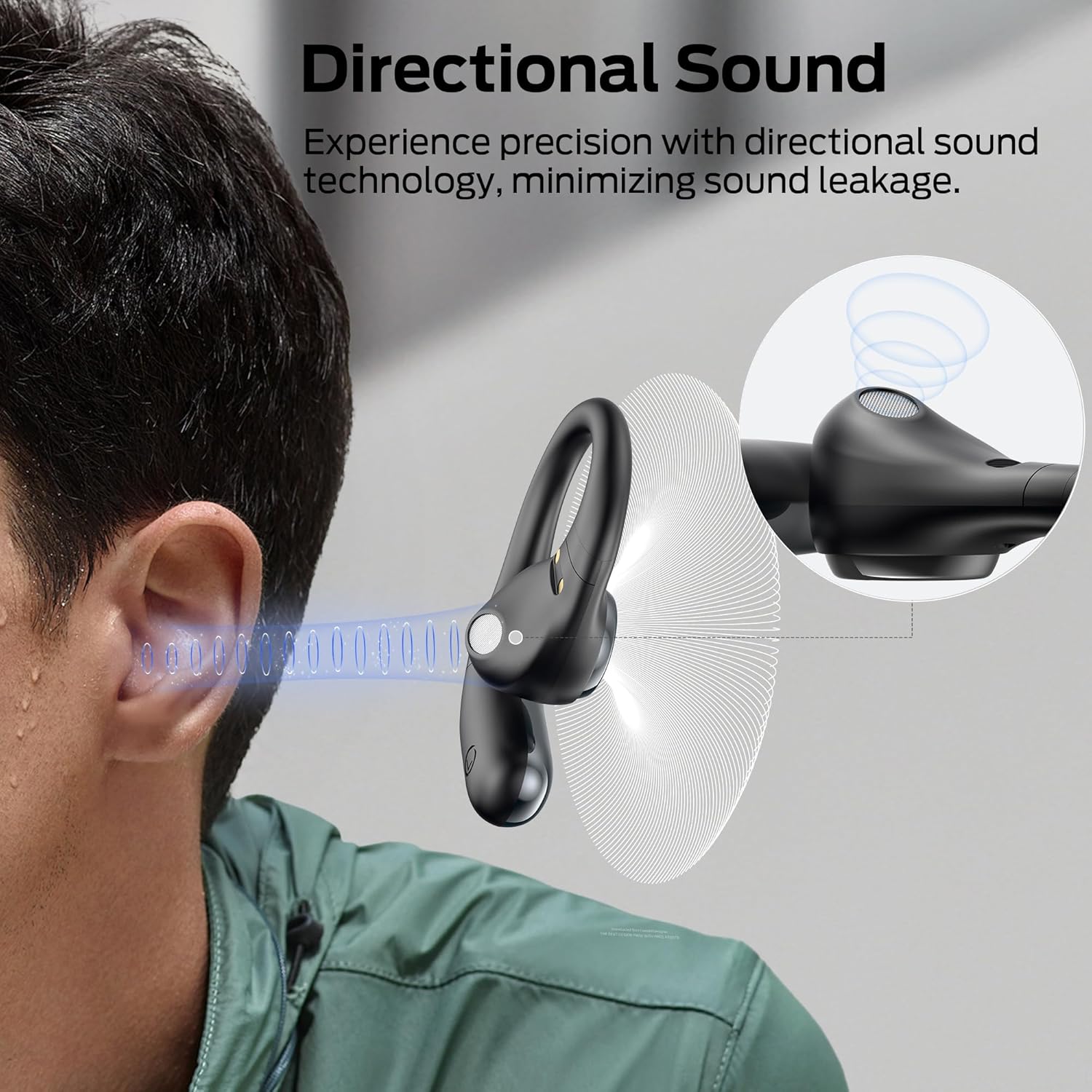
Image 4.5: Illustration of the directional sound technology, which aims to minimize sound leakage and enhance the listening experience.
5. Maintenance
5.1 Cleaning
- Gently wipe the earbuds and charging case with a soft, dry, lint-free cloth.
- Avoid using abrasive materials, solvents, or chemical cleaners.
- Do not allow liquids to enter any openings.
5.2 Storage
- When not in use, store the earbuds in their charging case to protect them and keep them charged.
- Store in a cool, dry place away from extreme temperatures and direct sunlight.
5.3 Water Resistance
The earbuds are IPX6 water resistant, meaning they can withstand high-pressure water jets from any direction. This makes them suitable for workouts and outdoor activities where they might be exposed to sweat or light rain.

Image 5.1: The earbuds shown with water droplets, demonstrating their IPX6 water-resistant rating, suitable for protection against rain, humidity, and moisture.
- Do not submerge the earbuds in water.
- Ensure the earbuds are dry before placing them back into the charging case to prevent damage.
6. Troubleshooting
If you encounter issues with your Monster Open Ear AC336 Headphones, please refer to the following common solutions:
- No Sound: Ensure the earbuds are charged, properly paired, and the volume on both the earbuds and your device is turned up.
- Cannot Pair: Make sure Bluetooth is enabled on your device and the earbuds are in pairing mode. Try turning Bluetooth off and on again on your device. If issues persist, reset the earbuds (refer to specific reset instructions if available in a quick start guide).
- Intermittent Connection: Ensure there are no obstructions between the earbuds and your device. Keep the device within the Bluetooth range. Avoid strong electromagnetic interference.
- Charging Issues: Check the USB-C cable and power adapter. Ensure the charging contacts on the earbuds and case are clean and free of debris.
- Unresponsive Touch Controls: Ensure your fingers are clean and dry. Try restarting the earbuds by placing them in the case and taking them out again.
For further assistance, please contact Monster customer support.
7. Specifications
| Feature | Detail |
|---|---|
| Model Name | E89 |
| Connectivity Technology | Wireless |
| Wireless Communication Technology | Bluetooth |
| Bluetooth Version | 6.0 |
| Compatible Devices | Smartphones, Laptops, Tablets, Smart Speakers, Televisions, Vehicles |
| Item Weight | 5.6 ounces (0.16 Kilograms) |
| Water Resistance Level | Waterproof (IPX6) |
| Control Method | Touch |
| Battery Life | 21 Hours (with charging case) |
| Audio Driver Type | Dynamic Driver (13mm) |
| Ear Placement | Open Ear |
| Form Factor | Open Ear |
| Product Dimensions | 1.02 x 0.6 x 0.3 inches |
| Manufacturer | Monster |
| Color | Black |
8. Warranty and Support
Monster products are designed and manufactured to the highest quality standards. For warranty information and customer support, please refer to the documentation included with your product or visit the official Monster website.
Please retain your proof of purchase for warranty claims.


