
1. Introduction
This manual provides comprehensive instructions for the assembly, operation, maintenance, and troubleshooting of your FLEXISPOT SF6 Cloud Sectional Couch. Please read this guide thoroughly before assembly and use to ensure proper setup and longevity of your product.

Image 1.1: The FLEXISPOT SF6 Cloud Sectional Couch in Grey, showcasing its L-shaped configuration with an ottoman.
2. Product Components and Dimensions
The FLEXISPOT SF6 Cloud Sectional Couch is delivered in three compact boxes for ease of transport and assembly. Ensure all components are present before beginning assembly.
2.1. Package Contents
- Modular Sofa Sections (3 total)
- Reversible Ottoman (1)
- Back Cushions (3 total)
- Seat Cushions (3 total)
- Armrests (2)
- Sofa Legs (16 total)
- Support Blocks and Screws
- Seat Frame Connectors
- Tea Table Board (for ottoman conversion)
2.2. Product Dimensions
- Sofa: 100.4" L x 51.2" W x 45.7" H
- Ottoman: 34.25" W x 22.83" D x 18.90" H
- Seat Height: 18.9 Inches
- Item Weight: 165 Pounds
- Seating Capacity: 4

Image 2.1: Detailed product dimensions for the sofa and ottoman.
3. Assembly Instructions
Assembly is tool-free. Follow these steps carefully. Cushions are vacuum-packed and require 24-48 hours to fully expand after opening.
3.1. Unboxing and Preparation
- Carefully open all three boxes and remove all components.
- Lay out all parts and verify against the component list.
- Locate the vacuum-packed cushions. Open their packaging and gently fluff them to aid in expansion. Allow 24-48 hours for full expansion.
3.2. Installing Sofa Legs
- For each sofa section and the ottoman, turn the base upside down.
- Attach the wooden legs by twisting them into the designated holes at each corner until secure. Ensure the protective pads are in place.
3.3. Assembling Modular Sections
- Position the sofa sections in your desired configuration (e.g., L-shape, straight line).
- Align the seat frames. Lift one side of the sofa slightly for easier access.
- Connect adjacent sofa sections using the provided seat frame connectors. Slide and clip them together securely.
3.4. Attaching Armrests and Backrests
- For each armrest and backrest, insert the padded armrest/backrest into its corresponding cloth cover. Ensure the zipper is fully closed.
- Locate the pre-drilled holes on the underside of the armrests and backrests.
- Align the backrest slot-in mechanism with the corresponding slots on the sofa base and slide into place.
- Secure the armrests and backrests to the sofa base using the provided bolts and screws.

Image 3.1: Visual guide for connecting sofa modules and installing legs.
3.5. Placing Cushions
- Once the sofa frame is assembled, place the expanded seat cushions onto the base.
- Place the expanded back cushions against the backrests.
3.6. Assembly Video Guide
Video 3.1: A detailed video guide demonstrating the assembly process for the FLEXISPOT SF6 Cloud Sectional Couch.
4. Operation and Features
4.1. Modular Configuration
The FLEXISPOT SF6 is a modular sectional sofa, allowing for flexible layouts. You can rearrange the sections to create a chaise lounge, a U-shaped sofa, or a straight-line sofa to suit your space and needs.

Image 4.1: Examples of various modular configurations possible with the SF6 sectional couch.
4.2. 3-in-1 Reversible Ottoman
The included ottoman offers three functionalities:
- Footrest: Use it as a comfortable extension for lounging.
- Coffee Table: Flip the top cushion to reveal a sturdy wooden tray surface.
- Hidden Storage: Lift the top to access a convenient storage space for blankets, remotes, or other items.
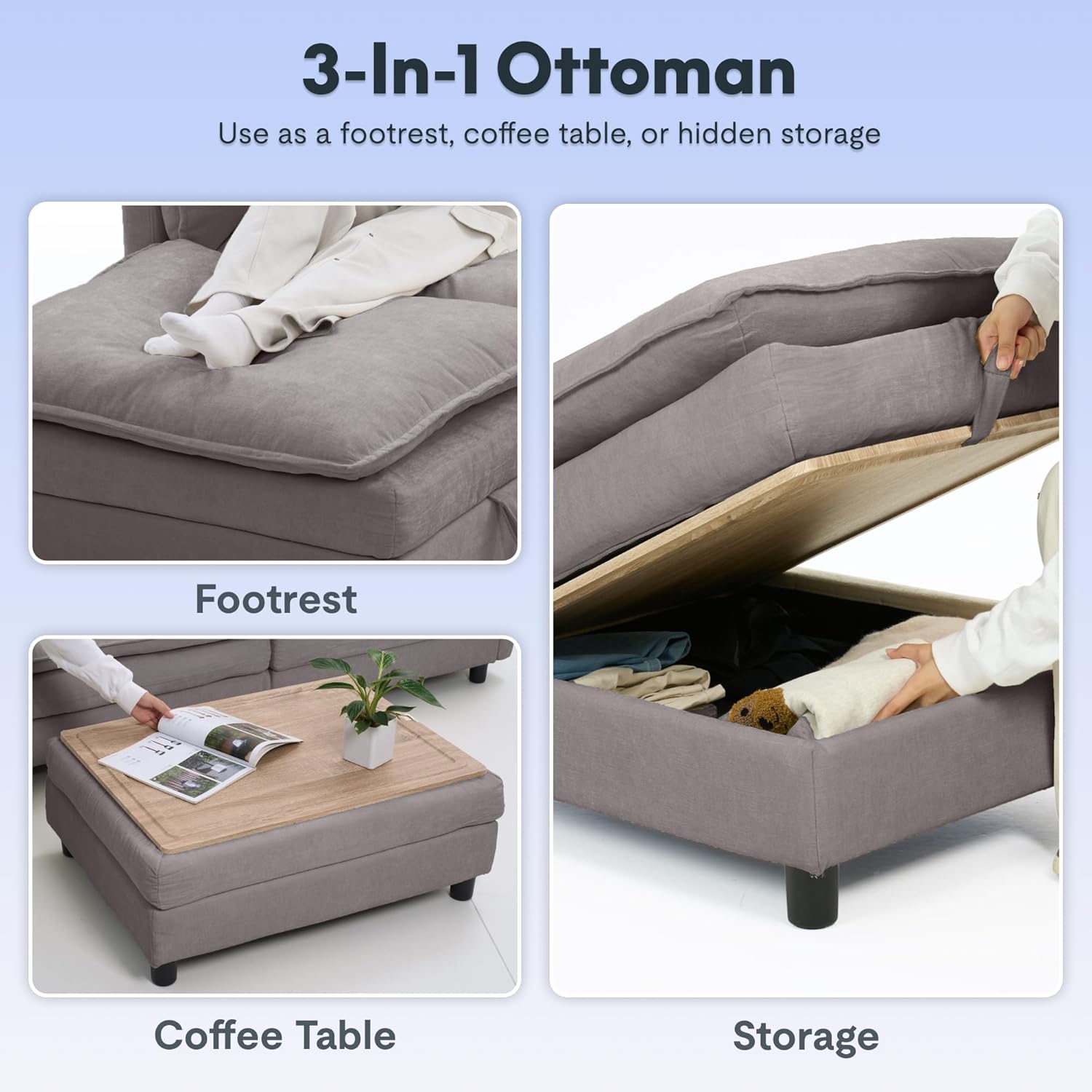
Image 4.2: The versatile 3-in-1 ottoman functioning as a footrest, coffee table, and storage unit.
4.3. Ottoman Functionality Video
Video 4.1: This video demonstrates the conversion of the ottoman from a coffee table to a footrest and highlights its hidden storage feature.
5. Maintenance and Care
Proper care will extend the life and appearance of your FLEXISPOT SF6 Cloud Sectional Couch.
5.1. General Cleaning
- Removable Covers: The cushion covers are removable for easy cleaning. Follow the care instructions on the fabric label. Typically, machine wash cold on a gentle cycle and air dry.
- Spot Cleaning: For minor spills, blot immediately with a clean, dry cloth. Avoid rubbing, which can spread the stain. Use a mild fabric cleaner if necessary, testing on an inconspicuous area first.
- Vacuuming: Regularly vacuum the sofa using a soft brush attachment to remove dust and debris.
5.2. Fabric Type
The sofa is upholstered in breathable chenille fabric, known for its soft and skin-friendly texture.

Image 5.1: Product details highlighting the plush armrest, supportive backrest, high-density seat, and removable cover for easy maintenance.
6. Troubleshooting
Here are solutions to common concerns:
- Cushions appear flat or compressed: The cushions are vacuum-packed for shipping. After opening, gently pat and fluff them. Allow 24-48 hours for them to fully expand and regain their shape.
- Sofa sections are not aligning properly: Ensure all seat frame connectors are securely clipped into place. Lift one side of the sofa slightly to adjust alignment if needed.
- Sofa feels unstable: Verify that all sofa legs are securely tightened and that the support blocks (if applicable) are correctly installed and fastened.
7. Specifications
| Feature | Detail |
|---|---|
| Brand | FLEXISPOT |
| Model | SF6 |
| Type | Sectional |
| Color | Grey |
| Upholstery Fabric Type | Chenille |
| Frame Material Type | Wood |
| Fill Material | High Density Foam |
| Cushion Construction | High-density foam cushions |
| Item Firmness Description | Soft |
| Special Feature | 3-in-1 Ottoman, Easy to Assemble, Removable Cover |
| Assembly Required | Yes |
| Includes All Assembly Tools | Yes |
| UPC | 840460452724 |
8. Warranty and Support
8.1. Warranty Information
This FLEXISPOT product comes with a Limited Warranty. Please refer to the warranty documentation included with your purchase for specific terms and conditions.
8.2. Customer Support
For any questions, assistance, or support regarding your FLEXISPOT SF6 Cloud Sectional Couch, please contact us:
- Email: contact@flexispot.com
- Phone: +1 (855) 585-5618