XIAOMI Redmi 15C

XIAOMI Redmi 15C 4G LTE User Manual

Model: Redmi 15C (25078RA3EL)

Introduction

Welcome to the user manual for your new XIAOMI Redmi 15C 4G LTE smartphone. This guide provides essential information on setting up, operating, maintaining, and troubleshooting your device. Please read this manual carefully to ensure optimal performance and longevity of your phone.

The Redmi 15C features a quad-curved design for comfortable handling, IP64 dust and water resistance, a 50MP AI dual camera system, and creative AI tools for effortless editing. It is powered by a massive 6000mAh (typ) battery with 33W turbo charging, designed for extended use.

What's in the Box

Upon unboxing your XIAOMI Redmi 15C, please verify that all the following items are included:

  • XIAOMI Redmi 15C Smartphone
  • 33W Wall Charger
  • Adapter
  • Phone Case

Setup

1. Initial Device Overview

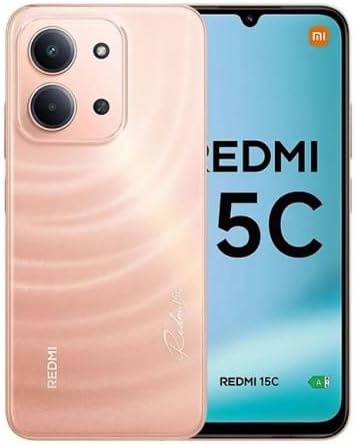
XIAOMI Redmi 15C smartphone in Twilight Orange, showing the front display and the rear camera module.

This image displays the XIAOMI Redmi 15C smartphone in Twilight Orange. The front shows the large display, while the back highlights the camera module and the phone's color. This provides a visual reference for the device's appearance.

Familiarize yourself with the physical layout of your new phone, including button placement, ports, and camera locations.

2. SIM Card Installation

The Redmi 15C supports Dual Nano SIM cards and one Micro SD card. Ensure your carrier is compatible with the device's network bands before installation.

Carrier compatibility chart for XIAOMI Redmi 15C, showing T-Mobile, Mint, Tello, Ultra, and outside USA as compatible, and Verizon, AT&T, Xfinity, Boost, Virgin, Visible, Cricket, and other CDMA carriers as not compatible.

This image illustrates the carrier compatibility for the XIAOMI Redmi 15C. It clearly lists compatible carriers (T-Mobile, Mint, Tello, Ultra, and outside USA networks) and incompatible carriers (Verizon, AT&T, Xfinity, Boost, Virgin, Visible, Cricket, and other CDMA carriers). This is crucial for users to verify network support.

  1. Locate the SIM card tray on the side of your phone.
  2. Insert the SIM ejector tool (or a small paperclip) into the small hole next to the tray and push gently until the tray pops out.
  3. Place your Nano SIM card(s) and/or Micro SD card into the designated slots on the tray, ensuring the gold contacts face downwards.
  4. Carefully push the tray back into the phone until it clicks into place.

3. Powering On/Off

  • To Power On: Press and hold the Power button until the Xiaomi logo appears.
  • To Power Off: Press and hold the Power button until the power menu appears, then select "Power off".
  • To Restart: Press and hold the Power button until the power menu appears, then select "Restart".

Operating Your Device

1. Basic Navigation

Your Redmi 15C runs on Xiaomi HyperOS based on Android 15. Navigation is primarily touch-based:

  • Tap: To select an item or open an app.
  • Swipe: To scroll through screens or lists.
  • Pinch: To zoom in or out on photos and web pages.
  • Long Press: To access contextual menus or move icons.

2. Camera Usage

The phone features a 50MP main camera and an 8MP front camera.

  • Open the "Camera" app from your home screen or app drawer.
  • Switch between photo, video, portrait, and other modes using the options at the bottom of the screen.
  • Tap the shutter button to take a photo or start/stop video recording.
  • Utilize features like HDR mode, Soft-light ring (front camera), and AI tools for enhanced photography.

Rear camera video recording supports 1080p (1920x1080) HD at 30 fps and 720p (1280x720) HD at 30 fps. Front camera video recording also supports 1080p and 720p HD at 30 fps.

3. Connectivity

  • Wi-Fi: Go to Settings > Wi-Fi to connect to available networks. Supports 2.4GHz and 5GHz.
  • Bluetooth: Go to Settings > Bluetooth to pair with other Bluetooth devices (version 5.1).
  • GPS: The device supports GPS, AGPS, GLONASS, Beidou, and Galileo for accurate location services.
  • 3.5mm Headphone Jack: Located on the device for wired audio accessories.

4. Battery Management

Your Redmi 15C is equipped with a 6000mAh (typ) battery and supports 33W turbo charging.

  • Use the included 33W charger for optimal charging speed.
  • To check battery usage, go to Settings > Battery.
  • Enable battery saver modes to extend battery life when needed.

Maintenance

1. Cleaning Your Device

To maintain the appearance and functionality of your phone:

  • Use a soft, lint-free cloth to wipe the screen and body.
  • Avoid using harsh chemicals, abrasive cleaners, or aerosol sprays.
  • For stubborn smudges, slightly dampen the cloth with water or a screen cleaner designed for electronics.

2. Software Updates

Regular software updates provide new features, security enhancements, and bug fixes. It is recommended to keep your device's software up to date.

  • Connect your phone to a stable Wi-Fi network.
  • Go to Settings > About phone > System update to check for and install available updates.

3. Storage Management

Your device comes with 128GB of internal storage. You can expand this using a Micro SD card.

  • To check storage usage, go to Settings > Storage.
  • Regularly clear cache, delete unnecessary files, and uninstall unused apps to free up space.

Troubleshooting

1. Common Issues and Solutions

IssuePossible Solution
Phone not turning onEnsure the battery is charged. Connect to the charger for at least 10 minutes, then try powering on.
Apps crashing or freezingClear the app's cache (Settings > Apps > [App Name] > Storage > Clear cache). If the issue persists, reinstall the app.
Poor network signalCheck SIM card installation. Ensure you are in an area with network coverage. Restart the phone. Verify carrier compatibility (refer to Setup section).
Battery draining quicklyReduce screen brightness, close background apps, disable unnecessary features like GPS or Bluetooth when not in use. Check battery usage in settings to identify power-hungry apps.

2. Factory Reset

A factory reset will erase all data on your phone and restore it to its original factory settings. This can resolve persistent software issues but should be used as a last resort.

  • Backup your data: Before proceeding, back up all important data to a cloud service or computer.
  • Go to Settings > About phone > Factory reset.
  • Follow the on-screen instructions to confirm the reset.

Specifications

Below are the detailed technical specifications for the XIAOMI Redmi 15C (Model: 25078RA3EL).

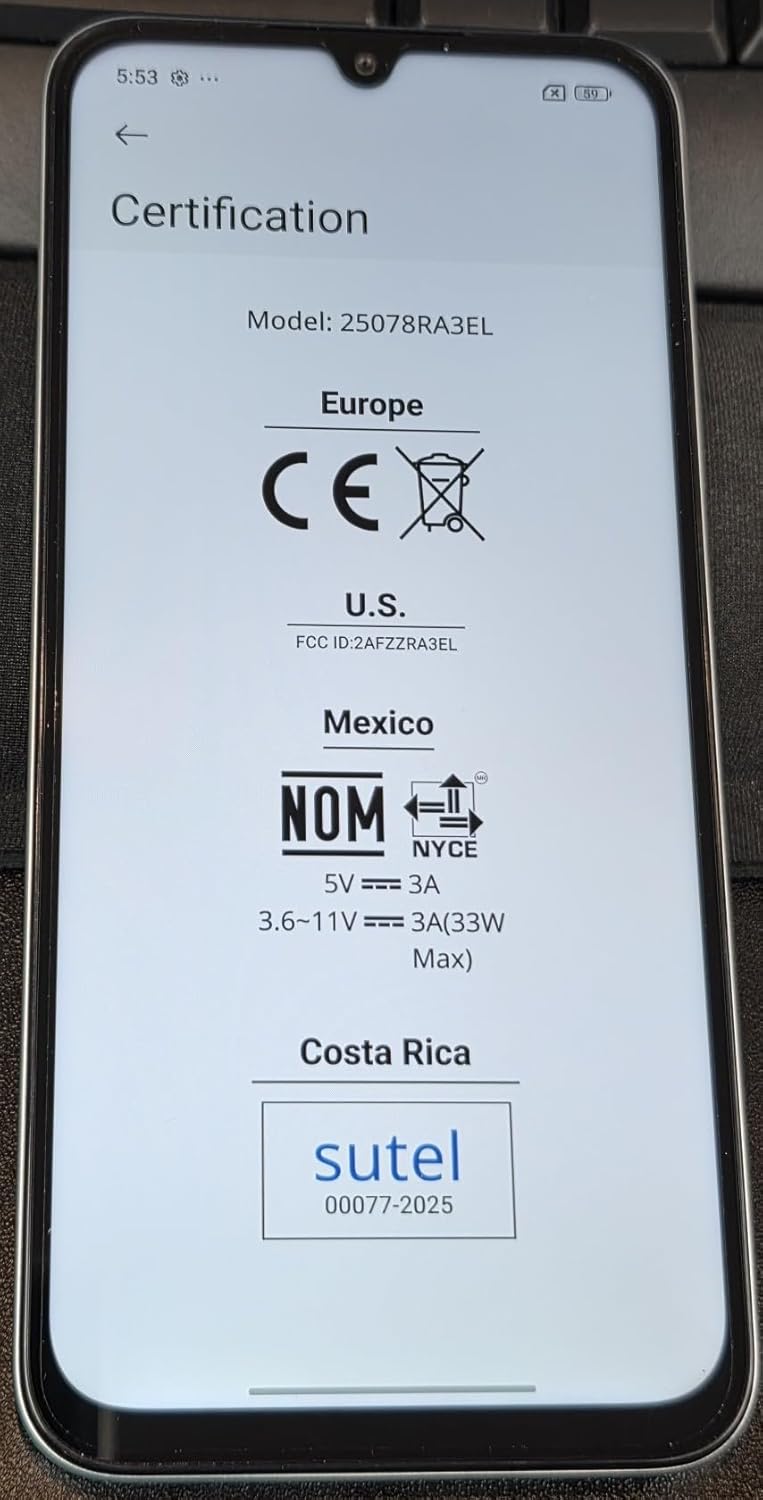
Certification details for XIAOMI Redmi 15C, showing Europe CE, US FCC ID: 2AFZZRA3EL, Mexico NOM, and Costa Rica Sutel certifications.

This image displays the certification information for the XIAOMI Redmi 15C, including CE for Europe, FCC ID: 2AFZZRA3EL for the US, NOM for Mexico, and Sutel for Costa Rica. This confirms the device's compliance with various regional regulatory standards.

FeatureDetail
Model NameRedmi 15C (25078RA3EL)
Operating SystemXiaomi HyperOS based on Android 15
ProcessorOcta Core Helio G81 2.0GHz, GPU Mali-G52 MC2
Display6.9 Inches FHD+ DotDisplay, 720 x 1600 Resolution, 120Hz Refresh Rate (up to 144Hz for supported apps), 288Hz Touch Sampling Rate, 700nits (typ) / 850 nits HBM Brightness
RAM4 GB
Internal Storage128 GB (expandable via Micro SD)
Rear Camera50MP main camera (5P lens, f/1.8) + Auxiliary lens
Front Camera8MP (f/2.0)
Battery6000mAh (typ) Nonstandard Battery, 33W Turbo Charging
ConnectivityWi-Fi (2.4GHz | 5GHz), Bluetooth 5.1, GPS (AGPS, GLONASS, Beidou, Galileo), USB Type-C
Network Bands (USA)Only Works on TMOBILE - MiNT IN THE USA Market (Previous sim card activated). Outside USA: 4G VoLTE Worldwide Unlocked Dual Nano sim. 2G: GSM:2/3/5/8; 3G: WCDMA:1/5/8; 4G: LTE FDD: 1/2/3/4/5/7/8/20/28; 4G: LTE TDD: 38/40/41.
SensorsRear fingerprint sensor, AI face unlock, Proximity sensor, Ambient light sensor, Accelerometer
Audio Jack3.5 mm
Dimensions7 x 4 x 2 inches (Package Dimensions)
Weight6 ounces
ColorTwilight Orange
CertificationsTÜV Rheinland Low Blue Light (Software Solution) Certified, TÜV Rheinland Circadian Friendly Certified, TÜV Rheinland Flicker Free Certified, FCC ID: 2AFZZRA3EL

Warranty and Support

For detailed warranty information and customer support, please refer to the official XIAOMI website or contact their customer service directly. Specific warranty terms may vary by region and retailer.

You can visit the official XIAOMI store for more information: XIAOMI Official Store

© 2025 XIAOMI. All rights reserved. Redmi 15C User Manual.

Information in this manual is subject to change without notice.

Ask a question about this manual

Ask about setup, troubleshooting, compatibility, parts, safety, or missing instructions. Manuals+ will review the question and use this page’s manual context to help answer it.

After a successful submission, we securely hash the supplied account or form email before sending it to Microsoft Advertising for conversion attribution. Privacy details.