
1. Introduction
This manual provides essential information for the proper setup, operation, and maintenance of your XIAOMI Redmi 15C 4G LTE smartphone. Please read this guide thoroughly to ensure optimal performance and longevity of your device.
2. Package Contents
Verify that all items are present in your product packaging:
- XIAOMI Redmi 15C 4G LTE Smartphone
- 33W Wall Charger
- Adapter
- Phone Case
- SIM Ejector Tool (may be included)
- Quick Start Guide (may be included)
3. Device Overview
Familiarize yourself with the physical components of your Redmi 15C smartphone.

Image 3.1: Front and rear view of the XIAOMI Redmi 15C smartphone. The image displays the device's 6.9-inch screen, the front camera notch, and the rear camera module with two lenses and a flash.
- Front Display: 6.9-inch FHD+ DotDisplay.
- Front Camera: Located at the top center of the display.
- Rear Camera Module: Contains the 50MP main camera and an auxiliary lens.
- Power Button: Typically on the right side, often integrated with the fingerprint sensor.
- Volume Buttons: Located near the power button.
- USB Type-C Port: For charging and data transfer, located at the bottom.
- 3.5mm Headphone Jack: For audio output.
- SIM/MicroSD Card Slot: Located on the side for inserting SIM cards and expandable storage.
4. Setup Instructions
4.1. Inserting SIM and MicroSD Cards
- Locate the SIM card tray on the side of the device.
- Insert the SIM ejector tool into the small hole next to the tray and press gently until the tray pops out.
- Place your Nano SIM cards (up to two) and/or a MicroSD card into the designated slots on the tray. Ensure the gold contacts face downwards.
- Carefully reinsert the tray into the phone until it clicks into place.
4.2. Initial Power On and Charging
- Press and hold the Power button until the XIAOMI logo appears.
- Follow the on-screen prompts to complete the initial setup, including language selection, Wi-Fi connection, and Google account setup.
- To charge the device, connect the provided 33W wall charger and USB Type-C cable to the phone's charging port. The device supports 33W turbo charging.
4.3. Network Compatibility (USA Users)
For users in the USA, this device is primarily compatible with specific carriers. Please review the compatibility information below:

Image 4.1: Network compatibility chart. The chart indicates that the device is compatible with T-Mobile, Mint, Tello, and Ultra in the USA, and generally compatible outside the USA. It is NOT compatible with Verizon, AT&T, Xfinity, Boost, Virgin, Visible, Cricket, or other CDMA carriers.
Compatible USA Carriers: T-Mobile, Mint, Tello, Ultra (requires previous SIM card activation).
Not Compatible USA Carriers: Verizon, AT&T, Xfinity, Boost, Virgin, Visible, Cricket, and other CDMA carriers.
The device supports 4G VoLTE worldwide and operates on the following bands:
- 2G GSM: 2/3/5/8
- 3G WCDMA: 1/5/8
- 4G LTE FDD: 1/2/3/4/5/7/8/20/28
- 4G LTE TDD: 38/40/41
5. Operating Instructions
5.1. Basic Navigation
- Power On/Off: Press and hold the Power button. Select 'Power off' or 'Restart'.
- Screen Lock/Unlock: Press the Power button briefly. Use fingerprint, face unlock, or PIN/pattern/password to unlock.
- Volume Control: Use the Volume Up/Down buttons.
- Home Screen: Swipe up from the bottom of the screen (if using gestures) or tap the Home button (if using navigation bar).
5.2. Display Settings
Your Redmi 15C features a 6.9-inch FHD+ DotDisplay with a resolution of 720x1600 pixels. Key display features include:
- Refresh Rate: Up to 120Hz for smoother visuals.
- Brightness: 700 nits (typical), 850 nits (HBM).
- Eye Comfort: TÜV Rheinland Low Blue Light, Circadian Friendly, and Flicker Free Certified for reduced eye strain.
5.3. Camera Usage
The device is equipped with a 50MP AI dual camera system on the rear and an 8MP front camera.
- Rear Camera: 50MP main lens (f/1.8) with an auxiliary lens. Supports 1080p HD video recording at 30 fps.
- Front Camera: 8MP (f/2.0). Features include filmCamera, HDR mode, Soft-light ring, Portrait mode, and Time-lapse. Supports 1080p HD video recording at 30 fps.
- To open the camera, tap the Camera app icon on your home screen or lock screen.
5.4. Battery Management
The Redmi 15C is powered by a large 6000mAh (typical) battery, designed for extended usage. To optimize battery life:
- Utilize the built-in battery saver modes.
- Reduce screen brightness or enable adaptive brightness.
- Close unused applications running in the background.
- Disable Wi-Fi, Bluetooth, or GPS when not in use.
5.5. Security Features
The device offers multiple security options:
- Rear Fingerprint Sensor: Register your fingerprints for quick and secure unlocking.
- AI Face Unlock: Use your face to unlock the device.
- PIN, Pattern, Password: Standard Android security options.
5.6. Connectivity
The Redmi 15C supports various connectivity options:
- Wi-Fi: Supports 2.4GHz and 5GHz bands.
- Bluetooth: Version 5.1.
- GPS: Includes GPS, AGPS, GLONASS, Beidou, and Galileo for accurate location services.
- Note: This device does NOT include NFC functionality.
6. Maintenance
6.1. Cleaning Your Device
- Use a soft, lint-free cloth to gently wipe the screen and body of the phone.
- Avoid using harsh chemicals, abrasive cleaners, or aerosol sprays.
- Ensure no moisture enters ports or openings.
6.2. Software Updates
Regularly check for and install system updates to ensure your device has the latest features, security patches, and performance improvements. You can usually find this option in Settings > About phone > System update.
7. Troubleshooting
This section addresses common issues you might encounter with your Redmi 15C.
7.1. Device Not Powering On
- Ensure the battery is charged. Connect the charger and wait a few minutes before attempting to power on.
- Press and hold the Power button for at least 10-15 seconds to force a restart.
7.2. Poor Network Signal or No Service
- Verify that your SIM card is correctly inserted.
- Check if your carrier is compatible with the device (refer to Section 4.3).
- Restart the device.
- Go to Settings > SIM cards & mobile networks and ensure your SIM is enabled and network settings are correct.
- Try moving to an area with better network coverage.
7.3. Apps Crashing or Freezing
- Close and reopen the app.
- Clear the app's cache and data (Settings > Apps > [App Name] > Storage > Clear cache/Clear data).
- Ensure the app is updated to its latest version.
- Restart your phone.
7.4. Battery Draining Quickly
- Review battery usage in Settings > Battery to identify power-hungry apps.
- Reduce screen brightness and screen timeout duration.
- Disable background app refresh for non-essential applications.
- Ensure your device software is up to date.
8. Specifications
Detailed technical specifications for the XIAOMI Redmi 15C smartphone:
| Feature | Specification |
|---|---|
| Model Name | Redmi 15C (25078RA3EL) |
| Operating System | Xiaomi HyperOS based on Android 15 |
| Processor | Octa Core Helio G81 2.0GHz (GPU Mali-G52 MC2) |
| Display | 6.9 Inches FHD+ DotDisplay, 720 x 1600 Resolution |
| Refresh Rate | Up to 120 Hz |
| RAM | 4 GB |
| Internal Storage | 128 GB |
| Rear Camera | 50MP Main (f/1.8) + Auxiliary lens |
| Front Camera | 8MP (f/2.0) |
| Battery Capacity | 6000 mAh (typical) |
| Charging | 33W Turbo Charging (33W wall charger included) |
| Connectivity | Wi-Fi (2.4GHz | 5GHz), Bluetooth 5.1, GPS, AGPS, GLONASS, Beidou, Galileo |
| Audio Jack | 3.5 mm |
| Security | Rear Fingerprint Sensor, AI Face Unlock |
| Dimensions (Package) | 7 x 4 x 2 inches |
| Item Weight | 6 ounces |
| FCC ID | 2AFZZRA3EL |
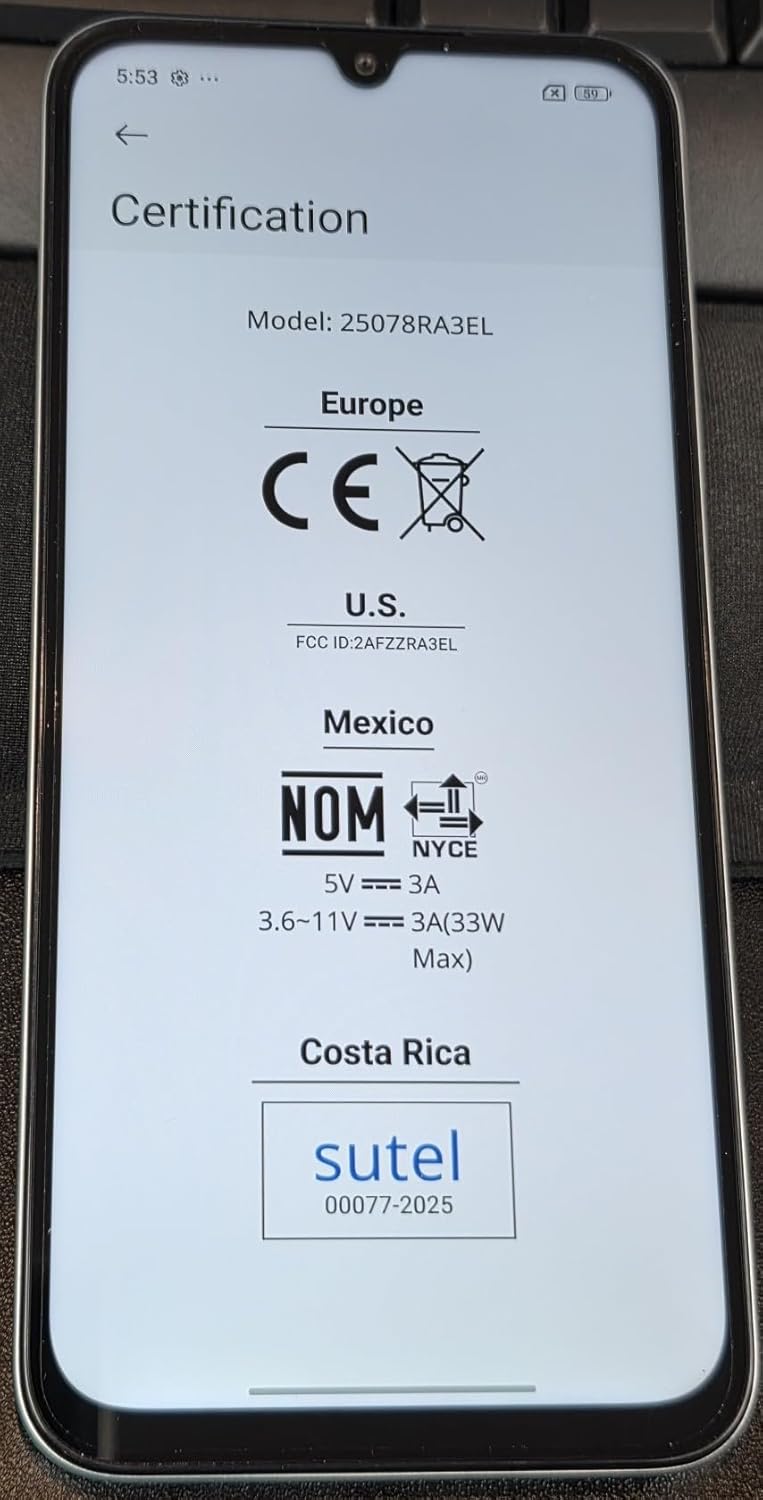
Image 8.1: Screen displaying certification details for the XIAOMI Redmi 15C, including Model: 25078RA3EL, CE mark for Europe, FCC ID: 2AFZZRA3EL for U.S., NOM for Mexico, and SUTEL for Costa Rica.
9. Safety Information
Please observe the following safety guidelines to prevent damage to your device or injury to yourself:
- Do not expose the device to extreme temperatures, direct sunlight, or excessive moisture.
- Use only approved chargers and accessories.
- Avoid dropping or subjecting the device to severe impact.
- Do not attempt to disassemble or repair the device yourself. Refer to authorized service personnel.
- Dispose of the device and its battery responsibly according to local regulations.
10. Warranty and Support
For warranty information, please refer to the warranty card included with your purchase or visit the official XIAOMI website. Support resources, including FAQs and contact information, can also be found on the manufacturer's official support pages.
Always purchase from authorized retailers to ensure valid warranty coverage.


