
Product Overview
The Shark FacialPro Glow is an at-home hydro-powered facial system designed to deliver spa-level skincare results. It features hydro-fueled extractions to clear impurities from pores, and the DePuffi attachment for instant contrast hot and cold therapy. The system is clinically tested to improve skin clarity, hydration, pore visibility, and texture.
The device utilizes expert formulas developed in Korea, which are dermatologist-tested and esthetician-approved. These include the Derm Detox AHA+BHA Exfoliating Gel for pore clearing and the Hydro Infuse BHA Hydrator with hyaluronic acid for enhanced hydration.
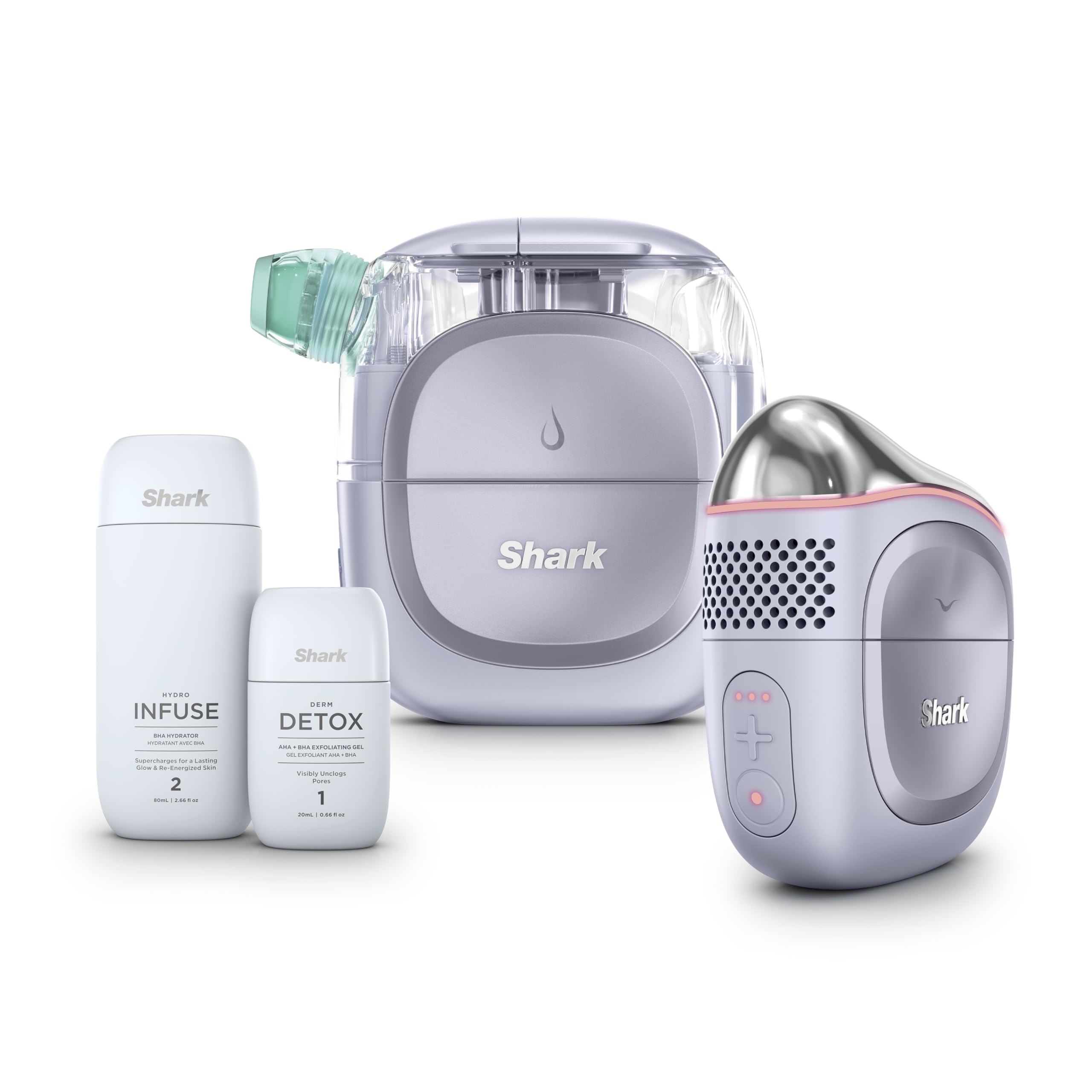
Image: The Shark FacialPro Glow system, highlighting its five-step process for achieving a radiant glow.
What's Included
Your Shark FacialPro Glow system comes with the following components:
- Power Hub: The main unit that powers the attachments.
- Extraction Attachment: Used for hydro-fueled pore cleansing and hydration.
- DePuffi Attachment: Provides hot and cold therapy for de-puffing and soothing.
- Self-Rinse Cap: For easy cleaning of the system.
- Normal Wide Tip: For general use on cheeks and forehead during extraction.
- Normal T-Zone Tip: For targeted use on the nose and chin during extraction.
- Gentle Wide Tip: A softer option for sensitive areas or skin types.
- Gentle T-Zone Tip: A softer option for sensitive areas on the nose and chin.
- USB-C Cable: For charging the device.
- Cleaning Brush: For maintaining the device.
- Derm Detox (20ml): AHA+BHA Exfoliating Gel.
- Hydro Infuse (80ml): BHA Hydrator.
- Storage Case: For convenient storage and travel.

Image: A visual representation of all items included with the Shark FacialPro Glow system.
Setup
- Charge the Power Hub: Connect the USB-C cable to the Power Hub and a suitable power source. Ensure the device is fully charged before first use.
- Prepare Skincare Solutions: The system uses two specialized solutions: Derm Detox and Hydro Infuse. These are designed to be used with the device.
- Attach the Extraction Head: Securely attach the Extraction Attachment to the Power Hub.
- Select the Appropriate Tip: Choose between the Normal Wide Tip, Normal T-Zone Tip, Gentle Wide Tip, or Gentle T-Zone Tip based on your skin type and the area you intend to treat. Attach it firmly to the Extraction Attachment.
- Fill the Clean Tank: Open the Clean Tank on the Extraction Attachment and fill it with the Derm Detox solution for the cleansing and extraction phase.
Operating Instructions
Step 1: Cleanse & Extract (Hydro-Fueled)
- Ensure the Extraction Attachment is connected and the Clean Tank is filled with Derm Detox.
- Turn on the device.
- Place the chosen tip flat against your skin, ensuring a good seal. Gently glide the device across your face. For the Wide Tip, use on cheeks and forehead. For the T-Zone tip, use on the nose and chin.
- You should hear a "kiss" sound when releasing the tip from the skin, indicating proper suction.
- The device will hydro-flush pores, clearing impurities and dead skin cells.

Image: The five-step process of the FacialPro Glow system, illustrating each stage of the facial treatment.
Step 2: Hydrate (Hydro Infuse)
- After cleansing and extraction, empty the Dirty Tank and rinse the Clean Tank.
- Fill the Clean Tank with the Hydro Infuse solution.
- Re-attach the Extraction Attachment and chosen tip.
- Repeat the gliding motion across your face to infuse the skin with hydrating serum.

Image: A visual explanation of how the Hydro Infuse moisture is delivered to the skin.
Step 3: DePuff & Soothe (DePuffi Attachment)
- Detach the Extraction Attachment and attach the DePuffi Attachment to the Power Hub.
- Select your desired temperature level (6 controlled temperature levels available) for either InstaChill (cooling) or InstaHeat (warming).
- Gently glide the DePuffi attachment across your face to de-puff under-eyes, sculpt, soothe redness, boost circulation, and support lymphatic drainage.

Image: The DePuffi attachment in use, demonstrating its contouring and soothing capabilities.
Understanding Your Gunk Tank
After using the Extraction Attachment, the Dirty Tank will contain the impurities removed from your skin. The appearance of the liquid can indicate different types of impurities:
- Makeup: You have removed excess makeup or SPF.
- Cloudy: You have removed excess oil.
- Floaties: You have removed dead surface skin cells or impurities.
- Clear: Your skin is clear from congestion.

Image: A guide to interpreting the contents of the 'Gunk Tank' after a facial session.
Maintenance
- Empty and Clean Tanks: After each use, empty the Dirty Tank and rinse both the Clean Tank and Dirty Tank thoroughly with water.
- Clean Tips: Use the provided cleaning brush to clean any residue from the extraction tips.
- Self-Rinse Function: Utilize the Self-Rinse cap to flush the internal pathways of the Extraction Attachment.
- Wipe Down Device: Wipe the exterior of the Power Hub and attachments with a clean, damp cloth. Do not submerge the Power Hub in water.
- Storage: Store the device and all components in the provided storage case in a cool, dry place.
Troubleshooting
If you encounter any issues with your Shark FacialPro Glow system, please refer to the following common solutions:
- No Suction: Ensure the tip is securely attached and creating a proper seal with your skin. Check that the tanks are correctly installed.
- Device Not Turning On: Verify that the Power Hub is fully charged. If not, connect it to the USB-C charger.
- Leaking: Ensure all attachments and caps are securely fastened. Check for any cracks or damage to the tanks or tips.
- DePuffi Not Heating/Cooling: Ensure the DePuffi Attachment is correctly connected and the desired temperature level is selected. Allow a few moments for the temperature to adjust.
For further assistance, please contact Shark customer support.
Specifications
| Product Dimensions | 1.65 x 4.57 x 4.37 inches |
| Item Model Number | FH320PL |
| UPC | 622356703048 |
| Manufacturer | SharkNinja |
| Item Weight | 1.36 Kilograms (3 Pounds) |
| Power Source | Battery Powered |
| Voltage | 3.6 Volts |
| Color | Lilac |
| Skin Type | All |
Safety Information
Please read all safety warnings and instructions before using the Shark FacialPro Glow system to prevent injury or damage to the device.
- Avoid using on broken or irritated skin.
- Continuous movement of the device may cause bruising.
- Do not use if you have certain medical conditions or have recently undergone specific cosmetic treatments. Consult a healthcare professional if unsure.
- Keep out of reach of children.
- Use only the provided Shark Derm Detox and Hydro Infuse solutions with the device.
Warranty and Support
For information regarding product warranty, registration, and customer support, please refer to the official Shark website or the documentation included in your product packaging. Protection plans are available for purchase separately to extend coverage.


