
1. Introduction
Thank you for choosing the WINTEMP B32CU-FHCA Instant Hot Water Dispenser. This advanced under-sink system provides precise temperature-controlled hot water on demand, along with filtered cold water, enhancing convenience in your kitchen or office. Featuring a durable stainless steel tank, energy-efficient insulation, and smart Wi-Fi control, this dispenser is designed for reliable and safe operation. Please read this manual thoroughly before installation and use to ensure optimal performance and safety.

Figure 1: WINTEMP Instant Hot Water Dispenser under-sink setup.
2. Package Contents
Verify that all items listed below are included in your package. If any parts are missing or damaged, please contact WINTEMP customer support.
- 1 x Instant Hot Water Dispenser Unit
- 1 x Hot and Cold Water Faucet
- 1 x Installation Accessory Kit (includes rubber gasket, stainless steel washer, hex nut, blue locking clips, wrench)
- 1 x User Manual Book
- 2 x Connector and hose

Figure 2: Complete package contents.
Unboxing Video
3. Safety Information
- Always unplug the unit before performing any maintenance or installation.
- Ensure the unit is filled with water before powering on to prevent boil-dry damage.
- The hot water dispensed can reach up to 208℉. Exercise extreme caution to prevent burns.
- Utilize the built-in child safety lock feature to prevent accidental hot water dispensing by children.
- Do not install the unit in an area prone to freezing temperatures.
- Ensure proper grounding for the electrical connection.
4. Installation
Pre-installation Checks
- Cabinet Space: The dispenser measures 12.9"L × 8.0"W × 13.1"H. Ensure your under-sink cabinet has at least 16" vertical space and that the P-trap or drain pipe is positioned above 15" from the cabinet floor.
- Faucet Hole: A sink accessory hole with a diameter of Ø1.10"–Ø1.26" is required for the faucet installation.
- Electrical Outlet: A dedicated 110V electrical outlet is necessary.
- Water Filtration: A standard water filtration system (not included) is recommended for optimal water quality and unit longevity.

Figure 3: Under-sink space requirements for installation.
Installation Steps
- Install Faucet: Shut off the main water supply. Insert the faucet body into the designated sink hole. From below, slide the rubber gasket and stainless steel washer onto the faucet tailpiece. Thread the hex nut and tighten securely with the provided wrench. Adjust the faucet orientation as needed.
- Place Dispenser Unit: Position the dispenser unit in a suitable location under the counter, ensuring easy access for connections and maintenance.
- Connect Water Lines:
- Connect the white PE water inlet tube from the faucet tailpiece to the water filter's outlet port. Ensure it's firmly inserted and secured with a blue locking clip.
- Thread the faucet's hot water outlet tube connector nut onto the dispenser unit's hot water outlet port. Use the wrench to tighten the hex nut firmly.
- Insert the remaining white PE tube into the filtered water inlet on the dispenser unit. Push the blue locking clip into place to secure it.
- Initial Tank Fill: Turn on the cold water supply valve. Open the hot water faucet and let water flow for 2-3 minutes until a steady stream comes out, indicating the internal tank is full.
- Plug In and Set Temperature: Plug the unit into the dedicated electrical outlet. Press the power button once to turn it on. Use the Up (▲) or Down (▼) buttons to set your desired temperature (113-208℉).

Figure 4: Faucet installation.

Figure 5: Water line connections.

Figure 6: Initial tank filling process.

Figure 7: Powering on and setting temperature.
Installation Video
5. Operating Instructions
Power On/Off and Temperature Setting
After initial setup, plug in the unit. Press the power button once to turn it ON. Use the Up (▲) or Down (▼) buttons on the unit's display to adjust the desired temperature between 113℉ and 208℉. The display will show the current temperature. To turn the unit OFF, press and hold the power button for 5 seconds.
Wi-Fi Smart Control
For enhanced convenience, the WINTEMP B32CU-FHCA supports Wi-Fi smart App control. You can operate the dispenser remotely from your smartphone or tablet. To enter Wi-Fi setup mode (while the unit is OFF), press and hold the Down (▼) button for 5 seconds. Follow the instructions in the app to connect your device.

Figure 8: Remote control via Wi-Fi smart App.
Child Safety Lock
To activate the child safety lock, press the Up (▲) and Down (▼) buttons simultaneously while the unit is ON or OFF. The lock icon will illuminate on the display. To unlock, press the Up (▲) and Down (▼) buttons simultaneously again; the lock icon will disappear.
Dispensing Water
- Hot Water: Grip the hot water faucet handle and turn it counter-clockwise towards the hot water icon to dispense hot water.
- Cold Water: Grip the cold water faucet handle and turn it counter-clockwise towards the cold water icon to dispense filtered cold water.

Figure 9: Premium Dual-flow Faucet for hot and cold water.
Operating Video
6. Maintenance
Draining the Unit
Regular draining is recommended for cleaning or before long periods of non-use.
- Turn off the power and unplug the unit.
- Close the cold water supply valve.
- Open the drain valve at the bottom of the dispenser. Let all internal water drain out completely (this takes about 2-3 minutes).
- Reseal the drain valve after draining, ensuring it's tightly closed to prevent leakage.

Figure 10: Tank drain function for maintenance.
Draining Video
7. Troubleshooting
- No Hot Water: Check if the unit is plugged in and powered on. Verify the temperature setting. Ensure the water supply valve is open and the tank is full.
- Leakage: Inspect all connections for tightness. Ensure O-rings and gaskets are properly seated. If leakage persists, turn off the water supply and contact customer support.
- Error Codes: Refer to the detailed user manual for specific error code meanings and troubleshooting steps.
- Wi-Fi Connectivity Issues: Ensure your Wi-Fi network is active and the unit is within range. Follow the Wi-Fi setup instructions in the app or manual.
8. Specifications
| Feature | Specification |
|---|---|
| Brand | WINTEMP |
| Model Name | B32CU-FHCA |
| Material | 304 Stainless Steel Tank, Stainless Steel Faucet |
| Color | Black |
| Tank Dimensions (L x W x H) | 12.87" x 7.99" x 13.11" |
| Item Weight | 10.7 Pounds |
| Voltage | 110 Volts |
| Wattage | 1300 watts |
| Temperature Range | 113℉ - 208℉ |
| Faucet Hole Diameter | Ø1.10"–Ø1.26" |
| Special Features | Boil Dry Protection, Child Lock, Digital Display, Large Capacity, Temperature Control, Wi-Fi Smart Control, PU Foam Insulation |

Figure 11: Product dimensions.
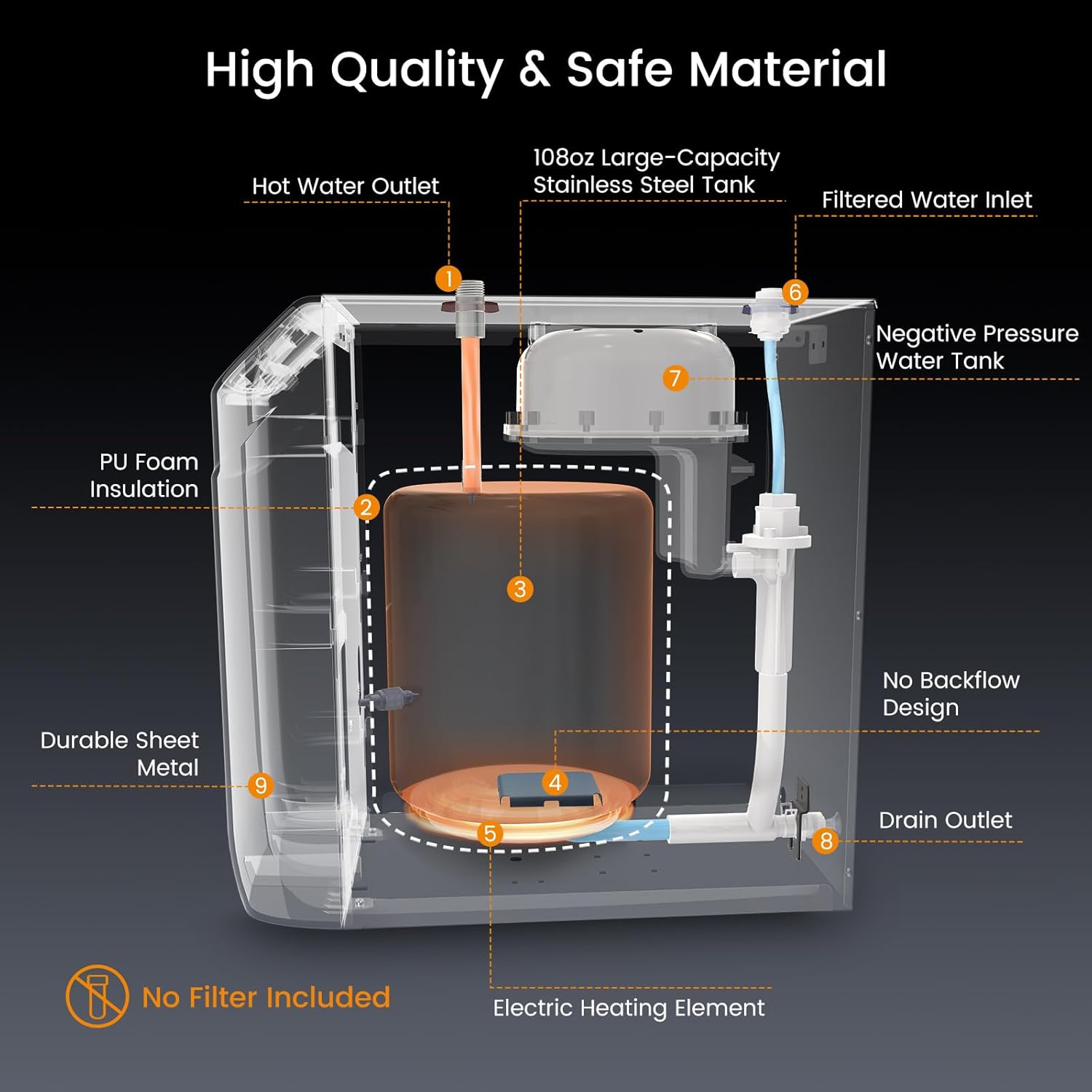
Figure 12: Internal components and material quality.
9. Warranty and Support
The WINTEMP B32CU-FHCA Instant Hot Water Dispenser is covered by a 1-year warranty for the entire unit and a 2-year warranty for the inner tank, protecting against manufacturing defects.
For technical assistance, troubleshooting, or warranty claims, please contact WINTEMP customer support through the retailer where you purchased the product or visit the official WINTEMP website for contact information.
