
1. Introduction
Thank you for purchasing the MUSITREND T408 Record Player. This versatile audio system combines a 3-speed turntable with a CD player, cassette deck, AM/FM radio, USB/SD playback, and Bluetooth connectivity. Please read this manual thoroughly before operating the unit to ensure proper use and to maximize your listening experience. Keep this manual for future reference.
Safety Precautions
- Do not expose the unit to rain or moisture.
- Do not block ventilation openings.
- Ensure proper power supply voltage as indicated on the unit.
- Avoid placing the unit near heat sources or in direct sunlight.
- Use only attachments/accessories specified by the manufacturer.
- Unplug the unit during lightning storms or when unused for long periods.
2. Package Contents
Verify that all items listed below are included in your package:
- MUSITREND T408 Record Player Unit
- Remote Control
- Instruction Manual
- 45 RPM Adapter (located on the turntable platter)
3. Product Overview
The MUSITREND T408 is a comprehensive audio system designed for various media playback. It features a classic wooden finish with a silver-toned control panel.
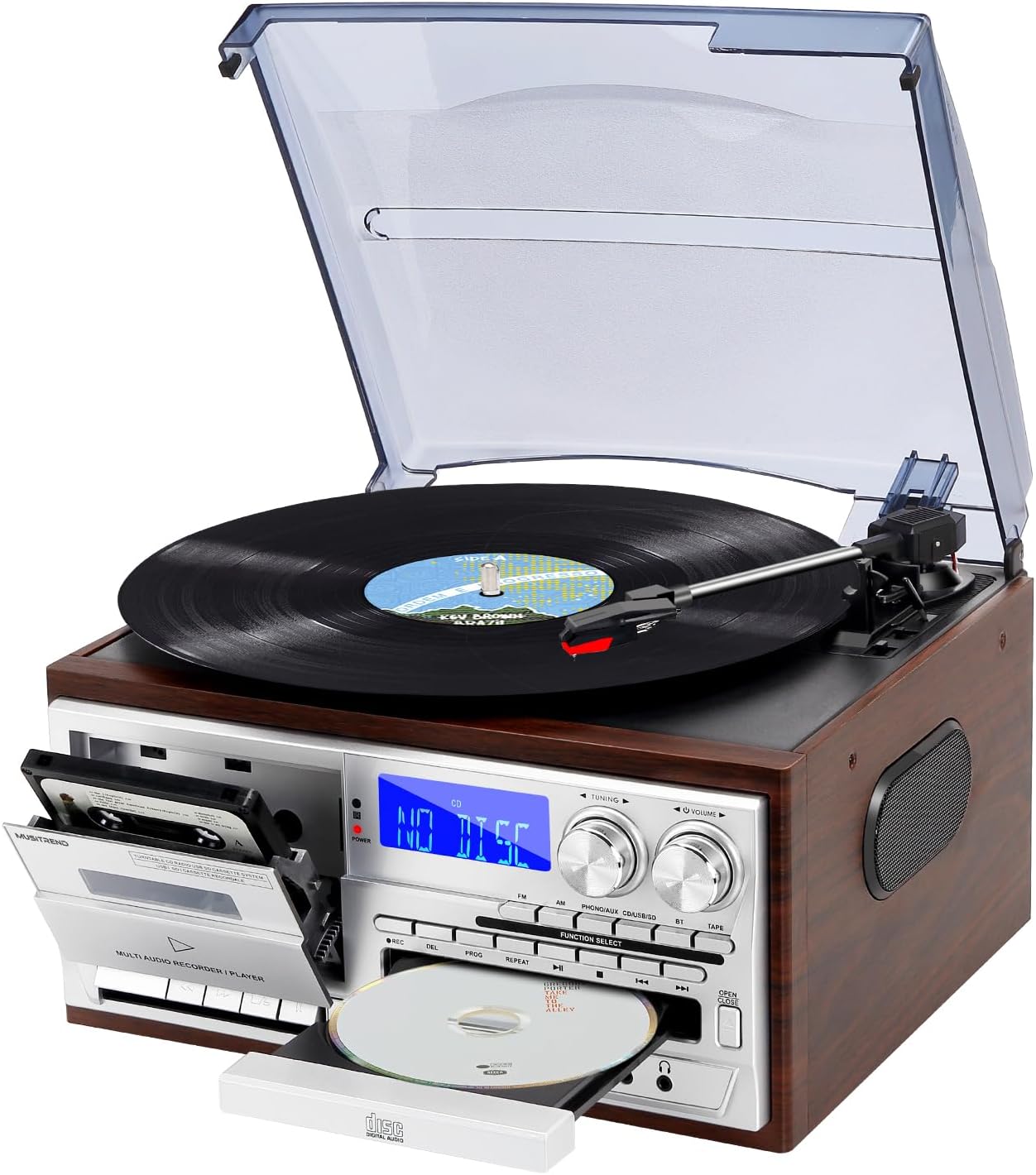
Figure 3.1: Front view of the MUSITREND T408 Record Player.
Key Components:
- Turntable: Located on top, with a clear dust cover. Supports 33, 45, and 78 RPM records.
- Cassette Deck: Front-loading slot on the left side of the control panel.
- CD Player: Front-loading tray below the main display.
- Control Panel: Features a digital display, tuning and volume knobs, function select buttons (FM, AM, PHONO/AUX/BT, CD, USB/SD, TAPE), and playback controls.
- USB Port: For USB flash drive playback.
- SD/MMC Card Slot: For SD/MMC card playback.
- AUX IN Jack: For connecting external audio devices.
- Headphone Jack: For private listening.
- Built-in Stereo Speakers: Integrated into the unit for direct audio output.
- RCA Line Out: (Rear panel) For connecting to external amplifiers or powered speakers.
- FM Antenna: (Rear panel) For improved radio reception.

Figure 3.2: Overview of the MUSITREND T408's multiple functions.
4. Setup
4.1 Initial Placement
- Place the unit on a flat, stable surface away from direct sunlight, heat sources, and excessive dust or moisture.
- Ensure adequate ventilation around the unit.
4.2 Power Connection
- Plug the AC power cord into a standard wall outlet.
- Press the Power button on the unit or remote control to turn it on.
4.3 FM Antenna Connection
- For optimal FM radio reception, extend the FM wire antenna located on the rear panel.
- Adjust its position for the best signal.
4.4 External Speaker Connection (Optional)
- To connect external powered speakers or an amplifier, use RCA cables (not included) to connect the RCA Line Out jacks (Red for Right, White for Left) on the rear of the unit to the corresponding input jacks on your external audio equipment.

Figure 4.1: RCA Line Out connection points on the rear panel.
5. Operating Instructions
5.1 Turntable (Vinyl Playback)
- Lift the dust cover.
- Place a vinyl record on the turntable platter. If playing a 45 RPM single, place the included 45 RPM adapter over the center spindle.
- Select the appropriate speed (33, 45, or 78 RPM) using the speed selector switch located on the turntable deck.
- Push the Function Select button until "PHONO/AUX/BT" is displayed, then press it again to select "PHONO".
- Release the tone arm lock.
- Gently lift the tone arm using the cue lever and position it over the desired track of the record.
- Lower the cue lever to slowly drop the tone arm onto the record. Playback will begin.
- To stop playback, lift the tone arm using the cue lever and return it to the tone arm rest. Secure the tone arm lock.

Figure 5.1: Turntable features including speed selector and stylus.
5.2 CD Player
- Press the Function Select button until "CD" is displayed.
- Press the OPEN/CLOSE button to open the CD tray.
- Place a CD with the label side facing up into the tray.
- Press the OPEN/CLOSE button again to close the tray. The unit will read the CD, and playback will start automatically.
- Use the PLAY/PAUSE, STOP, SKIP (forward/backward) buttons to control playback.
5.3 Cassette Player
- Press the Function Select button until "TAPE" is displayed.
- Press the STOP/EJ button on the cassette deck to open the cassette door.
- Insert a cassette tape into the compartment with the open edge facing up.
- Close the cassette door.
- Press the PLAY button to begin playback.
- Use the REW (rewind), F.F (fast forward), STOP/EJ, and PAUSE buttons to control playback.

Figure 5.2: CD and Cassette playback functions.
5.4 AM/FM Radio
- Press the Function Select button until "FM" or "AM" is displayed.
- Rotate the TUNING knob to search for radio stations.
- Adjust the volume using the VOLUME knob.
5.5 Bluetooth Pairing
- Press the Function Select button until "BT" is displayed. The unit will enter Bluetooth pairing mode, indicated by a flashing Bluetooth icon on the display.
- On your Bluetooth-enabled device (smartphone, tablet, etc.), enable Bluetooth and search for available devices.
- Select "MUSITREND" from the list of devices.
- Once paired, the Bluetooth icon on the unit's display will stop flashing. You can now stream audio from your device to the record player.

Figure 5.3: Bluetooth streaming from a smartphone.
5.6 USB/SD Playback
- Insert a USB flash drive into the USB port or an SD/MMC card into the SD/MMC slot.
- Press the Function Select button until "USB/SD" is displayed. The unit will automatically detect and begin playing audio files from the inserted media.
- Use the PLAY/PAUSE, STOP, SKIP (forward/backward) buttons to control playback.
5.7 Recording to USB/SD
The unit supports recording audio from the turntable, CD player, or cassette deck directly to a USB flash drive or SD card.
- Insert a USB flash drive or SD card into its respective slot.
- Select the desired source (PHONO, CD, or TAPE) using the Function Select button.
- Begin playback of the source audio (e.g., start playing a record, CD, or cassette).
- Press the REC (Record) button on the unit. The recording indicator will light up, and the unit will begin recording the audio to the USB drive or SD card.
- Press the STOP button to end the recording.
5.8 Remote Control
The included remote control allows convenient operation of various functions from a distance. Ensure the remote has working batteries and is pointed towards the unit's front panel.
- Power: Turns the unit on/off.
- Mute: Mutes/unmutes audio.
- Function Select Buttons: Directly select input sources (PHONO, CD, TAPE, FM, AM, BT, USB/SD).
- Playback Controls: Play, Pause, Stop, Skip/Search (forward/backward).
- Volume +/-: Adjusts the master volume.
- REC: Initiates recording to USB/SD.
6. Maintenance
6.1 Cleaning the Unit
- Wipe the unit with a soft, dry cloth. Do not use abrasive cleaners or solvents.
- Keep the dust cover closed when the turntable is not in use to prevent dust accumulation.
6.2 Stylus Care
- The stylus (needle) is a delicate component. Handle it with care.
- Clean the stylus periodically with a soft brush, brushing from back to front.
- Replace the stylus when you notice a degradation in sound quality or visible wear. Replacement styli are available from audio retailers.
6.3 Record Care
- Keep records clean and free of dust. Use a record brush before each play.
- Store records vertically in their sleeves to prevent warping.
7. Troubleshooting
If you encounter issues with your MUSITREND T408, refer to the following common problems and solutions:
| Problem | Possible Cause | Solution |
|---|---|---|
| No power | Power cord not securely connected. | Check power cord connection to the unit and wall outlet. |
| No sound from speakers | Volume too low; incorrect function selected; headphones connected. | Increase volume; select correct function; disconnect headphones. |
| Turntable not spinning | Power off; speed selector incorrect. | Ensure unit is on; check speed selector (33/45/78 RPM). |
| CD/Cassette not playing | Media inserted incorrectly; dirty/damaged media. | Reinsert media correctly; clean or try a different CD/cassette. |
| Bluetooth not connecting | Unit not in BT mode; device too far; device already connected to another unit. | Select BT mode; ensure device is within range; disconnect from other devices. |
| Poor radio reception | FM antenna not extended/positioned correctly. | Extend and adjust the FM wire antenna. |
8. Specifications
| Feature | Detail |
|---|---|
| Model Name | T408 |
| Brand | MUSITREND |
| Product Dimensions | 12.79 x 11.41 x 7.87 inches |
| Item Weight | 8.08 pounds |
| Turntable Speeds | 33, 45, 78 RPM |
| Motor Type | Direct-Drive |
| Connectivity | Bluetooth, USB, SD/MMC, AUX In, RCA Line Out |
| Included Components | Remote Control |
| Power Source | Corded Electric |
9. Warranty and Support
For warranty information, technical support, or service inquiries, please refer to the documentation provided with your purchase or contact MUSITREND customer service directly. Keep your proof of purchase for any warranty claims.
10. Product Videos
Watch these official videos for a visual guide to the MUSITREND T408 Record Player's features and operation.
MUSITREND 9 in 1 Vinyl Record Player Overview
This video provides a general overview of the MUSITREND 9-in-1 record player, demonstrating its various playback functions including vinyl, CD, cassette, and radio.
Musitrend Multimedia 9 in 1 Record Player Features
This video highlights the multimedia capabilities of the Musitrend 9-in-1 record player, showcasing its diverse input options and user interface.


