1. Important Safety Instructions
Read this manual carefully before operating the QNQ H8 Electric Scooter. Failure to follow instructions can result in serious injury or property damage. Always prioritize safety.
- Always wear a helmet and appropriate protective gear (knee pads, elbow pads) when riding.
- Observe all local traffic laws and regulations.
- The scooter is designed for individuals within the specified age range (typically 8-15 years) and weight limit (maximum 120 kg).
- Do not ride in wet conditions, on slippery surfaces, or in heavy traffic.
- Avoid riding at night or in low visibility conditions without proper lighting.
- Maintain a safe distance from other vehicles and pedestrians.
- Perform a pre-ride check of brakes, tires, and all connections.
- The scooter features a non-zero start function. The motor will only activate after the scooter reaches a speed of at least 5 km/h (3 MPH) to prevent accidental acceleration.
2. Product Overview
The QNQ H8 Electric Scooter is designed for urban commuting and recreational use, featuring a powerful motor, solid tires, and a foldable design.

Image 2.1: QNQ H8 Electric Scooter. This image displays the QNQ H8 Electric Scooter, highlighting its sleek design and primary components such as the handlebars, stem, deck, and wheels.
Key Features:
- Motor: 500W Peak Motor for efficient performance.
- Tires: 8-inch solid rubber tires for durability and puncture resistance.
- Speed: Maximum speed of 25 km/h with three adjustable speed modes (6 km/h, 15 km/h, 25 km/h).
- Range: Up to 15-20 km on a single charge (actual range varies based on conditions).
- Battery: 36V 4Ah battery.
- Braking System: Rear drum brake with power cut-off function and front braking for reliable stopping.
- Display: LED display showing speed, battery level, and gear mode.
- Portability: Advanced one-step folding system and lightweight design (13 kg).
3. Unboxing and Assembly
3.1 Package Contents:

Image 3.1: What's in the Box. An overview of all items included in the product package, such as the scooter itself, charger, assembly tools, handlebars, and the user manual.
Upon opening the package, ensure all the following items are present:
- QNQ H8 Electric Scooter
- Power Charger
- Tool Kit
- Handlebars (x2)
- User Manual
3.2 Initial Assembly:
- Unfold the Scooter: Carefully lift the stem until it locks into the upright position. Ensure the folding mechanism is securely latched.
- Attach Handlebars: Insert the left and right handlebars into their respective slots on the stem. Ensure they are fully seated and tightened if necessary using the provided tools.
- Check Connections: Verify that all cables and connections are secure and not pinched.
4. Initial Setup and Charging
4.1 Charging the Battery:
Before first use, fully charge the scooter's battery. This ensures optimal battery life and performance.
- Locate the charging port on the scooter.
- Connect the charger to the charging port, then plug the charger into a standard electrical outlet.
- The charger indicator light will typically show red during charging and turn green when fully charged.
- Charging time is approximately 3-4 hours. Do not overcharge.
4.2 Battery Indicators:
The LED display on the handlebars shows the current battery level. Ensure sufficient charge before each ride.
5. Operation
5.1 Powering On/Off:
- To Power On: Press and hold the power button on the display for a few seconds until the screen illuminates.
- To Power Off: Press and hold the power button again until the display turns off.
5.2 Non-Zero Start:
For safety, the QNQ H8 uses a non-zero start mechanism. The motor will not engage from a standstill.
- Push off with your foot to gain initial momentum.
- Once the scooter reaches approximately 5 km/h (3 MPH), press the accelerator lever to engage the motor.
5.3 Speed Modes and LED Display:

Image 5.1: LED Display. A detailed view of the handlebar-mounted LED display, indicating current battery charge, speed, selected gear mode, and trip distance.
The scooter offers three speed modes:
- Mode 1: 6 km/h (Eco Mode)
- Mode 2: 15 km/h (Standard Mode)
- Mode 3: 25 km/h (Sport Mode)
Press the mode button (usually the power button pressed briefly while on) to cycle through the speed modes. The LED display will show the current speed, battery level, and selected gear mode.
5.4 Braking System:

Image 5.2: Dual Brake System. This image visually explains the scooter's dual braking system, which combines an electric brake with a mechanical brake for enhanced stopping power.
The QNQ H8 is equipped with a dual braking system for effective stopping:
- Rear Drum Brake: Activated by the brake lever on the handlebar. This brake also includes a power cut-off function, which disengages the motor when applied.
- Front Braking: Provides additional stopping power.
Always apply brakes smoothly and gradually to avoid skidding or loss of control.
5.5 Lighting System:

Image 5.3: Lighting System. An image demonstrating the scooter's integrated lighting system, featuring a bright front headlight and a visible rear taillight for safety.
The scooter includes integrated lighting for visibility:
- Front Headlight: Provides illumination for riding in low-light conditions.
- Rear Taillight: Enhances visibility from behind.
Refer to the display controls for activating and deactivating the lights.
5.6 Folding and Portability:

Image 5.4: Easy to Carry. This image shows the scooter in its folded state, demonstrating its compact size and ease of transport, fitting conveniently into a car trunk.
The QNQ H8 features a one-step folding mechanism for easy storage and transport.
- Ensure the scooter is powered off.
- Locate the folding latch mechanism at the base of the stem.
- Follow the instructions on the latch to release the stem and fold it down towards the deck until it clicks into place.
- To unfold, reverse the process, ensuring the stem is securely locked in the upright position before riding.
6. Maintenance
Regular maintenance ensures the longevity and safe operation of your QNQ H8 Electric Scooter.
6.1 Battery Care:
- Charge the battery fully after each use, especially if it will be stored for an extended period.
- Avoid completely draining the battery.
- Store the scooter in a cool, dry place, away from direct sunlight and extreme temperatures.
- If storing for a long time, charge the battery to about 50-70% every 1-2 months.
6.2 Tire Inspection:
The scooter uses 8-inch solid rubber tires, which do not require inflation. However, regular inspection is important:
- Check tires for any signs of wear, cracks, or damage before each ride.
- Ensure no foreign objects are embedded in the tire tread.
6.3 Brake System Check:
- Regularly check the brake lever for proper tension and responsiveness.
- Ensure the drum brake is functioning correctly and provides adequate stopping power.
- If braking performance degrades, consult a qualified technician for adjustment or repair.
6.4 General Cleaning:
- Wipe down the scooter with a damp cloth after use to remove dirt and dust.
- Do not use high-pressure water jets or immerse the scooter in water.
- Avoid using harsh chemicals that could damage the finish or electronic components.
7. Troubleshooting
This section addresses common issues you might encounter with your QNQ H8 Electric Scooter.
- Scooter does not power on:
- Ensure the battery is charged.
- Check if the power button is pressed and held correctly.
- Verify all electrical connections are secure.
- Motor does not engage:
- Remember the non-zero start feature: push off to gain speed (at least 5 km/h) before pressing the accelerator.
- Check battery level; low battery may prevent motor engagement.
- Ensure the brake lever is not partially engaged, as it cuts power to the motor.
- Reduced range or speed:
- Battery may not be fully charged or is aging.
- Riding conditions (uphill, heavy load, low temperature) can affect performance.
- Ensure tires are free of debris that could increase rolling resistance.
- Brakes feel loose or ineffective:
- Inspect the brake cable for damage or stretching.
- The drum brake may require adjustment. Contact customer support or a qualified technician.
If you encounter issues not listed here or if troubleshooting steps do not resolve the problem, please contact customer support.
8. Specifications
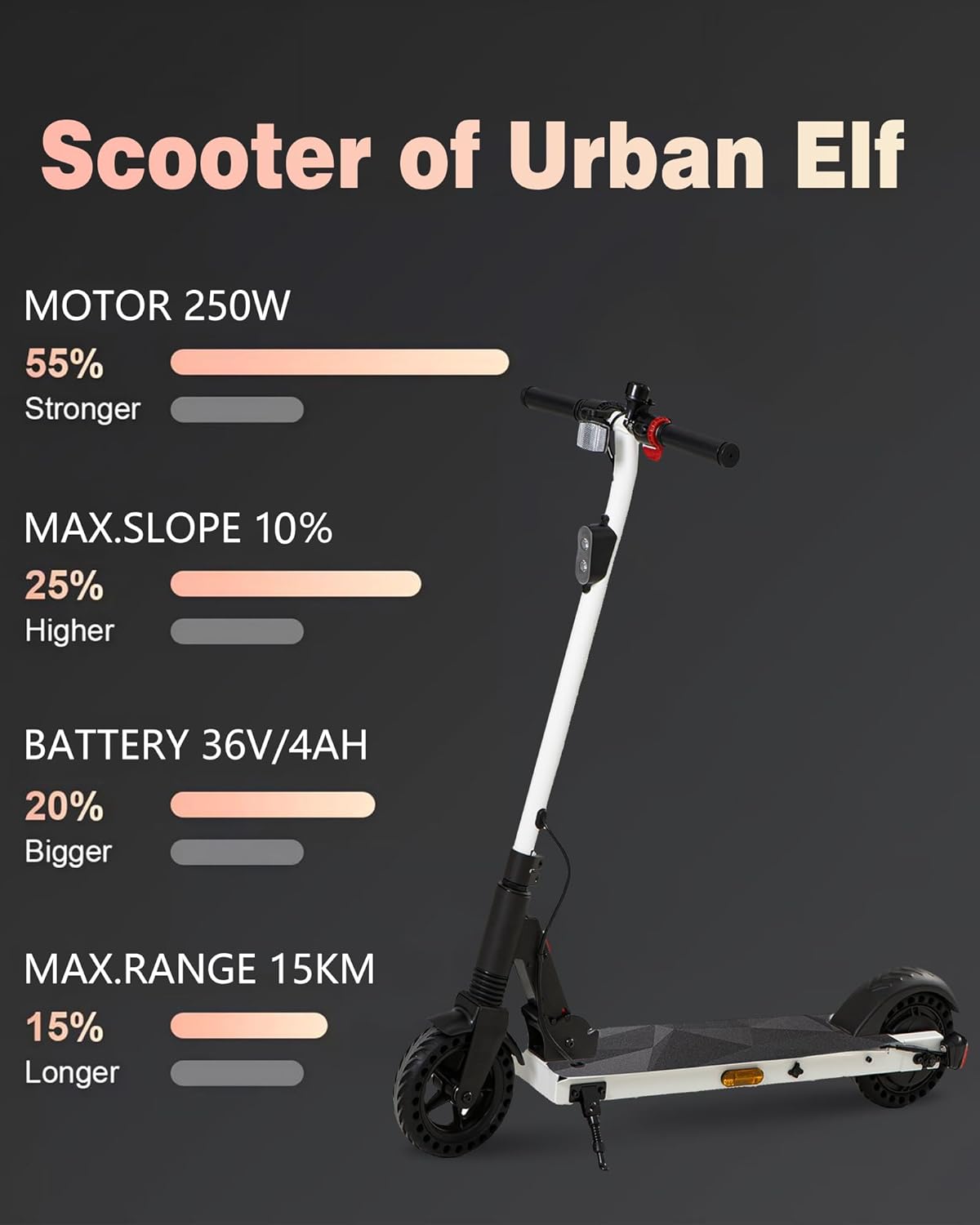
Image 8.1: Performance Overview. An infographic illustrating the key performance specifications of the scooter, including motor power, maximum incline capability, battery capacity, and maximum range.
| Feature | Specification |
|---|---|
| Model Name | SEL-H8 |
| Brand | QnQ |
| Motor Power | 500W (Peak) |
| Battery | 36V 4Ah |
| Max Speed | 25 km/h |
| Max Range | 15-20 km |
| Tire Size | 8 inches (Solid Rubber) |
| Braking System | Rear Drum Brake with Power Cut-off, Front Braking |
| Max Weight Capacity | 120 kg |
| Frame Material | Aluminum |
| Special Features | LED Digital Display, Foldable Design, Front Suspension |
| Dimensions (Unfolded) | 108.00 × 37.49 × 17.50 cm |
9. Warranty and Support
QNQ is committed to providing quality products and customer satisfaction. Your QNQ H8 Electric Scooter comes with a manufacturer's warranty covering defects in materials and workmanship under normal use.
- Warranty Period: Please refer to your purchase documentation or contact customer support for specific warranty terms and duration.
- What is Covered: Manufacturing defects.
- What is Not Covered: Damage due to misuse, accidents, unauthorized modifications, normal wear and tear, or failure to follow maintenance instructions.
Customer Support:
For warranty claims, technical assistance, or any questions regarding your QNQ H8 Electric Scooter, please contact our customer support team. Have your model number (SEL-H8) and proof of purchase ready.
Contact information can typically be found on the QNQ official website or your purchase receipt.


