
1. Introduction
Thank you for choosing the RORRY T1-5000 Portable Charger. This compact and versatile 5000mAh power bank is designed to provide convenient charging for your mobile devices on the go. Featuring built-in Lightning and USB-C cables, along with a dedicated USB-C port, it ensures broad compatibility and ease of use. Its lightweight design and integrated keychain make it an ideal travel companion.
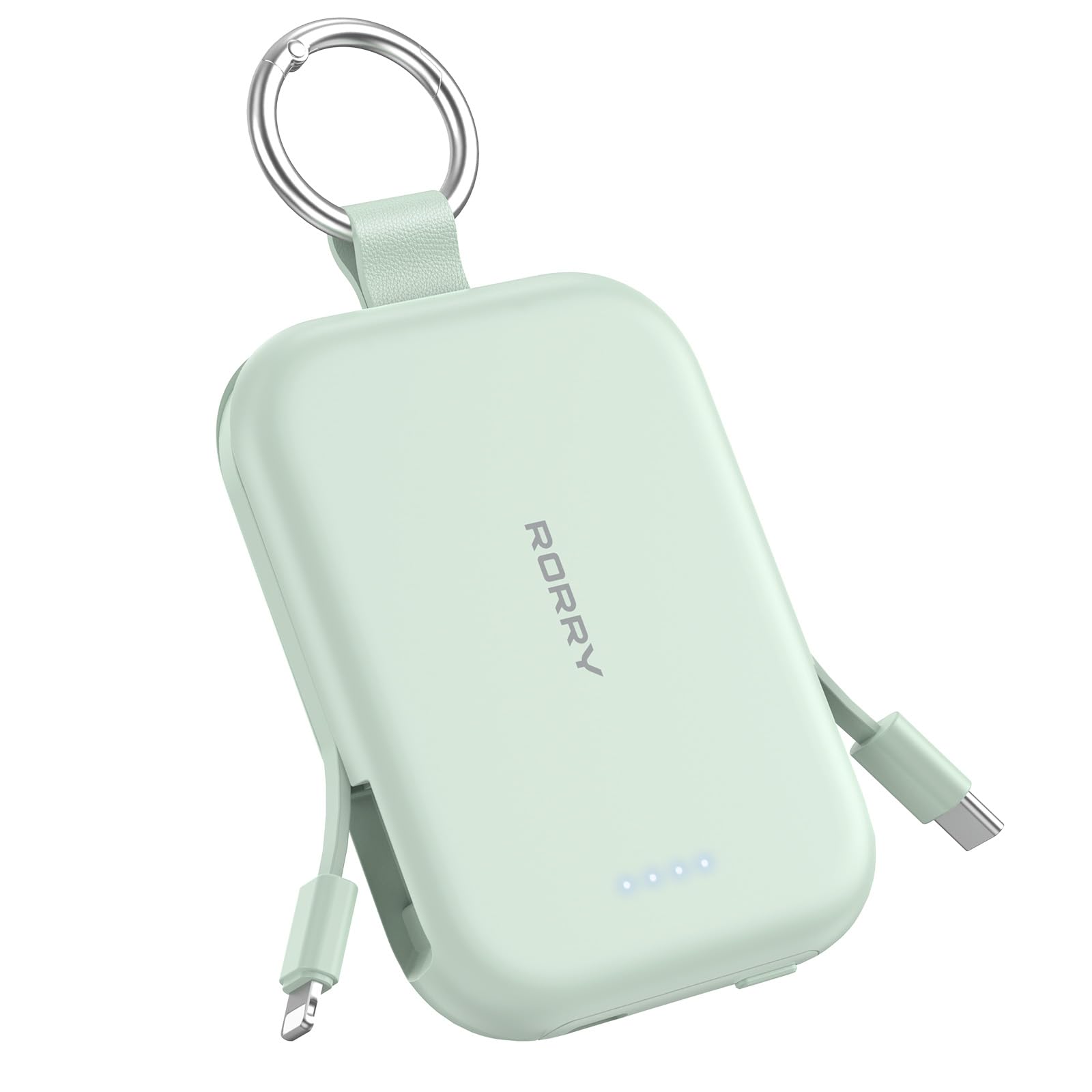
Image 1.1: The RORRY T1-5000 Portable Charger, showcasing its compact design and keychain attachment.
2. Safety Information
Please read all safety instructions carefully before using this product. Failure to follow these instructions may result in fire, electric shock, product damage, or property damage.
- Do not expose the power bank to extreme temperatures, direct sunlight, or high humidity.
- Do not disassemble, modify, or attempt to repair the device.
- Keep out of reach of children.
- Avoid dropping or subjecting the power bank to strong impacts.
- Use only compatible charging cables and adapters.
- If the power bank swells, emits smoke, or shows any signs of damage, discontinue use immediately.
3. Package Contents
- 1x RORRY T1-5000 Portable Charger
- 1x USB-C to USB-C Charging Cable (for recharging the power bank)
- 1x User Manual
4. Product Overview
The RORRY T1-5000 Portable Charger is designed for maximum convenience and portability. It features multiple charging options and a clear battery indicator.
Key Features:
- Built-in Cables: Includes both Lightning and USB-C cables for direct device charging.
- Additional USB-C Port: A dedicated USB-C port for charging the power bank or an additional device.
- LED Indicator Lights: Four LED lights display the remaining battery capacity.
- Keychain Design: A durable keychain allows for easy attachment to bags or keys.
- Compact and Lightweight: Designed for ultimate portability, fitting easily into pockets or small bags.

Image 4.1: Close-up view of the RORRY T1-5000, highlighting its integrated Lightning and USB-C charging cables.

Image 4.2: The RORRY T1-5000 with its LED battery indicator lights illuminated, showing remaining charge.
5. Setup
5.1 Charging the Power Bank
Before initial use, fully charge your RORRY T1-5000 Portable Charger. This ensures optimal battery performance.
- Connect the provided USB-C to USB-C cable to the USB-C input port on the power bank.
- Plug the other end of the cable into a compatible USB-C wall adapter (not included) or a powered USB-C port.
- The LED indicator lights will illuminate and blink to show the charging progress. All four LEDs will be solid when the power bank is fully charged.
A full charge typically takes approximately 2.5 to 2.8 hours.
6. Operating Instructions
6.1 Charging Your Devices
The RORRY T1-5000 offers versatile charging for various devices.
- Using Built-in Cables: Gently pull out the integrated Lightning or USB-C cable from its slot. Connect the appropriate cable directly to your device's charging port.
- Using the USB-C Port: For devices requiring a different cable or for simultaneous charging, connect your device's charging cable to the dedicated USB-C output port on the power bank.
- The power bank will automatically begin charging your device. The LED indicators will show the remaining power.
- To stop charging, simply disconnect the cable from your device. The built-in cables can be neatly tucked back into their slots when not in use.

Image 6.1: The RORRY T1-5000 demonstrating its 3-in-1 charging capability, powering an iPhone, AirPods, and a tablet simultaneously.
6.2 Device Compatibility
This portable charger is compatible with a wide range of devices, including but not limited to:
- For iPhone: iPhone 17/16/15/14/13/12/11/Pro/Pro Max and earlier models.
- For AirPods: AirPods 2/3/4/Pro/Pro 2.
- For Android Devices: Samsung Galaxy S24/S23/S22/S21/S20/+/Ultra/FE, Pixel, Moto, LG, and other Android phones and tablets.
- Other Devices: Nintendo Switch, Steam Deck, and other USB-C compatible gadgets.

Image 6.2: Visual representation of the RORRY T1-5000's broad compatibility with various smartphones, earbuds, and gaming consoles.
6.3 Video Demonstration
Watch this video for a comprehensive overview and demonstration of the RORRY Portable Charger's features and operation:
Video 6.3: A detailed review and demonstration of the RORRY Portable Charger, covering its features, usage, and benefits for various devices.
7. Maintenance
Proper maintenance ensures the longevity and optimal performance of your RORRY T1-5000 Portable Charger.
- Cleaning: Use a soft, dry cloth to clean the exterior of the power bank. Avoid using harsh chemicals or abrasive materials.
- Storage: Store the power bank in a cool, dry place away from direct sunlight and extreme temperatures.
- Battery Care: To prolong battery life, fully charge the power bank at least once every three months if not in regular use. Avoid completely draining the battery frequently.
- Cable Care: Ensure built-in cables are properly tucked into their slots to prevent damage. Avoid excessive bending or pulling of the cables.
8. Troubleshooting
If you encounter issues with your RORRY T1-5000 Portable Charger, refer to the following common solutions:
- Power Bank Not Charging:
- Ensure the USB-C charging cable is securely connected to both the power bank and the power source.
- Verify that the wall adapter or USB-C port is functional.
- Try using a different USB-C cable or power adapter.
- Device Not Charging:
- Check if the power bank has sufficient charge (indicated by the LED lights).
- Ensure the built-in cable or external cable is correctly connected to your device.
- Try using a different built-in cable or an external cable with the USB-C port.
- Confirm your device is compatible with the power bank.
- Slow Charging:
- Ensure you are using a high-quality charging cable and a compatible power adapter for optimal speed.
- Some devices may charge slower if multiple devices are connected simultaneously.
- LED Indicators Not Working:
- Press the power button briefly to activate the LED indicators.
- If the power bank is completely drained, the LEDs may not light up until it receives some charge.
If the issue persists, please contact RORRY customer support for further assistance.
9. Specifications
| Feature | Detail |
|---|---|
| Model Name | T1-5000 |
| Brand | RORRY |
| Battery Capacity | 5000 Milliamp Hours (mAh) |
| Connector Type (Input) | USB Type C |
| Connector Type (Output) | Built-in Lightning, Built-in USB-C, USB Type C Port |
| Special Features | Built-in Cables, LED Indicator Lights, Pocket Size, Slim, Keychain |
| Item Dimensions (L x W x Th) | 3.86" x 2.85" x 0.65" |
| Item Weight | 128 Grams |
| Battery Cell Type | Lithium Ion |
| Manufacturer | Shenzhen Xianyang Innovation Technology Co., Ltd |
10. Warranty and Support
10.1 Warranty Information
The RORRY T1-5000 Portable Charger comes with a 12-Month Warranty from the date of purchase. This warranty covers manufacturing defects and ensures your product is free from material and workmanship flaws under normal use.
10.2 Customer Support
RORRY is committed to providing excellent customer service. For any inquiries, technical support, or warranty claims, please contact us through the following channels:
- 7x24H After-sales Service: Our support team is available around the clock to assist you.
- 30-Day Exchange Service: If you are not satisfied with your purchase, you may be eligible for an exchange within 30 days.
- 12-Months Care Plan: Extended support and care for your product throughout the warranty period.
Please refer to the contact information provided on the product packaging or our official website for the most up-to-date support details.


