
idoooz X2
idoooz X2 Mini MP3 Music Player User Manual
Model: X2 | Brand: idoooz
1. Introduction
Thank you for choosing the idoooz X2 Mini MP3 Music Player. This compact and lightweight device is designed for portability and ease of use, perfect for sports, gym, jogging, and other activities. It features a clip-on design, LED indicators, and 8GB of built-in storage for your music.
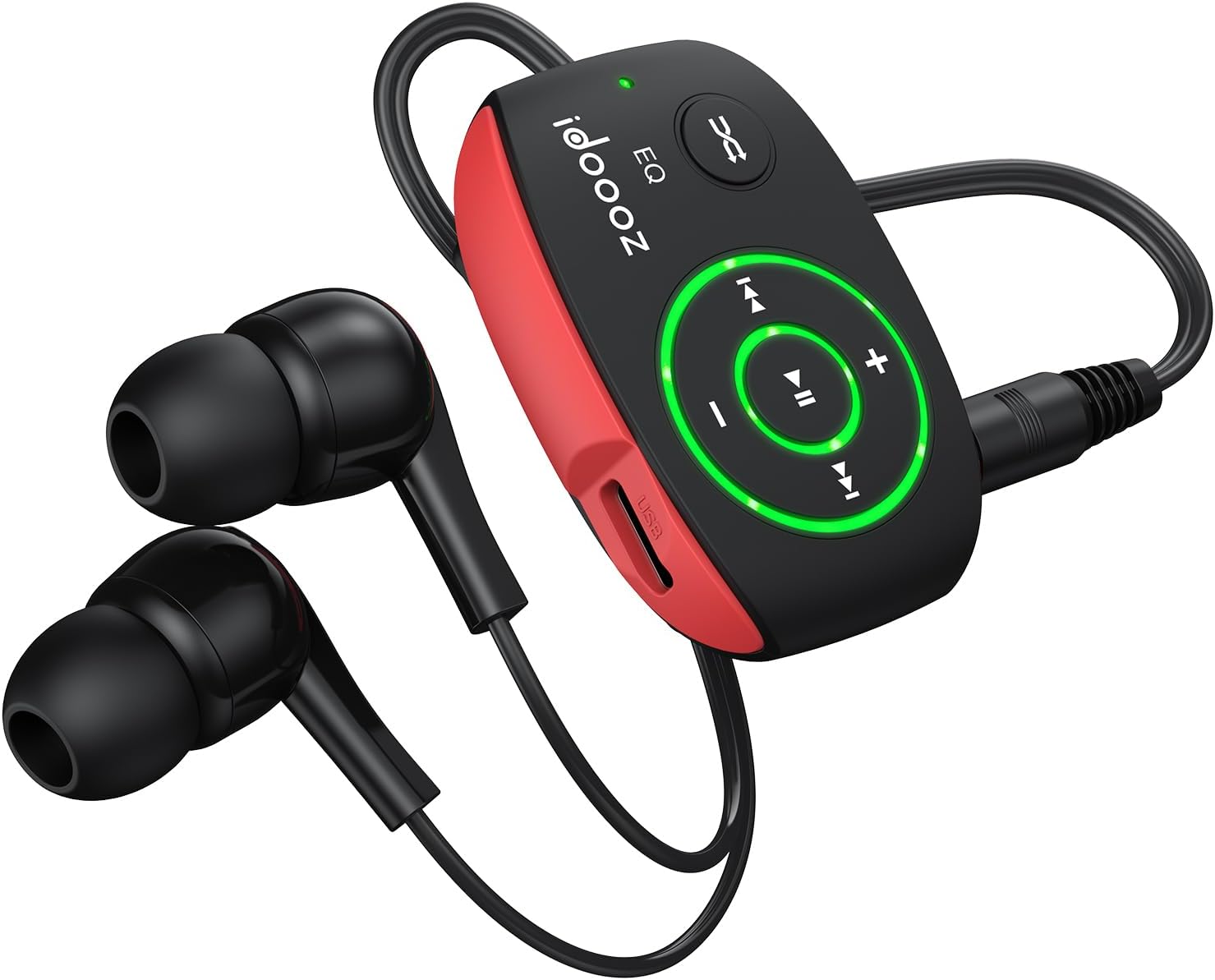
Image 1.1: The idoooz X2 Mini MP3 Player with wired earphones.
2. What's in the Box
Please check the package contents to ensure all items are present:
- idoooz X2 Mini MP3 Player
- High-quality Earphones
- USB-C Charging Cable
- User Manual (this document)

Image 2.1: Package contents of the idoooz X2 Mini MP3 Player.
3. Product Overview and Components
Familiarize yourself with the various parts and controls of your idoooz X2 MP3 Player.

Image 3.1: Labeled diagram of the idoooz X2 MP3 Player components.
- USB-C Charging Port / Data Transfer: Used for charging the device and transferring music files.
- LED Charging Indicator Light: Indicates charging status.
- LED Playback Status Light: Indicates device status (play/pause/power).
- Volume - / +: Adjusts the playback volume.
- Previous Track / Fast Backward: Navigates to the previous track or fast backward.
- Next Track / Fast Forward: Navigates to the next track or fast forward.
- EQ / Shuffle / Standard Playback: Toggles between equalizer modes, shuffle, and standard playback.
- On / Off / Play / Pause: Powers the device on/off and controls music playback.
- 3.5 mm Earphone Jack: Connects your wired earphones.
- RESET: Small button for resetting the device if needed.
- Clip: Integrated clip for attaching the player to clothing or accessories.
4. Setup
4.1 Charging the Device
Before first use, fully charge your MP3 player. The built-in 110mAh rechargeable battery provides approximately 15 hours of continuous music playback at medium volume and takes about 2.5 hours to fully charge.
- Connect the provided USB-C cable to the charging port on the MP3 player.
- Connect the other end of the USB-C cable to a USB power adapter (not included) or a computer's USB port.
- The LED Charging Indicator Light will illuminate during charging. It will change or turn off once charging is complete.
4.2 Transferring Music Files
The idoooz X2 has 8GB of built-in flash memory, capable of storing over 2,000 songs. It supports MP3, WMA, APE, and FLAC formats with lossless audio quality.
- Connect the MP3 player to your computer using the provided USB-C cable.
- The computer will recognize the MP3 player as a removable disk drive.
- Open the drive folder. You can drag and drop your music files (MP3, WMA, APE, FLAC) directly into this folder.
- Once all files are transferred, safely eject the MP3 player from your computer before disconnecting the cable.

Image 4.1: Transferring music files from a computer to the MP3 player.
OTG Function (Optional): You can also transfer music from your smartphone to the MP3 player using an OTG adapter (not included) and a compatible cable. Connect the OTG adapter to your phone, then connect the MP3 player via its USB-C cable to the adapter.

Image 4.2: Using the OTG function to transfer music from a smartphone.
5. Operating Instructions
5.1 Power On/Off and Playback
- Power On: Press and hold the On/Off/Play/Pause button until the LED Playback Status Light illuminates.
- Play/Pause: Briefly press the On/Off/Play/Pause button to play or pause the current track. The LED light will flash to indicate playback status.
- Power Off: Press and hold the On/Off/Play/Pause button until the LED Playback Status Light turns off.
5.2 Volume Adjustment
- Press the Volume + button to increase the volume.
- Press the Volume - button to decrease the volume.
5.3 Track Navigation
- Next Track: Briefly press the Next Track / Fast Forward button.
- Previous Track: Briefly press the Previous Track / Fast Backward button.
- Fast Forward: Press and hold the Next Track / Fast Forward button.
- Fast Backward: Press and hold the Previous Track / Fast Backward button.
5.4 EQ / Shuffle / Standard Playback
Press the EQ / Shuffle / Standard Playback button to cycle through different playback modes, including equalizer settings and shuffle mode.

Image 5.1: The idoooz X2 MP3 Player in use during exercise.
6. Maintenance
- Keep the device dry. Avoid exposure to moisture or liquids.
- Clean the device with a soft, dry cloth. Do not use harsh chemicals or abrasive cleaners.
- Avoid extreme temperatures. Do not store in very hot or cold environments.
- Protect the USB-C port and earphone jack from dust and debris.
- If the device becomes unresponsive, use a thin object (like a paperclip) to press the RESET button.
7. Troubleshooting
| Problem | Possible Solution |
|---|---|
| Device does not power on. | Ensure the device is fully charged. Press and hold the Power button for a few seconds. If unresponsive, try the RESET button. |
| Cannot transfer files to the device. | Ensure the USB-C cable is securely connected to both the player and the computer. Try a different USB port or cable. Ensure the device is powered on when connected. |
| No sound from earphones. | Check if earphones are properly plugged into the 3.5mm jack. Ensure volume is not set to minimum. Test with different earphones if available. |
| LED indicator not working. | Refer to the "Product Overview and Components" section for expected LED behavior. If the device functions otherwise, this may not indicate a critical issue. |
| Device freezes or becomes unresponsive. | Press the RESET button using a thin, pointed object. This will restart the device without deleting data. |
8. Specifications
| Feature | Detail |
|---|---|
| Model Name | X2 |
| Brand | idoooz |
| Memory Storage Capacity | 8 GB |
| Product Dimensions | 1.81 x 1.18 x 0.7 inches |
| Item Weight | 0.52 ounces |
| Connectivity Technology | USB-C |
| Supported Audio Formats | MP3, WMA, APE, FLAC |
| Battery Life | Approx. 15 hours (medium volume) |
| Charging Time | Approx. 2.5 hours |
| Special Features | Built-In Clip, Equalizer, LED light |
9. Warranty and Support
The idoooz X2 Mini MP3 Music Player comes with a 365-day warranty. If you encounter any problems or have questions regarding your device, please contact idoooz customer service directly for assistance.
For support, please refer to the contact information provided with your purchase or visit the official idoooz website.
Ask a question about this manual
Ask about setup, troubleshooting, compatibility, parts, safety, or missing instructions. Manuals+ will review the question and use this page’s manual context to help answer it.