
TOPUTURE TP2
TOPUTURE TP2 2-in-1 Foldable Walking Pad Treadmill User Manual
Model: TP2
1. Introduction
Thank you for choosing the TOPUTURE TP2 2-in-1 Foldable Walking Pad Treadmill. This manual provides essential information for the safe and effective use, setup, operation, and maintenance of your new fitness equipment. Please read this manual thoroughly before initial use and retain it for future reference.
The TOPUTURE TP2 is designed for both walking and light running, featuring a foldable handle for versatile use as an under-desk walking pad or a traditional treadmill. It includes an incline feature, app connectivity, and a compact design for home or office environments.
2. Important Safety Instructions
To reduce the risk of serious injury, read all instructions before using this equipment. The manufacturer is not responsible for personal injury or property damage sustained by or through the use of this product.
- Always place the treadmill on a flat, stable surface.
- Ensure adequate clearance around the treadmill (at least 2 feet on sides and rear).
- Keep children and pets away from the treadmill during operation.
- Wear appropriate athletic footwear.
- Use the safety key at all times. Attach the clip to your clothing.
- Do not operate the treadmill if it is damaged or malfunctioning.
- Consult a physician before starting any exercise program.
- Maximum user weight capacity: 300 lbs.
3. Setup
3.1 Unboxing and Placement
The TOPUTURE TP2 treadmill comes pre-assembled. Carefully remove all packaging materials. Place the treadmill on a firm, level surface. Ensure the power cord is accessible and not obstructed.
3.2 Handle Bar Configuration
The treadmill can be used in two modes: with the handle bar up for running/walking, or folded down for under-desk walking.
- To raise the handle bar: Lift the handle bar until it locks securely into the upright position. Ensure both locking mechanisms are engaged.
- To lower the handle bar: Release the locking mechanisms (refer to the quick release handle image below) and gently lower the handle bar until it rests flat against the treadmill deck.

Image: The TOPUTURE TP2 treadmill shown with the handle bar raised for traditional use and lowered for under-desk operation.

Image: Detailed view of the device holder, magnetic remote control, safety key, quick release handle for folding, and built-in transport wheels.
3.3 Power Connection and Safety Key
Connect the power cord to a grounded electrical outlet. Insert the safety key into its designated slot on the console. The treadmill will not operate without the safety key properly inserted.
4. Operating Instructions
4.1 Console and LED Display
The integrated LED display shows key workout metrics:
- Time: Duration of your workout.
- Speed: Current speed in MPH.
- Distance: Total distance covered.
- Calories: Estimated calories burned.

Image: The LED display on the treadmill console, illustrating the various metrics displayed during operation.
4.2 Starting and Stopping the Treadmill
- Ensure the safety key is in place.
- Step onto the side rails of the treadmill.
- Press the START button on the remote control or console. The treadmill will begin at a low speed.
- To stop, press the STOP button on the remote or console, or pull the safety key.
4.3 Speed Adjustment
Adjust the speed using the remote control or the console buttons.
- Remote Control: Use the '+' and '-' buttons to increase or decrease speed.
- Console Buttons: Use the speed adjustment buttons on the console.
The speed range is 0.6 to 7.5 MPH.

Image: The treadmill console with speed controls and the remote control, highlighting two ways to adjust speed.
4.4 Incline Feature
The TOPUTURE TP2 features a fixed 7% incline, designed to simulate uphill walking and increase calorie expenditure compared to flat treadmills.

Image: Visual comparison demonstrating the 7% incline of the TOPUTURE TP2 treadmill and its effect on calorie burn versus a flat treadmill.
4.5 2-in-1 Functionality (Walking Pad / Treadmill)
- Walking Pad Mode (Handle Bar Down): When the handle bar is folded down, the treadmill operates as a walking pad, ideal for use under a standing desk. The speed range in this mode is typically 0.6-4 MPH.
- Treadmill Mode (Handle Bar Up): With the handle bar raised and secured, the treadmill functions as a traditional treadmill, allowing for speeds up to 7.5 MPH.

Image: Two individuals illustrating the two operational modes: walking pad mode (handle bar down) and treadmill mode (handle bar up).

Image: A woman using the TOPUTURE TP2 treadmill in its under-desk walking pad configuration while working at a standing desk.
4.6 Smart App Integration
The treadmill can connect to a sports application via Bluetooth for enhanced tracking and control.
- Download the recommended Sport APP (e.g., FitShow, Zwift, Kinomap) from your device's app store.
- Enable Bluetooth on your mobile device.
- Open the Sport APP and follow the on-screen instructions to pair with your TOPUTURE TP2 treadmill.
- The app allows you to record exercise data, set goals, and access various workout programs.
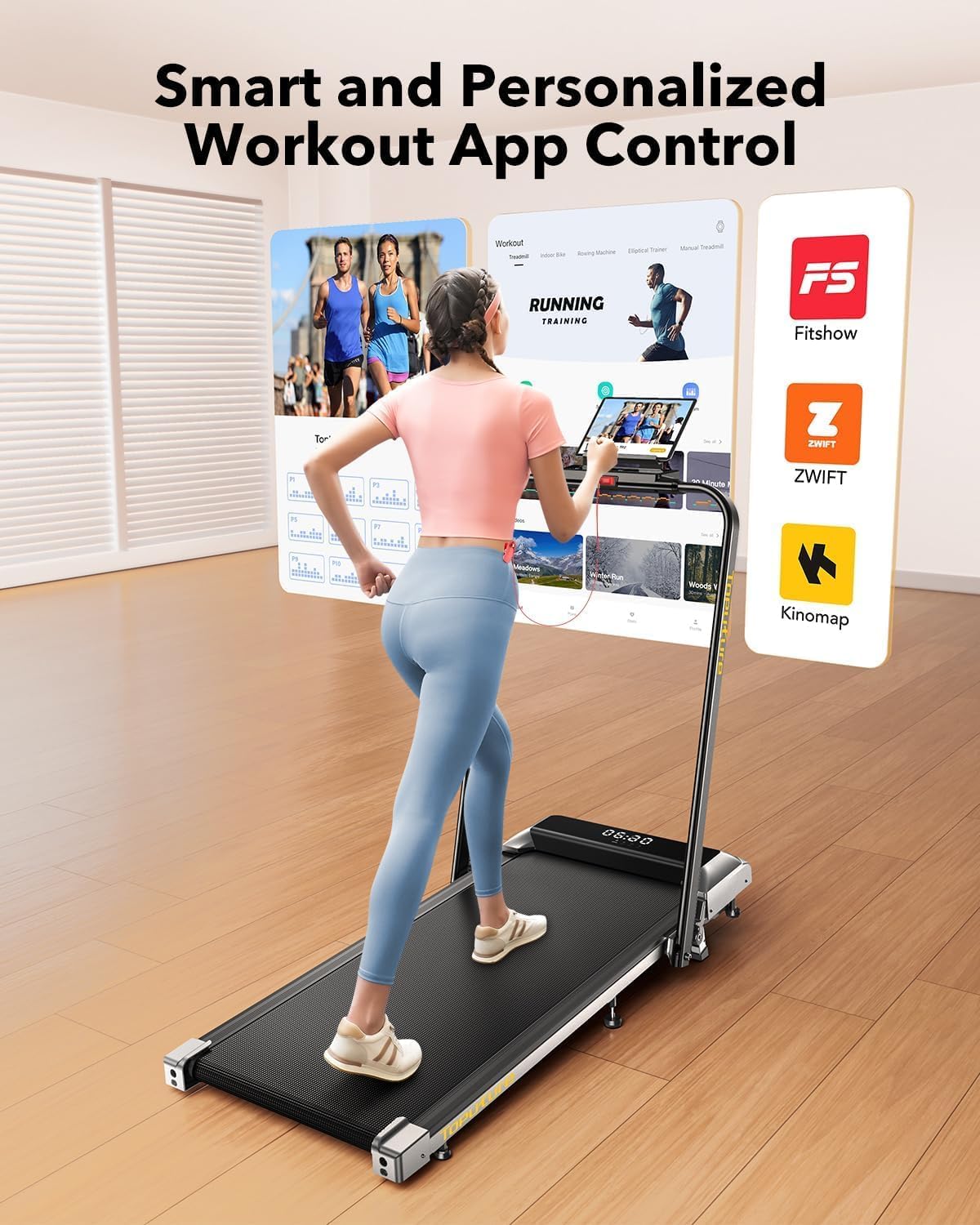
Image: A user interacting with a fitness application on a tablet, demonstrating the smart app integration feature of the treadmill.
4.7 Device Holder
The treadmill features a device holder on the console, allowing you to place your phone or tablet for entertainment or app viewing during your workout.
5. Maintenance
5.1 Cleaning
Regular cleaning helps maintain the treadmill's performance and appearance.
- Always unplug the treadmill before cleaning.
- Wipe down the console and exterior surfaces with a soft, damp cloth. Avoid abrasive cleaners.
- Periodically vacuum under the treadmill to prevent dust buildup.
5.2 Running Belt Lubrication
The running belt may require lubrication after extended use to ensure smooth operation and prolong its lifespan. Refer to the included user manual for specific lubrication instructions and recommended lubricant type.
5.3 Running Belt Adjustment
If the running belt becomes off-center or slips, it may need adjustment. Consult the detailed instructions in the full user manual for proper belt centering and tensioning procedures.
5.4 Storage
The TOPUTURE TP2 is designed for easy storage due to its foldable design and transport wheels.
- Ensure the treadmill is powered off and unplugged.
- Lower the handle bar as described in Section 3.2.
- Utilize the built-in transport wheels to move the treadmill to a desired storage location. It can be stored flat under furniture or upright against a wall.

Image: A woman demonstrating the ease of moving and storing the folded TOPUTURE TP2 treadmill using its flexible wheels.
6. Troubleshooting
If you encounter issues with your treadmill, refer to the following common problems and solutions:
| Problem | Possible Cause | Solution |
|---|---|---|
| Treadmill does not power on. | Power cord not connected; Safety key not inserted. | Ensure power cord is securely plugged in; Insert safety key fully. |
| Running belt slips or hesitates. | Belt tension too loose; Belt requires lubrication. | Adjust belt tension (refer to full manual); Lubricate the running belt. |
| Unusual noise during operation. | Loose components; Motor issue; Belt friction. | Check for loose screws; Lubricate belt; Contact customer support if noise persists. |
| App connection issues. | Bluetooth off; App not updated; Incorrect pairing. | Ensure Bluetooth is on; Update app; Re-attempt pairing process. |
For issues not listed here, please contact TOPUTURE customer support.
7. Specifications
The following table outlines the key specifications for the TOPUTURE TP2 Walking Pad Treadmill:
| Feature | Detail |
|---|---|
| Brand | TOPUTURE |
| Model Name | TP2 |
| Product Dimensions (LxWxH) | 51.1" x 22" x 5.1" |
| Folded Size | 51.2" x 22" x 5.3" |
| Item Weight | 50 Pounds |
| Material | Alloy Steel |
| Maximum Speed | 7.5 Miles per Hour |
| Maximum Incline Percentage | 7% (fixed) |
| Maximum Horsepower | 2.5 HP |
| Maximum Weight Recommendation | 300 Pounds |
| Running Area | 40" x 16" |
| Connectivity Technology | Bluetooth |
| Included Components | Power Cord, Remote Control, Safety Key, User Manual |

Image: Illustration detailing the 2.5 HP motor, low noise level (45db), speed range (0.6-7.5 MPH), and 300 lbs weight capacity.

Image: Cross-section diagram illustrating the five layers of the anti-slip, shock-absorbing running belt, including anti-slip, enhanced, absorbing, supporting, and fabric knitted layers.
8. Warranty and Support
8.1 Warranty Information
The TOPUTURE TP2 Walking Pad Treadmill comes with a one-year warranty from the date of purchase. This warranty covers manufacturing defects under normal use. It does not cover damage caused by misuse, accidents, unauthorized modifications, or improper maintenance.
8.2 Customer Support
For warranty claims, technical assistance, or any questions regarding your TOPUTURE TP2 treadmill, please contact TOPUTURE customer support. Refer to the contact information provided in the packaging or on the official TOPUTURE website.
Related documentsTP2


Ask a question about this manual
Ask about setup, troubleshooting, compatibility, parts, safety, or missing instructions. Manuals+ will review the question and use this page’s manual context to help answer it.