
1. Overview and Compatibility
This manual provides detailed instructions for the AWESAFE Android 13 Car Radio, model IB-FR-YXTA372SC-HS19. This unit is designed for Audi A3, S3, and RS3 8P models manufactured between 2003 and 2012. It features a 7-inch touchscreen, Android 13 operating system, 2GB RAM, 64GB ROM, integrated Carplay and Android Auto, GPS navigation, Wi-Fi, USB, FM radio, Bluetooth, and steering wheel control compatibility. A rearview camera is included in the package.
Important: For some Audi car models, the original car is equipped with a Bose audio system, which may result in no sound from the rear speakers. Please contact the seller to obtain a new power cord with an amplifier to resolve this issue.
2. Package Contents
Please check the box for the following items:
- AWESAFE Android 13 Car Radio Unit
- Power Connectors
- RCA Cable
- GPS Antenna
- External Microphone
- USB Cables
- Canbus Decoder
- Radio Antenna
- Camera Detection Line
- Installation Tools
- Rearview Camera

Figure 2.1: Included components for the AWESAFE car radio.
3. Installation Guide
3.1 Product Dimensions
Before installation, please confirm the dimensions of your car's central console. The car radio unit measures approximately 240mm in top width, 228mm in bottom width, and 123mm in height. The screen size is 7 inches diagonally.

Figure 3.1: AWESAFE Car Radio Dimensions.
3.2 Wiring Connections
Refer to the wiring diagram for proper connection. The power cord includes two power plugs (power plug 1 and power plug 2). Regardless of which power socket you connect to, simply connect the two small white and red plugs of the power cord corresponding to the small box (impedance converter).

Figure 3.2: Power and RCA Wiring Diagram.
3.3 General Installation Notes
- Ensure the vehicle's power is disconnected before starting installation.
- Use the provided installation tools to carefully remove the original car radio.
- Connect all cables according to the wiring diagram.
- Securely mount the new AWESAFE car radio into the dashboard.
- Reconnect the vehicle's power and test all functions.
4. Operating Instructions
4.1 Android 13 System
The car radio operates on the latest Android 13 system, offering a fast, fluid, and intelligent user experience with 2GB RAM and 64GB ROM for efficient application performance.
4.2 CarPlay & Android Auto
The unit features integrated Carplay and Android Auto. You can connect your smartphone via wired (USB for Android Auto) or wireless (Wi-Fi for Carplay) connection. This allows seamless access to navigation, calls, text messages, and music directly from your phone's interface displayed on the car radio screen. iPhones use Carplay, and Android phones use Android Auto.
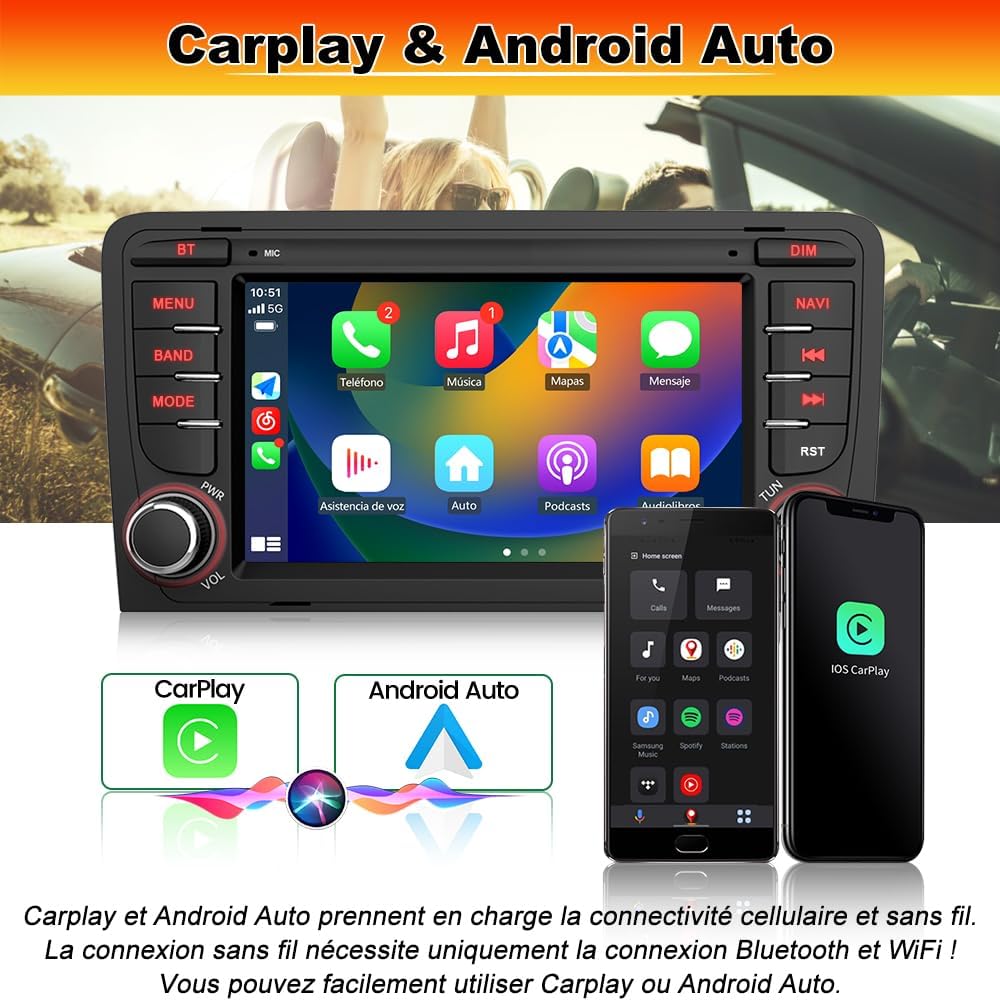
Figure 4.1: Carplay and Android Auto Interface.
4.3 GPS Navigation & Wi-Fi Connectivity
The Android car radio supports online navigation maps. Connect to Wi-Fi to download applications like Sygic or Waze for real-time map information, navigation, and traffic conditions. Wi-Fi also enables downloading various other applications, music, and videos, enhancing your in-car entertainment and utility.

Figure 4.2: GPS Navigation and Wi-Fi Features.
4.4 Bluetooth Functionality
Bluetooth is compatible with all Android and iPhone devices. It allows for hands-free calling and Bluetooth music streaming, ensuring your favorite tracks are always within reach without the need for cables.
4.5 FM Radio
The integrated FM/RDS radio allows you to listen to your favorite stations with clear reception.
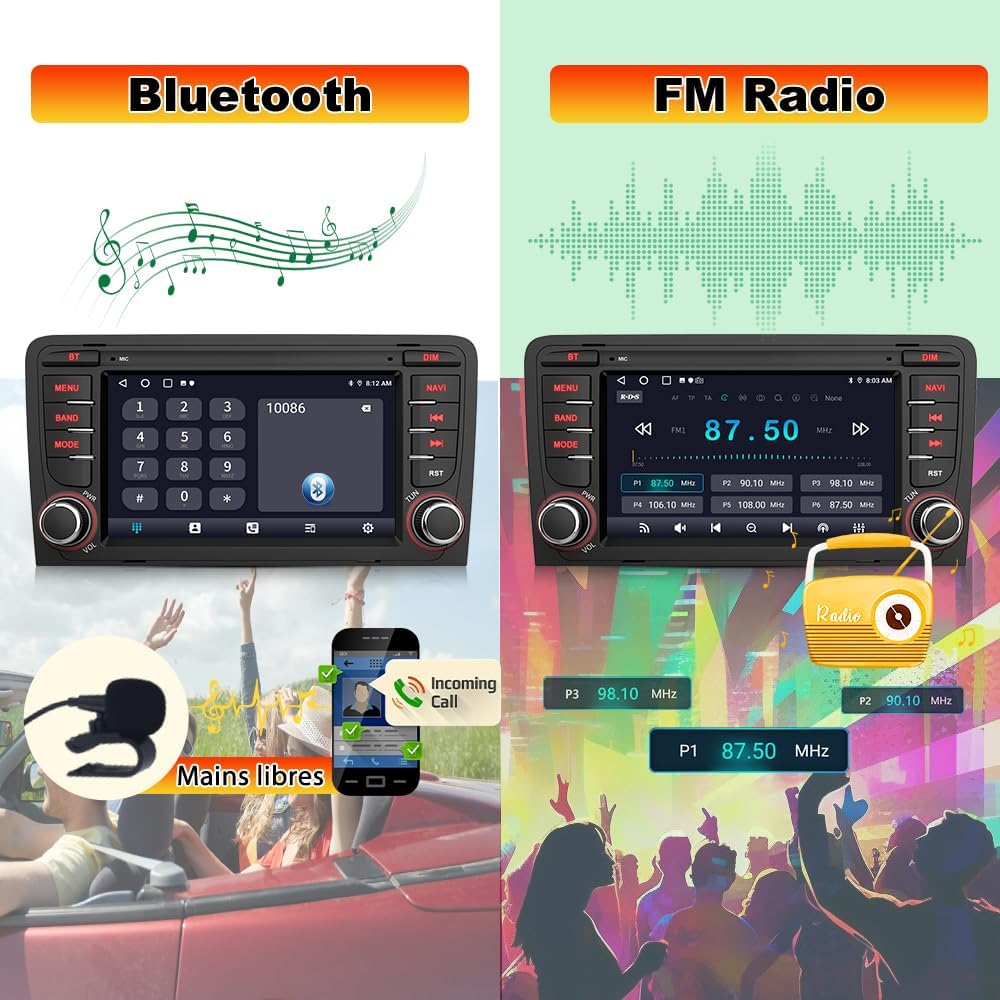
Figure 4.3: Bluetooth and FM Radio Interfaces.
4.6 Steering Wheel Control
The unit supports steering wheel controls for enhanced safety and convenience, allowing you to manage audio and calls without taking your hands off the wheel. Ensure the Canbus and 8-pin interface are correctly connected if these functions are not working.
4.7 Parking Assist (Rearview Camera)
A rearview camera is included in the package. When reversing, the screen automatically displays the rear view with parking assist lines for safe and convenient parking. Connect the camera via the RCA input.

Figure 4.4: Parking Assist with Rearview Camera.
4.8 Digital Sound Processor (DSP)
The Digital Sound Processor (DSP) function allows for personalized audio settings and various equalization methods (e.g., jazz, rock, pop, classic) for an optimized listening experience.
4.9 Customizable Colored Lights
Customize the unit's button backlighting with various colored light options to match your vehicle's interior or personal preference.
4.10 Product Features Video
Video 4.1: Overview of AWESAFE Car Radio features, including screen display, Carplay/Android Auto, Bluetooth, GPS, DSP, steering wheel control, colored lights, FM radio, and parking assist.
5. Maintenance
To ensure the longevity and optimal performance of your AWESAFE car radio, follow these maintenance guidelines:
- Screen Cleaning: Use a soft, dry, lint-free cloth to clean the touchscreen. For stubborn smudges, slightly dampen the cloth with water or a screen-safe cleaner. Avoid abrasive materials or harsh chemicals.
- General Cleaning: Keep the unit free from dust and debris. Use a soft brush or compressed air to clean around buttons and vents.
- Connection Checks: Periodically check that all cables and connectors are securely attached to prevent intermittent issues.
- Software Updates: Check for available software updates from AWESAFE to ensure you have the latest features and bug fixes.
6. Troubleshooting
If you encounter issues with your AWESAFE car radio, refer to the following common troubleshooting steps:
- No Power: Ensure all power connections are secure and correctly wired. Check the vehicle's fuse box for any blown fuses related to the car radio.
- No Sound (especially rear speakers in Bose systems): As mentioned in the overview, if your Audi has a Bose audio system and you experience no sound from the rear speakers, contact the seller for a new power cord with an amplifier.
- Poor GPS Signal: Verify that the GPS antenna is properly installed and has a clear, unobstructed view of the sky. Avoid placing it under metal objects.
- Steering Wheel Controls Not Working: Confirm that the Canbus decoder and the 8-pin interface are correctly connected. Refer to the installation section for wiring details.
- Bluetooth Connection Issues: Ensure Bluetooth is enabled on both the car radio and your smartphone. Try unpairing and re-pairing the devices.
- Touchscreen Unresponsive: Try restarting the unit. If the issue persists, a factory reset might be necessary (refer to the system settings).
For persistent issues or problems not listed here, please contact AWESAFE customer support.
7. Technical Specifications
| Feature | Specification |
|---|---|
| Brand | AWESAFE |
| Model Number | IB-FR-YXTA372SC-HS19 |
| Connectivity Technology | Bluetooth, Wi-Fi |
| Controller Type | Android |
| Special Feature | Android Auto, Carplay, GPS Navigation, FM/RDS Radio, DSP |
| Compatible Devices | Smartphone |
| Connector Type | 3.5 mm Jack, USB, WiFi, Reverse camera input |
| Audio Output Mode | Stereo |
| Video Encoding | AVI |
| Product Dimensions (D x W x H) | 12.2D x 24W x 11H centimeters |
| Output Power | 45 Watts |
| Internet Application | Browser |
| Control Method | Touch, Voice |
| Wireless Technology | Bluetooth, Wi-Fi |
| UPC | 759973264086 |
| Warranty Description | 2 years |
| Country of Origin | China |
| Item Weight | 1600 Grams |
8. Warranty and Support
The AWESAFE Android 13 Car Radio comes with a 2-year warranty from the date of purchase. This warranty covers manufacturing defects and malfunctions under normal use.
For technical assistance, warranty claims, or any other inquiries, please contact AWESAFE customer support through the seller's platform or the official AWESAFE website. Please have your model number (IB-FR-YXTA372SC-HS19) and proof of purchase ready when contacting support.


