
1. Introduction
The AFERIY P010 Portable Power Station is a versatile and reliable power solution designed for various applications, including home backup, outdoor activities, and emergency power needs. Featuring a 512Wh LiFePO4 battery and an 800W (1600W surge) pure sine wave AC output, it provides stable and efficient power for a wide range of devices. This manual provides essential information for safe and effective operation, maintenance, and troubleshooting of your P010 power station.

2. Safety Instructions
To ensure safe operation and prolong the lifespan of your AFERIY P010, please adhere to the following safety guidelines:
- Do not disassemble, repair, or modify the unit. Incorrect reassembly may cause fire or injury.
- Do not expose the unit to fire or extreme temperatures (above 60°C/140°F).
- Do not use or store the unit in a bathroom or in areas exposed to water or moisture.
- Keep the unit away from children and pets.
- Avoid dropping, impacting, or subjecting the unit to strong vibrations.
- Use only recommended accessories and chargers.
- Ensure proper ventilation during use and charging to prevent overheating.
- In case of fire, use a dry powder fire extinguisher.
3. Package Contents
Verify that all items are present in your package:
- AFERIY P010 Portable Power Station
- AC Charging Adapter
- MC4-XT60 Cable (for solar charging)
- Car Charging Cable
- Product Manual (this document)
- Warranty Card
- Dust Cover
- Accessories Bag

4. Product Overview
Familiarize yourself with the various ports and controls on your AFERIY P010 power station.

Ports and Controls:
- AC Output (800W): For standard household appliances.
- USB QC3.0 Ports (x2): For quick charging compatible USB devices.
- Type-C Ports (x3): Includes 100W and 20W ports for various USB-C devices.
- DC6530 Output: For DC-powered devices.
- Car Charging Outlet (12V/10A): For powering 12V car appliances.
- Input Port: For AC, solar, or car charging.
- Power Button: To turn the unit on/off.
- Light Control Button: To activate and cycle through LED light modes.
LCD Display:
The integrated LCD panel provides real-time information about the power station's status:
- Input/Output Wattage: Displays current power draw and charging input.
- Battery Level: Shows remaining battery capacity.
- Estimated Run/Charge Time: Indicates how long the unit can power devices or how long until fully charged.
- Frequency (Hz): Displays the AC output frequency.
- Error Indicators: Alerts for potential issues.

5. Setup
Before first use, ensure your AFERIY P010 is fully charged.
- Unpack: Carefully remove all components from the packaging.
- Initial Charge: Connect the AC charging adapter to the power station's input port and plug it into a wall outlet. Allow the unit to charge completely until the battery indicator on the LCD display shows 100%. This typically takes about 1.5 hours.
- Placement: Place the power station on a stable, flat surface in a well-ventilated area, away from direct sunlight, heat sources, and moisture.
6. Charging Methods
The AFERIY P010 offers multiple convenient charging options:
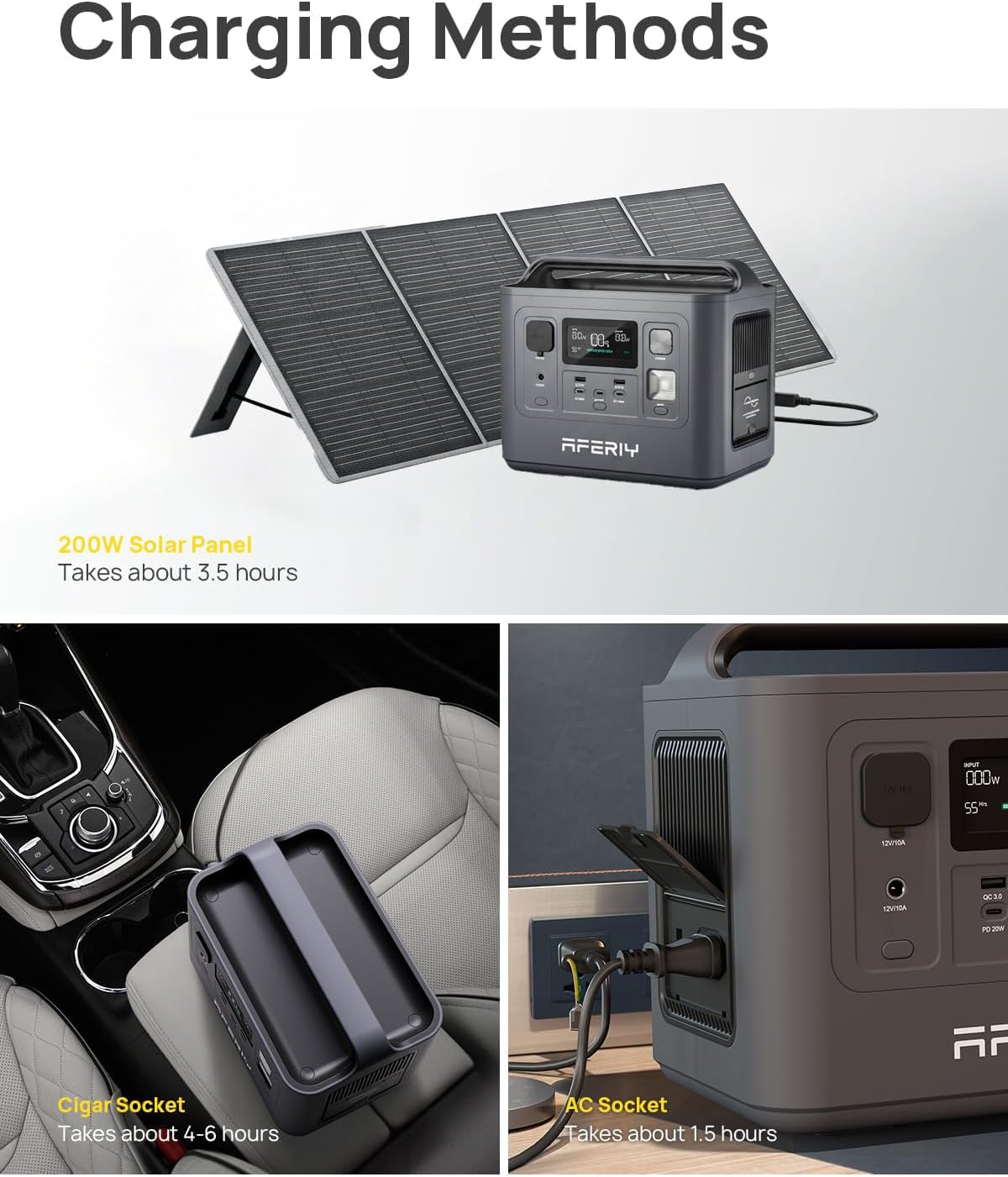
- AC Wall Outlet (400W): Connect the AC charging adapter to the input port and a standard wall outlet. This method provides the fastest charge, reaching 100% in approximately 1.5 hours.
- Solar Panel (up to 200W max): Connect compatible solar panels (not included) to the input port using the MC4-XT60 cable. Charging time varies based on solar intensity and panel wattage. A 200W solar panel can fully charge the unit in about 3.5 hours under optimal sunlight.
- Car Charger: Use the provided car charging cable to connect the power station to your vehicle's 12V cigarette lighter port. This method typically takes 4-6 hours for a full charge.
- AC + Solar Panel: For even faster charging, combine AC wall charging with solar panel input simultaneously.
7. Operating Instructions
Powering On/Off:
Press and hold the main Power Button for a few seconds until the LCD screen illuminates to turn the unit on. To turn it off, press and hold the same button until the screen goes blank.
Using Output Ports:
Once the power station is on, activate the desired output sections by pressing their respective buttons (e.g., AC button for AC outlets, USB button for USB ports). The LCD screen will indicate when an output is active.
- Connect your devices to the appropriate ports.
- Ensure the total power draw of connected devices does not exceed the power station's rated output (800W continuous, 1600W surge).
- When finished, turn off the output sections and then the main power station to conserve battery.

8. UPS Function
The AFERIY P010 features an Uninterruptible Power Supply (UPS) function. When connected to an AC wall outlet and simultaneously powering devices, the unit can act as a pass-through power source. In the event of a power outage, the P010 will automatically switch to battery power within 0.1 seconds, providing seamless power to your connected devices. This protects sensitive electronics from sudden power interruptions.
9. LED Light Modes
The P010 includes an integrated LED light with three modes for various lighting needs:
- Lighting: Standard illumination for general use.
- SOS: Flashes the international Morse code signal for emergencies.
- Flashing: A rapid flashing light for signaling or warning.
Press the Light Control Button to cycle through these modes and turn the light on/off.
10. Maintenance
Proper maintenance ensures the longevity and optimal performance of your AFERIY P010.

- Storage: If storing the unit for an extended period, charge it to 50-80% every 3-6 months to maintain battery health. Store in a cool, dry place away from direct sunlight.
- Cleaning: Use a dry, soft cloth to clean the exterior of the power station. Do not use abrasive cleaners or immerse the unit in water.
- Battery Life: The LiFePO4 battery is designed for over 3500 charge cycles to 80% capacity, offering significantly longer lifespan compared to other battery types.
- Ventilation: Ensure the ventilation vents are clear of dust and debris to prevent overheating.
11. Troubleshooting
If you encounter issues with your AFERIY P010, refer to the following common problems and solutions:
| Problem | Possible Cause | Solution |
|---|---|---|
| Unit does not turn on | Battery is completely depleted; Power button not pressed long enough. | Charge the unit using the AC adapter. Press and hold the power button for 3-5 seconds. |
| AC output not working | AC output not activated; Overload protection triggered; Device power draw too high. | Press the AC button to activate. Reduce the number or power of connected devices. Restart the unit. |
| Unit not charging | Charging cable loose or damaged; Charger not connected to power source; Solar panel not receiving sufficient sunlight. | Check all cable connections. Ensure the AC adapter is plugged into a live outlet. Reposition solar panels for direct sunlight. |
| Overheat warning on display | Poor ventilation; Excessive load. | Move the unit to a cooler, well-ventilated area. Reduce the load on the power station. |
If the problem persists, please contact AFERIY customer support for assistance.
12. Specifications
Detailed technical specifications for the AFERIY P010 Portable Power Station:
| Feature | Specification |
|---|---|
| Model Name | AF-P010 |
| Battery Type | LiFePO4 |
| Capacity | 512Wh |
| AC Output Power | 800W (Continuous), 1600W (Surge) |
| AC Output Voltage | 110V |
| AC Charging Input | 400W (Full charge in approx. 1.5 hours) |
| Solar Charging Input | 200W Max |
| USB QC3.0 Output | 2 ports |
| Type-C Output | 3 ports (100W/20W) |
| DC6530 Output | 1 port |
| Car Charging Output | 12V/10A |
| UPS Function | Automatic switch within 0.1s |
| Dimensions (L x W x H) | 10.7" x 7.4" x 9.45" |
| Weight | 14.33 lbs (6.5 kg) |
| Material | ABS |
| Certifications | UL, CE, FCC, PSE, RoHS, TELEC |
13. Warranty and Support
AFERIY products come with a manufacturer's warranty. Please refer to the included Warranty Card for specific terms and conditions, including warranty period and coverage details.
For technical support, troubleshooting assistance, or warranty claims, please contact AFERIY customer service through the official website or the contact information provided on your warranty card.
Online resources and FAQs may also be available on the AFERIY website to help resolve common issues.


