
Introduction
Thank you for choosing the SMUG Adjustable Height Standing Desk. This manual provides essential information for the safe and efficient use of your new desk. Please read it thoroughly before assembly and operation, and keep it for future reference.

Image: The SMUG Adjustable Height Standing Desk in Oak, showcasing its spacious desktop and clean design, ready for a productive workspace.
Safety Information
- Ensure all components are present and undamaged before assembly.
- Do not overload the desk. The maximum weight capacity is 176 lbs.
- Keep hands and objects clear of the moving parts (legs and motor mechanism) during height adjustment to prevent injury or damage.
- The desk features an anti-collision system. If an obstruction is detected, the desk will stop and reverse slightly.
- Do not allow children to operate the desk without adult supervision.
- Use only the provided power adapter.
- Avoid placing liquids directly on the desk surface without proper coasters to prevent damage.
Package Contents
Before beginning assembly, please verify that all parts listed below are included in your package:
| Part | Description | Quantity |
|---|---|---|
| Desktop Panel | Oak finish, 48x24 inches | 1 |
| Leg Frames | T-shaped steel frame | 2 |
| Control Panel | With LED display and memory presets | 1 |
| Motor | Quiet dual motors | 1 |
| Power Adapter | For electric operation | 1 |
| Headphone Hooks | For cable management or accessories | 2 |
| Assembly Hardware | Screws, Allen wrench, etc. | 1 set |
| Instruction Manual | This document | 1 |

Image: Visual representation of the desk's dimensions (47.24"W x 23.62"D, adjustable height 28.7"-48") and key features like wire holes, sturdy hooks, and splicing boards for the desktop.
Setup and Assembly
Assembly of the SMUG Standing Desk is designed to be straightforward, typically taking less than 30 minutes for most users. Follow the step-by-step instructions provided in the included assembly guide.
- Unpack Components: Carefully remove all parts from the packaging and lay them out on a clean, soft surface to prevent scratches.
- Assemble Leg Frames: Attach the T-shaped leg frames to the crossbar according to the diagrams. Ensure all screws are tightened securely.
- Attach Desktop: Carefully place the desktop panel onto the assembled leg frame. Align the pre-drilled holes and secure the desktop using the provided screws.
- Install Control Panel: Mount the control panel to the underside of the desktop in the designated slot. Connect the motor and power cables to the control panel.
- Attach Accessories: Install the headphone hooks on either side of the desk as desired. Utilize the desktop wire holes for cable routing.
- Connect Power: Plug the power adapter into the control panel and then into a wall outlet.
Tip: It is recommended to have two people for easier and safer assembly, especially when handling the desktop.


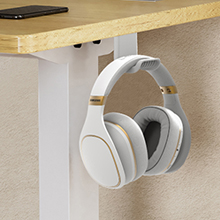
Images: Details of the desktop's splicing boards for secure assembly, integrated wire holes for cable management, and sturdy hooks for headphones or bags.
Operating Instructions
The SMUG Standing Desk features an intuitive control panel for easy height adjustment and memory functions.

Image: The advanced control panel, featuring an LED display for precise height readings, up/down arrows for adjustment, three memory presets (1, 2, 3), and a save button (S).
Basic Operation:
- Adjusting Height: Use the ▲ (Up) and ▼ (Down) buttons to raise or lower the desk to your desired height. The LED display will show the current height.
- Quiet Operation: The dual motors operate quietly, ensuring minimal disturbance during adjustments.

Image: Illustration of the desk's wide height range, demonstrating its adjustability from a minimum of 28.7 inches for sitting to a maximum of 48 inches for standing.
Memory Presets:
The desk allows you to save up to three preferred height settings for quick recall.
- To Save a Height: Adjust the desk to your desired height. Press the S (Save) button, then immediately press one of the memory preset buttons (1, 2, or 3). The height is now saved to that preset.
- To Recall a Height: Simply press the corresponding memory preset button (1, 2, or 3). The desk will automatically move to the saved height.
Safety Features:
- Anti-Collision System: If the desk encounters an obstruction during adjustment, it will automatically stop and reverse slightly to prevent damage or injury.
- Safety Lock: The control panel may include a safety lock feature to prevent accidental adjustments. Refer to the detailed assembly guide for specific instructions on activating/deactivating this feature.
Maintenance
Proper maintenance will ensure the longevity and optimal performance of your SMUG Standing Desk.
- Cleaning: Wipe the desk surface with a dry cloth. For stubborn marks, use a slightly damp cloth and mild detergent, then dry immediately. Avoid abrasive cleaners or harsh chemicals.
- Motor Care: The dual motors are designed for durability and require minimal maintenance. Do not attempt to lubricate or disassemble the motor components.
- Cable Management: Periodically check that all cables are neatly organized and not pinched or tangled, especially during height adjustments.
- Regular Inspection: Occasionally check all screws and connections to ensure they remain tight.

Image: The desk's eco-friendly tabletop with smooth, rounded edges, designed for durability and easy cleaning.
Troubleshooting
If you encounter any issues with your SMUG Standing Desk, refer to the following common problems and solutions:
| Problem | Possible Cause | Solution |
|---|---|---|
| Desk does not move. | Power cable disconnected; Safety lock engaged. | Check power connections. Refer to manual for safety lock disengagement. |
| Desk moves unevenly or makes unusual noise. | Loose connections; Obstruction; Overload. | Ensure all screws are tight. Check for obstructions. Reduce weight on desk. |
| Anti-collision system frequently activates. | Sensitivity setting too high; Obstruction. | Check for objects near the desk's path. Consult manual for sensitivity adjustment. |
| Memory presets not working. | Incorrect saving procedure. | Re-save your desired heights following the "To Save a Height" instructions. |
If the problem persists, please contact SMUG customer support.
Specifications
- Brand: SMUG
- Model Number: ELT-P4824V3-BK814
- Model Name: ELT-P4824V3-OAK
- UPC: 720314569337
- Product Dimensions: 23.6"D x 47.2"W x 46.5"H
- Adjustable Height Range: 28.7" to 46.5"
- Weight Capacity: Up to 176 lbs
- Motor Type: Dual Electric Motors
- Noise Level: <55dB
- Desktop Material: Wood (Oak finish)
- Frame Material: T-shaped Steel
- Features: 3 Memory Presets, LED Display, Anti-Collision System, Safety Lock, Cable Management (2 wire holes, 2 side hooks)
- Assembly Required: Yes (Easy Assembly)
- Color: Oak (This variant)
- Size: 48*24 (This variant)
Warranty and Support
SMUG stands behind the quality of its products. For warranty information, please refer to the documentation included with your purchase or visit the official SMUG website.
For any questions, technical assistance, or customer support, please contact our 24/7 customer support team. Contact details can be found on our website or your purchase receipt.
We are committed to providing excellent service and ensuring your satisfaction with your SMUG Adjustable Height Standing Desk.


