
Introduction
This manual provides detailed instructions for the installation, operation, and maintenance of your AWESAFE 2-DIN Car Stereo. This unit features a 7-inch IPS touchscreen, wireless CarPlay, Android Auto, Bluetooth connectivity, FM radio, USB/Type-C ports, and includes a rear view camera for enhanced safety. Please read this manual thoroughly before installation and use to ensure proper function and to avoid damage.
What's in the Box
Carefully unpack all items and check against the list below. If any items are missing or damaged, please contact customer support.
- AWESAFE 2-DIN Car Stereo Unit
- Wiring Harnesses
- Rear View Camera with Cable
- Installation Tools (e.g., pry tool, screwdriver)
- External Microphone
- Mounting Brackets
- User Manual

Image: All accessories included with the AWESAFE 2-DIN Car Stereo, such as the main unit, rear camera, wiring harnesses, installation tools, external microphone, mounting brackets, and user manual.
Installation Guide
1. General Installation
This car stereo is designed for universal 2-DIN installation, fitting most vehicles with a standard 180mm x 100mm opening. Ensure your vehicle's dashboard has adequate space before proceeding. Professional installation is recommended.

Image: A visual comparison demonstrating the dashboard before and after the installation of the 2-DIN car stereo, highlighting the fit and appearance.
2. Wiring Diagram
The car stereo is universal and does not come with an ISO connector, but with scattered cables. During installation, use the provided connector and connect the cables one by one according to your car's specifications. Incorrect wiring can cause short circuits, excessive power consumption, or other issues.

Image: A comprehensive wiring diagram illustrating the connections for the car stereo, including speaker outputs, power (B+, ACC, GND), steering wheel control inputs (KEY1, KEY2), reverse detection (BACK), antenna, and various RCA video/audio inputs/outputs.
3. Steering Wheel Control Connection
The steering wheel control function requires manual configuration. When installing the car stereo, connect the brown wire to KEY1, which controls the steering wheel commands. Then, synchronize the steering wheel controls for them to function. Note: Not compatible with vehicles equipped with a CAN bus system.
4. Rear Camera Installation
The included rear view camera enhances parking safety. Connect the camera's video output to the 'BACK' video input on the stereo's wiring harness. Connect the camera's black wire to the negative wire of your car's reverse light and the red wire to the positive wire of your car's reverse light. This ensures the camera activates automatically when reverse gear is engaged.
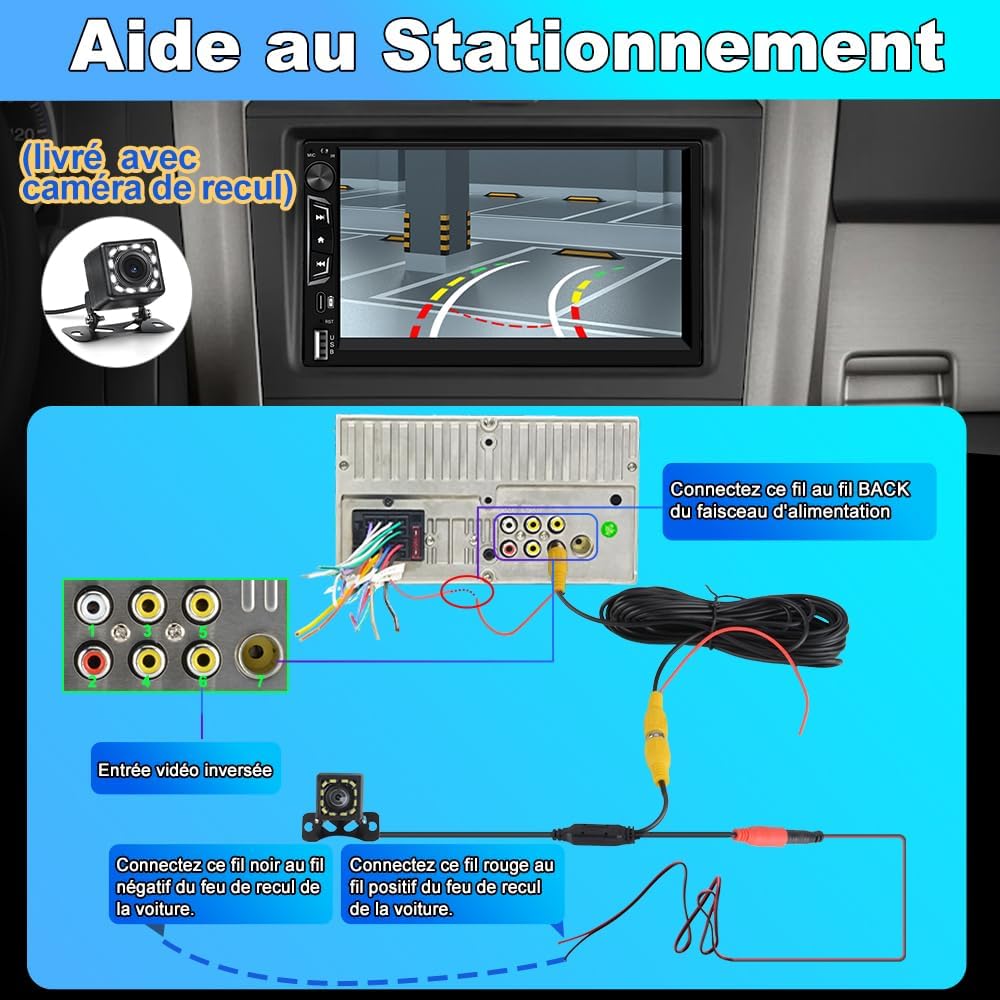
Image: A diagram illustrating how to connect the rear view camera, showing the camera unit, its wiring to the car stereo's video input, and power connections to the vehicle's reverse light circuit.
Operation Guide
1. CarPlay & Android Auto
The 2-DIN car stereo supports seamless integration with smartphones via CarPlay and Android Auto. This provides access to GPS navigation, music playback, and call management directly from the vehicle's touchscreen. Control applications hands-free using Siri or Android Assistant to maintain focus on the road for safer driving.
- Wireless Connection: Connect via Bluetooth and Wi-Fi for a cable-free experience.
- Wired Connection: Use your original USB cable for a stable wired connection.

Image: The car stereo display showing both CarPlay and Android Auto interfaces, with text indicating wireless connection via Bluetooth and Wi-Fi, and wired connection via original USB. A note mentions that some Android phones may not support Android Auto.
2. Bluetooth Connection
The integrated Bluetooth technology ensures a stable connection for hands-free calls and audio streaming, providing a complete in-car entertainment experience. Navigate to the Bluetooth menu on the stereo to pair your device. Note: If CarPlay/Android Auto is connected via Bluetooth, the dedicated Bluetooth page may be inaccessible.

Image: The car stereo display showing the Bluetooth connection interface, with options for making calls and playing music. It emphasizes safe driving with hands-free functionality.
3. FM Radio
The unit includes an FM radio tuner. Please use your vehicle's original antenna to ensure a stable signal. Currently, only FM stations are supported, and station names are not displayed.

Image: The car stereo screen displaying the FM radio interface, showing the current frequency, preset buttons, and controls for scanning and playback. It also highlights the USB and Type-C ports and backlit buttons.
4. USB/Type-C Media Playback
The car stereo is equipped with USB and Type-C ports.
- Type-C: Primarily used for charging mobile phones. It is not intended for data transmission.
- USB: Connect a USB drive to play videos, music, and other media files.
5. Touchscreen Interface
The 7-inch IPS touchscreen offers a clear resolution and vibrant colors for an intuitive and enjoyable user experience. Navigate through menus and control functions by touching the screen.
6. Adjusting Settings
Access the settings menu to customize various aspects of the stereo, including audio equalizer (EQ), display brightness, and other system preferences.
Maintenance
To ensure the longevity and optimal performance of your AWESAFE car stereo, follow these maintenance guidelines:
- Cleaning: Use a soft, dry cloth to clean the touchscreen and unit exterior. For stubborn smudges, lightly dampen the cloth with water or a screen-safe cleaner. Avoid abrasive materials or harsh chemicals.
- Temperature: Avoid exposing the unit to extreme temperatures, both hot and cold, as this can affect performance and lifespan.
- Moisture: Keep the unit dry. Do not expose it to water or excessive humidity.
- Dust: Regularly clean dust from vents and ports to prevent overheating.
Troubleshooting
If you encounter issues with your car stereo, refer to the following common problems and solutions:
- Unit does not power on or has power consumption issues: Check if the ACC (ignition) and B+ (permanent power) cables of the car stereo's power harness are correctly connected to the corresponding cables in your car. Incorrectly connected cables (e.g., reversed) can cause this problem.
- Rear camera does not activate: Ensure the camera's video cable is securely connected to the 'BACK' input and its power wires are correctly connected to the vehicle's reverse light circuit.
- No sound: Check speaker connections, volume levels, and audio source selection. Ensure the mute function is not active.
- Bluetooth connection issues: Ensure Bluetooth is enabled on both the stereo and your smartphone. Try unpairing and re-pairing the devices.
- CarPlay/Android Auto not connecting: Verify that your smartphone is compatible. For wired connections, use the original USB cable. For wireless, ensure Bluetooth and Wi-Fi are active and properly paired.
If you are unsure about wiring or cannot resolve an issue, please contact seller support for assistance.
Specifications
| Feature | Specification |
|---|---|
| Brand | AWESAFE |
| Model Number | IB-FR-CLP19 |
| Display | 7-inch IPS Touchscreen |
| Connectivity Technology | Bluetooth |
| Special Features | Android Auto, CarPlay (Wireless) |
| Compatible Devices | Smartphone |
| Connector Type | USB Type-C, AUX, RCA, HDMI, Optical, Coaxial, XLR |
| Audio Output Mode | Stereo |
| Surround Sound Channel Configuration | 5.1 or 7.1 |
| Video Encoding | AVI |
| Product Dimensions (D x W x H) | 9.5 x 18 x 10 centimeters |
Warranty and Support
Warranty Information
This AWESAFE car stereo comes with a 2-year manufacturer's warranty. Please retain your proof of purchase for warranty claims.
Customer Support
For any questions, technical assistance, or warranty claims, please contact AWESAFE customer support. If you have specific questions regarding your car's original wiring or installation, you may send photos of your original car power cable to seller support for guidance.


