
1. Introduction
The Lefant M2S PLUS is an advanced robotic vacuum and mop designed to provide comprehensive floor cleaning. Featuring 360° LiDAR navigation, 7000Pa suction power, and a self-emptying station, it offers efficient and hands-free cleaning for various floor types, including hard floors and carpets. This manual provides detailed instructions for setup, operation, maintenance, and troubleshooting to ensure optimal performance of your device.

Image 1.1: The Lefant M2S PLUS Robot Vacuum and Mop with its self-emptying station, app interface, and mopping accessories.

Image 1.2: The M2S PLUS robot vacuum demonstrating its 3-in-1 functionality, sweeping, vacuuming, and mopping simultaneously on a hard floor.
2. What's in the Box
Carefully unpack all components and ensure all items are present. If any items are missing or damaged, please contact customer support.
- Robot Vacuum (x1)
- Self-Emptying Station (x1)
- Mop Holder (x1)
- Power Cord (x1)
- User Manual (x1)
- Dust Bag (x2)
- Washable Mop Cloth (x1)
- HEPA Filter (x4)
- Disposable Dry Mop (x1)
- Cleaning Tool (x1)
- Side Brush (x2)
- Dustbin Filter Sponge (x2)

Image 2.1: Visual representation of all components included in the Lefant M2S PLUS packaging.
3. Setup
3.1 Charging the Robot
- Place the self-emptying station against a wall in an open area, ensuring there are no obstacles within 1 meter to either side and 1.5 meters in front.
- Connect the power cord to the self-emptying station and plug it into a power outlet.
- Place the robot vacuum onto the charging contacts of the self-emptying station. Ensure the charging indicators illuminate. Allow the robot to fully charge before first use (approximately 6 hours).
3.2 App Connection
To unlock all smart features, download the Lefant App and connect your robot.
- Download the 'Lefant App' from your mobile device's app store (iOS or Android).
- Register or log in to your Lefant account.
- Ensure your phone is connected to a 2.4GHz or 5GHz Wi-Fi network. The M2S PLUS supports dual-band Wi-Fi.
- Power on the robot vacuum by pressing the power button.
- Press and hold the start button on the robot for 6 seconds until the Wi-Fi indicator blinks.
- In the app, tap 'Add Device' and select 'M2S Plus'. Follow the on-screen instructions to complete the connection.

Image 3.1: Step-by-step guide for connecting the Lefant M2S PLUS robot vacuum to the mobile application.
3.3 Voice Assistant Integration (Alexa/Google Assistant)
After connecting to the Lefant App, you can link your robot to Amazon Alexa or Google Assistant for voice control.
- Open the Lefant App, navigate to 'Mine' -> 'Voice' to find third-party service instructions. Note your voice account and password.
- Open the Alexa or Google Home app.
- Search for the 'Smart Life' skill/service.
- Enable the skill/service and link your Lefant account using the voice account and password noted in step 1.
- Once linked, you can use voice commands such as "Alexa, turn on M2S Plus" or "Hey Google, ask robot to clean."

Image 3.2: Visual guide for integrating the Lefant M2S PLUS with Amazon Alexa for voice control.
4. Operating Instructions
4.1 Starting and Stopping Cleaning
- Start Cleaning: Press the power button on the robot once, or use the 'Start' command in the Lefant App or via voice assistant.
- Pause/Resume: Press the power button again to pause cleaning. Press it once more to resume.
- Return to Dock: Press and hold the power button for 3 seconds, or use the 'Recharge' command in the app or via voice assistant.
4.2 Cleaning Modes
The M2S PLUS offers various cleaning modes:
- Vacuuming: The robot will vacuum floors. Adjust suction power via the app.
- Mopping: Attach the mop holder with a wet mop pad and fill the water tank. The robot will mop.
- Vacuum & Mop: The robot can perform both functions simultaneously.
- Carpet Detection: When the mop holder is removed, the robot automatically increases suction power on carpets (up to 7000Pa). When the mop holder is installed, the robot will avoid carpets during mopping.

Image 4.1: The M2S PLUS robot vacuum cleaning a carpet, illustrating its powerful 7000Pa suction for pet hair, food, and debris.
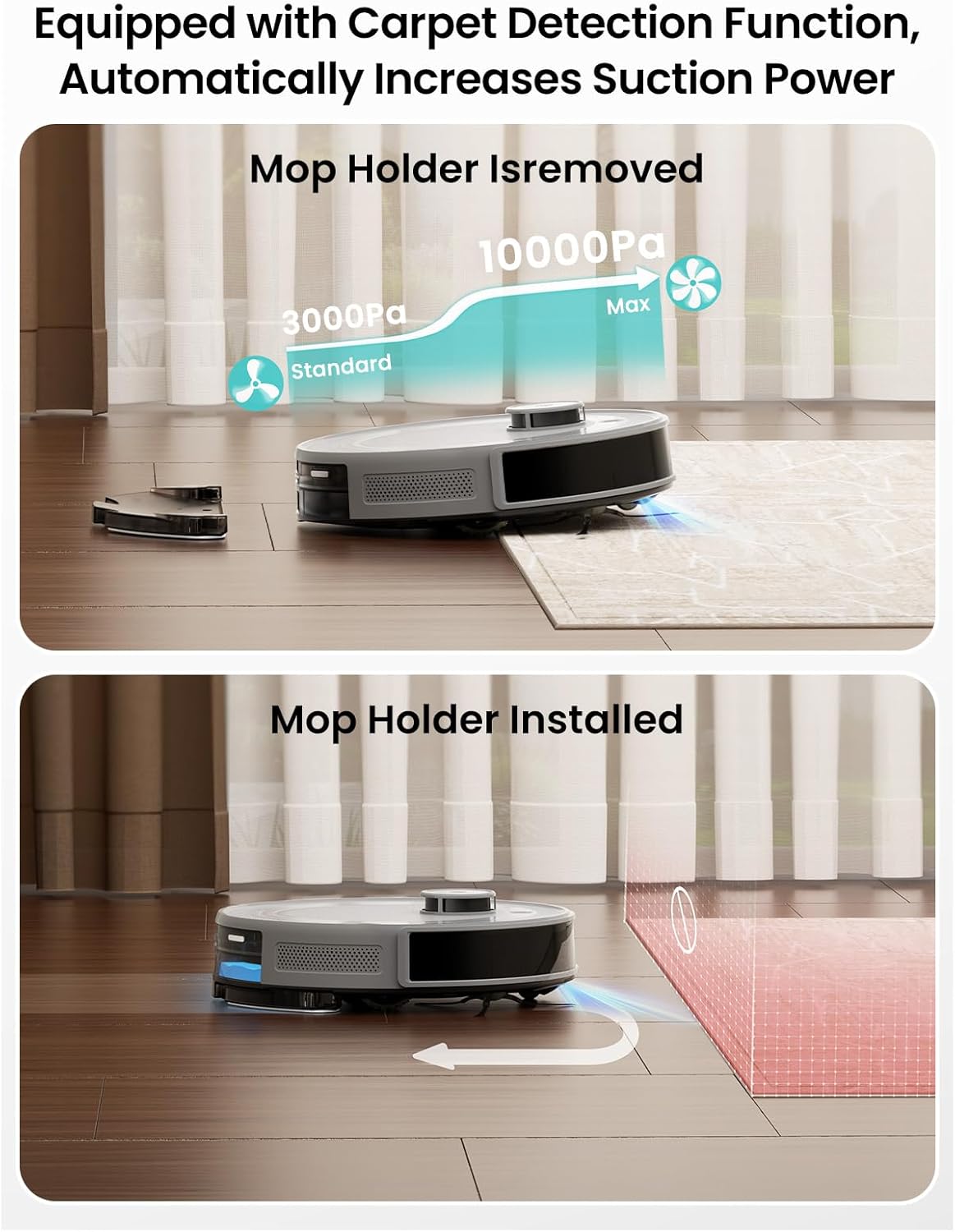
Image 4.2: Illustration of the robot's carpet detection, showing increased suction when the mop holder is removed and carpet avoidance when installed.
4.3 Smart Navigation and Mapping
The M2S PLUS uses 360° LiDAR navigation to create accurate maps of your home.
- Map Display: View the real-time cleaning map in the Lefant App.
- Multi-Level Mapping: The robot can store maps for up to 3 different floors.
- No-Go Zones: Use the app to set virtual boundaries or no-go zones to prevent the robot from entering specific areas.
- Obstacle Detection: 190° PSD (Position Sensitive Detector) technology helps the robot accurately detect and avoid obstacles.

Image 4.3: The M2S PLUS robot vacuum utilizing its 360° LiDAR navigation to map a room, ensuring comprehensive coverage.

Image 4.4: The M2S PLUS robot vacuum demonstrating its 190° PSD precision obstacle detection, navigating around various household items.
4.4 Self-Emptying Function
The self-emptying station automatically transfers collected debris from the robot's dustbin into a larger dust bag, providing up to 40 days of hands-free operation.

Image 4.5: The Lefant M2S PLUS robot vacuum docking with its self-emptying station, illustrating the automatic debris transfer process.
4.5 App and Voice Control Features
The Lefant App provides extensive control and customization options:
- Schedule Cleaning: Set specific times for the robot to clean automatically.
- Custom Routines: Create personalized cleaning sequences.
- Do Not Disturb Mode: Define periods when the robot should not operate.
- Targeted Zone Cleaning: Select specific areas on the map for the robot to clean.
- Water Flow Adjustment: Control the water output for mopping.
- Tap-to-Clean Anywhere: Direct the robot to clean a specific spot on the map.

Image 4.6: A user interacting with the Lefant M2S PLUS via the mobile app and voice commands through a smart speaker.
4.6 Auto-Resume Cleaning
If the robot's battery runs low during a cleaning cycle, it will automatically return to the charging station. Once sufficiently charged, it will resume cleaning from where it left off.

Image 4.7: The M2S PLUS robot vacuum returning to its charging station to recharge before automatically resuming its cleaning path.
5. Maintenance
Regular maintenance ensures optimal performance and extends the lifespan of your Lefant M2S PLUS.
5.1 Dustbin and Filters
- Empty Dustbin: The robot's internal dustbin is automatically emptied into the self-emptying station's dust bag. Check the dust bag in the station periodically and replace it when full (typically every 40 days).
- Clean Filters: Remove the HEPA filter and filter sponge from the robot's dustbin. Tap them gently to remove dust. Rinse the filter sponge with water if necessary and allow it to air dry completely before reinstallation. Do not wash the HEPA filter. Replace filters every 3-6 months depending on usage.
5.2 Brushes
- Side Brushes: Regularly check side brushes for tangled hair or debris. Use the provided cleaning tool to remove any obstructions. Replace side brushes if they are worn or damaged.
- Main Brush (if applicable): If your model includes a main brush, remove it and clean any tangled hair or debris using the cleaning tool.
5.3 Mop Pad and Water Tank
- Clean Mop Pad: After each mopping session, remove the mop pad and wash it thoroughly. Allow it to air dry completely before reuse.
- Empty Water Tank: After mopping, empty any remaining water from the water tank to prevent mildew and odors.
5.4 Sensors and Charging Contacts
- Wipe the cliff sensors, wall sensors, and charging contacts on both the robot and the charging station with a clean, dry cloth to ensure proper function.
6. Troubleshooting
If you encounter issues with your Lefant M2S PLUS, refer to the following common problems and solutions:
- Robot not turning on: Ensure the battery is charged. Place the robot on the charging station and check if the indicator lights are on.
- Robot not charging: Verify the power cord is securely plugged into the charging station and the outlet. Clean the charging contacts on both the robot and the station with a dry cloth.
- Robot getting stuck frequently: Clear obstacles, loose cables, and thick rugs from the cleaning path. Clean the obstacle detection sensors.
- Poor cleaning performance: Empty the dustbin/replace the dust bag. Clean or replace filters. Clean the main and side brushes. Ensure the mop pad is clean and wet for mopping.
- App connection issues: Ensure your phone and robot are connected to the same 2.4GHz or 5GHz Wi-Fi network. Restart your router, phone, and robot. Follow the app connection steps again.
- Robot making unusual noises: Check for any foreign objects or tangled hair in the brushes or wheels.
- Self-emptying station not working: Check if the dust bag is correctly installed and not full. Ensure the debris channel is clear.
If the problem persists, please refer to the full troubleshooting guide in the Lefant App or contact customer support.
7. Specifications
| Feature | Specification |
|---|---|
| Brand | Lefant |
| Model Name | M2S Plus |
| Suction Power | 7000Pa (Max) |
| Navigation | 360° LiDAR |
| Obstacle Detection | 190° PSD |
| Battery Life | Up to 240 minutes |
| Self-Emptying Capacity | Up to 40 days (2.5L dust bag) |
| Filter Type | HEPA filter |
| Connectivity | Wi-Fi (2.4GHz & 5GHz), Alexa, Google Assistant |
| Product Dimensions | 14.37"L x 11.41"W x 14.48"H |
| Item Weight | 13.62 pounds |
| UPC | 609484080685 |
8. Warranty and Support
For detailed warranty information, please refer to the official Lefant website or the warranty card included with your product. If you require technical assistance or have questions not covered in this manual, please contact Lefant customer support through the official website or the Lefant App.
Online Resources:
- Lefant Official Website: www.lefant.com
- Lefant App: Available on iOS App Store and Google Play Store