
1. Introduction
Thank you for purchasing the xdobo BMTL Mission Portable Bluetooth Speaker. This manual provides essential information for setting up, operating, and maintaining your speaker. Please read it thoroughly before use to ensure optimal performance and longevity of your device.
2. Package Contents
- xdobo BMTL Mission Portable Bluetooth Speaker
- Type-C Charging Cable
- User Manual
3. Product Overview
The xdobo BMTL Mission speaker features a compact design with intuitive controls on the top panel. It is designed for both indoor and outdoor use, offering powerful stereo sound and deep bass.

This image displays the xdobo BMTL Mission portable Bluetooth speaker from an angled top-down view, highlighting its black fabric grille, the 'BMTL' logo, and the control panel on top. The control panel includes buttons for power, mode, volume down, play/pause, volume up, TWS pairing, and bass boost.
Control Panel Functions:
- Power Button: Press and hold to power on/off.
- M (Mode) Button: Short press to switch between Bluetooth, AUX, or other available modes.
- - (Volume Down) Button: Short press to decrease volume. Long press for previous track.
- ► (Play/Pause) Button: Short press to play or pause audio.
- + (Volume Up) Button: Short press to increase volume. Long press for next track.
- ∞ (TWS) Button: Short press to initiate TWS pairing (for connecting two BMTL Mission speakers).
- BASS Button: Short press to activate or deactivate Bass Boost mode.
4. Setup
4.1. Charging the Speaker
- Locate the Type-C charging port on the speaker.
- Connect one end of the provided Type-C charging cable to the speaker's charging port.
- Connect the other end of the cable to a compatible USB power adapter (not included) or a computer's USB port.
- The charging indicator light will illuminate during charging and turn off when fully charged. A full charge takes approximately 3 hours.
4.2. Powering On/Off
- To Power On: Press and hold the Power button for approximately 2-3 seconds until you hear an audible prompt and the indicator light illuminates.
- To Power Off: Press and hold the Power button for approximately 2-3 seconds until you hear an audible prompt and the indicator light turns off.
4.3. Bluetooth Pairing
To connect your xdobo BMTL Mission speaker to a Bluetooth-enabled device:
- Ensure the speaker is powered on and in Bluetooth pairing mode (the indicator light will flash). If not, short press the 'M' button to switch to Bluetooth mode.
- On your device (smartphone, tablet, laptop), enable Bluetooth and search for available devices.
- Select "xdobo BMTL Mission" from the list of devices.
- Once connected, you will hear a confirmation sound, and the indicator light will remain solid.
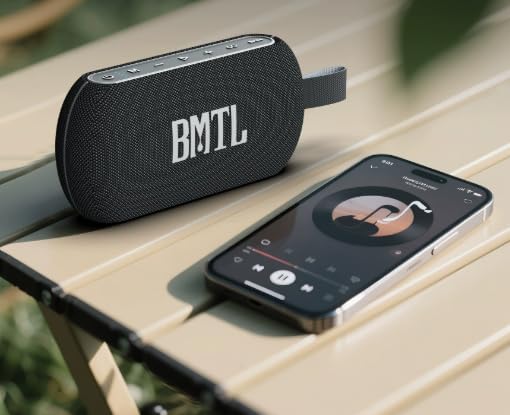
This image features the xdobo BMTL Mission portable Bluetooth speaker placed on a light-colored surface next to a smartphone. The smartphone screen displays a music player interface, illustrating the speaker's wireless connectivity for audio playback.
4.4. Wired Connection (AUX)
For devices without Bluetooth, you can use an AUX cable (not included) to connect:
- Connect one end of a 3.5mm AUX cable to the speaker's AUX input port.
- Connect the other end to the audio output jack of your device.
- Short press the 'M' button on the speaker to switch to AUX mode.
5. Operating Instructions
5.1. Basic Audio Controls
- Play/Pause: Short press the ► button.
- Volume Up: Short press the + button.
- Volume Down: Short press the - button.
- Next Track: Long press the + button.
- Previous Track: Long press the - button.
5.2. Bass Boost Function
To enhance the bass output, short press the BASS button. Press it again to return to standard audio mode.
5.3. True Wireless Stereo (TWS) Pairing
You can pair two xdobo BMTL Mission speakers together for a true wireless stereo sound experience:
- Ensure both speakers are powered on and not connected to any other Bluetooth device.
- On one speaker (this will be the primary speaker), short press the ∞ (TWS) button. The speaker will enter TWS pairing mode.
- The primary speaker will automatically search for and connect to the second speaker.
- Once successfully paired, you will hear a confirmation sound. The indicator light on both speakers will change to indicate a successful TWS connection.
- Now, connect your Bluetooth device to the primary speaker as described in section 4.3. Audio will play in stereo through both speakers.
6. Maintenance
Proper maintenance ensures the longevity and performance of your speaker.
- Cleaning: Use a soft, dry cloth to wipe the speaker's surface. Do not use harsh chemicals or abrasive cleaners.
- Water Resistance: The speaker is IPX7 waterproof, meaning it can withstand immersion in water up to 1 meter for 30 minutes. Ensure the charging port cover is securely closed before exposure to water. After exposure to water, dry the speaker thoroughly before charging.
- Storage: Store the speaker in a cool, dry place away from extreme temperatures and direct sunlight.
- Battery Care: To preserve battery life, charge the speaker fully before long periods of inactivity and recharge it at least once every three months.
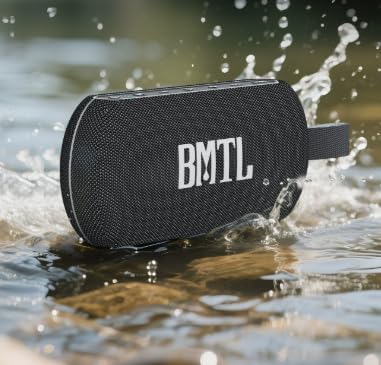
The xdobo BMTL Mission portable Bluetooth speaker is shown partially submerged in water with splashes, demonstrating its IPX7 waterproof capability. The speaker's black fabric exterior and 'BMTL' logo are visible.
7. Troubleshooting
If you encounter issues with your speaker, refer to the following common problems and solutions:
| Problem | Possible Solution |
|---|---|
| Speaker does not power on. | Ensure the battery is charged. Connect the speaker to a power source using the Type-C cable. |
| Cannot pair via Bluetooth. | Ensure the speaker is in Bluetooth pairing mode. Turn off and on your device's Bluetooth. Move the speaker closer to your device. Clear previous Bluetooth connections on your device. |
| No sound or low volume. | Increase the volume on both the speaker and your connected device. Ensure the speaker is not muted. Check if the correct input mode (Bluetooth/AUX) is selected. |
| Sound distortion. | Reduce the volume on both the speaker and your device. Ensure the speaker is within Bluetooth range. Check for interference from other electronic devices. |
| TWS pairing fails. | Ensure both speakers are xdobo BMTL Mission models and are not connected to any other Bluetooth device. Try resetting both speakers and repeating the TWS pairing process. |
8. Specifications
| Feature | Detail |
|---|---|
| Model Name | BMTL Mission |
| Brand | xdobo |
| Speaker Type | Portable |
| Connectivity Technology | Bluetooth |
| Bluetooth Version | 5.3 (Inferred from product description) |
| Wireless Communication | Bluetooth |
| Speaker Maximum Output Power | 40 Watts |
| Audio Output Mode | Stereo |
| Water Resistance Level | IPX7 Waterproof |
| Power Source | Battery Powered |
| Battery Capacity | 4000 Milliamp Hours |
| Charging Time | 3 Hours |
| Playtime | Up to 20 hours (varies by volume and content) |
| Product Dimensions | 1.38"D x 8.07"W x 3.74"H (205x35x95mm) |
| Item Weight | 620 Grams (1.37 pounds) |
| Material | Fabric, Metal, Plastic |
| Input Voltage | 5 Volts |
| Impedance | 4 Ohms |
| Frequency Response | 60 Hz (Lower limit provided) |
| Audio Driver Type | Dynamic Driver |
| Audio Driver Size | 52 Millimeters |
| Control Method | Touch |
| Compatible Devices | Laptop, Smartphone, Tablet |
9. Safety Information
- Do not disassemble, repair, or modify the speaker. This may cause damage, electric shock, or fire.
- Keep the speaker away from extreme temperatures, direct sunlight, and open flames.
- Do not expose the speaker to strong magnetic fields.
- Use only the provided or certified charging cables.
- Keep out of reach of children.
- Avoid prolonged listening at high volumes to prevent hearing damage.
10. Warranty and Support
The xdobo BMTL Mission Portable Bluetooth Speaker comes with a limited warranty. For specific warranty terms and conditions, please refer to the warranty card included in your package or visit the official xdobo website.
For technical support, troubleshooting assistance, or any inquiries regarding your product, please contact xdobo customer service through their official channels.


