
Introduction
This manual provides detailed instructions for the installation, operation, and maintenance of your MASTERFUN Automatic Chicken Coop Door with Camera, Model J01. This device is designed to enhance the safety and convenience of managing your poultry by offering automated door control, real-time monitoring, and predator deterrence. Please read this manual thoroughly before use to ensure proper functionality and longevity of the product.

Figure 1: Overview of the MASTERFUN Automatic Chicken Coop Door with included accessories.
Safety Information
- Ensure all power sources are disconnected before performing any maintenance or installation.
- The anti-pinch safety feature is designed to protect poultry. However, always supervise initial operations.
- The device is waterproof and weather-resistant, but avoid submerging it in water.
- Only use the provided charging cable and solar panel for power.
Package Contents
Verify that all items listed below are included in your package:
- Automatic Chicken Coop Door with Camera
- Instruction Manual
- Charging Cable (Type-C)
- Remote Control
- Solar Panel (7W)
- Rechargeable 5000mAh Battery (pre-installed or separate)
- Mounting Hardware (screws, etc.)

Figure 2: All components included in the product package.
Product Overview
Familiarize yourself with the main components of your automatic chicken coop door:

Figure 3: Key features and indicators of the chicken coop door.
- Night Vision Light: Provides illumination for the camera in low-light conditions.
- PIR Motion Sensor: Detects movement to trigger alarms and notifications.
- Camera: 1080P HD camera for live video feed and recording.
- Speaker: Enables two-way audio communication.
- Video Indicator Light (Blue): Indicates video recording or live view status.
- WiFi Hotspot Indicator Light (Green): Shows WiFi connection status.
Setup and Installation
1. Mounting the Door
The roll-up design of this door allows for flexible installation on most chicken coops. Ensure the mounting surface is flat and secure. Use the provided screws to firmly attach the door unit to the coop. The door dimensions are approximately 9.4 inches (24cm) wide and 13.7 inches (35cm) high, with the opening being 7.9 inches (20cm) wide and 9.4 inches (24cm) high. Ensure your coop opening matches these dimensions for optimal fit.

Figure 4: The roll-up shutter structure allows for versatile installation.
2. Power Options
The chicken coop door offers multiple power options for continuous operation:
- Solar Powered: Connect the 7W solar panel to the door unit. Position the solar panel in a location that receives direct sunlight for maximum charging efficiency.
- Rechargeable Battery: The door includes a 5000mAh rechargeable battery, providing power for up to 30 days on a full charge. This ensures operation even without direct sunlight or external power.
- Direct Plug-in: For continuous power, connect the door directly to an electrical outlet using the provided charging cable.

Figure 5: Multiple power options ensure reliable operation.
3. App and WiFi Connection
To utilize smart features, download the dedicated mobile app (refer to the instruction manual for app name and QR code). The device supports 2.4G WiFi networks only; 5G WiFi is not compatible. Follow the in-app instructions to connect the door to your home WiFi network.
4. Remote Control Pairing
The handheld remote control is pre-paired with the door. If re-pairing is necessary, consult the detailed instructions in the included paper manual. The remote operates within a 15-meter range.
Video 1: Demonstration of the solar panel connection and remote control operation of the chicken coop door.
Operating Instructions
1. Smart App Remote Control
The mobile app allows comprehensive control and monitoring:
- Set Schedules: Program daily opening and closing times for the door.
- Real-Time Monitoring: View live 1080P HD video feed from the built-in camera.
- Two-Way Audio: Communicate with your chickens or deter potential predators.
- Manual Control: Open or close the door remotely at any time.
- Capture & Share: Take photos or videos and share them with family or friends.

Figure 6: App interface for scheduling and monitoring.
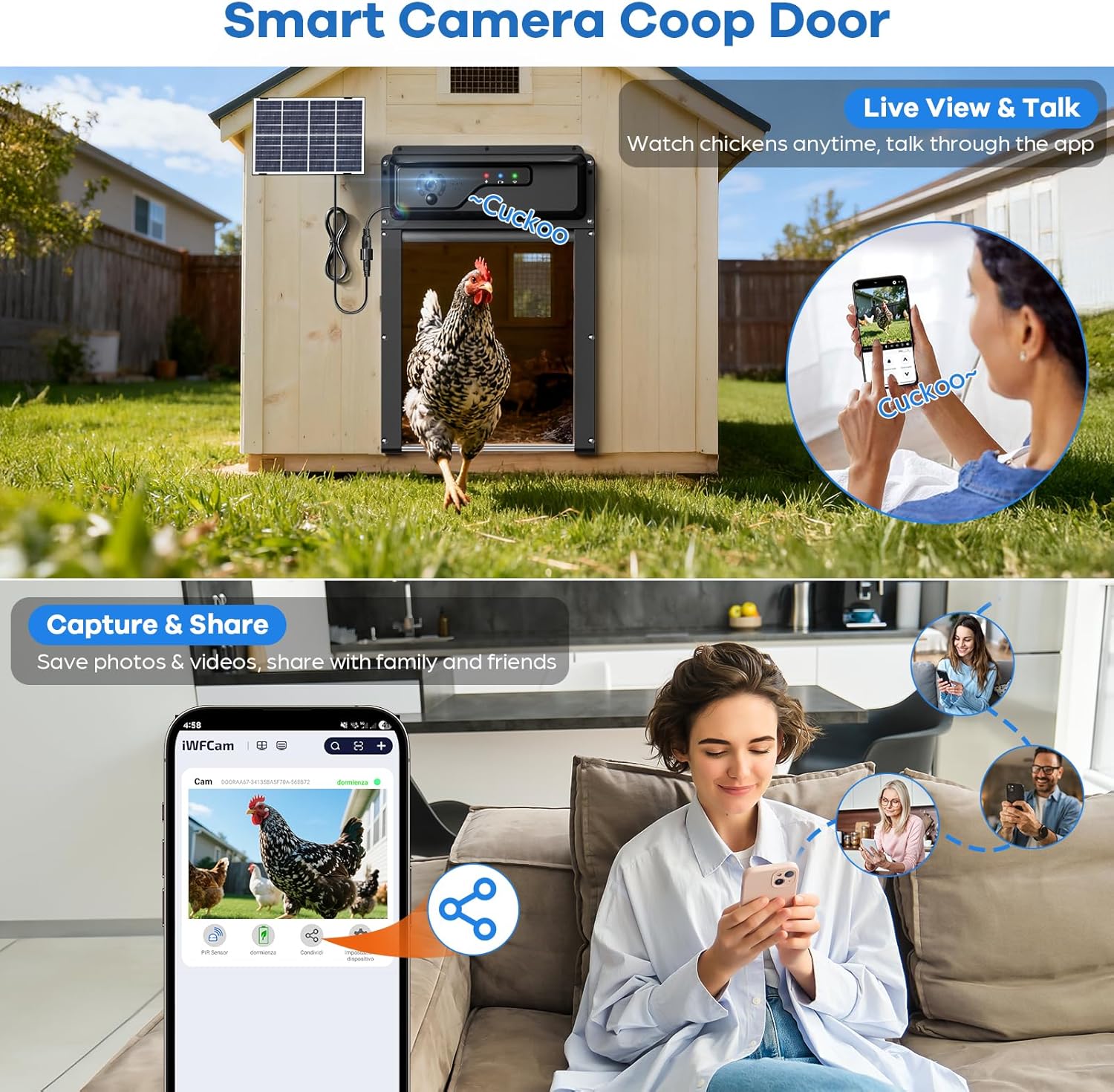
Figure 7: Live view, two-way talk, and sharing features via the app.
2. Manual Remote Control
Use the provided handheld remote control for quick manual operation of the door within a 15-meter range. Press the up arrow to open and the down arrow to close the door.
3. Anti-Pinch Safety
The door is equipped with anti-pinch technology. If an obstruction (e.g., a chicken) is detected during closing, the door will stop and gently reverse its movement. It will attempt to close again up to three times. If the obstruction persists, an alarm will sound, and an instant notification will be sent to your phone via the app.

Figure 8: Anti-pinch safety mechanism.
4. Smart Security System with Alerts
The integrated camera and app function as a security system:
- Motion Detection: The PIR motion sensor detects unusual activity near the coop.
- Alarm Trigger: If motion is detected, an audible alarm will sound to deter predators.
- Instant Notifications: Receive push notifications on your phone with real-time alerts and snapshots of the activity.
- Night Vision: The camera provides clear visibility even in complete darkness.

Figure 9: Smart security system with motion detection and alerts.
Maintenance
1. Battery Charging
Regularly check the battery level via the app or the indicator lights on the device. Recharge the battery using the solar panel or the provided Type-C charging cable when necessary. A fully charged battery can last up to 30 days.
2. Cleaning
Periodically clean the camera lens and the door's exterior with a soft, damp cloth to ensure clear visibility and smooth operation. Avoid using harsh chemicals or abrasive materials.
3. Weather Protection
The door is designed to withstand various weather conditions, including sun, rain, and snow, with an operating temperature range of -15°F to 140°F. Ensure the solar panel is free from debris or snow to maintain charging efficiency.

Figure 10: The door is built for reliable performance in diverse weather.
Troubleshooting
- Door Not Opening/Closing: Check battery level and ensure no obstructions are present. Verify scheduled times in the app.
- WiFi Connectivity Issues: Ensure your WiFi network is 2.4G. Restart your router and the chicken coop door. Re-attempt app pairing.
- Alarm Triggering Frequently: Adjust motion detection sensitivity in the app if false alarms occur due to small animals or environmental factors.
- Poor Camera Quality: Clean the camera lens. Ensure adequate lighting, especially at night (night vision should activate automatically).
- Remote Control Not Working: Check the remote's battery. Ensure you are within the 15-meter operating range.
Specifications
| Feature | Detail |
|---|---|
| Model Number | J01 |
| Brand | MASTERFUN |
| Item Weight | 4.64 pounds |
| Product Dimensions (LxWxH) | 9.4" x 3" x 13.7" |
| Material | Acrylonitrile Butadiene Styrene (ABS) |
| Color | Black |
| Power Source | Solar, Rechargeable 5000mAh Battery, Direct Plug-in |
| Battery Type | 12V (included) |
| Camera Resolution | 1080P HD |
| WiFi Compatibility | 2.4G WiFi only (not compatible with 5G) |
| Remote Control Range | Up to 15 meters |
| Special Features | Anti-pinch safety, Night Vision, Real-time notifications, Smart alarms, App control |
| Operating Temperature | -15°F to 140°F |
Warranty and Support
The MASTERFUN Automatic Chicken Coop Door with Camera comes with a 2-year manufacturer's warranty, covering defects in materials and workmanship under normal use. For technical support, warranty claims, or any questions regarding your product, please refer to the contact information provided in the original packaging or visit the official MASTERFUN website.