
1. Introduction
This manual provides detailed instructions for the installation, operation, and maintenance of your boAt Aavante Prime 5.1 7050D Soundbar System. Please read this manual thoroughly before using the product to ensure proper functionality and to prevent damage.
2. Safety Instructions
- Do not expose the device to rain, moisture, or extreme temperatures.
- Ensure proper ventilation around the soundbar and subwoofer.
- Do not open the casing of any component; refer servicing to qualified personnel.
- Use only the power adapter supplied with the device.
- Keep the device away from strong magnetic fields.
- Clean the device only with a dry, soft cloth.
3. Package Contents
Verify that all items listed below are included in your package:
- Soundbar Unit
- Wireless Subwoofer
- Wireless Satellite Speakers (2 units)
- Power Cables
- Remote Control (with 2 x 12V batteries included)
- User Manual (this document)
4. Product Overview
The boAt Aavante Prime 5.1 7050D is a 5.1 channel soundbar system designed to deliver immersive audio. It includes a main soundbar unit, a wireless subwoofer, and two wireless satellite speakers for a complete surround sound experience. The system features Dolby Audio for enhanced sound quality and a total output of 700W.
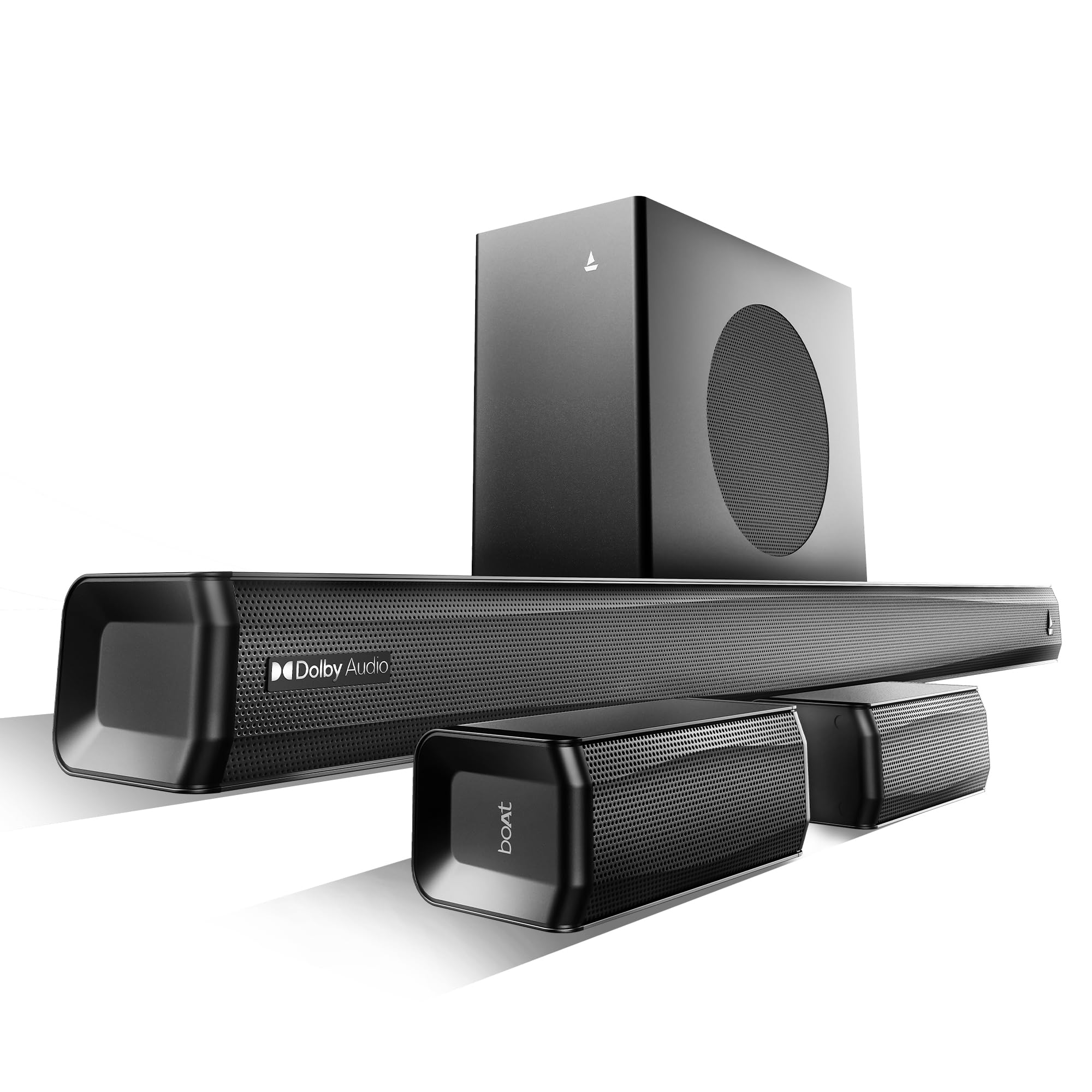
Image: Overview of the boAt Aavante Prime 5.1 7050D Soundbar, Subwoofer, and Satellite Speakers.
4.1. Main Soundbar Unit
The central component, housing multiple speakers for front and center channels. It features various input ports and control buttons.
4.2. Wireless Subwoofer
Provides deep bass frequencies, connecting wirelessly to the main soundbar unit.
4.3. Wireless Satellite Speakers
Two compact speakers that provide rear surround sound, connecting wirelessly to the main soundbar unit.
4.4. Remote Control
Allows full control over the soundbar system, including power, input selection, volume, and EQ modes.

Image: Close-up of the Master Remote Control for the soundbar system.
5. Setup
5.1. Placement
- Soundbar: Place the soundbar centrally below your television. Ensure it is on a stable, flat surface or wall-mounted securely.
- Subwoofer: Position the wireless subwoofer on the floor, preferably in the front of the room, near the soundbar. Avoid placing it in a corner directly, as this can sometimes lead to boomy bass.
- Satellite Speakers: Place the wireless satellite speakers behind your listening position, one on the left and one on the right, for optimal surround sound. Ensure they are within range of the soundbar for wireless connection.

Image: Illustration of a 5.1 channel setup with soundbar, wireless subwoofer, and wireless satellite speakers.
5.2. Power Connection
- Connect the power cable to the main soundbar unit and then to a power outlet.
- Connect the power cable to the wireless subwoofer and then to a power outlet.
- Connect the power cables to each wireless satellite speaker and then to power outlets.
- Ensure all components are powered on.
5.3. Satellite Pairing
The satellite speakers need to be paired with the soundbar for wireless operation:
- Power on both satellite speakers. The blue LED on each satellite will blink slowly, indicating they are searching for a connection.
- On one of the satellite speakers, press and hold the PAIR button for approximately 3 seconds until its LED blinks rapidly.
- Repeat the pairing process for the second satellite speaker.
- Wait for 20-30 seconds. Once successfully paired with the soundbar, the LED on each satellite speaker will turn solid blue.
5.4. Connecting to Audio Sources
The soundbar offers multiple connectivity options:

Image: Diagram showing various connectivity options: Optical, Bluetooth v5.4, AUX IN, HDMI e-ARC, and USB.
- HDMI (ARC): Connect an HDMI cable from the HDMI ARC port on your TV to the HDMI ARC port on the soundbar. This allows audio from your TV to be sent to the soundbar and enables control of the soundbar volume with your TV remote (if supported by your TV).
- Optical: Connect an optical cable from the optical output on your TV or other audio source to the OPTICAL input on the soundbar.
- AUX: Use a 3.5mm audio cable to connect your device's headphone jack or audio output to the AUX IN port on the soundbar.
- USB: Insert a USB drive into the USB port to play audio files directly from the drive.
- Bluetooth: For wireless connection, refer to the Bluetooth Pairing section below.
6. Operating Instructions
6.1. Power On/Off
Press the Power button on the remote control or the soundbar to turn the system on or off.
6.2. Input Selection
Press the Input button on the remote control or the soundbar to cycle through available input sources (HDMI ARC, Optical, AUX, USB, Bluetooth).
6.3. Volume Adjustment
Use the VOL+ and VOL- buttons on the remote control or the soundbar to adjust the master volume. The subwoofer and satellite speaker volumes are balanced with the main soundbar volume.
6.4. Bluetooth Pairing
- Switch the soundbar to Bluetooth input mode. The display will show "BT" and blink.
- Enable Bluetooth on your mobile device or computer.
- Search for "boAt Aavante Prime 7050D" in the list of available devices and select it to pair.
- Once connected, the soundbar's display will show a solid "BT".
6.5. Entertainment EQ Modes
The soundbar features pre-set equalizer modes optimized for different content types. Use the dedicated buttons on the remote control to select:

Image: Visual representation of the four Entertainment EQ Modes: Movies, Music, News, and Sports.
- Movies: Enhances dialogue clarity and cinematic effects.
- Music: Optimizes audio for music playback.
- News: Focuses on vocal clarity.
- Sports: Accentuates ambient sounds and commentary.
6.6. Dolby Audio
The system supports Dolby Audio, providing a dynamic and immersive sound experience. When playing content with Dolby Audio, the soundbar processes the audio to create a rich, multi-dimensional soundscape.

Image: Illustration depicting sound waves emanating from a soundbar and surrounding a listener, indicating Dolby Audio's immersive effect.
6.7. boAt Signature Sound
The 700W boAt Signature Sound delivers powerful and balanced audio with deep bass, suitable for various audio content from music to gaming.

Image: Illustration of sound waves and a '700W' graphic emanating from the soundbar, representing the boAt Signature Sound.
7. Maintenance
- Cleaning: Use a soft, dry, lint-free cloth to clean the surfaces of the soundbar, subwoofer, and satellite speakers. Do not use liquid cleaners or abrasive materials.
- Storage: If storing the system for an extended period, disconnect it from power and store it in a cool, dry place.
- Ventilation: Ensure that the ventilation openings on the soundbar and subwoofer are not blocked.
8. Troubleshooting
| Problem | Possible Cause | Solution |
|---|---|---|
| No power | Power cable not connected; power outlet not active. | Check power connections for all components. Test the power outlet with another device. |
| No sound | Incorrect input selected; volume too low; audio cable not connected properly. | Select the correct input source. Increase volume. Ensure audio cables are securely connected. |
| Satellite speakers not working/paired | Not paired; out of range; power issue. | Follow the Satellite Pairing instructions (Section 5.3). Ensure satellites are powered on and within range of the soundbar. |
| Bluetooth connection issues | Device not in pairing mode; interference; already connected to another device. | Ensure soundbar is in Bluetooth pairing mode. Disconnect from other devices. Move closer to the soundbar. |
| Display remains on/does not turn off | This model's display behavior. | The display is designed to show dashes when off. Long-press the 'Input' button on the remote to temporarily turn off the display. It will reactivate with any control input. |
| Random audio disconnects (HDMI ARC/Bluetooth) | Interference; cable issue; firmware. | Ensure cables are secure. Try a different cable. Minimize wireless interference. Check for firmware updates from the manufacturer (if available). |
9. Specifications
| Feature | Specification |
|---|---|
| Model Name | Aavante Prime 5.1 7050D |
| Speaker Type | Soundbar |
| Surround Sound Channel Configuration | 5.1 |
| Speaker Maximum Output Power | 700 Watts |
| Connectivity Technology | Bluetooth v5.4, AUX, USB, Optical, HDMI (ARC) |
| Compatible Devices | Home Theater, Television |
| Product Dimensions | 90D x 10W x 9H Centimeters |
| Item Weight | 5.8 kg |
| Control Method | Push Button, Remote Control |
| Batteries Required | Yes (2 x 12V, included) |
| Audio Driver Type | Dynamic Driver |
| Manufacturer | Imagine Marketing Ltd |
| Country of Origin | India |
10. Warranty and Support
The boAt Aavante Prime 5.1 7050D Soundbar System comes with a limited warranty. Please refer to the warranty card included in your package for specific terms and conditions. For technical support, service, or further inquiries, please contact boAt customer service through their official website or the contact information provided in your warranty documentation.


