
1. Safety Information
Please read all instructions carefully before using the Trisomy SD-380GM Foldable Treadmill. Retain this manual for future reference.
- Power Line: Ensure the power line is properly grounded. If you experience any issues, please seek professional assistance. Do not disassemble the unit yourself.
- Safety Key: Always attach the safety key to your clothing before starting your workout. In case of an emergency, pulling the safety key will immediately stop the treadmill.
- Weight Capacity: Do not exceed the maximum weight recommendation of 350 pounds.
- Placement: Place the treadmill on a flat, stable surface. Ensure adequate clear space around the treadmill for safe operation.
- Children and Pets: Keep children and pets away from the treadmill during operation.
- Maintenance: Perform regular maintenance as described in this manual to ensure safe and optimal performance.
2. What's in the Box
Your Trisomy SD-380GM Foldable Treadmill package includes the following components:
- Trisomy SD-380GM Foldable Treadmill Unit
- Power Cord
- Remote Control
- Safety Key
- User Manual (this document)
- L-shaped Wrench
- Lubricant
- Pad Holder
- Magnetic Sticker

Figure 2.1: All included components in the Trisomy SD-380GM package.
3. Setup
The Trisomy SD-380GM treadmill comes 95% pre-assembled for your convenience. Follow these steps to complete the setup:
- Unpack the Treadmill: Carefully remove the treadmill and all accessories from the packaging.
- Position the Treadmill: Place the treadmill on a flat, stable surface.
- Raise the Handlebar: If using in treadmill mode, gently lift the handlebar until it locks into the upright position. Secure it by tightening the knobs on both sides.
- Attach Safety Key: Connect the safety key to the designated slot on the handlebar console.
- Plug In: Connect the power cord to the treadmill's power inlet (located at the front base) and then to a grounded electrical outlet.
- Power On: Flip the main power switch (usually red, located near the power inlet) to the 'ON' position. The LED display will illuminate.

Figure 3.1: The handlebar can be folded down for under-desk use or raised for jogging/running.

Figure 3.2: Secure the handlebar by tightening the side knobs.
4. Operating Instructions
4.1 Power On/Off
- To turn on, ensure the treadmill is plugged in and the main power switch is on. The display will light up.
- To turn off, press the power button on the remote control or the main power switch.
4.2 Using the Remote Control
The remote control allows you to start/stop the treadmill, adjust speed, and switch display modes.
- Start/Stop: Press the play/pause button to start or stop the treadmill.
- Speed Adjustment: Use the '+' and '-' buttons to increase or decrease the speed.
- Mode Selection: Press the 'M' button to cycle through different display metrics (Time, Speed, Distance, Calories).
4.3 Display Information
The transparent LED display shows your workout metrics:
- Speed: Current speed in MPH.
- Time: Duration of your workout.
- Distance: Total distance covered in miles.
- Calories: Estimated calories burned.
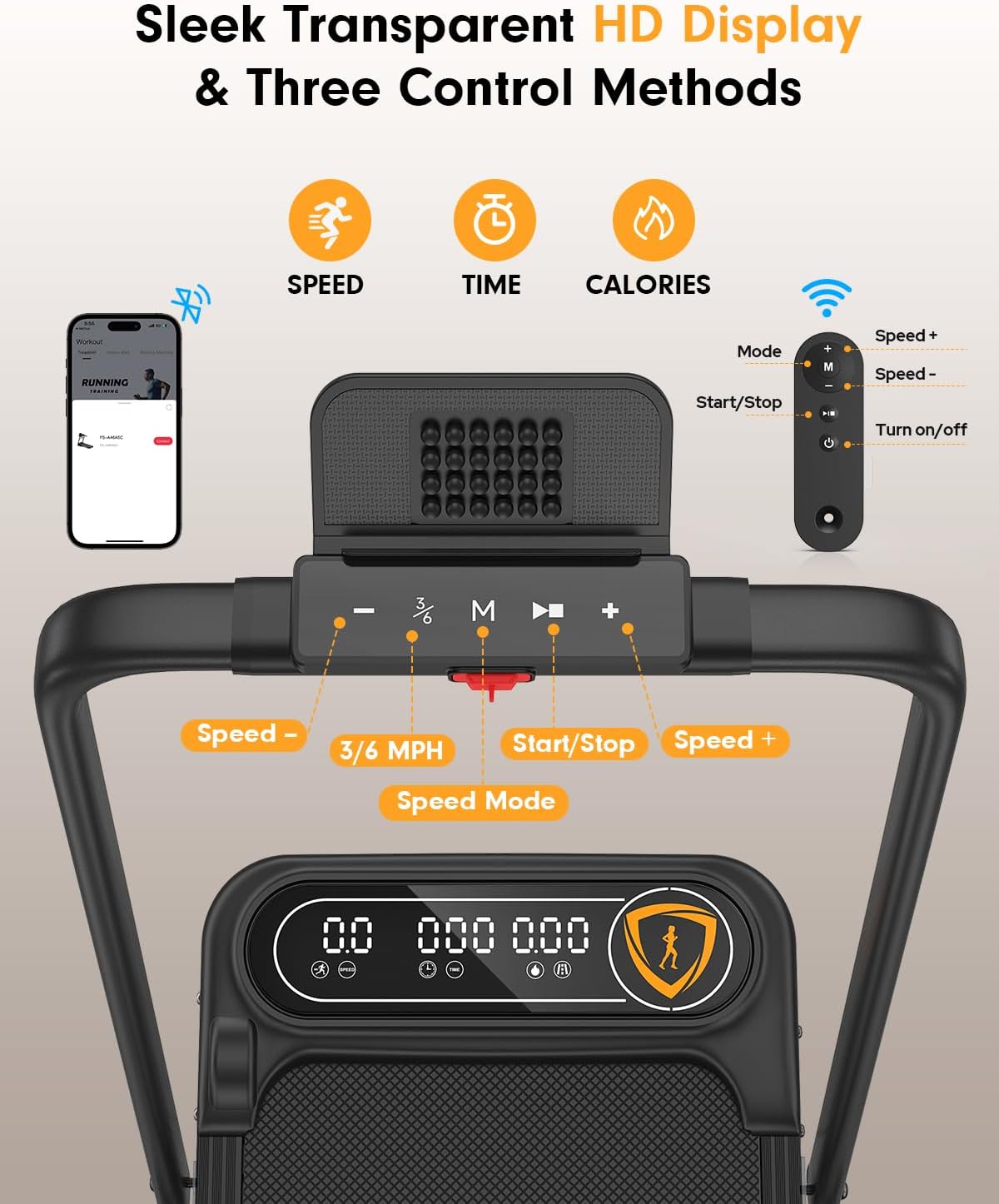
Figure 4.1: Ultra-clear transparent LED display and control buttons on the handlebar.
4.4 Operating Modes & Speed
- Walking Pad Mode (Handlebar Folded): For walking and light jogging, speeds range from 0.6 to 4 MPH. Ideal for use under a desk.
- Treadmill Mode (Handlebar Raised): For jogging, running, and incline training, speeds range from 0.6 to 6 MPH.
Figure 4.2: The treadmill supports both walking pad and traditional treadmill modes.
4.5 Manual Incline Adjustment
The treadmill features a 10% manual incline for increased calorie burning. To adjust the incline:
- Ensure the treadmill is off and unplugged.
- Locate the adjustable feet at the rear of the treadmill.
- Manually adjust the height of these feet to achieve the desired incline level.

Figure 4.3: The 10% manual incline helps burn more calories.
4.6 App Control
Enhance your workout experience by connecting to the fitness app via Bluetooth:
- Download the official Trisomy fitness app from your device's app store.
- Enable Bluetooth on your device and open the app.
- The app will automatically detect and connect to your treadmill.
- Track key metrics, customize workouts, and connect with other users.

Figure 4.4: Explore more with the dedicated fitness app for interactive workouts.
Video 4.1: Official Trisomy video demonstrating the walking pad with incline and app features.
5. Maintenance
5.1 Lubrication
Regular lubrication is essential for smooth operation and extending the lifespan of your treadmill. Apply lubricant every 3-6 months depending on usage.
- Turn off and unplug the treadmill.
- Lift the running belt slightly on one side.
- Apply a small amount of the provided lubricant evenly under the center of the belt.
- Repeat on the other side.
- Plug in the treadmill and run it at a low speed (e.g., 1 MPH) for 5 minutes to distribute the lubricant.

Figure 5.1: Apply lubricant regularly for optimal performance.
5.2 Running Belt Adjustment
If the running belt drifts to one side, it may need adjustment:
- Belt Drifts Right: Tighten the right screw slightly or loosen the left screw.
- Belt Drifts Left: Tighten the left screw slightly or loosen the right screw.
- Self-Centering Function: The treadmill has a self-centering function that corrects slight belt misalignment via no-load low-speed operation.

Figure 5.2: Adjusting the running belt to ensure proper alignment.
6. Storage
The Trisomy SD-380GM treadmill features a space-saving, foldable design and smooth-rolling wheels for easy storage.
- Fold the Handlebar: Loosen the knobs on the handlebar and gently fold it down.
- Move with Wheels: Tilt the treadmill and use the integrated wheels to roll it to your desired storage location.
- Storage Options: Store it under a sofa, desk, bed, or against a wall. Its ultra-compact design (folds to 4.43" tall) makes it suitable for small apartments and offices.

Figure 6.1: The treadmill's space-saving design allows for easy storage.
7. Troubleshooting
If you encounter any issues with your Trisomy SD-380GM treadmill, please refer to the following common solutions:
- Treadmill Not Starting: Ensure the power cord is securely plugged into both the treadmill and a grounded outlet. Check that the main power switch is 'ON' and the safety key is correctly attached.
- Belt Slipping: The running belt may need tension adjustment. Refer to Section 5.2 for instructions.
- Unusual Noise: Check for any loose parts or foreign objects under the belt. Ensure proper lubrication (Section 5.1).
- Display Not Working: Verify power connection. If the issue persists, contact customer support.
For further assistance, please contact Trisomy customer support.
8. Specifications
| Feature | Specification |
|---|---|
| Brand | Trisomy |
| Model Name | SD-380GM |
| Product Dimensions | 46"D x 23.4"W x 39"H |
| Material | Alloy Steel |
| Maximum Speed | 6 Miles per Hour |
| Special Features | Compact Design, Foldable, Manual 10% Incline, Portable, Shock Absorbent, APP & Remote Control |
| Maximum Horsepower | 3.5 Horsepower |
| Maximum Weight Recommendation | 350 Pounds |
| Noise Level | Under 40 dB |
| Running Surface | 36"x15" with 6-layer anti-slip belt |
9. Warranty & Support
9.1 Warranty Information
The Trisomy SD-380GM Foldable Treadmill comes with a 1-year warranty from the date of purchase. This warranty covers manufacturing defects and malfunctions under normal use. Please retain your proof of purchase for warranty claims.
9.2 Customer Support
For any questions, technical support, or warranty claims, please contact Trisomy customer service. Our dedicated team is available to assist you promptly.
- Online Support: Visit the Trisomy Store on Amazon and use the 'Ask a Question' feature.
- Email/Phone: Refer to the contact information provided in the physical user manual included with your product.